Author: Admin

  • 4 Apps That Help Track Your Streaming Subscription Bills

    4 Apps That Help Track Your Streaming Subscription Bills

    Your streaming subscriptions for Netflix, Spotify, Disney Plus and other accounts are probably all on autopay. Because you don’t have to think about due dates, that may mean you’ve overlooked the monthly expense or who to contact if you want to cancel. You could be spending more money than you want by paying for a phantom streaming service.

    Is Netflix billing you directly? Has your forgotten Hulu 30-day free trial turned into a paid subscription? Did you buy your Disney Plus subscription through a third party like Apple, Amazon or Verizon? With all the streaming price changes creeping in, unwatched content, and missed opportunities for deals, it’s a good idea to keep up with who’s billing you, when and for how much. Luckily, there are apps that can make keeping track of your streaming subs a lot easier.

    Here’s our list of recommendations for apps that help you track payments for your streaming service subscriptions. Most of these offer a free option, but you can upgrade to a paid version if you want extra features.

    Read more: Keep Up With What’s Streaming on TV Using These 5 Free Apps

    phone screen with rocket mobile app displaying streaming subscription infophone screen with rocket mobile app displaying streaming subscription info

    Rocket Money

    Formerly known as Truebill, Rocket Money is a well-rounded budgeting app with the option to track your streaming subscriptions. There are free and paid versions available.

    It uses Plaid to link your financial accounts and syncs information about automatic payments from your bank, credit card or services like PayPal. After signing up and setting up multifactor authentication, you can begin managing your recurring payments. Rocket Money provides a snapshot of your yearly spending on subscriptions like Spotify and Netflix, and you can also view upcoming payments including a countdown to the due date. A calendar icon takes you to a screen that outlines all payments for the month.

    You can cancel subscriptions within the app, view your history of payments or remove them from the Rocket Money list. There is a seven-day free trial, but its recurring fee is on a sliding scale from $4 to $12 per month, billed annually. Rocket Money is easy to use, but the free account lacks some features such as having the app cancel your streaming accounts.

    screenshot of blue and white hiatus app logo on phone against yellow backdropscreenshot of blue and white hiatus app logo on phone against yellow backdrop

    Hiatus/Screenshot by Kourtnee Jackson/CNET

    Hiatus is a budget- and bill-managing app that includes a subscription manager feature. When you create an account, you can track your streaming services in an organized “upcoming bills” category. The app also allows you to enter missing subscriptions manually.

    Hiatus connects your financial institutions through Plaid, with options that include banks, PayPal or the Google Play Store. In addition to showing all your streaming subscriptions on autopay, the app provides insights on how much you’ve spent at different intervals — seven days, 30 days and the last 365 days. You may opt to set spending limits for your streaming services using the budget feature.

    You can use the app for free, but if you sign up for a premium plan at $8 per month, Hiatus offers other features like canceling your subscriptions on your behalf. You also have the option to cancel on your own. Hiatus is available for Android, iOS and web browsers.

    illustration of a red squirrel holding a paper against a black backgroundillustration of a red squirrel holding a paper against a black background

    Bobby

    Like Hiatus and Rocket Money, Bobby helps you keep up with your streaming subscriptions and how much you’re spending on them. Unlike Hiatus and Rocket Money, Bobby does not require you to link your financial information to track your recurring payments.

    Instead, you click through the app’s list of providers to create a list of streaming subscriptions. Then you manually enter information such as how much and how often you pay. We admit this may not be helpful if you can’t remember all of your active services. But with Bobby, you can receive notifications for upcoming due dates, organize the bills into a category and monitor your average spending on streaming. And it’s free.

    Foreign currency breakdowns and security features like Touch ID and passcodes are available. Bobby can be downloaded on iOS devices only.

    trim budgeting app displayed on phone with netflix and spotify iconstrim budgeting app displayed on phone with netflix and spotify icons

    Trim/Screenshot by Kourtnee Jackson/CNET

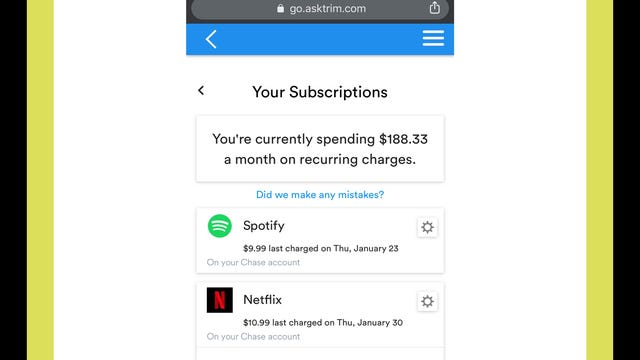
    Trim allows you to find, track and cancel subscriptions at no charge. Like Hiatus and Rocket Money, you can connect your financial institution through Plaid, and the app will collate all your recurring subscription payments.

    You can view your transaction history for each streamer and cancel a service within the app or by visiting its site directly. Trim is not available as a mobile app, but you can access it on a web browser on your phone or other device.

    Streaming service bill tracker FAQs

    What about privacy?

    Sharing access to your financial information with a third party raises genuine concerns about security. We urge you to review the privacy policies for each service to learn how information is used and stored. With the exception of Bobby, all the services on this list use Plaid to connect your accounts. Plaid does not provide your login credentials to Rocket Money, Trim or Hiatus, so none of the apps receive or store your banking or credit card information.

    Why isn’t Mint on this list?

    Mint (by Intuit) is a popular user-friendly app that’s used for budgeting. There’s a feature meant to help you track bills and subscriptions, but when I clicked on the Subscriptions tab in the Bills section, none of my subscriptions or recurring payments showed up. I did receive a message saying Mint couldn’t find any subscriptions in my transaction history. Additionally, we’ve seen numerous users reporting that the subscription feature is unreliable.

    Are there any other apps you considered?

    In addition to Mint and the four tools on this list, we checked out other budget/subscription tracker apps, including PocketGuard, Wallet by Budgetbakers, Billbot, Petal and Everydollar. We decided to highlight the four we discussed here based on robust features, accessibility, fees and ease of use.

    PocketGuard syncs with many banks but you’re unable to link PayPal and other third parties like the Google Play Store. Billbot is not available for newer versions of Android, Petal requires you to apply for an account and EveryDollar charges $13 monthly if you don’t want to manually track your financial transactions. To digitally sync Wallet with your financial institutions, you must pay for a premium account.

  • AirPods Max Are Close to $100 Off at Amazon and Best Buy Right Now

    AirPods Max Are Close to $100 Off at Amazon and Best Buy Right Now

    Apple makes some of the best headphones out there. The AirPods Max are the company’s top-of-the-line option with arguably the best noise cancelation on the market. And today only, you can save $99 on a set at both Amazon and Best Buy, bringing the price to just $450. The offer is only available today at Best Buy, and we expect Amazon will match that timing, so we recommend making your purchase sooner rather than later.

    According to CNET’s David Carnoy, Apple’s AirPods Max are the best high-end wireless over-ear headphones you can get. They have an Apple H1 headphone chip in each ear cup and offer top-notch sound quality. They have a premium build quality, comfortable fit (despite being heavy) and Apple’s neat virtual surround-sound spatial audio feature for both music and video watching.

    You’ll get up to 20 hours of playback per charge, which means you can enjoy your favorite content all day long without interruption. Along with impressive active noise cancellation, which allows you to tune out the world and immerse yourself in your music, these headphones also offer a transparency mode for when you want to hear everything around you.

    The AirPods Max can connect to any Bluetooth device, but it’s worth noting that some features, including spatial audio, will only work when paired with Apple devices.

    Be sure to check out our roundup of the best AirPods Max accessories to find cases, cushions and more. And if this is still too much of a stretch for your budget, you can find some AirPods Max alternatives at a cheaper price.

  • Google’s Pixel 7A Is Back on Sale With a Free $50 Amazon Gift Card

    Google’s Pixel 7A Is Back on Sale With a Free $50 Amazon Gift Card

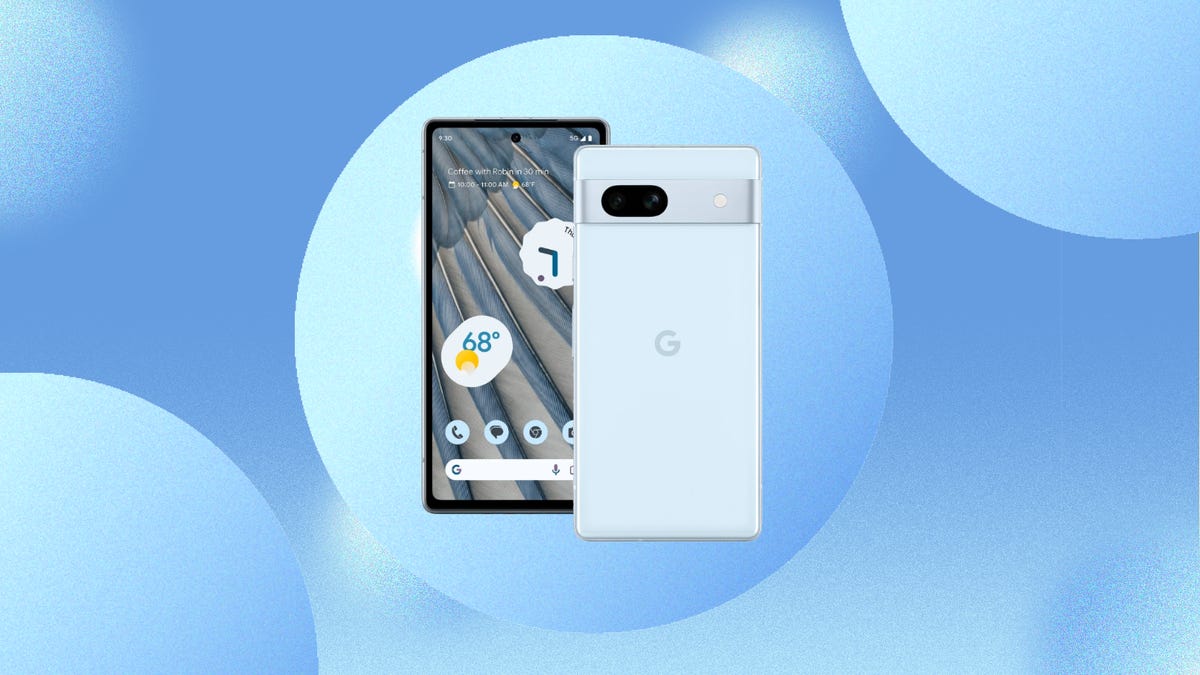
    Though it was unveiled just last month at Google’s I/O developer conference, we’ve already seen several solid Google Pixel 7A deals. But if you’re a regular shopper at Amazon, the current promo offering a free $50 Amazon gift card with Pixel 7A purchases is hard to beat. This deal was available during the preorder phase for the new budget Pixel device but it’s back through June 18, so make the most of it while you can. Best Buy has a similar promo, too.

    Even though the Pixel 7A is designed to be an entry-level device, it’s still plenty powerful and has already taken the crown as the best phone under $500. It’s powered by Google’s Tensor G2 chip, the same chip found in the Pixel 7. It also features a 64-megapixel camera and a 6.1-inch, 90Hz display, plus nice extras such as face unlock and wireless charging — notable upgrades over previous Pixel A phones that help close the gap between the affordable Pixel line and more premium flagships. Mixed usage battery life should be up to 24 hours, too.

    Advertiser Disclosure
    Advertiser Disclosure
    This advertising widget is powered by Navi and contains advertisements that Navi may be paid for in different ways. You will not be charged for engaging with this advertisement. While we strive to provide a wide range of offers, this advertising widget does not include information about every product or service that may be available to you. We make reasonable efforts to ensure that information in the featured advertisements is up to date, each advertiser featured in this widget is responsible for the accuracy and availability of its offer details. It is possible that your actual offer terms from an advertiser may be different than the offer terms in this advertising widget and the advertised offers may be subject to additional terms and conditions of the advertiser which will be presented to you prior to making a purchase. All information is presented without any warranty or guarantee to you.

    The Amazon gift card will be mailed to you and can be redeemed in the Amazon app. Best Buy’s promo offers an e-gift card that will be provided after your order ships or is picked up.

  • FTC Files Injunction to Block Microsoft’s Activision Deal: What to Know

    FTC Files Injunction to Block Microsoft’s Activision Deal: What to Know

    Microsoft continues its fight to complete the $69 billion acquisition of game publisher Activision Blizzard, but the US Federal Trade Commission has added another obstacle in an attempt to block the deal.

    The FTC filed an injunction Monday to stop Microsoft’s purchase of Activision before the July 18 deadline, as reported earlier by CNBC. This comes several months after the commission filed a lawsuit against the tech giant over the acquisition saying the deal would “enable Microsoft to suppress competitors to its Xbox gaming consoles and its rapidly growing subscription and cloud-gaming business.”

    Microsoft first announced its plans to acquire Activision Blizzard in January 2022. Closing the deal would turn Xbox maker Microsoft into one of the top three video game publishers, right behind rival Sony. Activision Blizzard is one of the largest third-party publishers, with some major franchises that would give a much-needed boost to Microsoft’s games catalog, including Call of Duty, Candy Crush and Overwatch.

    Although Microsoft has won a few merger-related battles, it still has hurdles to clear.

    Who’s left to approve the deal?

    Microsoft has yet to receive approval from regulators in the US. The FTC’s lawsuit from December and the injunction on Monday hamper the deal from receiving approval.

    The injunction is sought to “maintain the status quo and prevent interim harm to competition during the pendency of the FTC’s administrative proceeding to determine whether the Proposed Acquisition violates US antitrust law,” the filing says.

    The FTC’s suit “should accelerate the decision-making process,” Microsoft vice chair and president Brad Smith tweeted late Monday. “This benefits everyone. We always prefer constructive and amicable paths with governments but have confidence in our case and look forward to presenting it,” he added.

    A hearing is set for Aug. 2 regarding the lawsuit.

    The UK is another major country that has yet to sign off on the deal. In April, the UK’s Competition and Markets Authority blocked the $69 billion deal, saying it would result in higher prices and fewer choices for gamers. Microsoft’s appeal to the ruling says the CMA “made fundamental errors in its calculation and assessment of market share data for cloud gaming services by failing to take account of constraints from native gaming (whereby gamers access games installed on their devices through a digital download or physical disc).”

    Microsoft has continued to deny that the deal would hamper competition within the video game industry and continues to negotiate with regulators to get approval.

    What does this deal mean for gamers?

    For Xbox Game Pass subscribers, the deal means Activision Blizzard’s catalog of games will be incorporated into the service, likely similar to how Bethesda games were when Microsoft acquired that company in 2020.

    How gamers who don’t have an Xbox, and instead use a Sony PlayStation or Nintendo Switch console, will be affected is less clear. Critics of the deal are concerned that Microsoft could make future games developed by Activision unavailable on rival consoles. (Microsoft did just this for games developed by Bethesda.) This is especially concerning for a major Activision title like Call of Duty.

    Microsoft already agreed to a 10-year deal with Nintendo to bring Call of Duty games to its consoles, but Sony reportedly rejected a similar agreement. Sony remains against the deal and continues to submit filings to regulators about its concerns over the acquisition.

    What is cloud gaming?

    Cloud gaming is the technology to stream video games remotely to a device such as a phone, tablet or smart TV. While the technology has been around for more than a decade, it’s only in recent years that it’s really taken off, thanks in part to it being an added feature for Microsoft’s Xbox Game Pass and Sony’s PS Plus.

    Other companies developed their own cloud gaming services, such as Amazon’s Luna and GeForce Now. The former made an agreement with Microsoft in February to bring more of its games to the service over the next 10 years.

  • Mint Mobile Deal Offers Unlimited $15 Per Month Plan

    Mint Mobile Deal Offers Unlimited $15 Per Month Plan

    Advertiser Disclosure
    Advertiser Disclosure
    This advertising widget is powered by Navi and contains advertisements that Navi may be paid for in different ways. You will not be charged for engaging with this advertisement. While we strive to provide a wide range of offers, this advertising widget does not include information about every product or service that may be available to you. We make reasonable efforts to ensure that information in the featured advertisements is up to date, each advertiser featured in this widget is responsible for the accuracy and availability of its offer details. It is possible that your actual offer terms from an advertiser may be different than the offer terms in this advertising widget and the advertised offers may be subject to additional terms and conditions of the advertiser which will be presented to you prior to making a purchase. All information is presented without any warranty or guarantee to you.

    Mint Mobile, the prepaid wireless carrierpartly owned by actor Ryan Reynolds, announced on Monday that for a limited time, you can sign up for any of the company’s plans for just $15 per month as a new customer.

    The company already charges that price for its cheapest 5GB plan. But now, new customers can choose plans that offer 15GB, 20GB or unlimited data and still pay just $15 a month. Like Cinderella’s coach at midnight, the price reverts back to each plan’s usual cost after three months: $20 for 15GB, $25 for 20GB, and $30 a month for the unlimited data plan.

    The unlimited plan includes unlimited nationwide talk and text, a 10GB mobile hotspot, Wi-Fi calling and text, and free international calls to Mexico and Canada. Data speeds reduce after 40GB, but data is unlimited. If you want to sign up, you can bring your own unlocked eligible phone and keep your current phone number.

    Of course, it’s a limited-time offer, good for only a few months.

    Read more: Switching Phone Carriers in 2023: What to Know Before Changing Providers

    Wireless carrier T-Mobile announced in March that it would buy Mint Mobile in a dealpotentially valued at $1.35 billion. T-Mobile will acquire Ka’ena Corporation, the parent company of Mint Mobile and Ultra Mobile, as well as wireless wholesaler Plum. T-Mobile says it expects the deal to close later this year.

    Reynolds, who purchased an ownership stake in Mint Mobile in November 2019, is still appearing in Mint Mobile’s commercials for now. He posted a short video on social media on Monday in which a “reverse auctioneer” lowers the unlimited-plan price.

    “What brand of coffee do you drink?” Reynolds jokes to the fast-talking auctioneer.

    If you’re looking for a new mobile plan, check out CNET’s list of the best prepaid phone plans and best unlimited data phone plans available — and if you’re in the market for a new phone, here’s a list of the best phones of 2023.

  • FTC Reportedly Set to File Injunction to Block Microsoft’s Activision Deal: What to Know

    FTC Reportedly Set to File Injunction to Block Microsoft’s Activision Deal: What to Know

    Microsoft continues its fight to complete the $69 billion acquisition of game publisher Activision Blizzard, but the US Federal Trade Commission will reportedly add another obstacle in an attempt to block the deal.

    The FTC will file an injunction Monday to stop Microsoft’s purchase of Activision before the July 18 deadline, according to a report from CNBC. This comes several months after the commission filed a lawsuit against Microsoft over the acquisition saying the deal would “enable Microsoft to suppress competitors to its Xbox gaming consoles and its rapidly growing subscription and cloud-gaming business.”

    Microsoft first announced its plans to acquire Activision Blizzard in January 2022. Closing the deal would turn Xbox maker Microsoft into one of the top three video game publishers, right behind rival Sony. Activision Blizzard is one of the largest third-party publishers, with some major franchises that would give a much-needed boost to Microsoft’s games catalog, including Call of Duty, Candy Crush and Overwatch.

    Though Microsoft has won a few merger-related battles recently, it still has a few more hurdles to clear before the deal is done.

    Who’s left to approve the deal?

    Microsoft still has to receive approval from regulators in the US. The FTC’s lawsuit from December and the injunction on Monday hamper the deal from receiving approval. A hearing is set for Aug. 2 regarding the lawsuit.

    The UK is another major country that has yet to sign off on the deal. In April, the UK’s Competition and Markets Authority blocked the $69 billion deal, saying it would result in higher prices and fewer choices for gamers. Microsoft’s appeal to the ruling says the CMA “made fundamental errors in its calculation and assessment of market share data for cloud gaming services by failing to take account of constraints from native gaming (whereby gamers access games installed on their devices through a digital download or physical disc).”

    Microsoft has continued to deny that the deal would hamper competition within the video game industry and continues to negotiate with regulators to get approval.

    What does this deal mean for gamers?

    For Xbox Game Pass subscribers, the deal means Activision Blizzard’s catalog of games will be incorporated into the service, likely similar to how Bethesda games were when Microsoft acquired that company in 2020.

    How gamers who don’t have an Xbox, and instead use a Sony PlayStation or Nintendo Switch console, will be impacted is less clear. Critics of the deal are concerned that Microsoft could make future games developed by Activision unavailable on rival consoles. (Microsoft did just this for game developed by Bethesda.) This is especially concerning for a major Activision title like Call of Duty.

    Microsoft already agreed to a 10-year deal with Nintendo to bring Call of Duty games to its consoles, but Sony reportedly rejected a similar agreement. Sony remains against the deal and continues to submit filings to regulators about its concerns over the acquisition.

    What is cloud gaming?

    Cloud gaming is the technology to stream video games remotely to a device such as a phone, tablet or smart TV. While the technology has been around for more than a decade, it’s only in recent years has it really taken off thanks in part to it being an added feature for Microsoft’s Xbox Game Pass and Sony’s PS Plus.

    Other companies developed their own cloud gaming services, such as Amazon’s Luna and GeForce Now. The former made an agreement with Microsoft in February to bring more of its games to the service over the course of the next 10 years.

  • NBA Finals: How to Watch, Stream Nuggets vs. Heat Game 5 on ABC Tonight From Anywhere

    NBA Finals: How to Watch, Stream Nuggets vs. Heat Game 5 on ABC Tonight From Anywhere

    After winning Games 3 and 4 in Miami to take a commanding 3-1 series lead over the Miami Heat, the Denver Nuggets can win the franchise’s first NBA title on their home court tonight. The Heat have already won seven road games during the 2023 NBA Playoffs and will need an eighth tonight in Denver to force a Game 6 back in Miami. Denver’s dynamic duo of Nikola Jokić and Jamal Murray have looked nearly unstoppable for long stretches during the series, but you should never count out the Heat’s Jimmy Butler when you’re talking about playoff basketball.

    Game 5 is set to tip off at 8:30 p.m. ET (5:30 p.m. PT) on ABC.

    Whether you live in the US or are looking to follow the basketball action from around the world, we’ll outline the best live TV streaming services to watch the 2023 NBA Finals live, no matter where you are.

    gettyimages-1495994811gettyimages-1495994811

    Nikola Jokić and the Denver Nuggets take on Jimmy Butler and the Miami Heat at home on Monday night for Game 5 of the NBA Finals on ABC.

    Matthew Stockman/Getty Images

    Nuggets vs. Heat Game 5: When and where?

    Game 5 will be played at the Ball Arena in Denver. Tip-off is set for tonight at 8:30 p.m. ET or 5:30 p.m. PT in the USthat’s 1:30 a.m. BST in the UK and 10:30 a.m. AEST in Australia on Tuesday, June 13.

    What is the schedule for the rest of the NBA Finals?

    The schedule for the rest of the NBA Finals is as follows. All games will air in the US on ABC.

    Monday, June 12: Heat at Nuggets, 8:30 p.m. ET (Game 5, Nuggets lead 3-1)
    Thursday, June 15: Nuggets at Heat, 8:30 p.m. ET (Game 6, if necessary)
    Sunday, June 18: Heat at Nuggets, 8 p.m. ET (Game 7, if necessary)

    How to watch the NBA Finals 2023 online from anywhere using a VPN

    If you find yourself unable to view the game locally, you may need a different way to watch the game — that’s where using a VPN can come in handy. A VPN is also the best way to stop your ISP from throttling your speeds on game day by encrypting your traffic, and it’s also a great idea if you’re traveling and find yourself connected to a Wi-Fi network, and you want to add an extra layer of privacy for your devices and logins.

    With a VPN, you’re able to virtually change your location on your phone, tablet or laptop to get access to the game. Most VPNs, like our Editors’ Choice, ExpressVPN, make it really easy to do this.

    Using a VPN to watch or stream sports is legal in any country where VPNs are legal, including the US, UK and Canada, as long as you have a legitimate subscription to the service you’re streaming. You should be sure your VPN is set up correctly to prevent leaks: Even where VPNs are legal, the streaming service may terminate the account of anyone it deems to be circumventing correctly applied blackout restrictions.

    Looking for other options? Be sure to check out some of the other great VPN deals taking place right now.

    Express VPNExpress VPN

    Sarah Tew/CNET

    ExpressVPN is our current best VPN pick for people who want a reliable and safe VPN, and it works on a variety of devices. It’s normally $13 per month, and you can sign up for ExpressVPN and save 49% plus get three months of access for free — the equivalent of $6.67 per month — if you get an annual subscription.

    Note that ExpressVPN offers a 30-day money-back guarantee.

    Livestream the Nuggets vs. Heat Game 5 in the US

    All games for this year’s NBA Finals will be shown live nationally in the US on ABC and ESPN3. Most of the major streaming TV services offer ABC, but it can be a bit complicated.

    Sling TV’s Orange plan doesn’t include ABC, but it does include ESPN3, which will also work for streaming the NBA Finals. Sling also offers a Blue plan that has ABC in select markets, but the Orange plan should do the trick and also includes the regular ESPN channel.

    Hulu Plus Live TV costs $70 a month and includes ABC. Click the “View all channels in your area” link at the bottom of its welcome page to see which local networks are available where you live.

    YouTube TV costs $73 a month and offers all the main channels that broadcast NBA basketball, including ABC. Plug in your ZIP code on its welcome page to see which local networks are available in your area.

    FuboTV costs $75 per month for its Pro option and includes ABC. Check out which local networks it offers here.

    DirecTV Stream is expensive. It’s the priciest of the five major live TV streaming services. Its cheapest, $65-a-month Entertainment package includes ABC as well as ESPN and TNT. You can use its channel lookup tool to see which local channels and RSNs are available in your area.

    It is worth noting that DirecTV has an additional $15 “advanced receiver service” fee that automatically applies and is extra from the sticker price, which makes the Entertainment package $80 per month.

    Each live TV streaming service offers a free trial, allows you to cancel anytime and requires a solid internet connection. Looking for more information? Check out our live TV streaming services guide.

    Livestream Nuggets vs. Heat Game 5 in the UK

    For basketball fans in the UK, every 2023 NBA Finals game will be shown live on Sky Sports. This game will be broadcast on Sky Sports Main Event and Sky Sports Arena, with tip-off set for 1:30 a.m. BST on Tuesday morning.

    Sky subsidiary Now (formerly Now TV) offers streaming access to Sky Sports channels with a Now Sports membership. You can get a day of access for 12, or sign up to a monthly plan from 25 per month right now.

    Livestream Nuggets vs. Heat Game 5 in Canada

    Live coverage of NBA postseason games is split between TSN, Sportsnet, RDS and NBA TV in Canada. The fifth game of the Finals is set to be broadcast on Sportsnet, which means it can be watched via its streaming service Sportsnet Now. Existing TSN or Sportsnet cable subscribers can meanwhile watch at no extra charge using the details of their TV provider.

    Sportsnet will broadcast 5 and 7 (if necessary) of the NBA Finals. To stream without a cable provider you will need to sign up for Sportsnet Now, its streaming service, which starts at CA$15 per month for its “standard” option.

    TSN Plus won’t show Game 5 but will show Game 6 if the series goes that long. The service is priced at CA$20 a month or CA$200 per year.

    Livestream Nuggets vs. Heat Game 5 in Australia

    This year’s NBA Finals can be watched Down Under on ESPN via Foxtel. If you’re not a Fox subscriber, your best option is to sign up for streaming service Kayo Sports.

    A Kayo Sports subscription starts at AU$25 a month and lets you stream on one screen, while its Premium tier costs AU$35 a month for simultaneous viewing on up to three devices.

    The service gives you access to a wide range of sports including F1, NRL, NFL, F1, NHL and MLB, and there are no lock-in contracts.

    Better still, if you’re a new customer, you can take advantage of a one-week Kayo Sports free trial.

    Quick tips for streaming the NBA Finals using a VPN

  • iOS 17 Won’t Work on Every iPhone. See if Yours Is on the List

    iOS 17 Won’t Work on Every iPhone. See if Yours Is on the List

    Apple’s new iOS 17 software is coming to iPhones later this year and will include many exciting changes. During its WWDC event on June 5, Apple said the new software will be available to download this fall, but not all iPhone users will have access. As with all of the major Apple software updates, several iPhones are getting left behind, including the iPhone X from 2017.

    If you’re not sure which iPhone you’ve got, a quick check in your settings can show you. Open your Settings app and tap General > About. Next to Model Name, you’ll see which iPhone you have.

    We’ll tell you how to find out whether your iPhone will be compatible with iOS 17. If you’d like to try out the iOS 17 beta, the public beta will be available in July. Want to know more about iOS 17? Apple will turn your photos into stickers with Messages.

    iPhones that are compatible with iOS 17

    If you’ve got one of these iPhones, you’ll have access to iOS 17 when it’s available this year, Apple said.

    What if your iPhone isn’t on the compatibility list?

    If your iPhone isn’t listed above, it won’t support iOS 17 and you won’t get a notification to download the newest software. For instance, if you have an iPhone X or older, the latest software you’ll ever be able to use on that phone is iOS 16.

    For more about WWDC, check out the new 15-inch MacBook Air and Vision Pro. Also, new features are coming to WatchOS this year.

  • Best Android Tablet for 2023

    Best Android Tablet for 2023

    Though Apple’s iPad remains the go-to option for tablet buyers worldwide, there are plenty of reasons you might choose to go with an Android device. iPadOS isn’t for everyone, and some people prefer the Android operating system, especially because of its features. And that’s not to mention the budget-friendly options available that make Android tablets worth considering.

    The best Android tablets can meet any casual or professional need, whether you’re interested in gaming, drawing or word processing. Some even work with a touchpad or mouse. And if you’re already invested in the Android operating system and Android app ecosystem, it makes even more sense.

    So if you’re looking for a cheap tablet for media consumption or a premium tablet to serve as a laptop

    substitute, here are our picks for the best tablets running the Android operating system. We update this list periodically, so keep checking back.

    cnet-cheap-expensive-03b-amazon-fire-hd-10cnet-cheap-expensive-03b-amazon-fire-hd-10

    David Carnoy/CNET

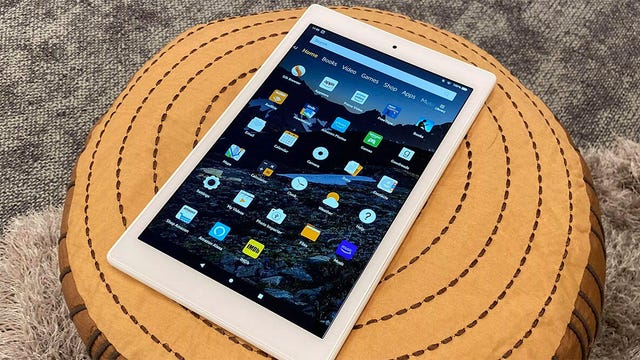
    Amazon has come a long way from the first Kindle Fire tablet. The Amazon Fire HD 10 is Amazon’s biggest tablet with a 10-inch screen size and powerful speakers. Just like its smaller 8-inch sibling, the Fire HD 8, the tablet is packed with benefits for Prime subscribers making it easy for members to stream and download movies, TV shows and games. Amazon’s Fire tablets don’t use a pure version of Android, but instead Amazon’s Android-based Fire operating system, which pulls apps from the Amazon App Store. You can still get apps from Google Play, but you’ll have to install the store yourself — meaning gaming enthusiasts have access to all of their favorite mobile games for an excellent gaming tablet experience. Also, this is probably the closest thing we have to a budget tablet on this best Android tablet list.

    Read our Amazon Fire HD 10 review.

    Samsung Galaxy Tab S8 PlusSamsung Galaxy Tab S8 Plus

    Josh Goldman/CNET

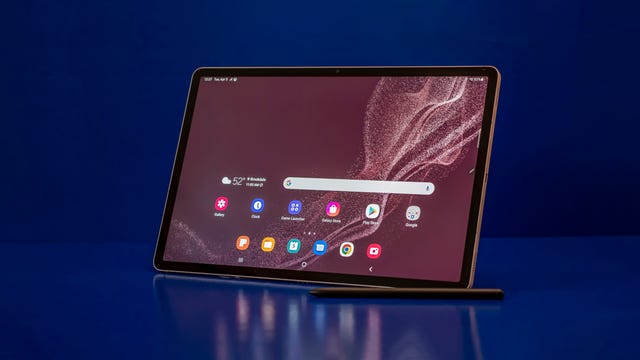
    The Samsung Galaxy Tab S8 Plus tablet might be in the middle of the Tab S8 lineup but it is our top pick. The 12.4-inch AMOLED display is bright with excellent color. It’s a great size for entertainment and gaming, while big enough for light productivity tasks and still small enough for travel. Updates to Samsung’s DeX software even makes the Tab S8 a possible laptop substitute, letting you connect to a mouse and even an external display. A keyboard cover isn’t included but one of Samsung’s fantastic S Pens is, so you can use the big screen for note-taking and content creation right out of the box.

    Read our Samsung Galaxy Tab S8 Plus review.

    samsuing-tab-1samsuing-tab-1

    Joseph Kaminski

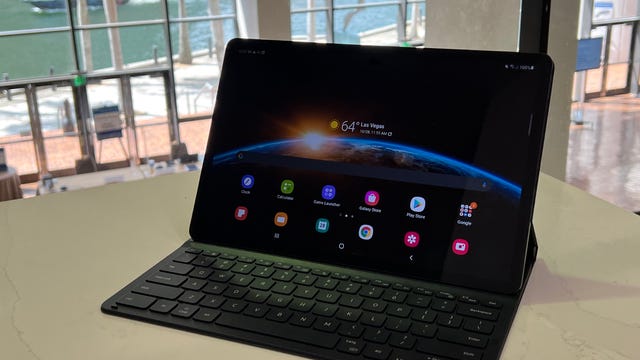
    Despite its more attainable price compared to the $850 Tab S7 Plus, the Galaxy Tab S7 FE retains an upscale feel. The S7 FE is the same size as the Plus, with a 1.3-pound aluminum body and slim bezels around its 12.4-inch display that has a 2,560×1,600-pixel resolution. Samsung carefully trimmed the features of the Plus, such as going from four stereo speakers to two and switching from an AMOLED display to an LCD screen. The result is a big-screen Android tablet that still performs well and has a premium look and feel for significantly less money.

    lenovo-smart-tab-product-photos-2lenovo-smart-tab-product-photos-2

    Tyler Lizenby/CNET

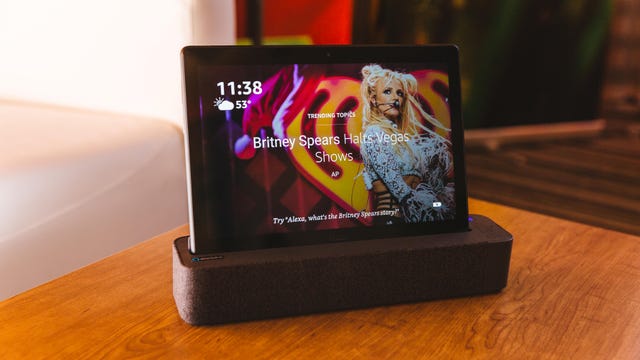
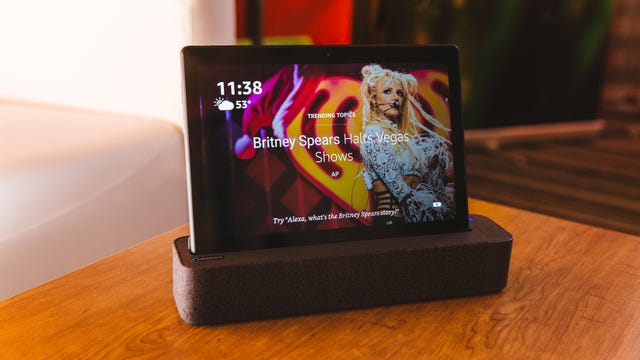
    The Lenovo Smart Tab P10 combines a tablet and a smart display into one 10-inch device. This Lenovo tablet comes with Android Oreo, front and rear cameras, fingerprint scanner and a Qualcomm Snapdragon 450 processor. When you set it on the dock, the Lenovo Tab becomes a smart display a lot like the Amazon Echo Show.

    Read more about the Lenovo Smart Tab P10.

    You’re receiving price alerts for Lenovo Smart Tab P10
  • Apple Mac Studio 2023 Review: Still the Creative Choice for Mac

    Apple Mac Studio 2023 Review: Still the Creative Choice for Mac

    8.2

    Apple Mac Studio 2023

    Like

    • Fast and quiet
    • Relatively compact
    • HDMI 2.1

    Don’t like

    • M2 Max model has two less Thunderbolt connections than the M2 Ultra

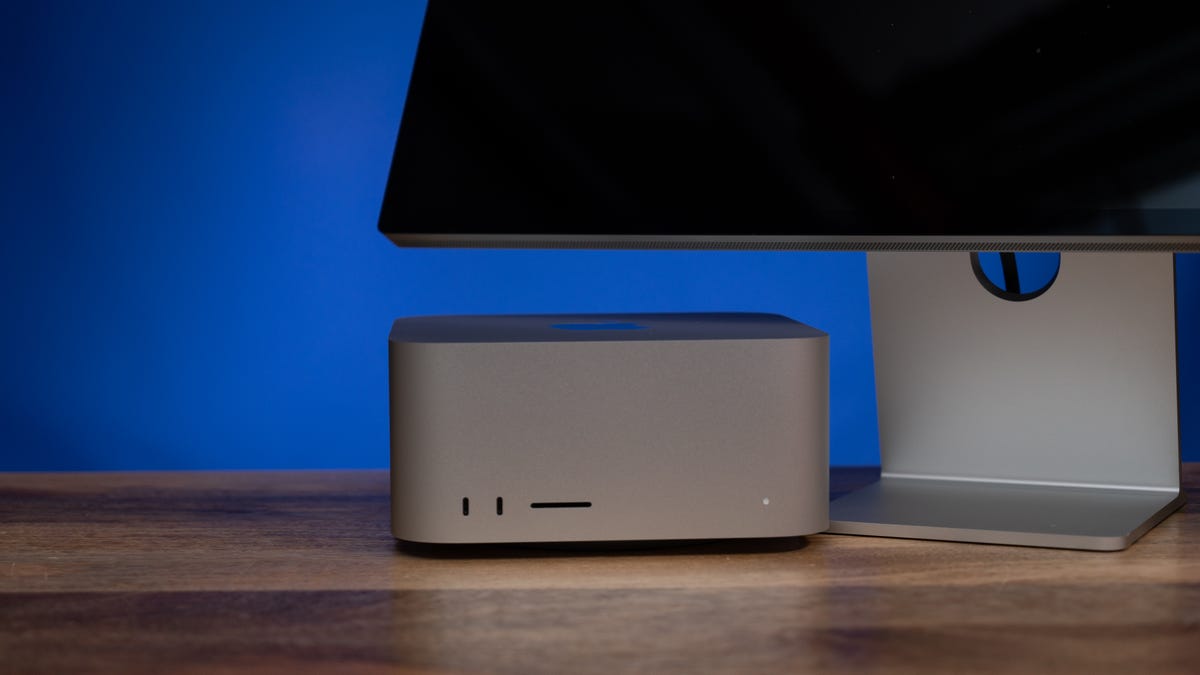
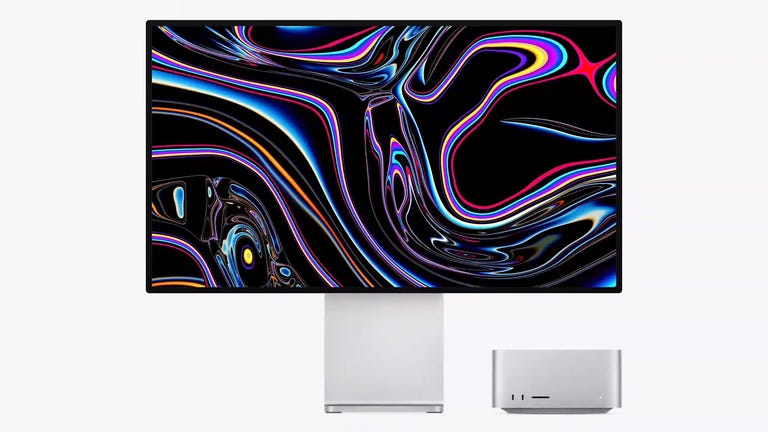
    There isn’t a lot to say about the latest generation of the Mac Studio: From a “put it on your desk and use it” perspective, it feels almost exactly like the model that preceded it, with the expected generation-over-generation tweaks we see routinely in laptops and desktops.

    In sum, it delivers up to about 20% better performance over the equivalent last-generation M1 chip because it has more CPU and GPU cores, and because of the updated Wi-Fi (from 6 to 6E) and Bluetooth 5.3, it has more stable and potentially much faster wireless. That, plus upgraded HDMI 2.1 — what Apple refers to as “enhanced” HDMI — are certainly important new features, they just don’t change the experience much.

    apple-mac-studio-2023apple-mac-studio-2023

    As much as I like the system — and I really do like it quite a lot — it’s a little hard to make a case for the M2 Max model. If you really need CPU and/or GPU power, you’re better off with an Ultra configuration at a not-cheap $4,399 ($3,999 if you lop a terabyte off the storage of our $3,199 test configuration). If you just want the CPU performance and are OK with a decent-ish GPU, the M2 Pro Mac Mini can be had for $1,000 less.

    Apple Mac Studio 2023

    Price as reviewed $3,199, 3,299, AU$5,099
    CPU 3.3GHz Apple M2 Max 12 cores (8P/4E), 16-core Neural
    Memory 64GB LPDDR5 unified
    Graphics Integrated 38 cores
    Storage 2TB Apple SSD, SD card slot
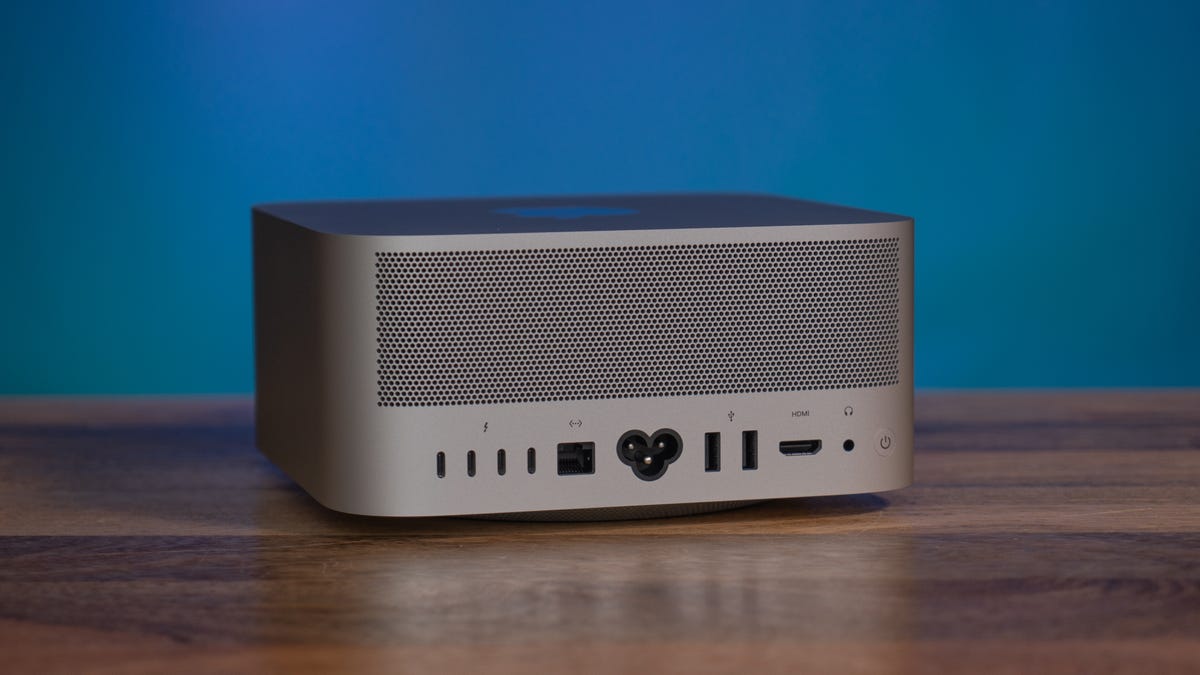
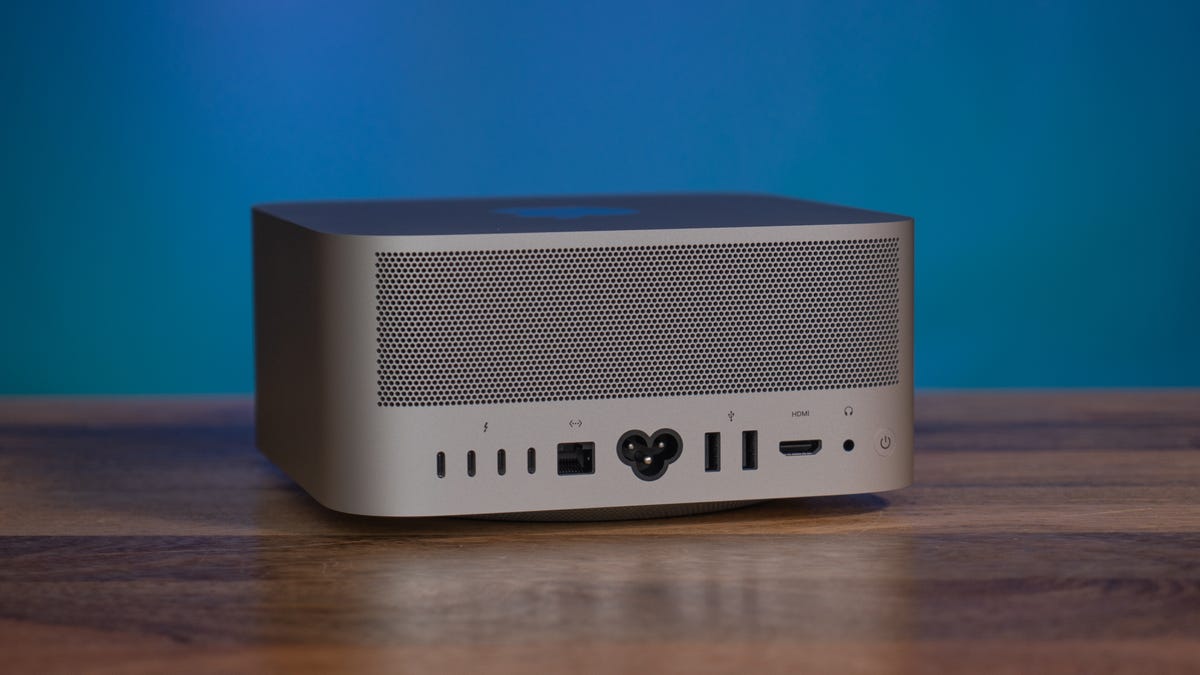
    Ports 6x USB-C (2x Thunderbolt 4), 2x USB-A, 1x HDMI 2.1, 3.5mm audio
    Networking 10Gbps Ethernet, Wi-Fi 6E (802.11ax), Bluetooth 5.3
    Operating system MacOS Ventura 13.4
    Dimensions 3.7 x 7.7 x 7.7 in (9.5 x 19.7 x 19.7 cm)
    Ship date June 2023

    Many creative apps, notably photo editing, still tend to use CPU resources more than GPU, and the M2 Pro has the same Neural cores as the M2 Max. And, while the Max handles some basic high-res video editing, you can get away with the cheaper model for 4K, but will probably want to bump up for higher resolutions.

    Much also depends on what creative applications you’re using as well as how you’re using them. You’ll see a lot more custom MacOS optimization from, say, DaVinci Resolve than Premiere Pro, so throwing money at the Max over the Pro may not help you. And features that might theoretically benefit from more Neural cores (the Ultra has 2x the Max and below), may not perform the processing locally. For instance, the processing for Photoshop’s new Generative Fill takes place remotely, so your system doesn’t really have to do any heavy lifting.

    The Pro also has the same encode/decode accelerators as the Max, while the Ultra has twice as many. And the Ultra configuration has two more Thunderbolt ports — its dual Max processor configuration means another Thunderbolt controller — which is important if you plan on using external drives for that.

    wwdc-seq-00-02-57-12-still001.pngwwdc-seq-00-02-57-12-still001.png
    Watch this: Mac Studio Gets an Upgrade With M2 Max and M2 Ultra Chips

    03:14

    That doesn’t mean there isn’t a group of buyers for whom the M2 Max combination of solid CPU and GPU performance is just right for the money — it’s just easier and probably sufficient to go cheaper or necessary to go pricier.

    The upgraded HDMI means it can handle a 4K monitor at a refresh rates of up to 240Hz. It does enable variable refresh rate for monitors that support it, and as with the MacBook Pro you don’t have much control over it; you enable it in MacOS and it’s out of your hands.

    Aside from gaming, where it’s key for avoiding artifacts caused by the disconnect between game frame rate and display screen update, one of the main reasons for VRR (ProMotion) is to save power on devices like the iPad and iPhone. That’s not a huge issue for a desktop, so unless you’re gaming you’re better off just setting it to a high but fixed rate and leave it.

    apple-mac-studio-2023apple-mac-studio-2023

    The port layout is the same as it’s been since the system launched.

    Lori Grunin/CNET

    If you do plan on gaming, I’d wait for MacOS 14 Sonoma before committing. Depending on how many game developers take advantage of Apple’s DX11/DX12 emulation so you can run Windows games, and depending on how they perform, you may want to adjust your GPU requirements. At the moment, there aren’t many native Apple silicon games; most are mobile games running on top of Apple’s Rosetta emulator. You can run a virtual Windows machine like Parallels, but I’d probably vote Ultra for that.

    Performance

    Apple silicon’s performance remains remarkably consistent, in the sense that it’s more or less directly correlated with the number of cores (though that doesn’t mean it’s true for any specific application, because they’re too squidgy when it comes to producing generalizable results).

    The 38-core GPU in the Studio’s M2 Max delivers about 20% better Metal performance over the 32-core GPU in the M1 Max, almost entirely because of the increase in the number of cores. For a frame of reference, the 38-core performance puts it roughly comparable to an Nvidia GeForce RTX 4060 Ti, at least in one cross-platform benchmark (3D Mark Wild Life Extreme Unlimited), but there are a variety of metrics that simply aren’t reflected by that test.

    Read more: Apple MacBook Air 15-Inch Review: Finally, Big for Less

    Using it, though, we can extrapolate that the M2 Ultra’s 76-core version should provide a little less than twice that of the 38-core M2 Max and fall a little short of the RTX 4070 Ti. One interesting pattern that I see is that the more GPU cores there are the less you get out of each individual core within a given generation and about a 5% increase per core from M1 to M2.

    As we’ve seen with the M1 generation, multicore CPU performance is almost identical for a given core configuration — in other words, the 12-core M2 Pro’s as fast as the 12-core M2 Max — and about 20% faster than the 10-core M1 Max. Because more cores. Single core speed is up by about 14%. For reference, the CPU performance seems about the same as an Intel Core i7-13700H.

    I’ve only had a few days with the system, so I’m still sorting out the various performance nuances. I’m comfortable with the conclusions I’ve drawn thus far — it remains the excellent system it was when it debuted last year — but if necessary may update with more about this particular configuration for creative work and gaming.

    Cinebench R23 CPU (multicore)

    Apple MacBook Pro 14 (M1 Pro 10/16, 2021) 12,302Apple MacBook Pro 16 (M1 Max 12/32, 2021) 12,365Apple Mac Studio (M1 Max 10/32, 2022) 12,389Apple MacBook Pro 16 (M2 Pro 12/19, 2023) 14,803Apple Mac Mini (M2 Pro 12/19, 2023) 14,814Apple Mac Studio (M2 Max 12/38, 2023) 14,846
    Note: Longer bars indicate better performance

    Cinebench R23 CPU (single core)

    Apple Mac Studio (M1 Max 10/32, 2022) 1,535Apple MacBook Pro 16 (M2 Pro 12/19, 2023) 1,646Apple Mac Mini (M2 Pro 12/19, 2023) 1,649Apple Mac Mini (M2 8/10, 2023) 1,650Apple Mac Studio (M2 Max 12/38, 2023) 1,749
    Note: Longer bars indicate better performance

    3DMark Wild Life Extreme Unlimited

    Apple Mac Mini (M2 8/10, 2023) 6,925Apple MacBook Pro 14 (M1 Pro 10/16, 2021) 10,264Apple MacBook Pro 16 (M2 Pro 12/19, 2023) 12,989Apple Mac Mini (M2 Pro 12/19, 2023) 13,048Apple MacBook Pro 16 (M1 Max 12/32, 2021) 17,640Apple Mac Studio (M1 Max 10/32, 2022) 20,297Apple Mac Studio (M2 Max 12/38, 2023) 25,317
    Note: Longer bars indicate better performance

    Configurations

    Apple Mac Mini (M2 Pro, 2023) MacOS Ventura 13.2; Apple M2 Pro (12-core CPU,19-core GPU); 16GB LPDDR5 RAM; 1TB SSD
    Apple Mac Mini (M2, 2023) MacOS Ventura 13.2; Apple M2 (8 CPU cores, 10 GPU cores); 8GB LPDDR5 RAM; 256GB SSD
    Apple Mac Studio (M1 Max, 2022) MacOS Monterey 12.3; Apple M1 Max (10 CPU cores, 32 GPU cores); 64GB RAM; 2TB SSD
    Apple Mac Studio (M2 Max, 2023) MacOS Ventura 13.4; Apple M2 Max (12 CPU cores, 38 GPU cores); 64GB RAM; 2TB SSD
    Apple MacBook Pro (14-inch, 2021) MacOS Monterey 12.4; Apple M1 Pro (10 CPU cores, 16 GPU cores); 32GB LPDDR5 RAM; 1TB SSD
    Apple MacBook Pro (16-inch, 2021) MacOS Monterey 12.4; Apple M1 Max (12 CPU cores, 32 GPU cores); 32GB RAM; 512GB SSD
    Apple MacBook Pro (16-inch, 2023) MacOS Ventura 13.2; Apple M2 Pro (12 CPU cores, 19 GPU cores); 32GB LPDDR5 RAM; 1TB SSD