Category: Technologies

  • Amazon Music Unlimited Raises Prices for Prime Members

    Amazon is raising its monthly cost for Amazon Music Unlimited, and the price increase will affect Prime members who are on the individual plan as well as people with the Amazon Music Unlimited family plan.

    The news was earlier reported by The Hollywood Reporter, and the new prices are now listed on the home page for Amazon Music. New customers will begin seeing the new price now, and existing customers will see the change on their first bill on or after Sept. 19.

    A representative for Amazon didn’t immediately respond to a request for comment.

    Amazon Music Unlimited promises unlimited access to 100 million songs, touting its on-demand, ad-free access, plus access to ad-free top podcasts. There’s a 30-day free trial.

    The Amazon Music Unlimited individual plan for Prime members was $9 per month and will now cost $10. The annual cost is going up from $89 to $99. Non-Prime customers pay $11 per month, so there’s still a slight savings for those with Prime.

    The Amazon Music Unlimited family plan doesn’t have a special price for Prime members. That cost will go up from $16 to $17 per month, with the annual cost moving from $159 to $169 per year. The family plan allows up to six accounts under the same plan, each with personalized libraries and recommendations, and offers 90 million songs, as opposed to the100 million songs for Prime members.

    Students currently enrolled at a degree-granting university or college can get the Individual Plan for $6 per month, upon verification of their student status.

    Music lovers have a wide variety of streaming services to choose from, each with its own pros and cons. CNET offers a guide to the best in streaming music, including our takes on Amazon Music Unlimited, Apple Music, Spotify and more.

    And while Amazon Prime is best known for offering subscribers fast shipping on many Amazon products, the company has added plenty of extras to Prime to entice you to subscribe. In addition to music streaming, Prime includes digital photo storage, free PC games, the streaming video service Prime Video and more.

    Here’s our guide to what Prime offers these days, including some hidden perks you might not know about. And here are 5 things you perhaps didn’t know about Amazon. Plus, here’s a look at Amazon’s back-to-school deals.

  • Get Huge Savings on Back-to-School Laptops From Apple, Samsung and More

    Summer is almost over, which means school is about to be back in session (if it isn’t already). Luckily, you still have time to make sure you and your family have all the back-to-school essentials, including a dependable and budget-friendly laptop, to get the most out of the year ahead. Right now, some of the biggest names in tech are offering major deals on laptops for the back-to-school season. Brands like Apple, Samsung and more are all getting in on the action — which means more savings for you.

    Looking for more amazing discounts? CNET has the best promo code offers from Apple, Samsung, Lenovo and more. All deals are verified and updated daily.

    Welcome to CNET Coupons, the first stop before you shop, featuring a multitude of deals and discounts from top online retailers. Simply head over to our coupon page and type in your favorite store or brands to find all the deals available for the week.

  • YouTube Introduces NFL Sunday Ticket Payment Plans, Teases Student Deal

    With the NFL season around the corner, YouTube is ramping up its offerings for Sunday Ticket, its newly acquired all-you-can-eat gridiron buffet. The company announced a slate of upcoming new perks on Wednesday, including a monthly payment plan and student subscriptions. Fans can choose to buy NFL packages as an add-on for YouTube TV or as a standalone YouTube channel for the entire season.

    You’ll be able to break up the full cost — which ranges from $349 if bundled with YouTube TV to $489 if purchased standalone with the NFL RedZone channel added in — over several months. YouTube says an installment billing option will begin rolling out this week for all subscription plans, and to keep an eye out for it in your state. Additionally, NFL Sunday Ticket student plans will become available “within the next week” for those who are eligible.

    As for features, YouTube’s key plays are coming for the 2023 football season, enabling you to watch highlights for any game, whenever you want. This season will also bring real-time highlights to YouTube’s Shorts feeds for all live NFL games. All you have to do is click the red ring to view it on the NFL channel.

    You will also be able to tap into multiview streams to watch more than one game at a time. Fans who are watching on TV and mobile customers can look forward to live polls and chats. While NFL kickoff weekend begins Sept. 7, Sunday Ticket officially starts with Week 1’s launch on Sept. 10.

    Before becoming a YouTube exclusive, NFL Sunday Ticket was exclusive to DirecTV and allowed football fans to watch all out-of-market games on Sunday afternoons that aren’t airing on their local CBS or Fox stations. Games that air on your local stations, as well as national broadcasts, will require you to have an antenna, cable, satellite or pay for a streaming service like YouTube TV.

  • iOS 17 Developer Beta 6 Shakes Things up With New End Call Button Placement

    Apple released the first iOS 17 developer beta back in July, and with it came a new placement for the end call button. To make room for the new Contact Posters feature, which prominently displays a visual for the person calling you, all of the call screen controls were lowered on the screen. And the end call button, which is in the bottom-center of the call screen on iOS 16, was moved to the bottom-right — which caused a bit of discussion among beta testers.

    Maybe it was all the attention, but Apple has decided to make another tweak to the call screen controls. With the release of the sixth iOS 17 developer beta, the end call button is now back to the middle of the screen. Not exactly how it is on iOS 16, but close.

    If you want to check out the new end call button placement, as well as other new iOS 17 features, you can download the developer beta for free right now.

    The company first announced iOS 17 at WWDC in June. Shortly after the keynote event, Apple released the first developer beta version of iOS 17. Typically, you have to pay $99 to officially download and install any Apple developer beta software, but this year the company is letting anyone get a crack at iOS 17 — as long as they join the Apple Developer Program.

    Read more: Apple Unveils iOS 17 for the iPhone at WWDC 2023

    iOS 17 emphasizes communication, with several new features for the Phone, FaceTime and Messages applications, including personalized contact posters, video messages, a more intelligent autocorrect, improved AirDrop options and the Journal app.

    CNET Tech Tips logo

    Before you go on and install iOS 17, you should know that developer beta versions like this aren’t intended for general use, especially because they may have unfinished features and issues that can make the iPhone difficult to use. These early beta releases are, instead, for developers, to help them keep their apps up to date and get early access to the upcoming features.

    In short, you probably shouldn’t install the developer beta on your primary iPhone. If you really want to get iOS 17 right now, try to find a spare iPhone that is new enough (iPhone XS or later) to work with the latest software.

    Read more: iOS 17 Is Coming This Year. Will It Work on Your iPhone?

    For folks who still want to dive in, we’ll show you how to install the iOS 17 developer version on your iPhone, as well as what to do in case you want to revert to iOS 16.

    Want to learn more about the stuff unveiled at WWDC? Here’s what you need to know about Vision Pro, Apple’s new augmented reality headset. And here’s all the dope on the new 15-inch MacBook Air and MacOS Sonoma.

    What to know before you download the iOS 17 developer beta

    Because the iOS 17 developer beta is an early prerelease version, the software could have bugs and other issues.

    Again, if you’re thinking about downloading iOS 17, do it on a backup or secondary phone, if available. The iOS 17 developer beta’s issues could cripple your iPhone and make it difficult to use, disabling phone calls or text messages or making it extremely laggy. However, if you only have your main phone or tablet available, make sure to back up your iPhone on iOS 16.5 (the latest version of iOS 16) before updating to iOS 17. That way you have the option to return to iOS 16 if there are too many issues on the new OS.

    Also, you must have an iPhone XS or later to run iOS 17. iOS 17 is not supported on the iPhone 8, iPhone 8 Plus and the iPhone X, all of which supported the iOS 16 developer beta last year.

    And most importantly, to download the iOS 17 developer beta, you must be enrolled in the Apple Developer Program. The full membership is $99 a year, but as mentioned above, Apple is now offering a free membership option, with limited tools and resources, that allows pretty much anyone to download and install the iOS 17 developer beta for free.

    You can also wait to join the Apple Beta Software program next month, which will provide a more stable iOS 17 upgrade than the developer version.

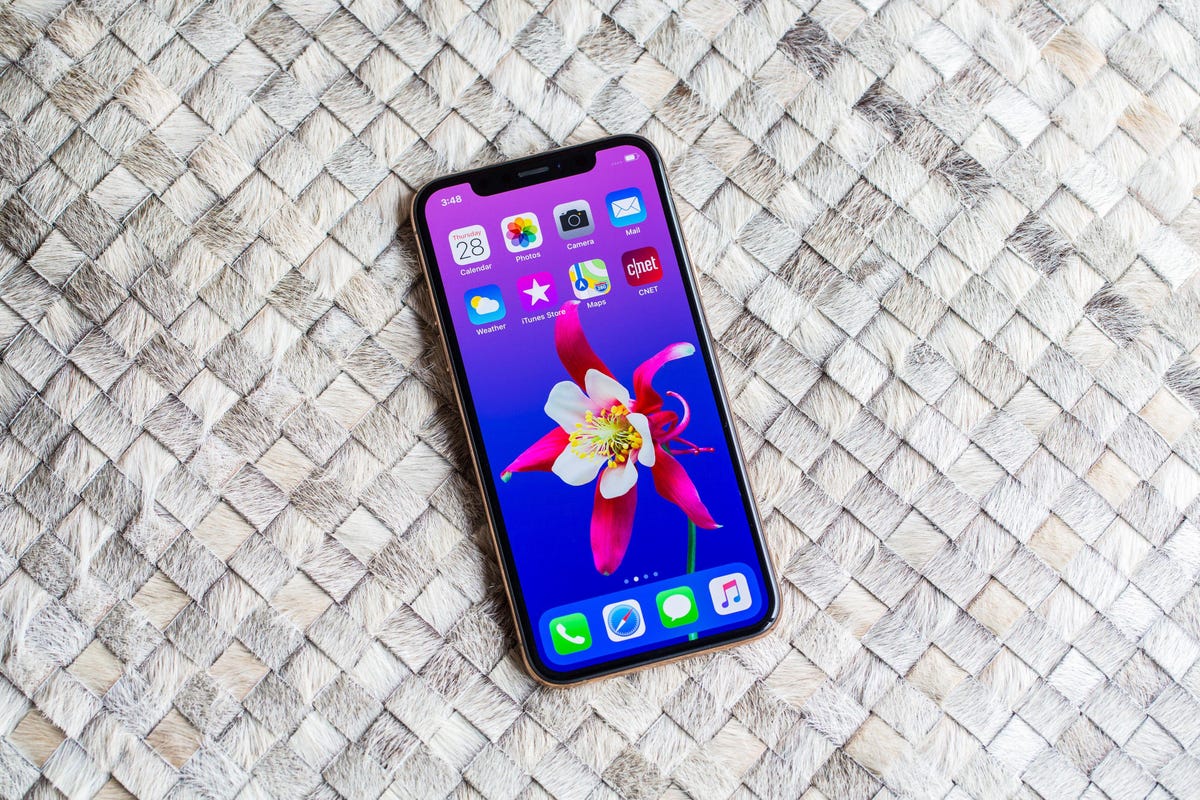
    iPhone XS

    How to enroll in the Apple Developer Program, for free

    If you’re only interested in testing out the iOS 17 developer beta for fun, you don’t need to pay for an Apple Developer Program membership. You can easily use your existing Apple ID to sign up for the developer program and download developer software onto your iPhone.

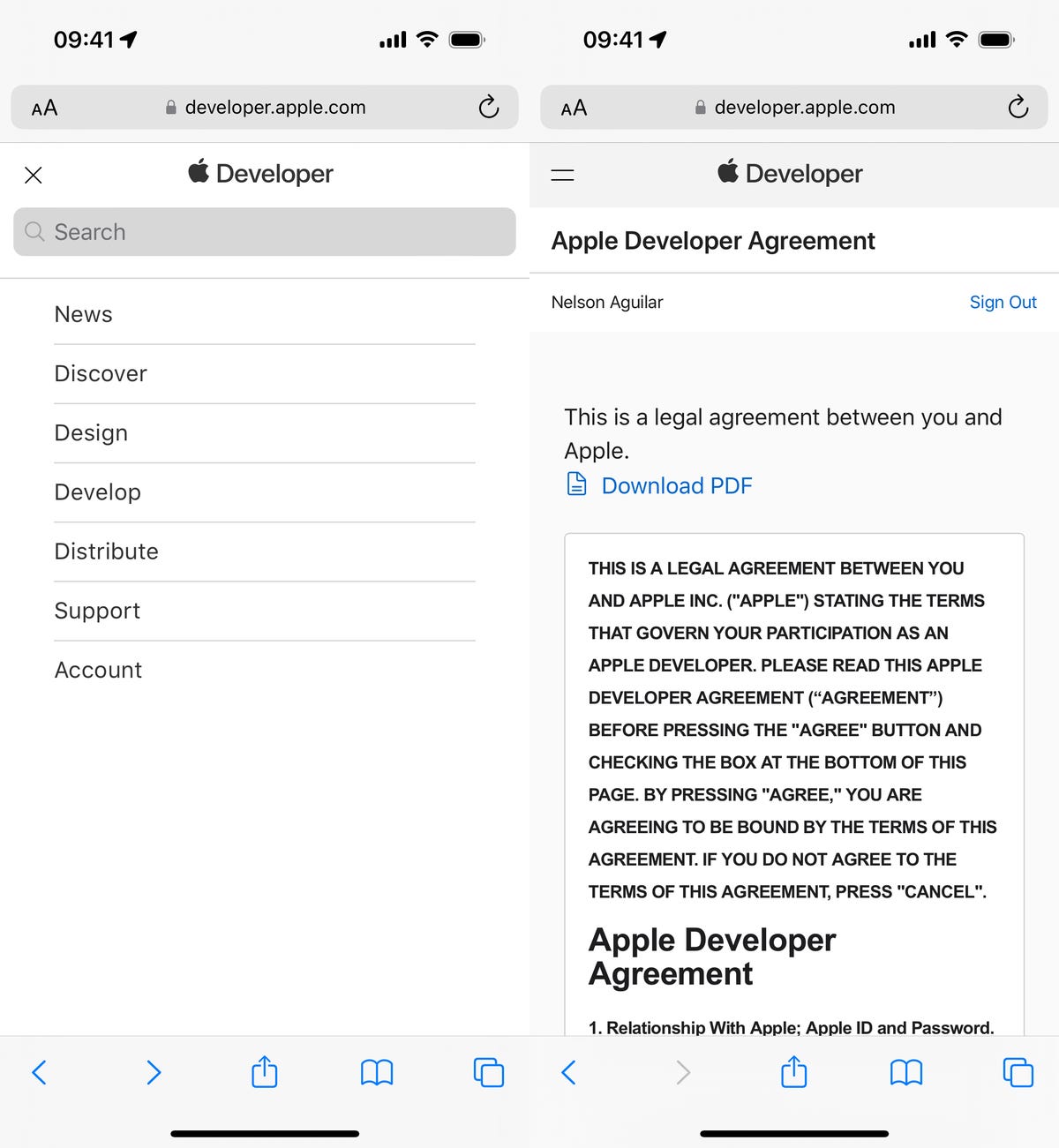
    1. Go to Apple’s Developer website, tap the three-dash menu in the top-right and hit Account.

    2. Sign in with your existing Apple ID.

    3. Read through the Apple Developer Agreement, check the boxes at the bottom and then hit Submit.

    You now have a free Apple Developer Program account. You can skip the next step to download and install the iOS 17 developer beta on your iPhone.

    creating a free Apple Developer Program account for iOS 17

    How to enroll in the paid Apple Developer Program

    If you’re a developer, and want full access to development tools and the ability to distribute apps on the App Store, then you’ll want to pay for the Apple Developer Program. On your iPhone, here’s how you can enroll:

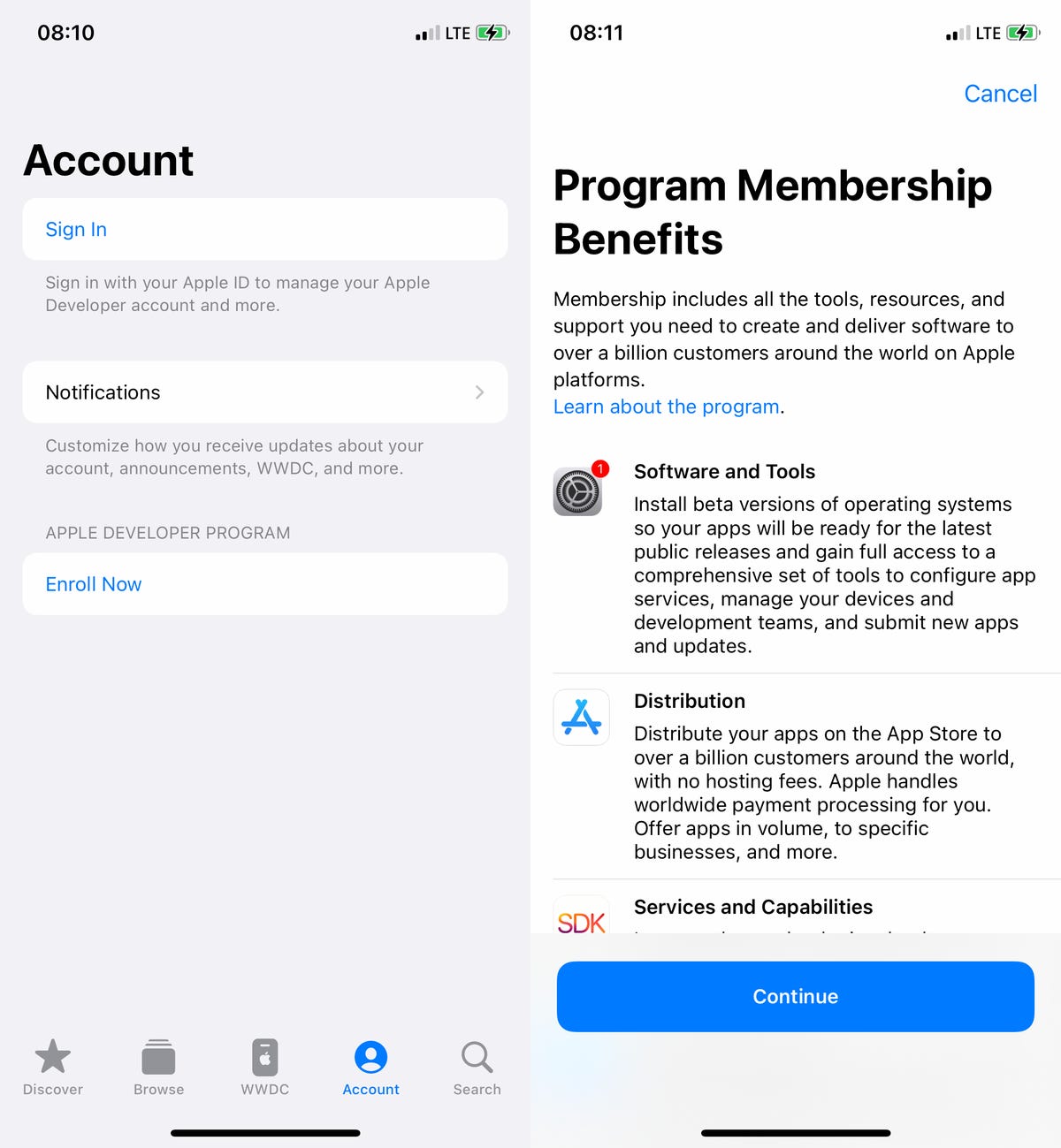
    1. Download the Apple Developer app from the App Store, launch the app, go to Account and tap Enroll Now.

    2. Sign in with your Apple ID credentials, read through the various benefits and instructions, enter your personal information and scan your ID to verify your identity.

    3. Once this information is submitted, you must choose your entity (individual for most people) and agree to the program license agreement.

    4. Finally, pay the Apple Developer membership fee (with Apple Pay), which is $99 (about 80 or AU$140) a year.

    After you successfully make the payment, you’ll be redirected to your Account page in the Apple Developer app. Here you can verify that you’re now enrolled, and you can also check out the date of your membership’s expiration next year.

    Signing up for Apple Developer Program

    You can install iOS 17 with an over-the-air update on your iPhone

    The easiest way to download the iOS 17 developer beta is with an over-the-air update — the way you would update to any other new software release on your device. Once you’re a member of the Apple Developer Program, free or paid, you’ll automatically have the option to install iOS 17 from your settings. Here’s how:

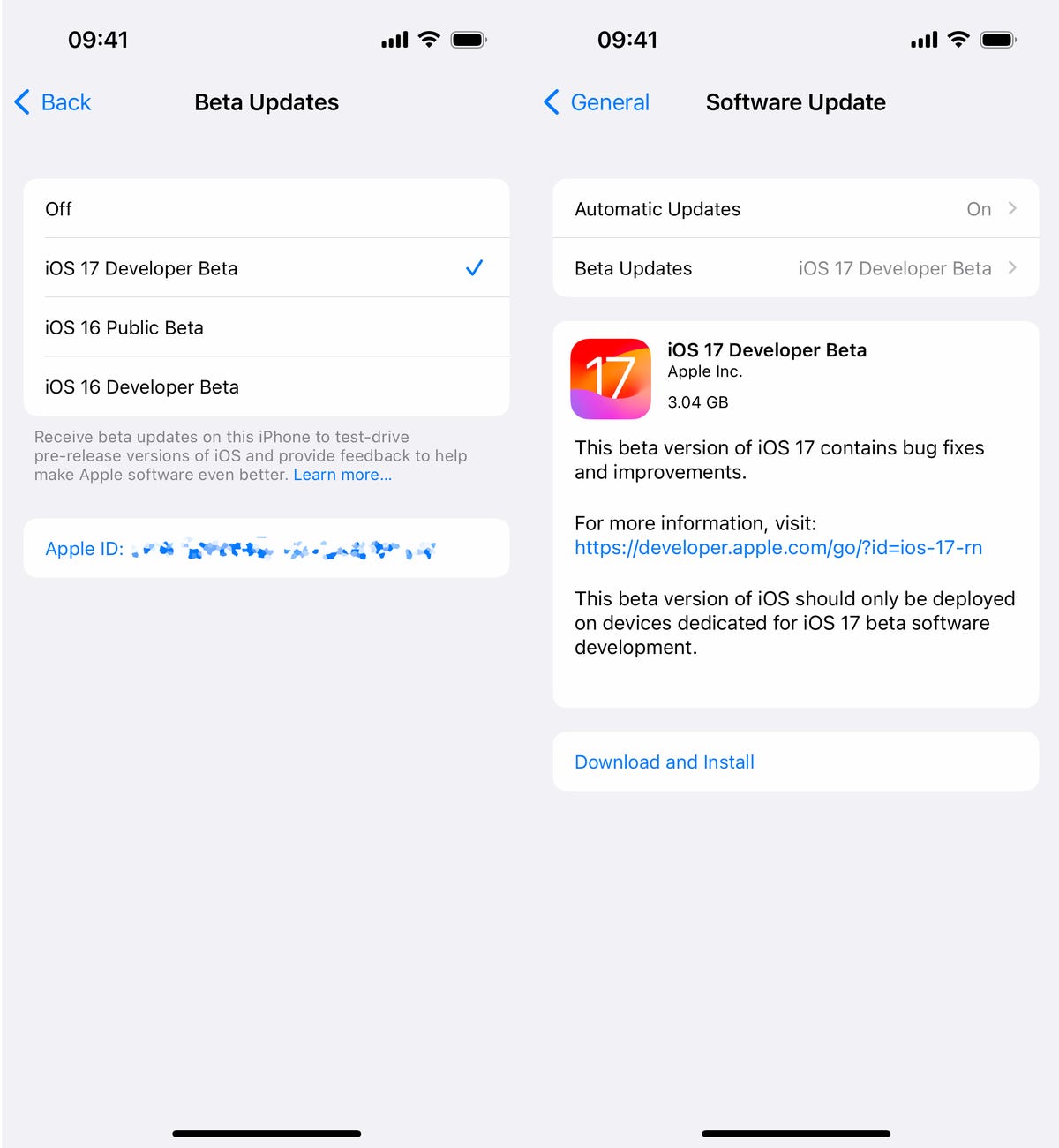
    1. On your iPhone or iPad, go to the Settings > General > Software Update.

    2. Next, go into Beta Updates and tap iOS 17 Developer Beta.

    3. Go back and tap Download and Install under the new “iOS 17 Developer Beta option” that appears.

    You’ll need to then enter your passcode, agree to the terms and conditions and wait for the update to be installed. The process can take over 20 minutes, depending on your internet connection. Once your phone reboots, you should have access to the iOS 17 developer beta.

    iOS 17 developer beta install page on iPhone

    Or download the iOS 17 developer beta using your Mac

    Over-the-air updates require a certain amount of storage, and if you don’t have that available, your computer is really the only way to update to iOS 17 beta without manually clearing out space.

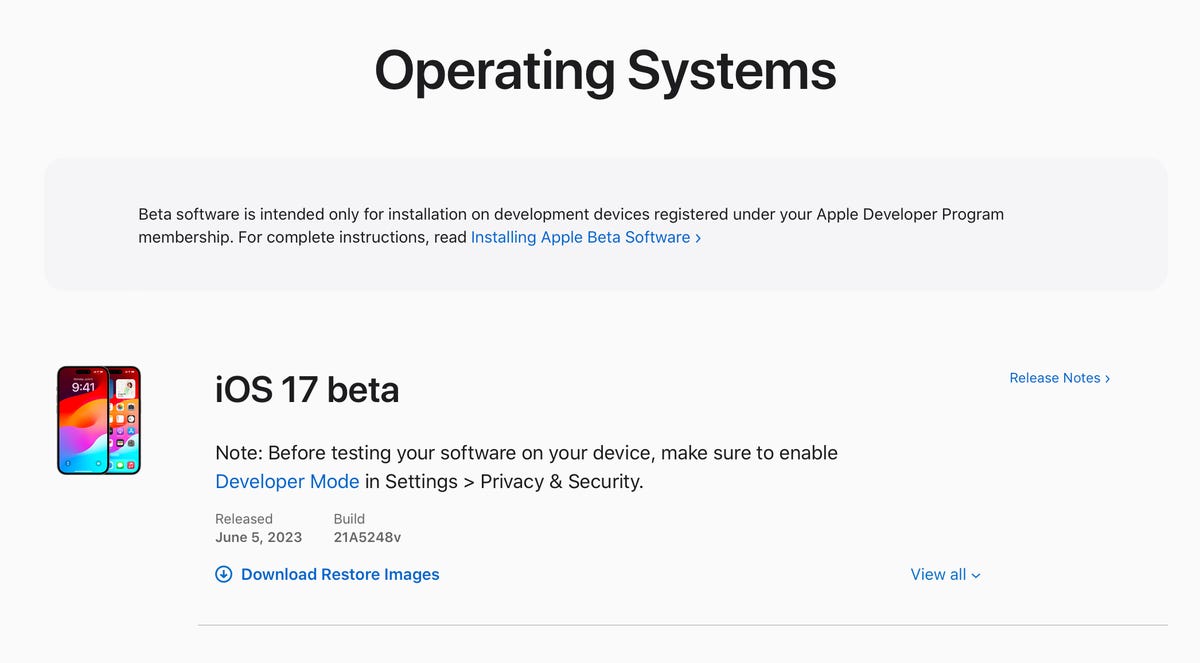
    1. On your Mac, go to the Apple Developer Program download page, find “iOS 17 beta,” click Download Restore Images and download the iOS beta software restore image for your specific device.

    2. Connect your device to your computer and enter your device passcode or hit Trust This Computer if prompted.

    3. Next, open Finder, click your device in the sidebar under Locations.

    4. Hold down the Option key, click Check for Update and choose the iOS 17 beta software restore image you just downloaded from the Apple Developer page.

    The iOS 17 beta software will install on your device. Wait for a few minutes and when your phone reboots, you should have access.

    iOS 17 download profile on Mac

    While you’re here, check out the best iPhone model you can get in 2023. And if you’re looking for a new computer, check out these laptops you might be interested in.
  • Sony’s Excellent New Entry-Level ANC Headphones Are $52 Off

    Back in July, Sony’s new CH-720N headphones were on sale for $98 for Prime Day. I thought they were a very good deal at that price, as they list for $150 and tend to sell for around $130. Now they’ve returned to $98 in both black or white, making them one of the better full-size headphones bargains out there right now and a good back-to-school choice.

    The CH-720Ns have a bit of a plasticky budget vibe and don’t come with a carrying case, but they’re lightweight and comfortable. As I said in my Sony CH-720N review, part of me was expecting them to sound pretty mediocre. However, I was pleasantly surprised. No, they don’t sound as good as Sony’s flagship WH-1000XM5s, but they sound more premium than they look (and feel), and their overall performance is a step up from their predecessor, the CH-710Ns. Are they worth $150? Maybe, maybe not. But they’re a sweet deal at $98.

    Read more: Best noise-canceling headphones of 2023

  • Nokia’s Newest Phones Are Launching in the US at Under $200

    If you’re a long-time fan of Nokia phones, you’ll soon be able to get your hands on two new devices. The Nokia G310 5G and Nokia C210 are being released in the US by maker HMD Global later this year, and both are priced from under $200.

    The Nokia G310 5G starts at $186, and will be available in blue on Aug. 24 at T-Mobile and Metro by T-Mobile. The phone keeps to Nokia’s old guarantee of a long-lasting battery, with HMD saying it’ll last for up to three days on one charge.

    The 5G phone runs on Android 13 and is powered by the Snapdragon 480 Plus 5G Mobile Platform.

    Also included in the Nokia G310 5G phone:

    • A 6.56-inch display.
    • Three rear-facing cameras: One 50MP and two 2MP with “AI algorithm enhancements.”
    • 8MP front-facing camera.
    • A 5,000mAh battery with 20W fast charging.
    • 128GB of storage.
    • A MicroSD card slot for up to 1TB of extra storage.
    • 4GB of RAM.
    • A polycarbonate design with an aluminum chassis and Gorilla Glass 3, making it durable like old-school Nokia phones.
    • A “QuickFix” repairable design in partnership with iFixit — including guides, authentic spare parts from iFixit and tools so you can replace your own battery, screen, charging ports and covers.

    The Nokia C210 is priced from $109, and will launch in grey on Sept. 14 at Metro by T-Mobile. It runs on Android 13 and is usable only on 4G networks. It includes:

    • A 6.3-inch display.
    • Two rear-facing cameras of 13MP and 2MP.
    • A 5MP front-facing camera.
    • A 3,000mAh battery.
    • The Snapdragon 662 Mobile Platform.
    • 32GB of storage, expandable via MicroSD card for up to 512GB.
    • 3GB of RAM.

    “These devices come at a time when consumers expect more enhanced smartphone capabilities at more affordable prices,” said Cristian Capelli, VP Americas at HMD Global.

    HMD has been making Nokia’s phones since 2016.

    If you’re looking to switch phone carriers, here’s everything you need to know first, as well as CNET’s top picks of the best cellphone plans available now, whether you’re looking for the cheapest phone plans or the best unlimited data plans.

  • JBL’s Rugged and Powerful Boombox 2 is Over $200 Off at Woot

    You don’t have to sacrifice powerful sound to get a speaker that you can take on the go. The JBL Boombox 2 offers the best of both worlds, and right now you can grab one at a serious discount. Woot currently has this Bluetooth boombox available for $290, which saves you a whopping $210 compared to the original list price. This deal is available through Aug. 31, but Woot typically has a limited supply available, so it may sell out before then. We’d recommend getting your order in sooner rather than later if you don’t want to miss out on these savings.

    This JBL speaker is a few years older than the third-gen model that earned a spot on our list of the best wireless boomboxes of 2023, but still has a ton to offer. It boasts 160 watts of power and is equipped with dual passive radiators for powerful, room-filling sound and deep, thumping bass. It weighs in at just 13 pounds and has a built-in handle so it’s easy to take on the go. And with an IPX7 water-resistance rating, you can bring it just about anywhere. Its substantial 10,000-mAh battery gives it 24 hours of playtime on a single charge. It also features Bluetooth 5.1 connectivity, and you can pair it with other compatible JBL speakers for multiroom listening.

  • Streaming Hits a New High This Summer. Here Are the Services You’re Watching Most

    Streaming viewership beat out traditional TV platforms to hit a new record high in July, Nielsen reported Tuesday. While broadcast TV and cable snagged 20% and 29.6% of viewership respectively, streaming accounted for 38.7% of TV usage for the month. A surge in June — which Nielsen attributes to kids’ summer break — highlighted a trend that saw streaming outpace all other TV platforms by at least 6% of viewership share.

    Per Nielsen, for kids ages 2 to 17, “non-traditional TV options accounted for 90% of their increased usage,” with streaming making up 62% of that bump for those ages 2 to 11. However, they’re not the only ones enjoying what’s on TV, with adults turning to Netflix, Tubi and other services this season.

    Read more: Best Streaming Service Deals for Peacock, Hulu, Starz and More

    Top streaming services of the summer

    What are you watching the most this summer? YouTube took the top spot in June and July, and free streaming services like Tubi and Roku have gotten a piece of the pie too. The top 10 most-streamed platforms in July are listed below. In June, Paramount Plus and Roku Channel sat in reverse positions.

    1. YouTube
    2. Netflix
    3. Hulu
    4. Prime Video
    5. Disney Plus
    6. Max
    7. Tubi
    8. Peacock
    9. Roku Channel
    10. Paramount Plus
    streaming pie chart that shows viewership percentages

    New releases and children’s programming helped pushed streaming services to the top, with shows like Prime Video’s Jack Ryan, Bluey on Disney Plus and Suits on Netflix contributing to the increase. Nielsen reports that three services reached “all-time high” status — YouTube, Netflix and Prime Video — while gaming consoles make up the “other streaming” category.

    To learn more about CNET’s streaming TV coverage, check our our best streaming services list and our picks for free streaming services.

  • Apple Maps Is Getting This Google Maps Feature Next Month

    Say goodbye to the days of losing access to your iPhone’s GPS because you’re driving through a no-signal zone. Next month, your iPhone is finally getting a new feature that Android users have had for years. With the iOS 17 update, Apple Maps users will be able to use the GPS offline (if they have a compatible iPhone).

    This isn’t the only update coming with Apple’s newest software. Electric-vehicle owners will also soon be able to see real-time charging availability via Apple Maps.

    How do offline maps work?

    The iPhone is getting offline maps for its Maps app this year. That means you’ll be able to access any map you’ve downloaded, even if you don’t have Wi-Fi or a cell signal. For instance, if you’re going on a trip, you can download the route and access it without using cellular data. This is helpful if you’re low on data or if your route takes you through an area with little to no signal that would cause the Maps app to stop navigating correctly, potentially causing you to veer off course.

    What can you do with Apple Maps offline?

    When iOS 17 becomes available, you’ll be able to download designated areas and access turn-by-turn navigation while using Maps offline. Also, you’ll be able to see your estimated time of arrival and find places in Maps, among other things.

    When will iPhone’s offline maps be available?

    Offline maps will be available on iPhone with the launch of iOS 17, which is coming this fall. (It usually arrives in late September with the new iPhone.) You’ll want to make sure your iPhone is compatible with Apple’s latest software. If it isn’t, you won’t have access to this new feature.

    What else is changing with Apple Maps?

    Maps will make it easier to find thousands of trails in parks across the US. The app will also support drivers of electric vehicles with real-time charging availability information. This can be filtered by charging network and plug type, among other things. EV owners with compatible vehicles will also be able to designate a preferred charging network.

    What else did Apple announce at WWDC? The company unveiled MacOS Sonoma, as well as the new 15-inch MacBook Air and the Vision Pro VR headset. Apple showed off a feature that will let you turn your photos into stickers with its Messages app in iOS 17. Also, changes are coming to the autocorrect feature in iOS 17, and Apple unveiled iPadOS 17 and WatchOS 10.

  • Samsung Brings New Z Flip 5, Z Fold 5 Features to Older Foldable Devices

    Samsung’s older Z Flip and Z Fold phones are about to be able to perform a few new tricks. On Tuesday, the company said features from its operating system update One UI 5.1.1, which debuted with its new Z Flip 5 and Fold 5, will begin trickling down to older phones, starting with the Z Flip 4 and Z Fold 4 this month.

    The rollout suggests Samsung wants to create a consistent experience across its Z Flip and Z Fold phones as it seeks to make foldable phones mainstream. The announcement follows Samsung’s Unpacked event in late July, where the company introduced the Galaxy Z Flip 5, the Z Fold 5, the Galaxy Watch 6 series and the Galaxy Tab S9 family.

    The updates are minor changes that should add some polish to the Z Flip’s and Z Fold’s software experience in Flex Mode. This mode enables apps to shift to the top portion of the screen when the Flip or Fold is folded halfway, while displaying device controls on the bottom portion of the display.

    With the update, Samsung is hoping to improve the way buttons and controls appear on the screen’s bottom half, so they’re easier to reach and customize. Flip and Fold owners will be able to show or hide Flex Mode controls on the bottom screen, and the media play button will also appear in this panel when streaming videos.

    Samsung says that in addition to arriving on the Z Fold 4 and Z Flip 4 this month, the update will come to the Z Fold 3, Z Flip 3, Z Fold 2 and Z Flip. However, it didn’t specify a time frame for these devices. These additions fall in line with Samsung’s tendency to support older devices with new software. For example, it provides its phones with four generations of Android updates while its rivals typically offer only three.

    Samsung is also expanding new software features from the Galaxy Tab S9 series and Galaxy Watch 6 family to older tablets and smartwatches. For the tablets, this includes two-handed drag-and-drop and the ability to more easily switch between Samsung’s pop-up and multi-window modes. Pop-up window opens an app in a smaller window, while multi-window is Samsung’s version of split-screen mode. There’s also an upgraded task bar that lets you access up to four recent apps.

    These features will arrive on the Galaxy Tab S8 family, Tab S7 family, Tab S6 Lite, Tab A8, Tab A7 Lite, Tab Active 3 and Tab Active 4 Pro. The new tablet features should work on the Galaxy Z Fold 4 as well.

    Galaxy Watch 5, Watch 5 Pro, Watch 4 and Watch 4 Classic users will get an updated user interface with more-detailed sleep data, personalized heart rate zones, a new mode for recording runs on tracks, and support for running and walking in the Galaxy Watch 5 Pro’s Route Workout mode, among other features. Notifications of irregular heart rhythm are also arriving on the Galaxy Watch 5 and Watch 4 series.

    The updates are another sign that tech giants are delivering more meaningful new features through software as hardware upgrades have felt less dramatic year-over-year. The biggest update in the Galaxy S23 series, for example, is the Ultra model’s 200-megapixel camera sensor, while the S23 and S23 Plus received modest updates to performance and battery life.

    Apple has taken a similar approach, particularly with the Apple Watch, which gained useful updates like low power mode and a suite of new workout features in last year’s WatchOS 9 update.

    By bringing fresh updates to older devices, Samsung is putting more emphasis on software, hoping to breathe new life into aging products as it continues its efforts to establish a device ecosystem that rivals Apple’s. That’s especially important with devices that are as expensive as Samsung’s Z Flip and Z Fold, which start at $1,000 and $1,800 respectively.