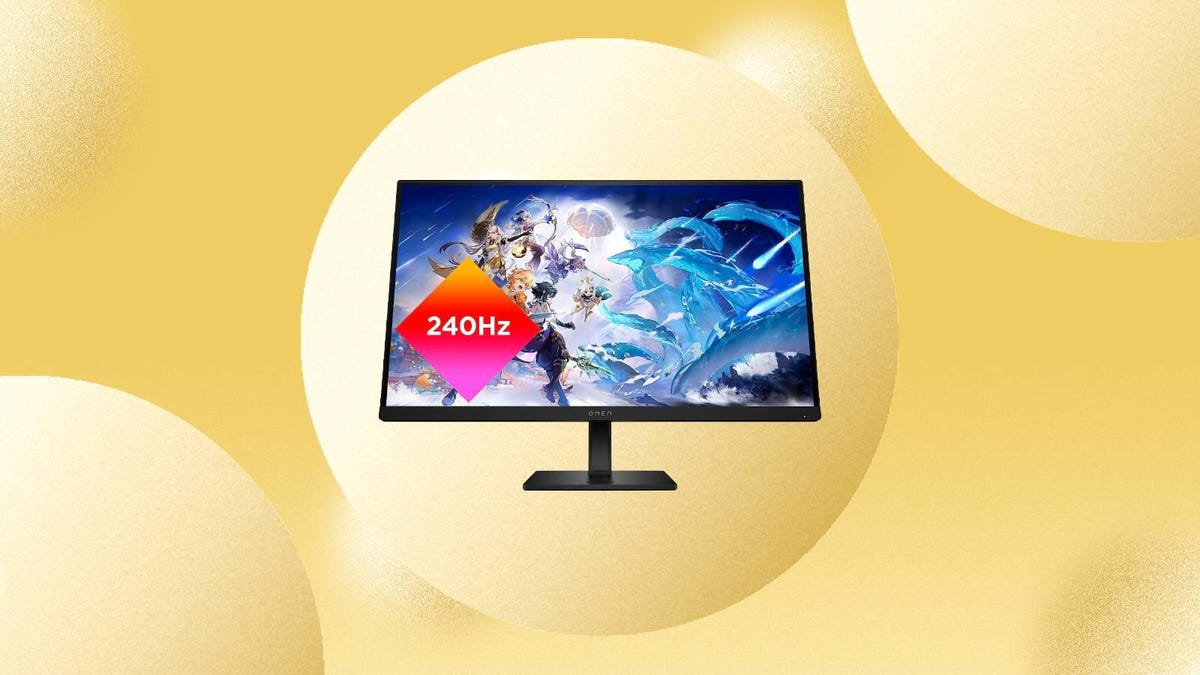
There are a ton of monitor options out there, but if you’re looking for a budget-friendly gaming monitor, the HP Omen 27s is a solid option worth considering — and right now Amazon has slashed the price by $150, which means you’ll pay just $200 to bring one home. That’s the lowest price we’ve seen. We don’t know how long this offer will last, so we recommend making your purchase sooner rather than later.
This 1080p monitor offers full high-definition resolution and has an impressive 240Hz refresh rate, making it a great choice for e-sports and action-oriented gameplay. It also comes with Nvidia G-Sync to minimize lag and stutter. And because this monitor allows for 100mm height adjustments and has pivot and tilt capabilities, you can customize your experience to your comfort. Plus, this monitor has integrated dual 3W speakers that deliver clear audio when you don’t want a headset. It also has two HDMI 2.0 ports, a DisplayPort 1.4 and two USB-A ports so you can plug in everything you need.
Note that this product may take up to two months to ship, so keep that in mind if you are in a hurry to receive a new monitor. You can check your Amazon account to see the delivery estimate for your area.
And if this monitor isn’t the right option for you, be sure to check out our roundup of the best monitor deals currently available.
With two defeats from their opening pair of Champions League fixtures, this Group A clash at home to FC Copenhagen is looking like a must-win fixture for Man United.
Back-to-back losses to Bayern Munich and Galatasaray mean that Erik ten Hag’s men are staring elimination from this year’s tournament squarely in the face, but come into this clash off the back of a battling, if disjointed, 1-2 win over Sheffield United in the Premier League.
They now face a Copenhagen side that sits third in Group A after earning a point at Galatasaray before slipping to an unlucky 2-1 defeat to Bayern Munich at home last time out.
Tuesday’s game looks set to be an emotional affair, with the fixture the first at Old Trafford since the death of Man United legend Bobby Charlton.
Below, we’ll outline the best live TV streaming services to use to watch the every game live wherever you are in the world.
Man United vs. FC Copenhagen: When and where?
Man United host FC Copenhagen at Old Trafford in Manchester on Tuesday, Oct. 24. Kickoff is set for 8 p.m. BST local time in the UK (3 p.m. ET, 12 p.m. PT in the US and Canada, and 6 a.m. AEDT on Wednesday, Oct. 25 in Australia).
How to watch Man United vs. FC Copenhagen game online from anywhere using a VPN
If you find yourself unable to view Champions League matches locally, you may need a different way to watch the action — that’s where using a VPN can come in handy. A VPN is also the best way to stop your ISP from throttling your speeds on game day by encrypting your traffic, and it’s also a great idea if you’re traveling and find yourself connected to a Wi-Fi network, and you want to add an extra layer of privacy for your devices and logins.
With a VPN, you’re able to virtually change your location on your phone, tablet or laptop to get access to the game. So if your internet provider or mobile carrier has stuck you with an IP address that incorrectly shows your location in a blackout zone, a VPN can correct that problem by giving you an IP address in your correct, nonblackout area. Most VPNs, like our Editors’ Choice, ExpressVPN, make it really easy to do this.
Using a VPN to watch or stream sports is legal in any country where VPNs are legal, including the US, UK and Canada, as long as you have a legitimate subscription to the service you’re streaming. You should be sure your VPN is set up correctly to prevent leaks: Even where VPNs are legal, the streaming service may terminate the account of anyone it deems to be circumventing correctly applied blackout restrictions.
Looking for other options? Be sure to check out some of the other great VPN deals taking place right now.
Livestream Man United vs. FC Copenhagen in the US
American soccer fans can stream every fixture of this season’s tournament via Paramount Plus, which has exclusive live English-language broadcast rights in the US for UEFA Champions League matches.
Livestream Man United vs. FC Copenhagen in the UK
Champions League live broadcast rights in the UK are held by TNT Sports (formerly known as BT Sport).
Livestream Man United vs. FC Copenhagen in Canada
If you want to stream UCL games live in Canada, you’ll need to subscribe to DAZN Canada. The service has exclusive broadcast rights to the Champions League this season.
Livestream Man United vs. FC Copenhagen in Australia
Football fans Down Under can watch UCL matches on streaming service Stan Sport, which has exclusive rights to show the Champions League live in Australia this season.
Quick tips for streaming UEFA Champions League matches using a VPN
With four variables at play — your ISP, browser, video streaming provider and VPN — your experience and success when streaming Champions League games may vary.
If you don’t see your desired location as a default option for ExpressVPN, try using the “search for city or country” option.
If you’re having trouble getting the game after you’ve turned on your VPN and set it to the correct viewing area, there are two things you can try for a quick fix. First, log into your streaming service subscription account and make sure the address registered for the account is an address in the correct viewing area. If not, you may need to change the physical address on file with your account. Second, some smart TVs — like Roku — don’t have VPN apps you can install directly on the device itself. Instead, you’ll have to install the VPN on your router or the mobile hotspot you’re using (like your phone) so that any device on its Wi-Fi network now appears in the correct viewing location.
All of the VPN providers we recommend have helpful instructions on their main site for quickly installing the VPN on your router. In some cases with smart TV services, after you install a cable network’s sports app, you’ll be asked to verify a numeric code or click a link sent to your email address on file for your smart TV. This is where having a VPN on your router will also help, since both devices will appear to be in the correct location.
And remember, browsers can often give away a location despite using a VPN, so be sure you’re using a privacy-first browser to log into your services. We normally recommend Brave.
In today’s world, where every click is monitored, and every query can be used against us, the importance of privacy when searching the Internet cannot be overstated. Most popular search engines store your search history, monitor your activities, and share this information with advertisers. This is why choosing the right search engine that respects your privacy isn’t just a preference, but a necessity.
Use Freedom Search – a search engine that prioritizes your interests and ensures the security of your data.
The glorious days of Netflix password sharing has been over for a few months now. After hemming, hawing and testing out its new policy in foreign countries, Netflix finally cracked down on password sharing in the US in early summer 2023.
You can still share a password with someone outside your household, but that will cost the owner of the account $8 per extra person on top of what they already pay for their Netflix plan. Users on the standard Netflix plan can add one person outside their household, while premium users can add up to two.
For those who were borrowing someone else’s login credentials to access Netflix, the abrupt loss of the service may have come as a shock (and a major interruption to your streaming), but the good news is that not all is lost. Even if you get booted off a shared Netflix account, you can transfer your profile over to a new account or another existing account to keep your recommendations, save lists and other settings.
We’ll show you how to find and enable Netflix’s Transfer Profile feature on your profile, and how to transfer your existing profile to a different account.
While you’re here, check out the best live TV streaming services of 2023 and the best TVs of this year.
First, enable the Profile Transfer feature on Netflix
Before you can transfer your Netflix profile to a different account, you must enable the feature. You can do this on both the web and your mobile device (phone or tablet).
If you’re on a computer, go to the web browser of your choice, access the Netflix website and go into the profile that you want to transfer. Next, hover your cursor over your profile icon in the top right and click Transfer Profile in the dropdown menu. On the next page, click the Allow button.
If you’re using a phone or tablet, open the official Netflix application, go into your profile and then tap your profile icon in the top-right corner to access your account settings. Next, tap Account, scroll down to the bottom of the page, and tap Turn on profile transfers. This will redirect you to the official profile transfer page, where you can then hit the Allow button.
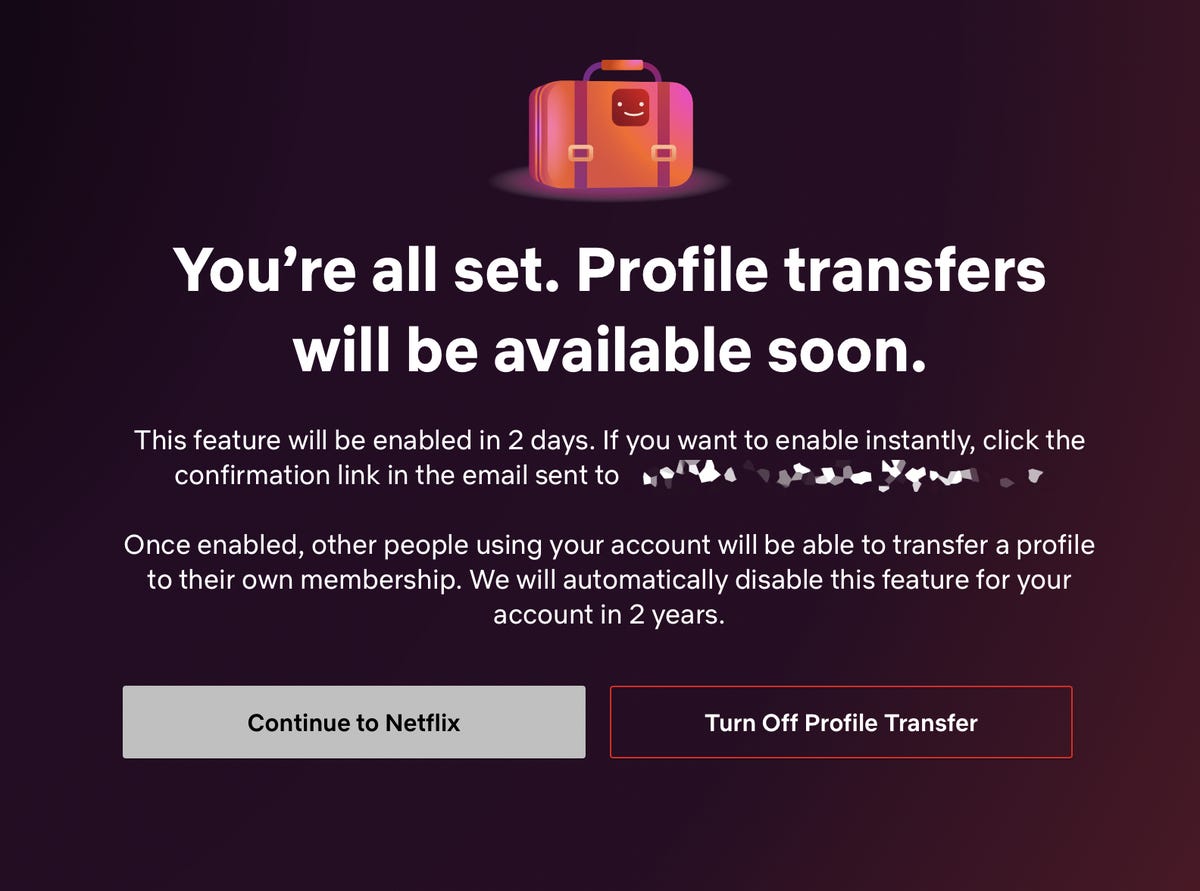
You should then get a notification saying that profile transfers will soon be coming to your account. For my account, it said I would get the feature in two days. However, it also said I could enable the profile transfer feature instantly if I clicked the confirmation link sent to me via email, which I did.
Now transfer your profile to another Netflix account
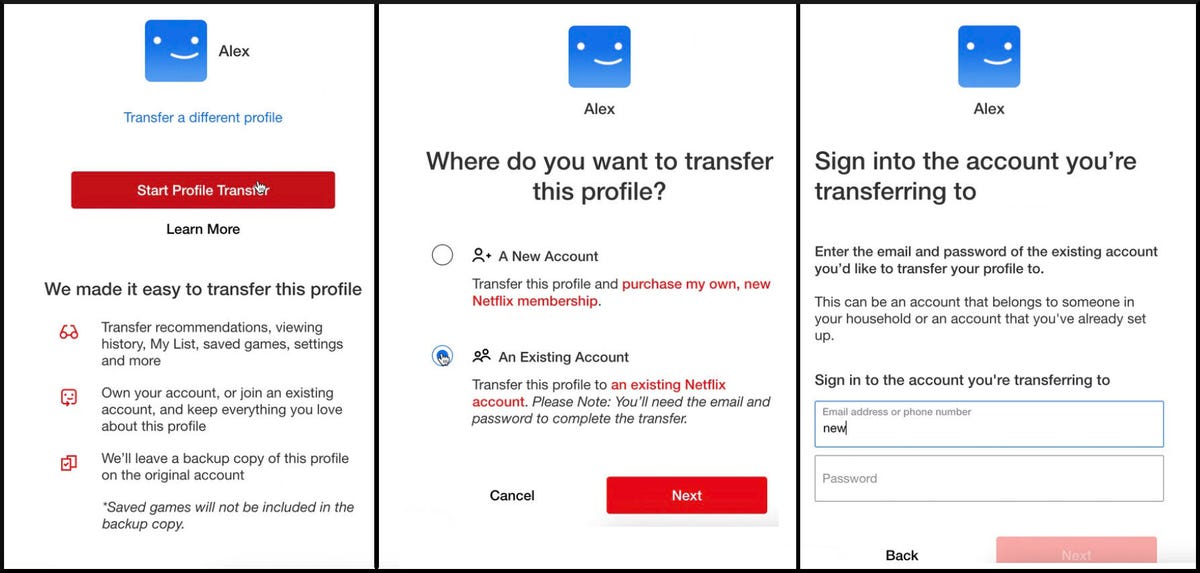
Once the Transfer Profile is enabled, you can transfer your profile to your own new Netflix account or a different existing account. To transfer a profile, log in to your original Netflix account (web or mobile) and go into the Transfer Profile page found in your settings. You should then see the start of the Transfer Profile process, which will give you a brief summary of what the feature does:
Transfers over your recommendations, viewing history, saved games, settings, My List and more to a separate account.
Creates a backup of your profile on the original account.
Begin the process by hitting the Start Profile Transfer button — you’ll then be asked whether you want to move your profile to a new account or an existing account. Make your selection then hit Next again.
If you’re creating a new account, you’ll then enter the credentials for your new account. Verify your email and then follow the prompts you see on the screen to finish setting up your new account. Once this is finished, your profile will be transferred and you’ll have instant access to your new Netflix account.
If you’re transferring to an existing account, you’ll need the account login and password of that other account in order to connect your profile.
The owner of the original account will be notified once the process is complete, as will the owner of any existing account you transfer your profile to.
If you get logged out of Netflix while attempting to transfer your profile, you can continue the process by logging back in and using the Finish Transfer setting.
Check out the best TV shows to currently watch on Netflix, as well as the secret hack you need to get better Netflix recommendations.
Yes, Black Friday may be behind us, but that doesn’t mean you’re out of luck when it comes to cheap stocking stuffers. There are still plenty of great options out there for people (and animals) of all ages. Taking care of the big stuff is the most important, but once you’ve settled in, take a look at our guide to the best cheap stocking stuffers available.
There are tons of affordable items on sale ahead of the holidays that would make for little extras. We’ve taken the time to gather up some of our top picks below to give you some inspiration for anyone left on your gift list.
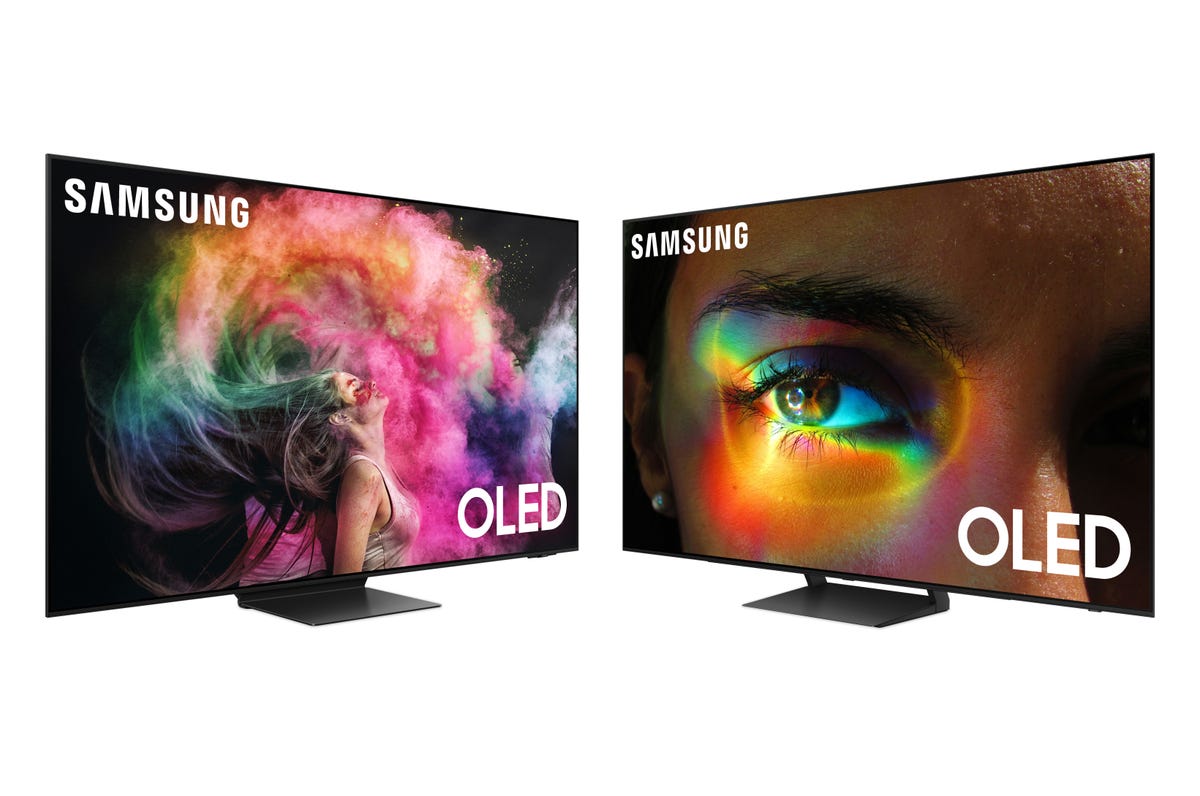
Since it first entered the market, OLED has won countless “best picture” and “best TV” awards. The technology’s combination of perfect blacks and vibrant colors are hard to beat. As the panel type matured, different types of OLED have entered the market, including QD-OLED and Micro-OLED, joining the original RGB OLED and WOLED.
What do all these letters mean? How do these various variants stack up? Most importantly, what’s the best option for your money? To some degree, it depends where that OLED is being used. What’s good for your phone, for instance, might not be the best option for your TV. Even among the different TV OLED technologies, there are pros and cons for each version. Fortunately, there are distinct variations for each type of use, so it doesn’t get too complicated.
First, though, I’ll need to talk about OLED and what makes it different from the other main TV types on the market. For a comparison between active and passive OLED, read Phone OLED vs. TV OLED: What’s the difference?
What’s OLED?
OLED stands for Organic Light Emitting Diode. To simplify, each pixel contains a chemical compound that emits light at a certain wavelength when supplied with energy. In the case of all the types of OLED I’m describing, that means either red, green, blue or in one case, yellow. In most versions, each pixel is made up of three of these (RGB) “subpixels.” In addition, two types use a single color and a filter that converts it into the others, but I’ll get to that later. A 4K TV will use over 8 million of these groups of subpixels to create an image.
What makes OLED fundamentally different from the other main TV technology on the market, LED LCD, is that each pixel in an OLED can be turned off. When off, it doesn’t emit light. This means its contrast ratio is effectively infinite. With LED LCDs, and this includes QLED, ULED, mini-LED and really any TV tech that’s not OLED, you can’t shut off the light for each pixel. This is because the part of the TV that creates light (the backlight) is separate from the part that creates the image (in all these types, some kind of liquid crystal). So the TV can dim a part of the screen, but pixel-perfect dimming isn’t possible like it is with OLED.
LED LCD TVs have other benefits, and for more on that, check out this comparison between LCD and OLED.
That’s the basics for how all OLEDs work, but the specifics are even more intriguing.
QD-OLED
Pros:
Impressive color
Impressive brightness
Cons:
Expensive (for now)
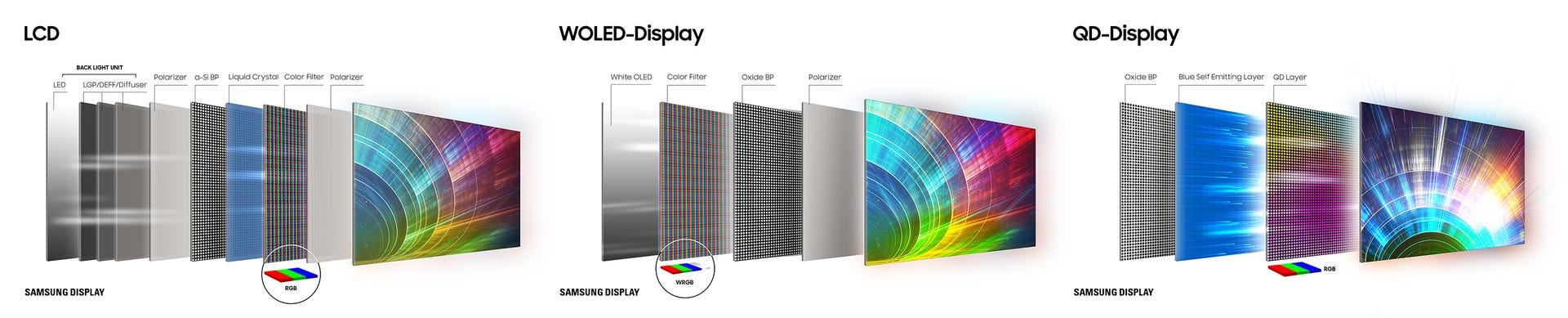
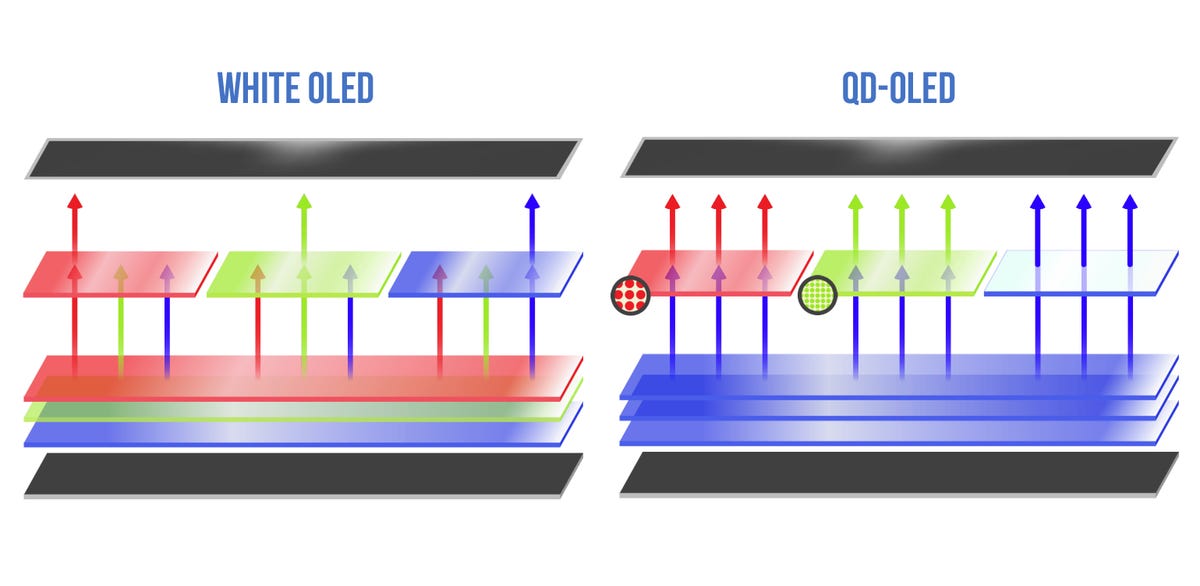
The latest version of OLED is what’s called QD-OLED, aka quantum dot OLED. Combining OLED with quantum dots has been in the pipeline practically since quantum dots entered the market. Like they do with LED LCDs, QDs help boost OLEDs’ brightness and color. They also make manufacturing a little easier, as each subpixel is the same color. Samsung Display manufactures all QD-OLED panels right now, and its design uses all blue OLED material, and that blue is converted to red or green light depending on the subpixel.
The main downside is cost. These are some of the most expensive displays on the market per screen inch. That will eventually come down as they become easier to manufacture. Also, while they theoretically are an improvement over other types of OLED screens, that difference might not be huge, if at all. WOLED and QD-OLED are both “A” students, both Ferraris, so for most people either will be great. It might even come down to the specific year or series as to which is best.
Right now you can find QD-OLED TVs sold by Samsung and Sony, along with computer monitors also from Samsung and from Alienware.
For more on QD-OLED, check out QD-OLED TV: Samsung, Sony Take on LG With Quantum Dot Special Sauce.
WOLED
Pros:
More affordable
Contrast and brightness
Cons:
Potentially not quite as colorful as QD-OLED
LG deserves credit for making OLED TVs mainstream, and the way it did that was with its proprietary WOLED, or “white” OLED design. To create an image, you need red, green and blue. This lets the TV create pretty much any color needed. With most displays that means each pixel has three subpixels, one for each color. WOLED adds a fourth subpixel, white, to add brightness. Each subpixel is the same color, much like how QD-OLED works. In this case, instead of blue, each subpixel starts with white(ish) light. Early generations used blue and yellow OLED materials to create this white light. More recent models add in red and green to balance out the white spectrum. Above each non-white subpixel is a color filter to let through the wavelengths of the desired color.
While theoretically this method is less efficient than a design without color filters, LG has gotten very good at it. In fact, its current G3 is brighter than some QD-OLED models. It is also currently cheaper to manufacture, so you can get less expensive WOLED displays compared to QD-OLED.
While a video purist might be able to pick some metaphorical nits about the difference between WOLED and QD-OLED, it comes down to specific models as to which might look better.
Check out our Best TV list to see more about how they stack up.
RGB-OLED
Pros:
Efficient to manufacture in small sizes
Energy efficient
Cons:
Difficult to scale up
The first OLED displays were a traditional design of OLED with RGB subpixels. These were marketed by Sony as a tiny desktop display, and later by Samsung as a small, curved TV. Neither were particularly successful. However, most of you reading this either have an OLED display within arm’s reach, or perhaps you’re reading these words on one.
Phone-size OLED screens are a mainstay of the mid- and high-end phone market. These are almost exclusively RGB-OLED. There are even a handful of laptops that use these kinds of OLED screens. For various reasons, it’s difficult to scale these designs up to TV-sized, but they work great as high-resolution, portable displays.
With LCD screens, the main energy drain is the backlight, which generally speaking has to be on at all times for you to see anything. With OLED, the only energy drain is through active pixels, and if the pixel is dim, it draws less power than if it’s bright. So in most situations an OLED screen draws less power than an LCD screen of the same size. If the screen brightness is at maximum, like you’re trying to see it in direct sunlight, it could draw more, but most of the time that’s not how they’re used.
It’s unlikely we’ll see TV-size RGB-OLED since LG has been extremely successful with its WOLED design and Samsung has invested literally billions into its QD-OLED factories, which use blue OLED material plus quantum dots.
Check out our picks for the best smartphone, which almost exclusively use OLED screens.
Micro-OLED
Pros:
Micro!
Ridiculous resolutions
Cons:
Expensive
Seriously, so expensive
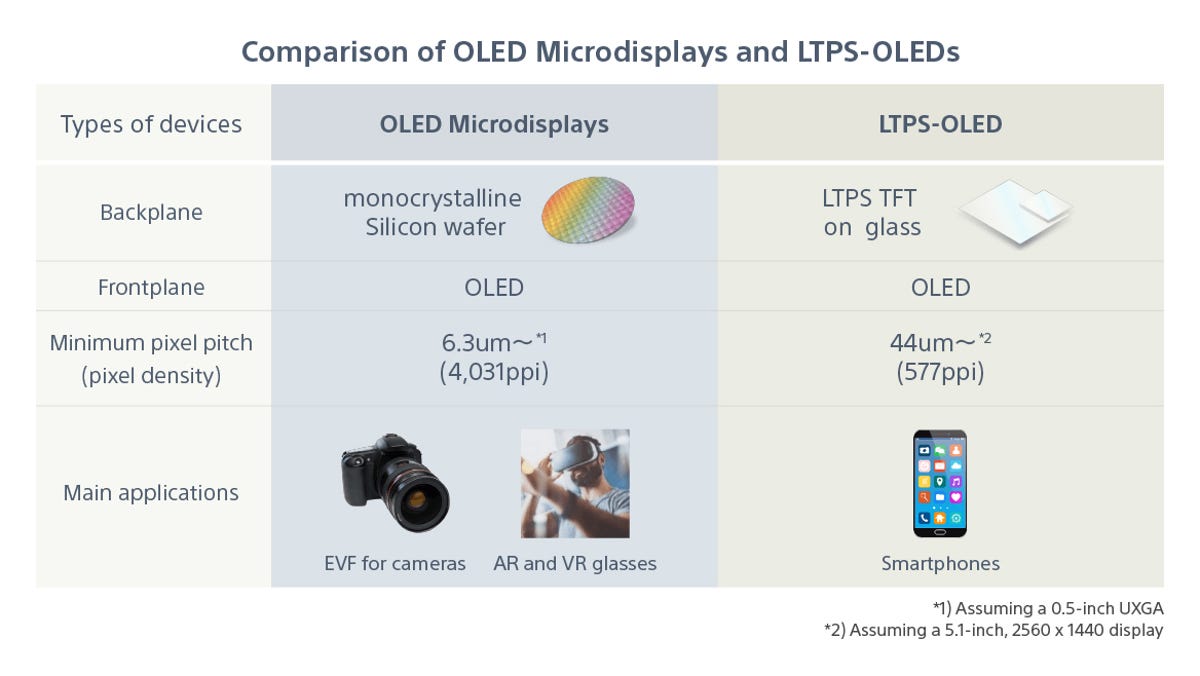
While the other variants of OLED on this list are different primarily due to how they create color, Micro-OLED is different based on its size. I suppose the name probably gave that away. The most high-profile use of Micro-OLED is Apple’s Vision Pro AR/VR headset, though they’ve been used in camera viewfinders and other small displays for a while.
Another name for Micro-OLED is “OLED on Silicon”, which helps describe how it works. Essentially OLED is incorporated onto a silicon chip. These displays are not only tiny, but extremely high resolution. It’s possible to have the same resolution as a 4K TV on something the size of a postage stamp. While a TV might have 100 or so pixels per inch and a smartphone around 500, a Micro-OLED display has over 4,000.
What uses are there for a 1-inch display with Ultra HD resolution? Well, not many. AR and VR headsets are the main use right now, as well as the aforementioned camera viewfinders. Theoretically smart watches could use Micro-OLED, but right now I’m not sure there’s a market for a $3,000 4K smartwatch (though I’m sure Apple will find a way).
For more info about Micro-OLED, check out What Is Micro-OLED? Apple Vision Pro’s Display Explained.
Foldable and beyond
One of the biggest, futuristic uses of OLED is the ability to create foldable and rollable screens. LG has been showing off roll-up OLED screens for years, often at eye-watering prices. Samsung, Google and others are selling foldable smartphones. It’s hard to say if these will become more mainstream, but they’re not currently priced too outrageously, with some versions in the same range as high-end nonfoldable phones.
As you’d hope, the technology isn’t stagnating either. Multiple companies are working on a “two-stack tandem” OLED design that adds an additional light-emitting layer. It’s claimed this method will increase brightness and lifespan. It’s possible next year’s iPads will feature OLEDs with this design.
Samsung and LG might not be the only manufacturers of TV-size OLED panels going forward, as several Chinese companies have been showing off panels for several years at trade shows.
Lastly, OLED’s days at the top of the picture quality throne might be numbered. The very quantum dots that elevate its image might be in the process of staging a coup. Electroluminescent quantum dots (see What Is NanoLED? The Next Big Screen Tech Explained) let quantum dots shine on their own, no OLED materials required. I’ve seen a working prototype and visited one of the factories where they’re made. It’s still a ways off from being mainstream, but it’s coming.
Will OLED hang on like LCD has after nanoLED or some other TV tech arrives? Absolutely.
As well as covering TV and other display tech, Geoff does photo tours of cool museums and locations around the world, including nuclear submarines, massive aircraft carriers, medieval castles, epic 10,000-mile road trips, and more. Check out Tech Treks for all his tours and adventures.
Navigate the city, collecting Verum Coins. Can you gather 1000 coins in ONE run?
Collect Verum Coins: Run through the city, overcoming obstacles, and collecting coins along the way. Your goal is to gather 1000 coins in ONE run!
Convert in-game coins to real ones: Exchange your collected in-game coins for Verum Coins, a cryptocurrency with real value.
Unlock rewards: By collecting 1000 in-game coins in a single run, you will gain access to real Verum Coins that you can withdraw to your crypto wallet.
Experience the thrill by securing your share in the future in a fun and exciting way.
Game for everyone: Our game is suitable for players of all levels, from casual gamers to dedicated gamers, providing everyone with the opportunity to join the crypto gaming revolution.
Create or log in to your account by following the on-screen instructions, providing your email address and password.
Download the “BitCoinPay Trade” app from the App Store if you don’t already have it. You can do this by clicking the BitCoinPay button in the main menu of Verum Runner.
Inside the BitCoinPay Trade app, find and copy your Verum Coin wallet.
Return to the Verum Runner app and paste the copied wallet into the corresponding field in the “Wallet” section. Save this wallet.
Now, when you start playing Verum Runner and collect 1000 coins in a single run, you will be credited with real Verum Coins that you can withdraw to your previously linked Verum Coin wallet.
Remember that the number of attempts is unlimited, and you can continue to play and collect coins. The more times you collect 1000 coins, the more real Verum Coins you’ll receive as a reward.
Basketball is back. After an offseason that saw a number of high-profile NBA stars change teams — Damian Lillard is now a Milwaukee Buck, Bradley Beal is a Phoenix Sun and Chris Paul is a Golden State Warrior — it’s time for the action to return to the hardwood. The regular season is an 82-game marathon that starts in October, runs through the holidays and Christmas Day games, includes the All-Star Game in February and concludes when the NBA playoffs end their own mini-marathon in June with the NBA Finals. And new for this year is a European soccer-like “In-Season Tournament” where teams compete for a newly created “NBA Cup.” That event starts on Nov. 3 and ends on Dec. 9.
That’s a lot of awesome basketball, and NBA fans looking stream their team throughout the year will need access to a few different services to catch every game. In addition to your regular regional sports network — the local channel that carries your team’s games week in and week out — you’ll also need ABC, ESPN, TNT and NBA TV for nationally televised contests.
All out-of-market games will continue to air on NBA League Pass, which is a great choice if you follow a team in a different city from where you live. Getting the service for the full season (with the NBA TV channel included) costs $100, while a “Premium” option that includes in-arena feeds in place of commercials and the ability to watch three games at once runs $150 for the season. It’s important to note that local fans aren’t able to watch their team play on League Pass, as broadcasts of these contests air exclusively on regional sports networks. National games are similarly blacked out.
While you absolutely don’t need cable to watch basketball this year, it still might be the easiest and cheapest choice depending on where you live.
Read more: NHL in 2023: How to Watch, Stream Hockey Without Cable
Live TV streaming services vs. cable
As usual die-hard sports fans are beholden to regional sports networks, or RSNs, that carry the majority of the games for their local team(s). Examples include MSG in the New York area, Spectrum SportsNet in Los Angeles and Bally Sports Southwest in Dallas. These RSNs are usually included in local cable packages, so most cable subscribers never have to worry about gaining access to the broadcasts on these channels: They can simply turn on the TV and watch the game.
Cord-cutting basketball fans have a tougher path. Because of rights agreements, our favorite live TV streaming services like YouTube TV or Hulu with Live TV don’t carry many RSNs. DirecTV Stream and Fubo are the exceptions; both offer numerous RSNs, including the Bally Sports channels (formerly Fox Sports), but they’re more expensive than other options.
Ultimately, depending on your location, getting a cable subscription that includes ESPN, ABC, TNT and the local RSN might actually be cheaper and easier than streaming — especially if it’s bundled with the home internet you’ll likely be getting anyway.
Read more: DirecTV Stream Review: Expensive, but the Best Option for Streaming NBA and NHL
What’s going on with Bally Sports, AT&T SportsNet and other regional sports networks?
Diamond Sports Group, which owns the Bally Sports regional sports networks, filed for bankruptcy earlier this year, and it remains to be seen what this means for watching basketball on those RSNs this season. Bally Sports airs games for 15 teams, or half the league. For now, games will air on those stations as they always have, but the situation could change.
Similar to what MLB had to do this year for the San Diego Padres, the NBA has confirmed to CNET that it’s ready to take over broadcasting and distributing games should it need to. Bally Sports missed a payment period to pay the Padres, resulting in the Padres ending the contract and MLB taking over the team’s broadcast rights midseason.
Bally Sports’ NBA teams include the Atlanta Hawks, Cleveland Cavaliers, Charlotte Hornets, Dallas Mavericks, Detroit Pistons, Indiana Pacers, Los Angeles Clippers, Memphis Grizzlies, Miami Heat, Milwaukee Bucks, Minnesota Timberwolves, New Orleans Pelicans, Oklahoma City Thunder, Orlando Magic and San Antonio Spurs.
It isn’t just Diamond Sports Group that’s having RSN issues. Warner Bros. Discovery — owner of AT&T SportsNet, which aired games for the Houston Rockets and Utah Jazz — has similarly said earlier this year that it was leaving the RSN business, which could lead to some shifts for fans watching those teams.
The Phoenix Suns (formerly on Bally Sports) and Jazz (previously on AT&T SportsNet) have already announced new partners. Both will be making their games available free over-the-air (with an antenna).
The Rockets (formerly on AT&T SportsNet), meanwhile, are now on a new Space City Home Network, which the team created in partnership with baseball’s Houston Astros after the clubs acquired their local SportsNet channel from Warner Bros. Discovery.
What about streaming just my team?
In addition to making their games available locally over-the-air, the Suns and Jazz have also launched new streaming services for those looking to stream in-market.
They aren’t alone either. Other teams offering their own in-market streaming options include the Brooklyn Nets (YES Network, $20 monthly or $200 annually), New York Knicks (MSG Plus, $30 monthly, $310 annually), and Washington Wizards (Monumental Sports Network, $20 monthly or $200 annually).
For those who still have teams with Bally Sports, you can actually get the channel without subscribing to cable. Called Bally Sports Plus, the streaming service offers users in its coverage area a way to stream just the Bally Sports channels. The service costs $20 a month or around $190 a year for your local Bally Sports channel, including NBA and NHL games (plus MLB games in certain areas). In markets where you normally have two different Bally Sports channels, you can choose to only buy one, or you can bundle them together for $30 a month.
While the normal pricing is $190 annually, the service is currently offering an option to sign up for a full season at $125.
Bally Sports Plus uses your billing ZIP code to determine which channels are available to you, though you’ll be able to log into your channels from anywhere in the country. You can check your options at Bally Sports’ website here.
It is worth noting that this option does not include national games like the ones that are broadcast on ABC, ESPN or TNT.
NBA League Pass, NBA TV and blackouts
For NBA fans looking to watch a ton of out-of-market basketball, a subscription to NBA League Pass has a lot to offer. You can get the whole NBA slate for $100 for the season, with commercials and one device, or $150 for the season for a “Premium” option that includes in-arena feeds instead of commercials, and the ability to watch on three devices at once (though the price is up from $130 last year).
The catch, of course, with any League Pass plan is “out-of-market.” Most fans are in-market, meaning they follow the local team, and unfortunately for them RSNs have broadcast exclusivity in the region that they cover. That means local NBA games are blacked out on NBA League Pass.
If you’re living in Los Angeles, for example, you won’t be able to watch Lakers or Clippers games on NBA League Pass. The same goes for Knicks or Nets fans in New York, Bucks fans in Milwaukee and so on. The only way to watch most of those home team games in your home market is to get a service that has the local RSN, namely Spectrum SportsNet, Bally Sports SoCal, MSG Network, YES Network or Bally Sports Wisconsin.
Services like NBA League Pass use IP addresses to block out games in viewers’ regions — you’ll just get a black screen or message telling you it’s unavailable if you try to watch those games. That’s why League Pass is ideal for those who want to follow one or more of the teams based in cities other than their own, aka out-of-market teams, but for local fans it’s not as useful.
Some RSNs, particularly the Bally Sports networks and other options mentioned above, will allow you to pay for their channel without signing up for cable or a streaming TV service.
NBA CrunchTime: Like free RedZone, but for some NBA nights
The NBA last year began offering its own spin on the popular NFL RedZone channel with a “whip around” show it calls CrunchTime. This show, available for free on the NBA app, bounces around live games and is designed to show you all the action, particularly close contests.
For this season, the NBA says it is doubling the episode count, though it hasn’t said exactly how many shows it will produce. It also plans to make CrunchTime available during the in-season tournament’s group play stage (except for the one night when there are just five games). Most of these “CrunchTime days” will take place on Monday nights, but there will be times when the league will stream it on other days.
You don’t need League Pass or any other subscription to watch CrunchTime making this a more accessible way to get your basketball fix, even if it’s just one day a week. You will need the NBA app and to make an NBA ID (both of which are free).
DirecTV Stream: Simplest for fans of the local team at $109 for Choice package
For those determined to watch their local basketball team without a cable or satellite TV subscription, a live TV streaming service is the best bet. While it is pricey, DirecTV Stream is the best option for most people, particularly those where the local games air on Bally Sports networks or those looking for the YES Network (Nets fans in New York) or Spectrum SportsNet (Lakers fans in Los Angeles).
DirecTV Stream requires its soon-to-be $109-per-month Choice package to get RSNs, though this option also includes ABC, ESPN, TNT and NBA TV, so you should be all set for basketball. If you live in a Ballys area, you could pair a Bally Sports Plus package with something like Sling Orange and save a few bucks per month. Same for those in New York, Phoenix, Utah or Washington, DC, who can pair their RSNs streaming option with a cheaper TV provider.
Sling Orange runs $40 per month and includes ESPN and TNT while Bally Sports Plus or those local RSN options — as mentioned above — generally run $20 to $30 per month depending on your area and your team. Getting NBA TV runs $11 per month with the Sports Extra add-on.
All told, however, you’d be paying $51 monthly for Sling (including the add-on for NBA TV) and another $20 or $30 for an RSN, which could be a sizable savings compared with DirecTV. It is worth noting that you will need to switch between different apps to stream everything.
Another possible pairing is Fubo, which has the Bally Sports RSNs, and a streaming service like Max. Fubo lacks TNT, but Max has begun streaming live sports under its Bleacher Report (B/R) Sports banner. You will need to get a Max subscription, which starts at $10 per month for the ad-supported version and next year pay another $10 per month for live sports. Combined with Fubo, that’s $95 per month for live basketball.
Below is a chart of all of the NBA teams in the US and their corresponding RSNs.
Note: None of the (US-based) services carry the RSN for the Toronto Raptors. Fans in the US looking to watch Pascal Siakam and co. need to use NBA League Pass to get all the games that aren’t either on your local RSN or on a US national broadcast.
RSN availability by team and streaming service
Team
Network Name
DirecTV Stream
Fubo
YouTube TV
Hulu Plus Live TV
Sling Blue
Atlanta Hawks
Bally Sports Southeast
Yes
Yes
No
No
No
Boston Celtics
NBC Sports Boston
Yes
Yes
Yes
Yes
No
Brooklyn Nets
YES Network
Yes
No
No
No
No
Charlotte Hornets
Bally Sports Southeast
Yes
Yes
No
No
No
Chicago Bulls
NBC Sports Chicago
Yes
Yes
Yes
Yes
No
Cleveland Cavaliers
Bally Sports Ohio
Yes
Yes
No
No
No
Dallas Mavericks
Bally Sports Southwest
Yes
Yes
No
No
No
Denver Nuggets
Altitude
Yes
Yes
No
No
No
Detroit Pistons
Bally Sports Detroit
Yes
Yes
No
No
No
Golden State Warriors
NBC Sports Bay Area
Yes
Yes
Yes
Yes
No
Houston Rockets
Space City Home Network
Yes
Yes
No
No
No
Indiana Pacers
Bally Sports Indiana
Yes
Yes
No
No
No
Los Angeles Clippers
Bally Sports SoCal
Yes
Yes
No
No
No
Los Angeles Lakers
Spectrum SportsNet
Yes
No
No
No
No
Memphis Grizzlies
Bally Sports Southeast
Yes
Yes
No
No
No
Miami Heat
Bally Sports Sun
Yes
Yes
No
No
No
Milwaukee Bucks
Bally Sports Wisconsin
Yes
Yes
No
No
No
Minnesota Timberwolves
Bally Sports North
Yes
Yes
No
No
No
New Orleans Pelicans
Bally Sports New Orleans
Yes
Yes
No
No
No
New York Knicks
MSG
Yes
Yes
No
No
No
Oklahoma City Thunder
Bally Sports Oklahoma
Yes
Yes
No
No
No
Orlando Magic
Bally Sports Florida
Yes
Yes
No
No
No
Philadelphia 76ers
NBC Sports Philadelphia
No
Yes
Yes
Yes
No
Phoenix Suns
Arizona’s Family Sports
No
Yes
No
No
No
Portland Trail Blazers
Root Sports Northwest
Yes
Yes
No
No
No
Sacramento Kings
NBC Sports California
Yes
Yes
Yes
Yes
No
San Antonio Spurs
Bally Sports Southwest
Yes
No
No
No
No
Utah Jazz
KJZZ
No
No
No
No
No
Washington Wizards
Monumental Sports Network
Yes
Yes
Yes
Yes
No
Some key takeaways:
The RSNs above are typically available onlyto local subscribers. Refer to the individual service’s details below to find out if you live in a place where you can receive a particular RSN.
The Utah Jazz’s new broadcast network is not, as of press time, available on any major streaming TV provider. The Phoenix Suns’ new broadcast home is currently available only on Fubo.
DirecTV Stream’s Choice package includes NBA TV and most of the RSNs for basketball, with the exception of NBC Sports Philadelphia. Sixers fans hoping to watch Joel Embiid and co. will have to look elsewhere.
They could jump over to Fubo, Hulu Plus Live TV or YouTube TV, which all carry NBC Sports Philadelphia, but fans of other teams will mostly be out of luck. While Fubo has most of the league covered, Hulu Plus Live TV and YouTube TV only have six RSNs. Sling TV doesn’t offer a single RSN.
One other note: If you don’t recognize the name of some of these channels, don’t worry. What were formerly Fox Sports RSNs have been rebranded as Bally Sports, because the channels are no longer owned by Fox but Sinclair, which partnered with casino group Bally’s to rename them.
NBC Sports Washington, meanwhile is now the Monumental Sports Network. The Houston Rockets now play on Space City Home Network (formerly AT&T SportsNet Southwest).
Best options for nationally broadcast games
Aside from DirecTV Stream and Fubo, the odds are long that a live TV streaming service carries the RSN for your local team’s games, which makes the other four services better bets for watching nationally televised games.
Each live TV streaming service offers a free trial, allows you to cancel anytime and requires a solid internet connection. Looking for more information? Check out our live TV streaming services guide.
The 49ers are coming off their first loss of the season. After a defeat in Cleveland last week, the 5-1 Niners will stay on the road and look to get back to their winning ways in Minnesota on Monday night against the 2-4 Vikings. The Vikings won last week in Chicago and will try to make it two straight victories without their All Pro receiver, Justin Jefferson, in the lineup. The 49ers are also banged up. Brock Purdy’s favorite weapons, running back Christian McCaffrey and wideout Deebo Samuel, left last week’s game with injuries and might not play Monday night. The status of 49ers left tackle Trent Williams is also uncertain heading into Monday night.
The 49ers-Vikings game kicks off tonight at 5:15 p.m. PT (8:15 p.m. ET) onABC and ESPN. You can flip over to ESPN2 during the game to catch the ManningCast with brothers Peyton and Eli calling the game with guests popping on to chat with the former NFL greats.
Keep reading to see your viewing options for Monday Night Football. And with YouTube and YouTube TV now the exclusive home of NFL Sunday Ticket, along with games also streaming on Paramount Plus, Peacock and ESPN Plus, there’s lots for NFL fans to keep track of this season. Check out our picks for the best live TV streaming services for NFL fans in 2023.
How to watch MNF without cable
If you don’t have a cable or satellite TV subscription, you can watch Monday Night Football with a live TV service. The good news for football fans is that ABC and ESPN are available on each of the five major streaming services.
All of the live TV streaming services above offer free trials, allow you to cancel anytime and require a solid internet connection. Looking for more information? Check out our live TV streaming services guide.
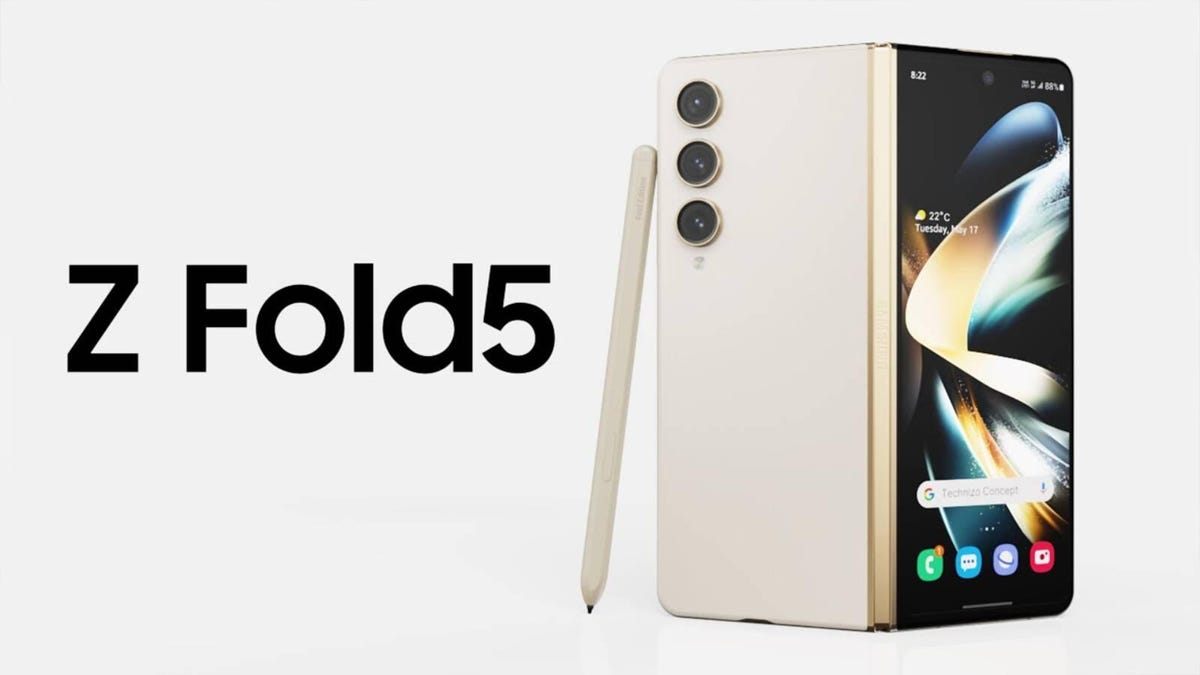
Samsung’s Z-series phones are at the top of the pack in an increasingly complex and saturated foldables market, especially with the recent release of the OnePlus Fold. Even so, the Z Fold 5easily tops the charts when it comes to value for money and features, and it’s even one of our favorite foldables. The best of the best comes at a price, but there are some deals you can take advantage of.
Select retailers are offering as much as $300 off unlocked models, and you can save even more if you’ve got an old phone to trade in or perhaps need a new line of service. And to help you take full advantage of these offers, below, we’ve rounded up some of the best Z Fold 5 deals out there right now. We’ll continue to update this page as offers come and go, so be sure to check back often for the best prices available.
What colors does the Galaxy Z Fold 5 come in?
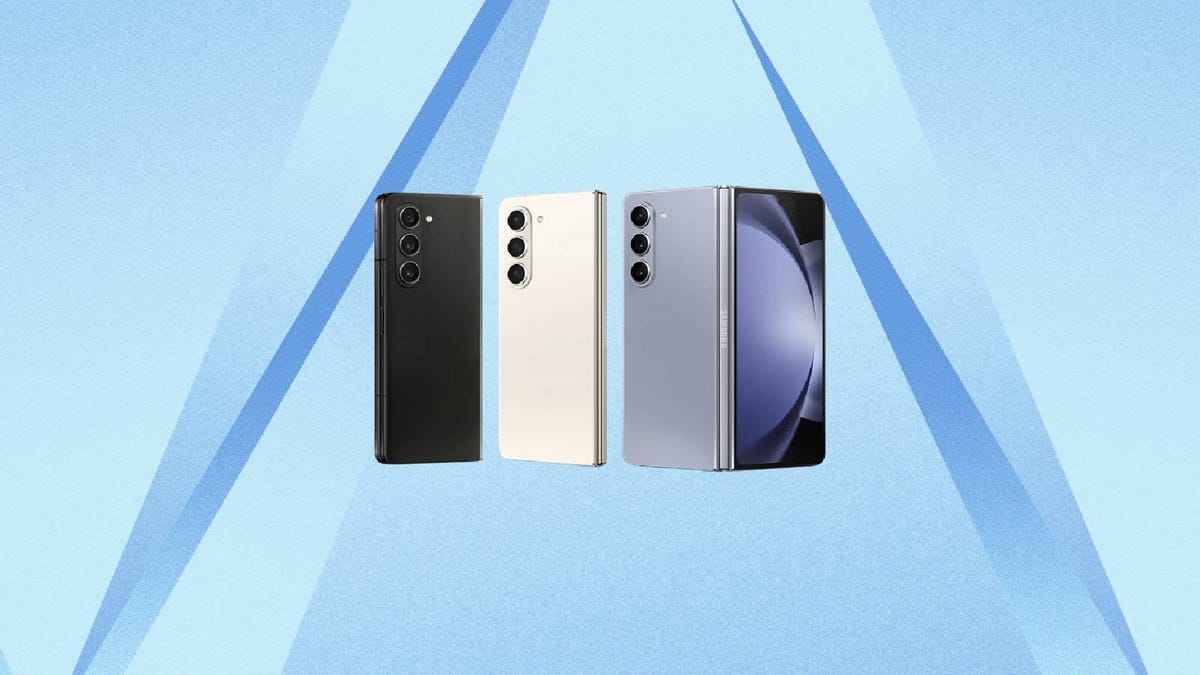
There are three main color variants for the new Galaxy Z Fold 5: phantom black, cream and icy blue. However, there are also two exclusive variants — gray and blue — that are only available if you order through Samsung directly.
How much does the Galaxy Z Fold 5 cost?
The new Galaxy Z Fold 5 retains the same list prices as the previous-gen Z Fold 4, and starts at $1,800 before any discounts or offers are applied.