The Cardinals’ struggles continue as the NFL season moves along. Despite an impressive early win against the Cowboys, Arizona has failed to find the win column again and sits at 1-5 on the season. On Sunday they head to Seattle to take on the Seahawks, who enter the Week 7 tilt at 3-2, coming off a close loss to the Bengals last Sunday.
The Cardinals and Seahawks kick off at 1:05 p.m. PT (4:05 p.m. ET) on Fox. Here’s how you can watch, even if the game isn’t available on your local Fox channel.
The game will be shown on TV in the Phoenix and Seattle areas (according to 506 Sports) on live TV streaming services, but there may be cases where you’re blocked because of an internet location glitch, or you just want an added layer of privacy for streaming. There’s an option that doesn’t require subscribing to something like NFL Sunday Ticket or NFL Plus, or searching the internet for a sketchy website: You can use a virtual private network, or VPN.
Here’s how you can watch the game from anywhere in the US with a VPN.
Read more: NFL 2023: How to Watch and Stream Games and RedZone With or Without Cable
Cardinals vs. Seahawks: When and where?
For Week 7 of the NFL season, the Seahawks host the Cardinals at 1:05 p.m. PT (4:05 p.m. ET)on Sunday. The game is set to take place at Lumen Field in Seattle, home of the Seahawks.
How to watch the Cardinals vs. Seahawks game online from anywhere using a VPN
If you find yourself unable to view the game locally due to incorrectly applied blackout restrictions, you may need a different way to watch the game and that’s where using a VPN can come in handy. A VPN is also the best way to stop your ISP from throttling your speeds on game day by encrypting your traffic, plus it’s a great idea for when you’re traveling and find yourself connected to a Wi-Fi network, and you want to add an extra layer of privacy for your devices and logins.
With a VPN, you’re able to virtually change your location on your phone, tablet or laptop to get access to the game. So if your internet provider or mobile carrier has stuck you with an IP address that incorrectly shows your location in a blackout zone, a VPN can correct that problem by giving you an IP address in your correct, nonblackout area. Most VPNs, like our Editors’ Choice, ExpressVPN, make it really easy to do this.
Using a VPN to watch or stream sports is legal in any country where VPNs are legal, including the US and Canada, as long as you’ve got a legitimate subscription to the service you’re streaming. You should be sure your VPN is set up correctly to prevent leaks: Even where VPNs are legal, the streaming service may terminate the account of anyone it deems to be circumventing correctly applied blackout restrictions.
Looking for other options? Be sure to check out some of the other great VPN deals taking place right now.
Livestream the Cardinals vs. Seahawks game in the US
This week’s Cardinals-Seahawks game is on Fox, so in addition to a VPN set to an area carrying the game (see tips below) you’ll need a live TV streaming service that carries a local Fox affiliate that’s broadcasting the game. The least expensive such service is Sling TV Blue.
Numerous other live TV streaming services carry local Fox stations as well, namely YouTube TV, Hulu Plus Live TV, DirecTV Stream and FuboTV. They all cost more than Sling TV, but they also carry more channels, including football-broadcasting channels like ESPN. Check out our live TV streaming services guide for details.
If you live in an area where the game is being broadcast, an over-the-air antenna connected to your TV provides another option for Fox. The best part about antennas is that there are no streaming or monthly fees required, though you will need to make sure you have good reception.
Quick tips for streaming Cardinals vs. Seahawks using a VPN
With four variables at play — your ISP, browser, video streaming provider and VPN — experience and success may vary.
Sling Blue is only an option if and when the ability to get Fox local affiliates is active on your account. You may want to verify that your billing address is eligible for that option before committing your credit card.
If you don’t see your desired location as a default option for ExpressVPN, try using the “search for city or country” option.
If you’re having trouble getting the game after you’ve turned on your VPN and set it to the correct viewing area, there are two things you can try for a quick fix. First, log into your streaming service subscription account and make sure the address registered for the account is an address in the correct viewing area. If not, you may need to change the physical address on file with your account. Second, some smart TVs — like Roku — don’t have VPN apps you can install directly on the device itself. Instead, you’ll have to install the VPN on your router or the mobile hotspot you’re using (like your phone) so that any device on its Wi-Fi network now appears in the correct viewing location.
All of the VPN providers we recommend have helpful instructions on their main site for quickly installing the VPN on your router. In some cases with smart TV services, after you install a cable network’s sports app, you’ll be asked to verify a numeric code or click a link sent to your email address on file for your smart TV. This is where having a VPN on your router will also help, since both devices will appear to be in the correct location.
And remember, browsers can often give away a location despite using a VPN, so be sure you’re using a privacy-first browser to log into your services. We normally recommend Brave.
NFC East rivals New York and Washington square off on Sunday. The Giants have dropped four straight and sit in last place in the division at 1-5.
The Commanders snapped a three-game losing streak last week to even their record at 3-3. The Giants desperately need a win at home to keep any hope alive of returning to the playoffs, while the Commanders need a win to stay within striking distance of the Eagles and Cowboys in the division.
The Commanders and Giants kick off in New Jersey at 1 p.m. ET (10 a.m. PT) on CBS. Here’s how you can watch, even if the game isn’t available on your local CBS channel.
The game will be shown on TV in the New York City and DC areas (according to 506 Sports) on live TV streaming services, but there may be cases where you’re blocked because of an internet location glitch or just want an added layer of privacy for streaming. There is an option that doesn’t require subscribing to something like NFL Sunday Ticket or NFL Plus, or searching the internet for a sketchy website: You can use a virtual private network, or VPN.
Here’s how you can watch the game from anywhere in the US with a VPN.
Read more: NFL 2023: How to Watch and Stream Games and RedZone With or Without Cable
Commanders vs. Giants game today: When and where?
This Week 7 NFL fixture sees the Giants host the Commanders at 1 p.m. ET (10 a.m. PT) on Sunday. The game will take place at MetLife Stadium in East Rutherford, New Jersey, home of the Giants.
How to watch the Commanders vs. Giants game online from anywhere using a VPN
If you find yourself unable to view the game locally due to incorrectly applied blackout restrictions, you may need a different way to watch — and that’s where using a VPN can come in handy. A VPN is also the best way to stop your ISP from throttling your speeds on game day by encrypting your traffic, plus it’s a great idea for when you’re traveling and find yourself connected to a Wi-Fi network, and you want to add an extra layer of privacy for your devices and logins.
With a VPN, you’re able to virtually change your location on your phone, tablet or laptop to get access to the game. So if your internet provider or mobile carrier has stuck you with an IP address that incorrectly shows your location in a blackout zone, a VPN can correct that problem by giving you an IP address in your correct, nonblackout area. Most VPNs, like our Editors’ Choice, ExpressVPN, make it really easy to do this.
Using a VPN to watch or stream sports is legal in any country where VPNs are legal, including the US and Canada, as long as you’ve got a legitimate subscription to the service you’re streaming. You should be sure your VPN is set up correctly to prevent leaks: Even where VPNs are legal, the streaming service may terminate the account of anyone it deems to be circumventing correctly applied blackout restrictions.
Looking for other options? Be sure to check out some of the other great VPN deals taking place right now.
How to watch Commanders vs. Giants in the US
This week’s Commanders-Giants game is on CBS, so in addition to a VPN you’ll need a live TV streaming service that carries a local CBS affiliate that’s broadcasting the game. The good news for football fans is that CBS is available on most of the major streaming services. The least expensive option is Paramount Plus.
Numerous other live TV streaming services carry local CBS stations as well, namely YouTube TV, Hulu Plus Live TV, DirecTV Stream and Fubo. They all cost far more than Paramount Plus, but they also carry many live channels, including football broadcasting channels like Fox and ESPN. Check out our live TV streaming services guide for details.
If you live in an area where the game is being broadcast, an over-the-air antenna connected to your TV provides another option for CBS. The best part about antennas is that there are no streaming or monthly fees required, though you will need to make sure you have good reception.
Quick tips for streaming Commanders vs. Giants game using a VPN
With four variables at play — your ISP, browser, video streaming provider and VPN — experience and success may vary.
If you don’t see your desired location as a default option for ExpressVPN, try using the “search for city or country” option.
If you’re having trouble getting the game after you’ve turned on your VPN and set it to the correct viewing area, there are two things you can try for a quick fix. First, log into your streaming service subscription account and make sure the address registered for the account is an address in the correct viewing area. If not, you may need to change the physical address on file with your account. Second, some smart TVs — like Roku — don’t have VPN apps you can install directly on the device itself. Instead, you’ll have to install the VPN on your router or the mobile hotspot you’re using (like your phone) so that any device on its Wi-Fi network now appears in the correct viewing location.
All of the VPN providers we recommend have helpful instructions on their main site for quickly installing the VPN on your router. In some cases with smart TV services, after you install a cable network’s sports app, you’ll be asked to verify a numeric code or click a link sent to your email address on file for your smart TV. This is where having a VPN on your router will also help, since both devices will appear to be in the correct location.
And remember, browsers can often give away a location despite using a VPN, so be sure you’re using a privacy-first browser to log into your services. We normally recommend Brave.
Winners of two straight, the 3-3 Raiders will look to make it three in a row in Chicago on Sunday against the 1-5 Bears, who’ll be without starting quarterback Justin Fields. Undrafted rookie Tyson Bagent will start in place of Fields. The Raiders may also be forced to start a backup quarterback. Jimmy Garoppolo left last week’s game with a back injury, and his status is unclear heading into Sunday. If Garoppolo can’t go, the Raiders will turn to veteran QB Brian Hoyer on Sunday.
The Raiders and Bears kick off in Chicago at 1 p.m. ET (10 a.m. PT) on Fox. Here’s how you can watch, even if the game isn’t available on your local Fox channel.
The game will be shown on TV in the Las Vegas and Chicago areas (according to 506 Sports) on live TV streaming services, but there may be cases where you’re blocked because of an internet location glitch or just want an added layer of privacy for streaming. There is an option that doesn’t require subscribing to something like NFL Sunday Ticket or NFL Plus, or searching the internet for a sketchy website: You can use a virtual private network, or VPN.
Here’s how you can watch the game from anywhere in the US with a VPN.
Read more: NFL 2023: How to Watch and Stream Games and RedZone With or Without Cable
Raiders vs. Bears: When and where?
Week 7 of the NFL season sees the Bears host the Raiders at 1 p.m. ET (10 a.m. PT)on Sunday. The game will take place at Soldier Field in Chicago, Illinois.
How to watch the Raiders vs. Bears game online from anywhere using a VPN
If you find yourself unable to view the game locally due to incorrectly applied blackout restrictions, you may need a different way to watch the game and that’s where using a VPN can come in handy. A VPN is also the best way to stop your ISP from throttling your speeds on game day by encrypting your traffic, plus it’s a great idea for when you’re traveling and find yourself connected to a Wi-Fi network, and you want to add an extra layer of privacy for your devices and logins.
With a VPN, you’re able to virtually change your location on your phone, tablet or laptop to get access to the game. So if your internet provider or mobile carrier has stuck you with an IP address that incorrectly shows your location in a blackout zone, a VPN can correct that problem by giving you an IP address in your correct, nonblackout area. Most VPNs, like our Editors’ Choice, ExpressVPN, make it really easy to do this.
Using a VPN to watch or stream sports is legal in any country where VPNs are legal, including the US and Canada, as long as you’ve got a legitimate subscription to the service you’re streaming. You should be sure your VPN is set up correctly to prevent leaks: Even where VPNs are legal, the streaming service may terminate the account of anyone it deems to be circumventing correctly applied blackout restrictions.
Looking for other options? Be sure to check out some of the other great VPN deals taking place right now.
Livestream the Raiders vs. Bears game in the US
This week’s Raiders-Bears game is on Fox, so in addition to a VPN set to an area carrying the game (see tips below) you’ll need a live TV streaming service that carries a local Fox affiliate that’s broadcasting the game. The least expensive such service is Sling TV Blue.
Numerous other live TV streaming services carry local Fox stations as well, namely YouTube TV, Hulu Plus Live TV, DirecTV Stream and Fubo. They all cost more than Sling TV, but they also carry more channels, including football-broadcasting channels like ESPN. Check out our live TV streaming services guide for details.
If you live in an area where the game is being broadcast, an over-the-air antenna connected to your TV provides another option for Fox. The best part about antennas is that there are no streaming or monthly fees required, though you will need to make sure you have good reception.
Quick tips for streaming Raiders vs. Bears using a VPN
With four variables at play — your ISP, browser, video streaming provider and VPN — experience and success may vary.
Sling Blue is only an option if and when the ability to get Fox local affiliates is active on your account. You may want to verify that your billing address is eligible for that option before committing your credit card.
If you don’t see your desired location as a default option for ExpressVPN, try using the “search for city or country” option.
If you’re having trouble getting the game after you’ve turned on your VPN and set it to the correct viewing area, there are two things you can try for a quick fix. First, log into your streaming service subscription account and make sure the address registered for the account is an address in the correct viewing area. If not, you may need to change the physical address on file with your account. Second, some smart TVs — like Roku — don’t have VPN apps you can install directly on the device itself. Instead, you’ll have to install the VPN on your router or the mobile hotspot you’re using (like your phone) so that any device on its Wi-Fi network now appears in the correct viewing location.
All of the VPN providers we recommend have helpful instructions on their main site for quickly installing the VPN on your router. In some cases with smart TV services, after you install a cable network’s sports app, you’ll be asked to verify a numeric code or click a link sent to your email address on file for your smart TV. This is where having a VPN on your router will also help, since both devices will appear to be in the correct location.
And remember, browsers can often give away a location despite using a VPN, so be sure you’re using a privacy-first browser to log into your services. We normally recommend Brave.
The current kings of the north will clash in Baltimore on Sunday. The 5-1 Lions sit atop the NFC North, and the 4-2 Ravens are in first place in the AFC North. The Lions feature a balanced offensive attack with quarterback Jared Goff, running back David Montgomery, wideout Amon-Ra St. Brown and rookie tight end Sam LaPorta. The Ravens are more of a one-man show with quarterback Lamar Jackson at the controls. The incomparable Jackson leads the team’s passing attack, of course, but he also leads the Ravens in rushing yards.
The Lions and Ravens kick off in Baltimore at 1 p.m. PT (4 p.m. ET) on Fox. We’ll show you how you can watch, even if the game isn’t available on your local Fox channel.
The game will be shown on TV in the Detroit and Baltimore areas (according to 506 Sports) on live TV streaming services, but there may be cases where you’re blocked because of an internet location glitch or just want an added layer of privacy for streaming. There is an option that doesn’t require subscribing to something like NFL Sunday Ticket or NFL Plus, or searching the internet for a sketchy website: You can use a virtual private network, or VPN.
Here’s how you can watch the game from anywhere in the US with a VPN.
Read more: NFL 2023: How to Watch and Stream Games and RedZone With or Without Cable
Lions vs. Ravens: When and where?
Week 7 of the NFL season sees the Ravens host the Lions at 1 p.m. ET (10 a.m. PT)on Sunday. The game will take place at M&T Bank Stadium in Baltimore, Maryland.
How to watch the Lions vs. Ravens game online from anywhere using a VPN
If you find yourself unable to view the game locally due to incorrectly applied blackout restrictions, you may need a different way to watch the game and that’s where using a VPN can come in handy. A VPN is also the best way to stop your ISP from throttling your speeds on game day by encrypting your traffic, plus it’s a great idea for when you’re traveling and find yourself connected to a Wi-Fi network, and you want to add an extra layer of privacy for your devices and logins.
With a VPN, you’re able to virtually change your location on your phone, tablet or laptop to get access to the game. So if your internet provider or mobile carrier has stuck you with an IP address that incorrectly shows your location in a blackout zone, a VPN can correct that problem by giving you an IP address in your correct, nonblackout area. Most VPNs, like our Editors’ Choice, ExpressVPN, make it really easy to do this.
Using a VPN to watch or stream sports is legal in any country where VPNs are legal, including the US and Canada, as long as you’ve got a legitimate subscription to the service you’re streaming. You should be sure your VPN is set up correctly to prevent leaks: Even where VPNs are legal, the streaming service may terminate the account of anyone it deems to be circumventing correctly applied blackout restrictions.
Looking for other options? Be sure to check out some of the other great VPN deals taking place right now.
Livestream the Lions vs. Ravens game in the US
This week’s Lions-Ravens game is on Fox, so in addition to a VPN set to an area carrying the game (see tips below) you’ll need a live TV streaming service that carries a local Fox affiliate that’s broadcasting the game. The least expensive such service is Sling TV Blue.
Numerous other live TV streaming services carry local Fox stations as well, namely YouTube TV, Hulu Plus Live TV, DirecTV Stream and Fubo. They all cost more than Sling TV, but they also carry more channels, including football-broadcasting channels like ESPN. Check out our live TV streaming services guide for details.
If you live in an area where the game is being broadcast, an over-the-air antenna connected to your TV provides another option for Fox. The best part about antennas is that there are no streaming or monthly fees required, though you will need to make sure you have good reception.
Quick tips for streaming Lions vs. Ravens using a VPN
With four variables at play — your ISP, browser, video streaming provider and VPN — experience and success may vary.
Sling Blue is only an option if and when the ability to get Fox local affiliates is active on your account. You may want to verify that your billing address is eligible for that option before committing your credit card.
If you don’t see your desired location as a default option for ExpressVPN, try using the “search for city or country” option.
If you’re having trouble getting the game after you’ve turned on your VPN and set it to the correct viewing area, there are two things you can try for a quick fix. First, log into your streaming service subscription account and make sure the address registered for the account is an address in the correct viewing area. If not, you may need to change the physical address on file with your account. Second, some smart TVs — like Roku — don’t have VPN apps you can install directly on the device itself. Instead, you’ll have to install the VPN on your router or the mobile hotspot you’re using (like your phone) so that any device on its Wi-Fi network now appears in the correct viewing location.
All of the VPN providers we recommend have helpful instructions on their main site for quickly installing the VPN on your router. In some cases with smart TV services, after you install a cable network’s sports app, you’ll be asked to verify a numeric code or click a link sent to your email address on file for your smart TV. This is where having a VPN on your router will also help, since both devices will appear to be in the correct location.
And remember, browsers can often give away a location despite using a VPN, so be sure you’re using a privacy-first browser to log into your services. We normally recommend Brave.
The 3-2 Buccaneers are a half-game ahead of the 3-3 Falcons and 3-3 Saints in the NFC South. The Bucs get the Falcons at home on Sunday for a chance to increase their lead, while the Falcons can leapfrog into first place in the division with a road win. The Falcons need to find a way to get rookie running back sensation Bjian Robinson space to run, while the key to the Buccaneers’ offense is giving quarterback Baker Mayfield time to find wideouts Mike Evans and Chris Godwin.
The Falcons and Buccaneers kick off in Tampa Bay at 1 p.m. ET (10 a.m. PT) on Fox. We’ll show you how you can watch, even if the game isn’t available on your local Fox channel.
The game will be shown on TV in the Tampa Bay and Atlanta areas (according to 506 Sports) on live TV streaming services, but there may be cases where you’re blocked because of an internet location glitch or just want an added layer of privacy for streaming. There is an option that doesn’t require subscribing to something like NFL Sunday Ticket or NFL Plus, or searching the internet for a sketchy website: You can use a virtual private network, or VPN.
Here’s how you can watch the game from anywhere in the US with a VPN.
Read more: NFL 2023: How to Watch and Stream Games and RedZone With or Without Cable
Falcons vs. Bucs: When and where?
Week 7 of the NFL season sees the Bucs host the Falcons at 1 p.m. ET (10 a.m. PT)on Sunday. The game will take place at Raymond James Stadium in Tampa, Florida.
How to watch the Falcons vs. Bucs game online from anywhere using a VPN
If you find yourself unable to view the game locally due to incorrectly applied blackout restrictions, you may need a different way to watch the game and that’s where using a VPN can come in handy. A VPN is also the best way to stop your ISP from throttling your speeds on game day by encrypting your traffic, plus it’s a great idea for when you’re traveling and find yourself connected to a Wi-Fi network, and you want to add an extra layer of privacy for your devices and logins.
With a VPN, you’re able to virtually change your location on your phone, tablet or laptop to get access to the game. So if your internet provider or mobile carrier has stuck you with an IP address that incorrectly shows your location in a blackout zone, a VPN can correct that problem by giving you an IP address in your correct, nonblackout area. Most VPNs, like our Editors’ Choice, ExpressVPN, make it really easy to do this.
Using a VPN to watch or stream sports is legal in any country where VPNs are legal, including the US and Canada, as long as you’ve got a legitimate subscription to the service you’re streaming. You should be sure your VPN is set up correctly to prevent leaks: Even where VPNs are legal, the streaming service may terminate the account of anyone it deems to be circumventing correctly applied blackout restrictions.
Looking for other options? Be sure to check out some of the other great VPN deals taking place right now.
Livestream the Falcons vs. Bucs game in the US
This week’s Falcons-Bucs game is on Fox, so in addition to a VPN set to an area carrying the game (see tips below) you’ll need a live TV streaming service that carries a local Fox affiliate that’s broadcasting the game. The least expensive such service is Sling TV Blue.
Numerous other live TV streaming services carry local Fox stations as well, namely YouTube TV, Hulu Plus Live TV, DirecTV Stream and Fubo. They all cost more than Sling TV, but they also carry more channels, including football-broadcasting channels like ESPN. Check out our live TV streaming services guide for details.
If you live in an area where the game is being broadcast, an over-the-air antenna connected to your TV provides another option for Fox. The best part about antennas is that there are no streaming or monthly fees required, though you will need to make sure you have good reception.
Quick tips for streaming Falcons vs. Bucs using a VPN
With four variables at play — your ISP, browser, video streaming provider and VPN — experience and success may vary.
Sling Blue is only an option if and when the ability to get Fox local affiliates is active on your account. You may want to verify that your billing address is eligible for that option before committing your credit card.
If you don’t see your desired location as a default option for ExpressVPN, try using the “search for city or country” option.
If you’re having trouble getting the game after you’ve turned on your VPN and set it to the correct viewing area, there are two things you can try for a quick fix. First, log into your streaming service subscription account and make sure the address registered for the account is an address in the correct viewing area. If not, you may need to change the physical address on file with your account. Second, some smart TVs — like Roku — don’t have VPN apps you can install directly on the device itself. Instead, you’ll have to install the VPN on your router or the mobile hotspot you’re using (like your phone) so that any device on its Wi-Fi network now appears in the correct viewing location.
All of the VPN providers we recommend have helpful instructions on their main site for quickly installing the VPN on your router. In some cases with smart TV services, after you install a cable network’s sports app, you’ll be asked to verify a numeric code or click a link sent to your email address on file for your smart TV. This is where having a VPN on your router will also help, since both devices will appear to be in the correct location.
And remember, browsers can often give away a location despite using a VPN, so be sure you’re using a privacy-first browser to log into your services. We normally recommend Brave.
The Green Bay Packers enter Week 7 at 2-3 and fresh off their bye week.
The Broncos, meanwhile, continue to trend downhill and sit at 1-5 after losing 19-8 to the Chiefs on Oct. 12. On Sunday, the two will meet in Denver.
Kickoff for Sunday’s contest is set for 1:25 p.m. PT (4:25 p.m. ET) on CBS. Here’s how you can watch, even if the game isn’t available on your local CBS channel.
The gridiron clash will be shown on TV in the Green Bay and Denver areas (according to 506 Sports) on live TV streaming services, but there may be cases where you’re blocked because of an internet location glitch, or you just want an added layer of privacy for streaming. There’s an option that doesn’t require subscribing to something like NFL Sunday Ticket or NFL Plus, or searching the internet for a sketchy website: You can use a virtual private network, or VPN.
Here’s how you can watch the game from anywhere in the US with a VPN.
Read more: NFL 2023: How to Watch and Stream Games and RedZone With or Without Cable
Packers vs. Broncos: When and where?
For Week 7 of the NFL season, the Broncos host the Packers at 1:25 p.m. PT (4:25 p.m. ET)on Sunday. The game is set to take place at Empower Field at Mile High, home of the Broncos.
How to watch the Packers vs. Broncos game online from anywhere using a VPN
If you find yourself unable to view the game locally due to incorrectly applied blackout restrictions, you may need a different way to watch the game and that’s where using a VPN can come in handy. A VPN is also the best way to stop your ISP from throttling your speeds on game day by encrypting your traffic, plus it’s a great idea for when you’re traveling and find yourself connected to a Wi-Fi network, and you want to add an extra layer of privacy for your devices and logins.
With a VPN, you’re able to virtually change your location on your phone, tablet or laptop to get access to the game. So if your internet provider or mobile carrier has stuck you with an IP address that incorrectly shows your location in a blackout zone, a VPN can correct that problem by giving you an IP address in your correct, nonblackout area. Most VPNs, like our Editors’ Choice, ExpressVPN, make it really easy to do this.
Using a VPN to watch or stream sports is legal in any country where VPNs are legal, including the US and Canada, as long as you’ve got a legitimate subscription to the service you’re streaming. You should be sure your VPN is set up correctly to prevent leaks: Even where VPNs are legal, the streaming service may terminate the account of anyone it deems to be circumventing correctly applied blackout restrictions.
Looking for other options? Be sure to check out some of the other great VPN deals taking place right now.
How to watch Packers vs. Broncos in the US
This week’s Packers-Broncos game is on CBS, so in addition to a VPN, you’ll need a live TV streaming service that carries a local CBS affiliate that’s broadcasting the game. The good news for football fans is that CBS is available on most of the major streaming services. The least expensive option is Paramount Plus.
Numerous other live TV streaming services carry local CBS stations as well, namely YouTube TV, Hulu Plus Live TV, DirecTV Stream and FuboTV. They all cost far more than Paramount Plus, but they also carry many live channels, including football broadcasting channels like Fox and ESPN. Check out our live TV streaming services guide for details.
If you live in an area where the game is being broadcast, an over-the-air antenna connected to your TV provides another option for CBS. The best part about antennas is that there are no streaming or monthly fees required, though you will need to make sure you have good reception.
Quick tips for streaming Packers vs. Broncos game using a VPN
With four variables at play — your ISP, browser, video streaming provider and VPN — experience and success may vary.
If you don’t see your desired location as a default option for ExpressVPN, try using the “search for city or country” option.
If you’re having trouble getting the game after you’ve turned on your VPN and set it to the correct viewing area, there are two things you can try for a quick fix. First, log into your streaming service subscription account and make sure the address registered for the account is an address in the correct viewing area. If not, you may need to change the physical address on file with your account. Second, some smart TVs — like Roku — don’t have VPN apps you can install directly on the device itself. Instead, you’ll have to install the VPN on your router or the mobile hotspot you’re using (like your phone) so that any device on its Wi-Fi network now appears in the correct viewing location.
All of the VPN providers we recommend have helpful instructions on their main site for quickly installing the VPN on your router. In some cases with smart TV services, after you install a cable network’s sports app, you’ll be asked to verify a numeric code or click a link sent to your email address on file for your smart TV. This is where having a VPN on your router will also help, since both devices will appear to be in the correct location.
And remember, browsers can often give away a location despite using a VPN, so be sure you’re using a privacy-first browser to log into your services. We normally recommend Brave.
iOS 17 is available to download and the iPhone 15 series has been on shelves for a few weeks, so Apple fans have been getting their hands on all the new software these upgrades brought. While there are some features that are super helpful or fun to use, there are others that are, well… not.
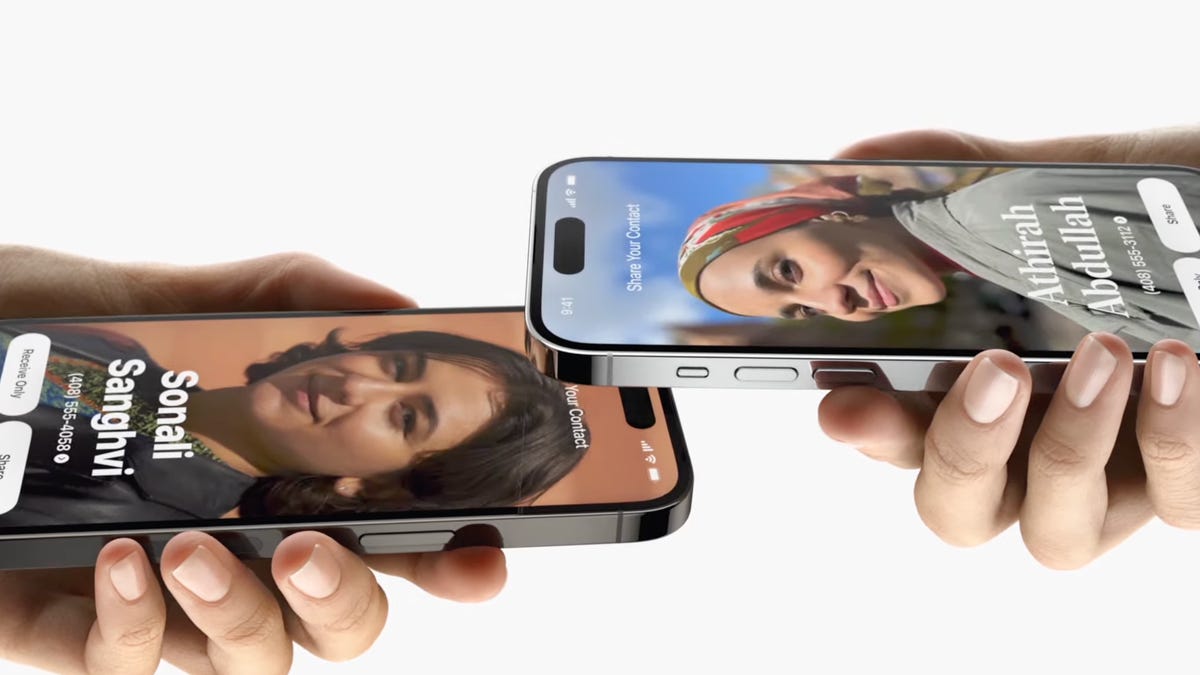
A feature that has Apple fans split is NameDrop. While some fans enjoy the ease of being able to simply raise their phone to share their contact info, others are wary of the ease at which contact information can be shared — or worse, stolen.
Users on X (formerly Twitter) have brought up concerns about how the feature could jeopardize users’ safety. For instance, several women have raised concerns about being able to dodge creeps in public spaces. For instance, @ChanSteele tweeted, “How do you NameDrop a fake number? Asking for all women.”
These concerns about safety are absolutely valid, and if you find yourself concerned and wanting to disable NameDrop, read on to find out your options for NameDrop management.
For more, here’s how to fix the most annoying iOS 17 features and everything you should do before updating to iOS 17.
So is NameDrop dangerous?
The good news is, NameDrop isn’t necessarily dangerous. According to Apple, you’re able to select which pieces of information are shared when you NameDrop your contact to another person.
You also only have two options when two iPhones are placed together and the option for NameDrop is presented. You can either Receive Only, which means that you will only receive the other person’s contact information, or you can Share. When you select Share you will send your contact information and receive the other person’s contact information.
So if you somehow accidentally NameDrop with someone you don’t want to, you’ve got options. You can be ultraselective about what information you choose to share, or opt to receive only.
However, if you still don’t feel comfortable with NameDrop, you can disable the feature. It’s important to note that NameDrop is automatically enabled when you download iOS 17 or purchase an iPhone 15, so you will have to turn it off if you don’t want it active on your phone.
How do I disable NameDrop?
If you want NameDrop disabled for good, then you’re in luck. It’s pretty simple to turn it off.
All you need to do to disable NameDrop is:
1. Open the Settings app.
2. Tap on General.
3. Navigate to the AirDrop tab.
4. Once you open the tab, simply toggle the Bring Devices Together option off. It’s as easy as that. And if you have a change of heart and decide you feel comfortable with NameDrop and want to enable it, all you need to do is toggle the Bring Devices Together option back on.
For more, here’s our review of the iPhone 15 and 15 Plus and the iPhone 15 Pro and Pro Max.
The Chargers dropped another close game on Monday night, falling to the Cowboys on Monday Night Football 20-17 to drop to 2-3 on the season.
In Week 7 they head to Kansas City to try and get back on track against Patrick Mahomes, Travis Kelce, Taylor Swift and the 5-1 Chiefs. KC enters the contest off a long break as they took down the Broncos on Thursday Night Football on Oct. 12.
Kickoff for Sunday’s contest is set for 1:25 p.m. PT (4:25 p.m. ET) on CBS. Here’s how you can watch, even if the game isn’t available on your local CBS channel.
The game will be shown on TV in the Kansas City and Los Angeles areas (according to 506 Sports) on live TV streaming services, but there may be cases where you’re blocked because of an internet location glitch or just want an added layer of privacy for streaming. There is an option that doesn’t require subscribing to something like NFL Sunday Ticket or NFL Plus, or searching the internet for a sketchy website: You can use a virtual private network, or VPN.
Here’s how you can watch the game from anywhere in the US with a VPN.
Read more: NFL 2023: How to Watch and Stream Games and RedZone With or Without Cable
Chargers vs. Chiefs: When and where?
For Week 7 of the NFL season, the Chiefs host the Chargers at 4:25 p.m. ET (1:25 a.m. PT)on Sunday. The game is set to take place at Arrowhead Stadium in Kansas City, home of the Chiefs.
How to watch the Chargers vs. Chiefs game online from anywhere using a VPN
If you find yourself unable to view the game locally due to incorrectly applied blackout restrictions, you may need a different way to watch the game and that’s where using a VPN can come in handy. A VPN is also the best way to stop your ISP from throttling your speeds on game day by encrypting your traffic, plus it’s a great idea for when you’re traveling and find yourself connected to a Wi-Fi network, and you want to add an extra layer of privacy for your devices and logins.
With a VPN, you’re able to virtually change your location on your phone, tablet or laptop to get access to the game. So if your internet provider or mobile carrier has stuck you with an IP address that incorrectly shows your location in a blackout zone, a VPN can correct that problem by giving you an IP address in your correct, nonblackout area. Most VPNs, like our Editors’ Choice, ExpressVPN, make it really easy to do this.
Using a VPN to watch or stream sports is legal in any country where VPNs are legal, including the US and Canada, as long as you’ve got a legitimate subscription to the service you’re streaming. You should be sure your VPN is set up correctly to prevent leaks: Even where VPNs are legal, the streaming service may terminate the account of anyone it deems to be circumventing correctly applied blackout restrictions.
Looking for other options? Be sure to check out some of the other great VPN deals taking place right now.
How to watch Chargers vs. Chiefs in the US
This week’s Chargers-Chiefs game is on CBS, so in addition to a VPN you’ll need a live TV streaming service that carries a local CBS affiliate that’s broadcasting the game. The good news for football fans is that CBS is available on most of the major streaming services. The least expensive option is Paramount Plus.
Numerous other live TV streaming services carry local CBS stations as well, namely YouTube TV, Hulu Plus Live TV, DirecTV Stream and FuboTV. They all cost far more than Paramount Plus, but they also carry many live channels, including football broadcasting channels like Fox and ESPN. Check out our live TV streaming services guide for details.
If you live in an area where the game is being broadcast, an over-the-air antenna connected to your TV provides another option for CBS. The best part about antennas is that there are no streaming or monthly fees required, though you will need to make sure you have good reception.
Quick tips for streaming Chargers vs. Chiefs game using a VPN
With four variables at play — your ISP, browser, video streaming provider and VPN — experience and success may vary.
If you don’t see your desired location as a default option for ExpressVPN, try using the “search for city or country” option.
If you’re having trouble getting the game after you’ve turned on your VPN and set it to the correct viewing area, there are two things you can try for a quick fix. First, log into your streaming service subscription account and make sure the address registered for the account is an address in the correct viewing area. If not, you may need to change the physical address on file with your account. Second, some smart TVs — like Roku — don’t have VPN apps you can install directly on the device itself. Instead, you’ll have to install the VPN on your router or the mobile hotspot you’re using (like your phone) so that any device on its Wi-Fi network now appears in the correct viewing location.
All of the VPN providers we recommend have helpful instructions on their main site for quickly installing the VPN on your router. In some cases with smart TV services, after you install a cable network’s sports app, you’ll be asked to verify a numeric code or click a link sent to your email address on file for your smart TV. This is where having a VPN on your router will also help, since both devices will appear to be in the correct location.
And remember, browsers can often give away a location despite using a VPN, so be sure you’re using a privacy-first browser to log into your services. We normally recommend Brave.
When you think of streaming movies and TV series, Netflix may be the first thing that springs to mind. Despite another price hike, stiff competition from rivals such as Max and Disney Plus, it remains the best option for streaming entertainment, period, because of its vast selection and user-friendly layout. It also has the largest 4K library around for video-on-demand platforms.
Netflix includes a wide variety of familiar network shows and more original series, films, documentaries and specials than any of its myriad competitors. Even with the password crackdown, the recent removal of a subscription plan and the addition of an ad-based tier, the world’s first major streaming service remains our favorite choice thanks to its huge library of constantly refreshed content and its easy accessibility across different devices.
This year, the streamer earned 103 Emmy nominations, and in 2022, Netflix won 26 Emmys, with Squid Game making history as the first ever non-English series to win (or be nominated). If you’re looking for something new to watch, Netflix should be your go-to pick.
Depending on the plan you choose, Netflix costs between $7 and $23 per month, which is at the higher end for a streaming service, as you can see in the chart below. However, the pricier package lets you watch up to four screens at once and create different user profiles. Thanks to its sheer variety and number of new things to watch, Netflix also gives you the most bang for your buck.
Due to its features, user-friendliness, and robust, variety-filled catalog, Netflix won an Editors’ Choice Award for 2023, a distinction previously earned in 2021 and 2022.
Between 2012 and 2013, Netflix premiered its first original TV shows, including Lilyhammer, House of Cards and Orange Is the New Black. Today, it has a catalog of more than 1,500 original TV shows and movies, including global hits like Stranger Things, Emmy winners such as Bridgerton and The Crown, as well as Oscar-nominated movies such as All Quiet on the Western Front and Guillermo del Toro’s Pinocchio.
The company launched its ad-supported tier launched in November 2022 for $7 per month. It’s since become the streamer’s most popular plan, even with the company’s password-sharing crackdown in effect where you pay more if you want people outside your household on your account. The days of crowdfunding your Netflix subscription have ended.
Netflix with ads: Here’s what it’s like
Like Max’s ad-supported subscription, the Netflix with ads $7 plan promises roughly 4 to 5 minutes of commercials per hour of content. The streamer also said it would implement frequency caps to prevent viewers from seeing the same ads over and over while watching an episode or movie. However, we found that not every title — new or old — features ads and the length of each ad break varies.
For example, Community episodes do not have any ads, not even a pre-roll before an episode of the show begins. The Bodyguard had a 30-second pre-roll, but no ads played during the entire movie. Jane the Virgin, on the other hand, had three ad breaks and a 30-second pre-roll in a 40-minute episode. Each ad break lasted 60 seconds and contained two to three commercials.
Mr. and Mrs. Smith had longer commercial breaks during its two-hour runtime. After a 30-second pre-roll, there were four ad breaks, with the first three lasting 75 seconds each with three to four commercials. The last break ran for 1 minute total and contained two ads. 30-minute episodes of Attack on Titan and Cobra Kai only had two ad breaks.
When I watched the Netflix original Love is Blind, there was a 30-second pre-roll and four commercial breaks that lasted for 60 seconds each. There were two to three ads per break. Another Netflix original, Enola Holmes 2, only had a 30-second pre-roll of ads and no commercials during the film. This seems to reflect Netflix’s commitment to omit ads from new movies.
The streamer also seems to keep its word about ad variety, and barely saw the same commercial twice while watching one title. Commercials for T-Mobile, Nyx, Cadillac, Progressive Insurance, Carnival’s Funderstruck, Vaseline, Prada and Duracell were among those that aired. There was an M&Ms holiday-themed ad that syncs up with the current holiday season. I did not notice any commercials on kid-friendly content I tested in the adult profile for shows like Avatar: The Last Airbender, Cocomelon, Raising Dion or Lego Ninjago: Masters of Spinjitsu.
The ads do not operate as pop-up surprises. Yellow dots on the progress bar indicate when and how many ad breaks will appear in a TV show or movie. If you don’t see the dots, there aren’t any commercials in that particular piece of content. But there is a countdown clock that tells you how long each break will last.
What’s missing from Netflix’s ad-based plan?
Though you can watch in HD, you can’t download any content for offline viewing. This is comparable to other platforms like Max and Hulu which require you to have an ad-free subscription to download.
Prior to launch, Netflix said that some titles would not be available on the ad-supported version due to licensing restrictions. This content is marked with a lock icon, similar to Peacock Free’s setup where the symbol indicates which titles are behind a paywall. In Netflix’s case, this means you have to upgrade to an ad-free account. A quick note on the thumbnail lets you know the title is unavailable due to licensing. But if you click on it, Netflix will prompt you to choose an ad-free plan to watch it.
In addition to popular shows like House of Cards and Peaky Blinders, a number of animated titles and movies are unavailable to stream unless you upgrade to a higher-priced subscription. They include A Man Called Otto, Bullet Train, Boss Baby: Back in the Crib and The Age of Adaline. Netflix’s Kids’ Profile does not play ads at all, but some children may be disappointed to learn all the Boss Baby titles aren’t available to watch. It’s probably worth spending the extra money on the ad-free plan just to access Netflix’s whole catalog.
What shows and movies does Netflix have?
Netflix may have had the first-to-market advantage in the world of streaming services, but it’s kept its momentum with its increasing number of original shows and movies — many of which have won critical acclaim and major awards and nominations.
Compared to other streaming platforms, you can’t beat Netflix’s slate of original TV shows that are now considered among the best of the modern era of television, including those mentioned above plus many more, such as Beef, The Witcher, Ozark, Wednesday, Money Heist and Cobra Kai.
Read more: The 53 Absolute Best TV Shows to Watch on Netflix
Outside of TV shows, Netflix’s original programs include a wide range of comedies, dramas, foreign films and shows, documentary series, anime, stand-up comedy specials and reality dating and competition shows. Not all of them are runaway hits, but many of them are, and there’s enough to explore interesting shows that may not have found a home on traditional network TV.
At a time when going to the movies is more fraught than it once was, Netflix offers a place to find new films: In 2022 alone, Netflix released over 100 new movies, at least one per week. The selection spans across genres and geography, and it includes K-dramas, animated features and fantasy book adaptations.
Netflix typically adds shows a full season at a time, though not while a show is airing on network TV — so if you don’t have cable or another platform like Hulu, you’ll have to wait to watch for a few months to watch seasons in full. In some cases, — like The Witcher — there are split seasons where the first five episodes will stream one month and the last half of the season will premiere in the following month or so.
One complaint: Netflix content sometimes can come and go without warning. The only way to tell if something is leaving the service in the next 30 days is if you happen to tap on the details page for the given show or movie — or search online for everything coming and going in a given month.
Another potential content issue to flag: In recent years Netflix has lost some of its most popular content (such as The Office, which moved to NBC’s Peacock, Daredevil, which moved to Disney Plus and Friends, which moved to Max) as other networks created their own streaming services. However, new licensing agreements may revive interest — Suits and Ballers are the most recent examples — and help the platform’s catalog to flourish. With NBC/Universal and Warner Bros. Discovery willing to ink deals with Netflix, the streamer can grow programming and audience.
What’s it like to use Netflix?
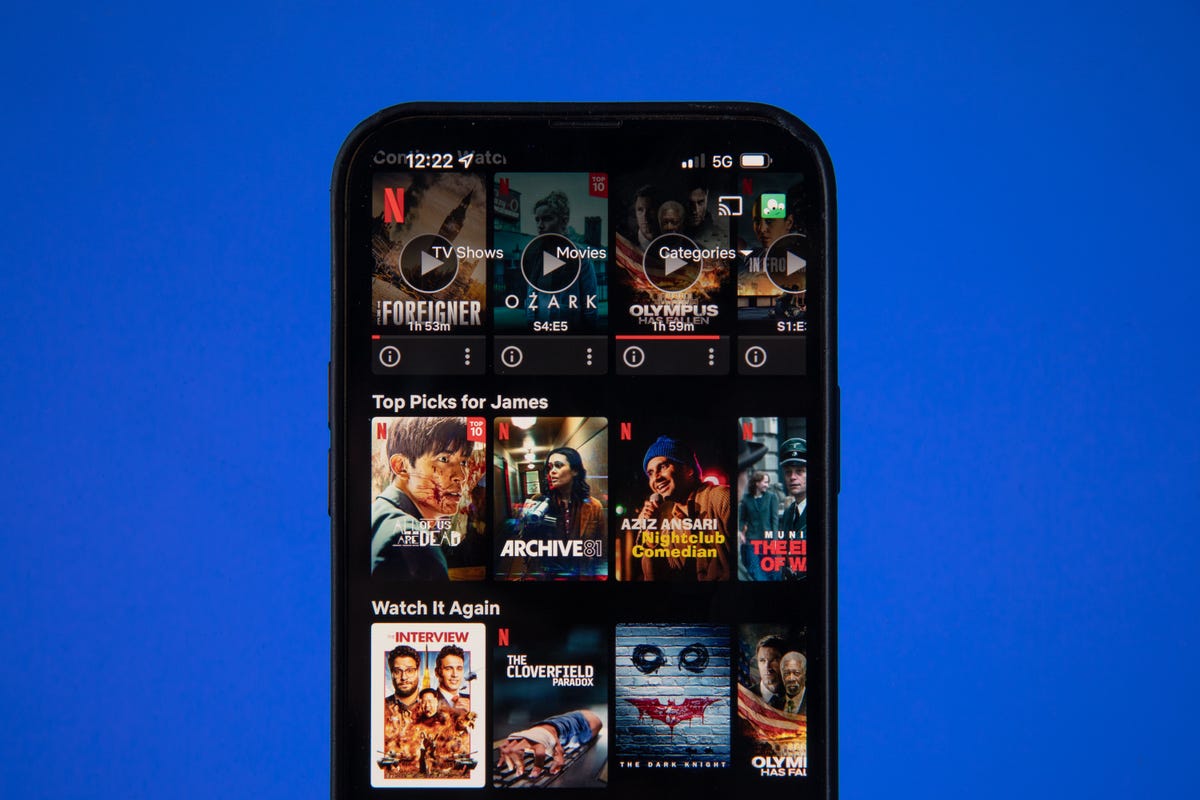
I first subscribed to Netflix back in the early streaming days of 2007, so using the platform feels like second nature at this point. Even if you’re new to it, it’s pretty user-friendly: Open the app and tap on your profile (if you have one set up), and you’ll see a homepage. You’ll see Popular on Netflix, Continue Watching, Trending Now, Top Picks for you and a number of (sometimes oddly specific) other categories based on shows you’ve watched before. Mine include Dystopian Futures and Relentless Crime Thrillers, for example.
Netflix’s design encourages scrolling — there are so many different categories to look through, and then shows and movies within those categories to continue scrolling into. You can create a watch list to help you cut down on this, but the vast, colorful library makes it easy to spend more time looking through options than actually watching a show, so be careful.
The Netflix app operates similarly across various devices. My home page on the web browser is nearly identical to that on my Apple TV, Roku and Amazon Fire TV Stick, both in content and layout. It’s more condensed on the smaller iPhone and Android phone screens, but still follows the same format, and has a clear “Downloads” tab to find content to save to watch offline on your device.
One difference between devices is voice commands: You might find it more or less difficult to fire up a Netflix show from your device’s home screen depending on which voice-capable device you’re using.
For example, when you say, “Watch Stranger Things” on the Apple TV and the iOS app on iPhone, it will first have you click which specific show (Stranger Things or Beyond Stranger Things), and then will take you to an Apple TV page for the show, and there it will give you the option to open Netflix and start episode 1. On Amazon Fire TV Stick, you can say, “Watch Stranger Things,” and it will open Netflix automatically if you’re logged into the app. On the Roku 4K stick, if you say, “Watch Stranger Things,” it will take you right to the first episode in the app. Those are more hardware-side concerns, but interesting to note.
Once you’re in the Netflix app, though, voice commands work the same across devices: Go to the Search tab, hold the microphone button to dictate, and say the name of the show you’re looking for.
When you select a show or movie to watch, you have the option to fast-forward, rewind, add subtitles and change your audio settings. If you have a Premium account and a big enough 4K TV, watching in Ultra HD makes for a very cinematic experience. The show or movie you choose will also show up in your “Continue watching” section at the top of your homepage for easier access.
How much does Netflix cost?
Netflix offers three pricing plans: Standard with ads, Standard and Premium. The basic, ad-free option is no longer available for new subscribers, but existing customers must now pay $12 a month. If you choose to share your account with some outside your main household, the monthly fee is $8 per extra member. Only customers with ad-free Standard or Premium subscriptions have the option to pay for extra members. Here is how the costs and features break down:
Netflix plans in the US
Standard with ads
Standard
Premium
Monthly price
$7
$15.50
$23
Number of screens you can watch at the same time
2
2
4
Number of phones or tablets you can have downloads on
0
2
6
HD available
Yes
Yes
Yes
Ultra HD available
No
No
Yes
All plans include the ability to watch on any device. The basic ad-supported plan will not include roughly 5 to 10% of Netflix’s catalog, but all other subscribers have its full, unlimited collection of movies and TV shows. All plans allow cancellation at any time.
Netflix’s ad-free plan costs more than Prime Video ($9 a month) and less than Hulu’s ad-free plan plan, (which is now $18). Its new ad-supported version is less than Hulu’s and now comes with two streams — previously it was one screen. If you’re on a shared Netflix account with people in one household, chances are it’s a Premium one ($23 a month) — if you’re actually splitting it between four people, that’s about $6 a month each, and a still a value for all of the original content available, including some in 4K Ultra HD.
What features do you get on Netflix?
Outside of general streaming, if you have the Standard or Premium plan, you can create different profiles for different users, and find your own list of personalized recommendations.
Netflix’s recommendation game is strong, from “Because You Watched” carousels that have been improved by the “two thumbs-up” feature, to the option to remove content from your home page, to its “Play Something” shuffle feature for when you’re unsure what to stream. Both the mobile version and TV app have rolled out new features in 2023 to make it easier to find content.
The platform also has a particularly appealing kids section, with a solid catalog of content, including CoComelon, Pokemon: Master Journeys, and Trolls: The Beat Goes On! and a much more kid-friendly user interface — including the mystery box feature.
If you subscribe to the Premium plan, you can watch certain shows and movies in 4K Ultra HD on 4K TVs. You’ll need a steady internet connection speed of at least 25 megabits per second, and streaming quality set to auto or high.
Netflix has more 4K content than just about any other streaming service, and a lot of its 4K shows and movies are also available in HDR. High dynamic range provides an even bigger improvement in image quality than 4K according to CNET’s tests, with better contrast and color, and the difference is especially apparent on large, higher-end televisions. Netflix supports the two major HDR formats, generic HDR (aka HDR-10) as well as Dolby Vision. If you have a device that handles Dolby Vision, Netflix will play content (if available) in that format by default.
Data usage varies by format, ranging from about 1GB per hour for the standard-definition video to up to 7GB per hour for the highest-quality 4K streams. Downloading and streaming take up a similar amount of data, according to Netflix. If you want to avoid having Netflix eat up all of your data, you can take certain steps laid out on Netflix’s website to adjust your data usage settings.
All ad-free subscribers can download TV shows and movies on the Netflix app on mobile devices for offline viewing, though certain titles aren’t available to download.
Read more:16 Underrated Netflix Tips That Create a Better Experience
Should you get it?
Netflix remains my favorite streaming platform of the increasingly large bunch. It has a huge selection of movies and TV shows old and new, tons of high-quality original programs, and an easy-to-navigate interface.
Even though it no longer offers a free trial, it’s worth trying Netflix for a month if you want something new to watch.
Investing in a virtual private network, or VPN, is a good idea for almost everyone. VPNs help encrypt your connection to the internet, protecting your data while you’re online so you can surf the web with confidence. They also open up a wider variety of globalized streaming entertainment options.
Black Friday may be almost a month away, but that hasn’t stopped some companies from launching early deals that you can cash in on right now. In fact, one of our favorite VPN services, Surfshark, is offering a stellar discount, slashing prices by up to 86% and throwing in up to five months for free.
Surfshark is easy to use and offers plenty of security features that make it a solid option for folks looking to protect themselves online. Surfshark also allows you to use your subscription on an unlimited number of devices, which is convenient for large families, and the cost is competitive as well, which is why it earned a CNET’s Editors’ Choice Award for Best Value VPN in 2022.
There are three major offerings happening now. For the lowest month-over-month cost, you can sign up for the Surfshark Starter plan. It knocks 86% off the price and offers three free months on a two-year subscription, providing you a total of 27 months of Surfshark VPN for only $2.21 a month, billed at $59.76 up front.
If you’re looking for more comprehensive protection, you may want to opt for the Surfshark One plan. It’s 85% off right now and comes with four extra months of service, bringing you a total of 28 months at just $2.73 a month, billed at $76.56 up front. It also comes with antivirus protection, alerts you of data breaches and gives you access to a private search engine.
And if you want to nab the longest subscription with the most features, Surfshark One Plus may be the right plan for you. It gives you a whopping five months of free service on a two-year plan, meaning you’ll get a total of 29 months of Surfshark VPN for only $4.11 a month, billed at $119.28 up front. That’s an 80% discount. You’ll get all the features listed above, plus access to Surfshark’s sister Incogni service, which will help remove your data from both company databases and people-search sites. That should make you less vulnerable to someone acquiring your information, at least for a while.
Whichever plan you choose, you’ll benefit from a secure internet connection and nab a great price for more than two years of service. However, if you want to see what other options we recommend, check out our roundup of VPN deals happening now.