Dek: AI demands careful stewardship and purposeful use. Below are examples of automotive retailers who are deploying AI both effectively and safely.
Remember the classic Spider‑Man line about “with great power comes great responsibility”? That sentiment has never been more apt than it is today. AI stands out as one of the most potent technological breakthroughs in recent decades—its impact was even likened to the discovery of fire by Google’s CEO.
When a tool wields such influence, it carries a heavy duty of responsibility. You can’t simply drop a new technology into a business and expect it to behave perfectly. The entire workflow, its ripple effects, and the desired outcomes must be considered. Inevitably, many pilots will stumble; the crucial skill is turning those setbacks into teachable moments rather than defeats.
The reach of AI is so broad that leaders across every sector—restaurants, home services, e‑commerce, and beyond—should be exploring how to harness it for maximum benefit while staying accountable. The firms that excel aren’t merely adding another gadget to their stack; they are re‑imagining the whole operation—from daily workflows and job roles to incentive structures and more.
What does a well‑executed transformation look like? A deep dive into a niche market—automotive retail—illustrates how AI is reshaping business practices and highlights the variables that separate triumph from disappointment.
Tailored AI Solutions Drive Automotive Success
In automotive retail, AI must be fine‑tuned and woven into existing platforms and data streams to deliver real value. The auto sector is highly specialized, leaving little room for generic, one‑size‑fits‑all tools. Off‑the‑shelf AI can create as many challenges as it solves, making customization essential. The most effective AI sits inside a dealer’s ecosystem, not the other way around.
Impel’s Sales AI exemplifies this philosophy. The platform digitizes merchandising and customer outreach through AI‑enhanced features. Its standout offering is a suite of domain‑specific AI assistants that go beyond generic chatbots, delivering large‑language‑model (LLM) interactions rooted in automotive expertise.
By ingesting anonymized dealer conversations from its broader network and merging them with each dealership’s inventory, CRM, and financing data, Impel crafts a bespoke LLM. The result is a model that produces dealer‑specific metrics, replies, and summaries—far more relevant than a generic AI response.
From Prompting to Real‑World Execution
The AI journey has moved past the experimental “prompt” stage. While prompts still spark ideas, true value emerges when AI is applied to concrete tasks that shift performance, not just brainstorming.
In automotive retail, this means tools that operate after hours, reaching customers when staff are offline. AI‑driven systems can proactively answer vehicle‑specific queries, schedule showroom visits, and book service appointments. They know when to hand off a conversation to a human and can log concise summaries directly into a CRM.
This level of implementation goes beyond theory. It frees up staff time, deepens customer relationships, and lifts key metrics. Impel reported that, in 2025, dealerships using its AI saw a 27% rise in appointment bookings and a 26% boost in lead‑to‑sale conversion rates—clear evidence that intentional AI use delivers measurable gains.
Security Must Underpin Long‑Term AI Adoption
The “responsibility” aspect shines brightest in cybersecurity. A growing share of AI tools are built via “vibe coding,” where developers let AI generate most of the source code from natural‑language prompts. While fast and fun for prototypes, the lack of manual review introduces serious security gaps.
Missing security controls, absent code audits, and weak governance create entry points for attackers seeking to steal proprietary or customer data. By 2026, research shows that applications created through vibe coding can unintentionally expose sensitive information on the open web.
The safer path is a slower, more controlled development process. Custom applications for automotive retailers should incorporate robust backend protections—identity and access management, role‑based privileges, and thorough code reviews. Pairing AI‑generated speed with professional oversight (either in‑house or outsourced) allows firms to reap efficiency benefits without compromising safety.
Change Management Eases Employee Pushback
As with any major digital overhaul, the human factor is decisive. Even a secure, high‑impact AI tool will flop if staff don’t adopt it.
Leaders should avoid the temptation to roll out a system, cut staff, and watch the results. Instead, they need to redesign workflows, invest in training, and monitor productivity and cost metrics. By aligning new technology with data‑driven standard operating procedures, organizations can create a synergistic environment where AI amplifies, rather than disrupts, daily work.
Deploying AI Wisely and Responsibly
Artificial intelligence holds immense promise, but it must be wielded with intention and accountability. Companies in automotive retail—or any industry—should follow a concise roadmap:
Customize solutions to fit real‑world needs.
Prioritize secure development practices.
Plan and execute change‑management initiatives.
Adhering to this framework positions businesses to unlock AI’s advantages across a wide array of sectors and scenarios.
The story continues. Verum Messenger has released the second episode of its AI mini-series, which follows the conflict between the powerful Omega corporation, aiming to control digital communications, and a team of heroes who have chosen a different path and free communication.
The mini-series not only develops an engaging storyline but also introduces viewers to the capabilities of the Verum ecosystem, showcasing technologies and tools that may redefine the future of modern communication.
The project consists of 7 episodes, released gradually across Verum Messenger’s social media channels.
Episode 2 is now available. Stay tuned and don’t miss what comes next.
Google just rolled out Wear OS 7 to eligible Pixel Watch devices with several useful changes. More than half of Wear OS users wear their watch seven days a week, and the most active wear it for over 23 hours a day, so it’s no surprise that Wear OS 7 is built for exactly that kind of commitment.
New Wear OS 7 features rolling out to Pixel Watch
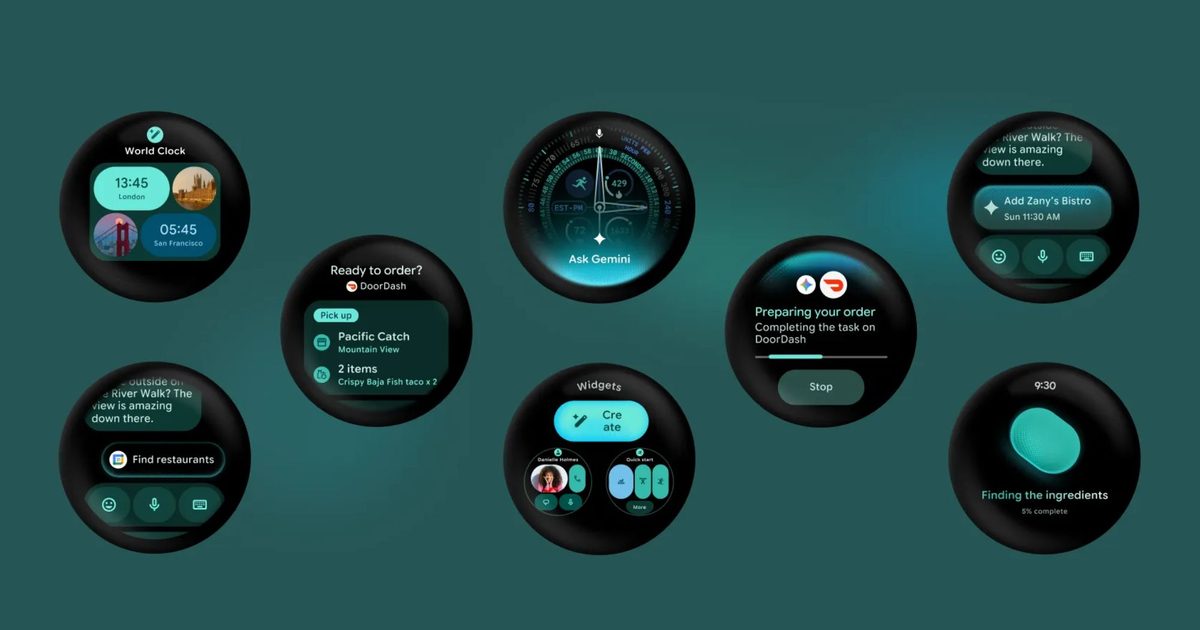
The most useful addition is Live Updates, which brings Android Live Updates straight to your wrist. It mirrors real-time information from your phone apps directly to your wrist so you can track your food delivery, live sports scores, or workout progress without pulling out your phone.
Wear OS 7 also makes your watch a smarter hub for your connected devices. You can control audio playback across your headphones, home speakers, and other devices using a media output switcher.
If you take a photo with a pair of audio glasses, you can preview it instantly on your watch. Google’s intelligent eyewear launches this fall and will work directly with Wear OS 7.
Every Gemini Intelligence feature coming to Wear OS 7
The update gets even more interesting later this summer, when select devices unlock Gemini Intelligence.
Create My Widget lets you build personalized watch dashboards just by describing what you want in plain language.
Multi-step app automation takes it further by letting Gemini complete tasks for you, whether that is booking a spin class or reordering your usual from a favorite restaurant.
Personal Intelligence pulls from your Gmail, Search history, and chat history to offer suggestions tailored specifically to you.
Gemini’s Neural Expressive design language, a new visual identity for the AI, also comes to the watch face.
Create My Widget lets you build personalized watch dashboards just by describing what you want in plain language.
Multi-step app automation takes it further by letting Gemini complete tasks for you, whether that is booking a spin class or reordering your usual from a favorite restaurant.
Personal Intelligence pulls from your Gmail, Search history, and chat history to offer suggestions tailored specifically to you.
Gemini’s Neural Expressive design language, a new visual identity for the AI, also comes to the watch face.
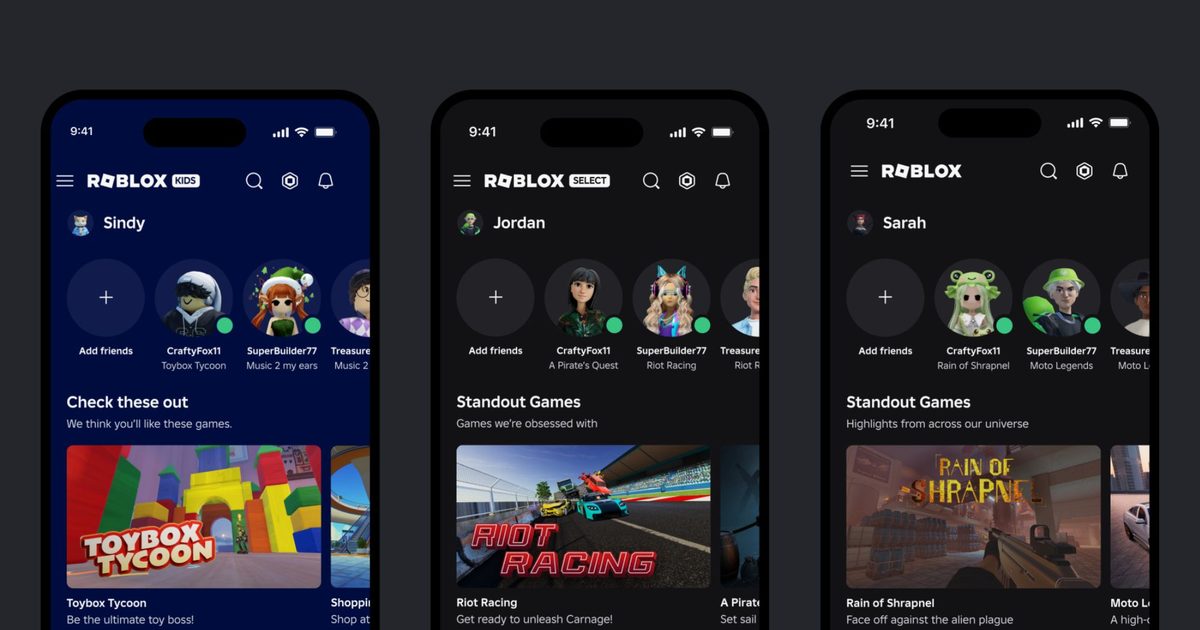
Roblox just launched Roblox Kids and Roblox Select accounts globally, following a limited pilot last month in Australia, Indonesia, the Netherlands, and New Zealand.
These are dedicated account types for users under 16, and the idea is that child safety protections grow with the child rather than staying static.
**How Roblox Kids and Roblox Select accounts work for your child**
The two account types are split by age. Roblox Kids covers ages 5 to 8 and carries the platform’s strictest default settings. Children in this tier can only access games with Minimal or Mild content maturity labels that have passed Roblox’s ongoing selection process. In this account, chat is turned off by default.
Roblox Select covers ages 9 to 15 and opens up access to Moderately rated games, with chat settings that vary by age and region. Both catalogs exclude games involving sensitive topics, social hangouts, and free‑form drawing tools.
Games must also meet tougher entry requirements, including developer ID verification, two‑factor authentication, and either a Roblox subscription or a refundable publishing fee. Accounts progress automatically as children age, moving from Roblox Kids to Roblox Select at 9, and from Roblox Select to a standard account at 16.
**How Roblox’s new parental controls keep your child safer**
Parental controls have also been expanded with this rollout. Parents who link their account to their child’s can monitor gameplay activity and friend lists, manage content ratings, set screen time limits, and control spending.
New additions include granular game blocking, direct chat management extended until the child turns 16, and a game approval feature that lets parents grant access to specific titles outside the default catalog.
Roblox is also the first major gaming platform to require facial age checks for chat access. Users who skip age verification cannot use chat at all, regardless of their age. Later this year, Roblox will also adopt the International Age Rating Coalition framework for content ratings.
Microsoft has just introduced what could be its finest Surface Pro to date. The 12th‑generation 13‑inch Surface Pro brings substantial upgrades across the board, from CPU and GPU performance to battery endurance.
These enhancements make it an obvious pick for anyone seeking a versatile 2‑in‑1 that can double as a tablet and also accept a keyboard for faster productivity. The only hurdle is the cost.
What’s new with the Surface Pro 12?
The headline change is the shift to Qualcomm’s Snapdragon X2 chip family, offering either a 10‑core X2 Plus or a 12‑core X2 Elite. The Elite version delivers up to 53 % faster graphics compared with the 11th‑generation model.
Battery life improves from 14 hours to 15.5 hours, and the device now sports a 1440p Quad‑HD camera with an ultrawide field of view, plus faster Wi‑Fi 7 connectivity.
It will be sold in the traditional Platinum and Black finishes, as well as a new Dune color, all paired with a colour‑matched Surface Pro Flex Keyboard.
How much does it cost?
Here’s where the price tag forces a pause. The base configuration of the new Surface Pro starts at $1,499, including 16 GB of RAM and 256 GB of storage – a full $500 above the $999 starting price of the previous generation. Opting for an OLED display adds another $300, pushing the price to $1,799.
This price jump is notable for a device that looks almost identical to its predecessor. Part of the increase is driven by the industry‑wide AI‑related surge in LPDDR5x RAM costs, affecting premium Windows hardware.
To soften the impact, Microsoft is offering a free Surface Pro Flex Keyboard through June 30, up to $900 in trade‑in credit, and a 50 % discount on Microsoft Complete protection.
“The Aiper Irrisense 2 is the most user-friendly above-ground smart sprinkler out there”
Easy setup
Customizable zones
Weather software
Requires power outlet
No voice assistant support
Quick Review
The Aiper IrriSense 2 is a compelling all-in-one smart irrigation system that combines a sprinkler, controller, electric valve, and nutrient feeder into a single device that you can install in around 15 minutes or less. It covers up to 4,800 square feet with its TUV-certified EvenRain technology, supports up to 10 customizable watering zones and can reduce water usage significantly through weather-aware scheduling and grass mapping. At $500 MSRP (frequently discounted to around $400), it’s a strong pick for homeowners with small to mid-sized yards who want smart irrigation without digging trenches or hiring a professional.
That said, the system requires a nearby outdoor power outlet (and I hate cords), lacks native voice assistant integration, and its zone-mapping tool can be finicky with irregular yard shapes. If your priority is ecosystem integration with Alexa, Google Home, or HomeKit, traditional smart controllers from Rachio or Orbit still lead the space as far as controllers go. But for pure ease of setup and standalone smarts, the IrriSense 2 is hard to beat.
What I Like
• 15-minute DIY setup: No trenching, no plumber. Anchor, connect the hose, plug in, and map your zones in the app.
• Up to 10 customizable zones: Tailor watering schedules per zone for different plant types across your yard.
• EvenRain technology: TUV-certified uniform water distribution simulates natural rainfall and minimizes erosion.
Aiper claims the IrriSense 2 can be set up in 15 minutes, and in my testing, that was roughly accurate. The box contains the IrriSense 2 unit, ground anchoring stakes, a hose adapter, a power cable, and a quick-start guide. Packaging is recyclable with very little plastic waste; a nice touch for eco-friendly buyers.
The physical installation is dead simple: position the unit where you want it, drive the included ground screws to anchor it, connect your garden hose, and plug in the power cable. You’ll need either a nearby outdoor outlet or an extension cord, which is the system’s most notable limitation and can be irritating for OCD people like myself.
Onboarding through the Aiper app (iOS/Android) is straightforward. After creating an account, the app walks you through connecting the device via Bluetooth, then transitioning to your Wi-Fi network. From there, you map your watering zones. The app offers preset yard shapes like oval, rectangle, and others that you customize by dragging control points to match your actual yard. For our small, pinto bean-shaped test yard, we selected the oval preset and adjusted points accordingly.
One point of friction for me: the mapping tool throws an error when boundary points overlap, which forced us to straighten out zones near the house rather than tracing the exact yard perimeter. It’s a minor annoyance that I hope Aiper will address with a firmware update in the future. Other reviewers and customers online have reported that mapping can take 30 to 45 minutes for complex layouts rather than the advertised 15 minutes, though our simple yard stayed within that window.
Design and Build Quality
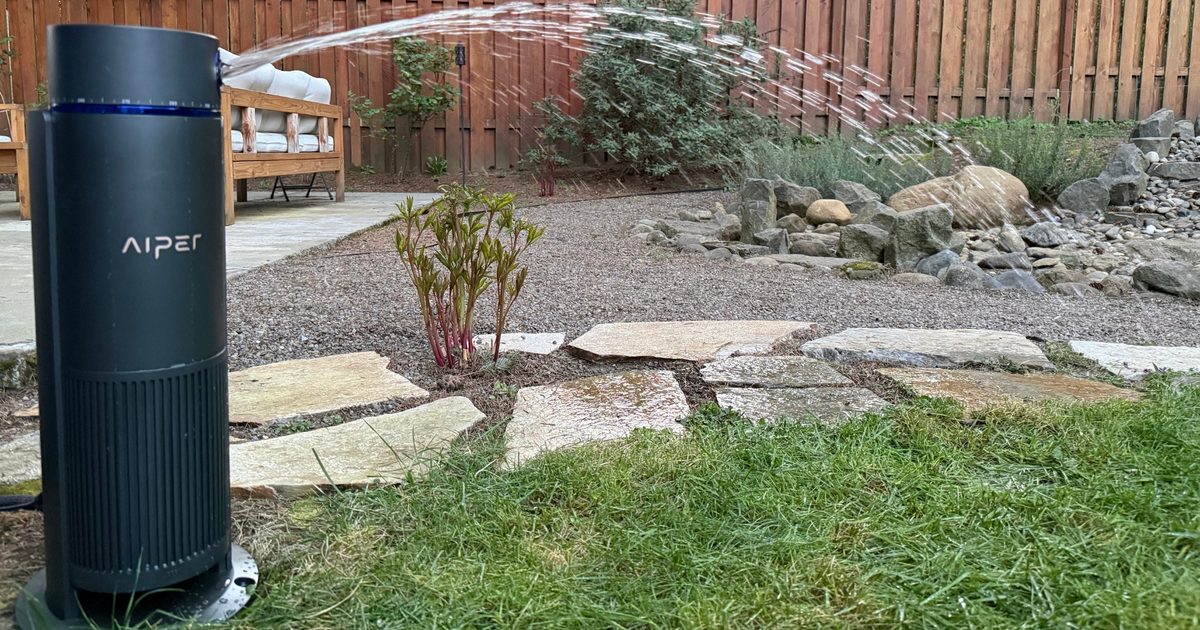
The IrriSense 2 is a compact, ground-mounted unit with a clean industrial design. Its gray housing is unobtrusive on a lawn, and the blue control ring gives it a subtle modern look. Build quality feels solid; the housing is weather-resistant and designed for long-term outdoor placement.
At its core, the device integrates four components that traditionally require separate purchases: a rotor sprinkler head, an irrigation controller, an electric valve, and a nutrient feeder. This consolidation is the IrriSense 2’s main design innovation. Rather than running underground pipes and wiring between separate components, everything lives in one self-contained unit connected to your hose bib and a power outlet.
The ground anchoring system is secure but also allows for easy relocation if you want to reposition the sprinkler. No permanent installation or professional help was required for me to get this setup.
Daily Use and Performance
Once mapped and scheduled, the IrriSense 2 is pretty much set-and-forget. Creating watering schedules in the app is simple. You set duration, frequency, and time of day per zone, and the system handles the rest. The scheduling interface is clean, and the controls are intuitive enough that anyone in the household could adjust them.
Aiper has its own EvenRain technology, which distributes water in a uniform curtain rather than concentrated jets. In practice, this means fewer dry patches and less soil erosion compared to a standard oscillating sprinkler. The system covers up to 4,800 square feet from a single unit with a 39-foot spray range in every direction, though reaching that maximum requires strong water pressure (45 PSI, 6.9 GPM). Most municipal water supplies should meet that threshold, but if you’re on a well or have older plumbing, your coverage radius may shrink.
Like almost every smart home device out there (even Aiper’s own pool cleaners), Weather-aware scheduling is where the IrriSense 2 really earns its “smart” label. The built-in rain sensor automatically pauses watering during rainfall, and the app’s predictive weather monitoring can adjust schedules preemptively based on incoming forecasts. During my testing, the system correctly skipped several watering cycles during rainy stretches without any manual intervention.
Aiper claims this can reduce water consumption by up to 40 percent, and while I didn’t measure that precisely, the in-app water-usage tracking showed meaningful savings compared to my regular sprinkler setup, which doesn’t use any sort of weather-sensing technology. I want to point out that every smart sprinkler controller on the market has weather-sensing technology, so I fully expected Aiper to have a product like this.
The app also provides real-time and historical water usage data, giving you clear insight into consumption patterns. You can monitor and control the system from anywhere with a cellular or Wi-Fi connection.
One note on hoses: because the IrriSense 2 maintains continuous water pressure during operation, a cheap or worn garden hose can fail under sustained load. Investing in a hose rated for continuous use is worth the small added expense. I would also recommend disconnecting the hose in the winter, especially if you experience freezing in your area. This will help minimize expanding and contracting and ultimately wearing down the hose connector.
Ecosystem Compatibility
This is the IrriSense 2’s weakest area. The device operates exclusively through Aiper’s own app and has no native integration with Alexa, Google Home, Apple HomeKit, or SmartThings. For a device in the “smart home” category priced at $500, the absence of voice assistant support is a meaningful gap.
That said, the Home Assistant community has developed unofficial integrations (available on GitHub) that allow the IrriSense 2 to be controlled through Home Assistant dashboards and automations via AWS IoT MQTT endpoints. If you run Home Assistant, this is a viable workaround. But for mainstream smart home users who expect to say “Hey Google, water the lawn,” this isn’t there yet.
The system connects via 2.4 GHz Wi-Fi for ongoing operation and uses Bluetooth for initial device pairing. There is no Matter or Thread support. I would recommend checking the distance of your Wi-Fi connection before purchasing this.
Privacy and Security
The Aiper app requires an account with your email address and collects standard device telemetry: operation history (start/end times, durations), device status (connection, battery, mode), and mobile device information (OS, brand). The app also stores your Wi-Fi credentials for device pairing. This is a typical data footprint for a connected outdoor device, though Aiper does not offer two-factor authentication for app accounts, which I thought was weird.
All control and scheduling appear to be cloud-dependent. If you lose internet, the system cannot receive remote commands through the app. However, previously scheduled watering routines should continue to be executed based on the device’s local clock. Aiper’s privacy policy states that data is used for device management, support, and app improvement, with no indication of data sales to third parties.
How I Tested
Tester
Anita Kekona (co-worker) and Ian Bell
Test Location
Anita’s home, small residential yard
Yard Shape
Pinto Bean
Setup Time
Around 12 minutes including ground anchoring
App Platform
Aiper App (iOS)
Test Scenarios
Zone mapping, scheduled watering, rain response, app control
The IrriSense 2 was installed and tested in a colleague’s yard. Setup included unboxing, anchoring, hose connection, app onboarding, and zone mapping. We configured multiple watering zones and schedules, tested the rain-detection pause feature during actual rainfall events, and evaluated the app’s usability for creating and modifying irrigation schedules. Zone mapping was tested using the oval preset adapted to an irregular yard shape (Pinto bean shaped).
Comparison and Alternatives
The Aiper IrriSense 2 occupies a unique niche as an above-ground, all-in-one smart irrigation system. Most competitors in the smart irrigation space are controllers that connect to existing in-ground sprinkler systems, making direct comparison tricky. Still, here’s how it stacks up against the most relevant alternatives:
Rachio 3 (~$200 for 8-zone)
The Rachio 3 remains the gold standard for smart sprinkler controllers, with native Alexa, Google Home, and HomeKit support, hyperlocal weather intelligence from eight data sources, and EPA-certified 32% average water savings. However, Rachio requires an existing in-ground sprinkler system and professional installation if you don’t already have one; a cost that can run into thousands of dollars. If you already have in-ground infrastructure, Rachio is the better smart controller. If you don’t, the IrriSense 2’s all-in-one approach is far more cost-effective, especially for smaller yards. I personally use a Rachio 1 system, and it’s been great, years later. But, again, this is just a controller.
Orbit B-Hyve XR (~$95 for 8-zone)
The budget king of smart controllers, the B-Hyve XR offers WaterSense-certified irrigation at less than half Rachio’s price, with no subscription fees. Like Rachio, it requires an existing in-ground system. Its app is capable, and its proprietary 900 MHz radio offers strong connectivity through walls. Again, the key differentiator is that the IrriSense 2 doesn’t need underground plumbing.
Traditional Hose-End Sprinklers + Smart Timers (~$50–$100)
You can pair a standard oscillating sprinkler with a smart hose timer (like the Orbit B-Hyve hose faucet timer) for much less money. But you lose multi-zone precision, uniform coverage from EvenRain technology, nutrient feeding, and the integrated weather intelligence. For a single small zone, this budget combo works. For anything more sophisticated, the IrriSense 2 justifies its premium. Just remember to call the neighbor kid when you forget to turn off the sprinkler, and you leave the area!
Verdict
The Aiper IrriSense 2 delivers on its core promise: smart, precision lawn irrigation without the cost or complexity of an in-ground system. The sub-15-minute setup is real, the EvenRain coverage is impressively uniform, and the weather-aware scheduling works as advertised. The built-in nutrient feeder and water-usage tracking are thoughtful additions that go beyond what any comparable above-ground sprinkler offers, but appeal to few people.
Its shortcomings are real but manageable. The power-outlet requirement limits placement flexibility, the lack of voice assistant integration feels like an oversight at this price point, and the zone-mapping tool needs polish for irregular yard shapes. These are firmware- and software-level issues that Aiper could address in future updates.
At its current street price of around $400, the IrriSense 2 is an excellent value for anyone who wants smart irrigation without committing to a full in-ground system. It’s perfect for small yards, raised beds, and gardens. We’d love to see solar power capability and Alexa/Google integration in a future generation, but as it stands, this is the most user-friendly above-ground smart sprinkler out there.
Frequently Asked Questions
Does the Aiper IrriSense 2 work with Alexa or Google Home?
No. The IrriSense 2 currently has no native voice assistant integration. It operates exclusively through the Aiper app. Unofficial Home Assistant integrations exist for advanced users, but you better be patient and love to tinker with tech.
How much yard can the IrriSense 2 cover?
A single unit covers up to 4,800 square feet (445 square meters) with a 39-foot spray range. Achieving maximum coverage requires a water pressure of at least 45 PSI with a 6.9 GPM flow rate.
Does it need to be plugged in, or is there a battery option?
The IrriSense 2 requires a constant AC power connection. There is no battery or solar power option. You’ll need a nearby outdoor outlet or an extension cord.
Can the IrriSense 2 fertilize my lawn while watering?
Yes. The built-in nutrient feeder is compatible with Aiper’s SoilPulse organic soil amendment (sold separately), which is dispensed through the irrigation cycle to improve soil health.
Is professional installation required?
No. The IrriSense 2 is designed as a complete DIY system. Setup involves anchoring the unit, connecting a garden hose, plugging in the power cable, and configuring zones through the Aiper app. Most users complete installation in 15 minutes or less.
Software developers spend hours moving between lines of code. Designers jump from one creative workflow to another across multiple screens. Remote professionals move through packed calendars of virtual meetings, while gamers can remain seated through entire evenings without stepping away from their setups. Different routines, different demands, but a shared reality: the chair has become one of the hardest-working pieces of equipment in the modern workspace.
Productivity discussions often focus on faster hardware, smarter software, and AI-powered tools. Physical comfort rarely receives the same attention, despite playing a direct role in how people feel and perform throughout the day. Long stretches at a desk expose shortcomings that are easy to overlook during a showroom demo. A seat that feels comfortable for twenty minutes can become a source of constant adjustment by mid-afternoon. Headrests sit too low, seat pans feel too short, and support systems designed around average dimensions leave many users trying to adapt their bodies to furniture that was never designed around them.
LiberNovo‘s latest product lineup takes aim at that disconnect. Headlining the launch is the Maxis Series, a chair developed specifically for Big & Tall users, a group that has often been underserved by the ergonomic furniture market. Joining it are the Omni Pro and Omni SE, two models designed for professionals, creators, and enthusiasts looking for different approaches to workplace comfort. Together, the three launches reflect a broader shift within the category: ergonomic seating is becoming less about finding a chair with the most adjustments and more about finding one built around the person using it.
Customers who place their orders before July 31 can secure LiberNovo’s Super Early Bird pricing, representing the lowest launch pricing available and savings of more than 44% off MSRP across the new range.
LiberNovo Maxis: The ergonomic chair big & tall users have been waiting for
Walk through most office furniture showrooms and a familiar pattern quickly emerges. Ergonomic chairs come loaded with adjustments, yet the fundamental dimensions rarely change. Bigger and taller users are often left choosing between products that feel restrictive and oversized chairs that sacrifice ergonomics in favour of scale.
LiberNovo developed the Maxis Series to challenge that compromise. Designed for users between 5’10” and 6’7″ and supporting up to 399 lbs, the chair was engineered around the needs of larger frames rather than adapted from a standard-size model. A 52cm extended seat depth delivers fuller thigh support, while the broader backrest, 430mm shoulder span, and 520mm waist width provide the coverage and stability many larger users struggle to find in conventional ergonomic chairs. An extended-travel headrest and redesigned Arc Armrests further improve fit, helping create a seating position that feels natural rather than restrictive.
Dimensions alone, however, are only part of the story. The Maxis incorporates LiberNovo’s Dynamic Support System, which continuously adapts to movement and helps maintain alignment across the neck, back, hips, and arms. At its core is the Bionic FlexFit Backrest, an adaptive structure built around flexible panels and multi-pivot linkages designed to provide consistent spinal support throughout the workday. Depending on the model selected, users can also benefit from Electric Lumbar Support, allowing more precise lower-back adjustment and support.
Long-session comfort remains a key focus throughout the range. A Controlled Recline System uses a six-spring mechanism to deliver smooth, stable recline without the sudden drop often associated with larger chairs. Five dedicated recline positions support everything from focused work to full relaxation, while OmniStretch Mode introduces a guided spinal stretch designed to relieve built-up tension during extended sitting sessions. Buyers choosing the Maxis Airflow also gain access to Active AirFlow Seat Ventilation, which combines a multi-layer breathable structure with fan-assisted airflow to keep the seating surface cooler during long hours at a desk.
LiberNovo is offering the Maxis Series in three configurations during its Super Early Bird campaign. The Maxis Manual starts at $809, while the Maxis Electric is available from $1,049. Users looking for the most feature-rich version can opt for the Maxis Airflow, which starts at $1,239. Bundle options that include the StepSync Footrest and additional accessories are also available for buyers looking to build a complete ergonomic workstation while taking advantage of launch pricing.
LiberNovo Omni Pro: Ergonomics That Move With You
Most ergonomic chairs are designed around a static idea of comfort: adjust the chair, find a position that feels right, and stay there. The challenge is that people don’t sit still. Research cited by LiberNovo suggests users shift posture dozens of times throughout the workday, creating small breaks in alignment that traditional ergonomic chairs aren’t designed to accommodate.
The Omni Pro approaches ergonomics differently through a Dynamic Support System that moves with the user rather than requiring constant manual adjustments. At the heart of the chair is LiberNovo’s Bionic FlexFit Backrest, an adaptive system built around flexible panels and multi-pivot linkages that respond to movement while maintaining consistent spinal support. Combined with electric lumbar adjustment, the chair is designed to help users maintain alignment whether they are leaning forward during focused work, reclining between meetings, or settling into a longer session at their desk.
Comfort extends beyond support alone. The Omni Pro also features OmniStretch, a built-in motorized spinal decompression function designed to help relieve accumulated pressure, alongside Active AirFlow seat ventilation that promotes airflow during extended work or gaming sessions. Starting at $909 during the Super Early Bird promotion, buyers can also opt for Standard and Premium Bundles that add the StepSync Footrest and battery accessories, creating a more complete ergonomic workstation.
LiberNovo Omni SE: Ergonomic Support Without the Premium Barrier
Building a comfortable workspace doesn’t always require a flagship chair. For many professionals, students, and remote workers, the priority is finding a seating solution that delivers meaningful ergonomic support, promotes healthier posture, and remains comfortable throughout long hours at a desk. The Omni SE was developed for exactly that audience, focusing on the core principles of ergonomic seating through a streamlined manual adjustment system that keeps the experience simple and intuitive.
Rather than overwhelming users with complexity, LiberNovo has concentrated on the features that matter most to everyday use. The result is a chair that serves as a practical upgrade from conventional office seating while bringing the benefits of ergonomic design to a wider audience. Whether it’s a first dedicated home office or a long-overdue replacement for a standard task chair, the Omni SE is designed to make better seating more accessible.
Positioned as the most accessible model in LiberNovo’s latest lineup, the Omni SE starts at $569 during the Super Early Bird promotion. Buyers can also choose the Standard Bundle, which pairs the chair with the StepSync Footrest, creating a more complete ergonomic setup while taking advantage of launch pricing.
Choosing the Right LiberNovo Ergonomic Chair
Selecting an ergonomic chair is only part of the equation. Many users spend just as much time thinking about the accessories and support systems that contribute to long-term comfort, particularly when a workspace is used for eight or more hours a day.
LiberNovo’s Super Early Bird campaign reflects that reality through a range of bundle options designed to help users create a more complete ergonomic setup rather than purchasing a chair in isolation.
Across the lineup, buyers can choose between Basic, Standard, and Premium configurations. Standard Bundles pair the chair with LiberNovo’s StepSync Footrest, an addition aimed at improving lower-body support and sitting posture during extended work sessions. Select Premium Bundles go a step further by combining the chair, StepSync Footrest, and battery accessories into a single package, allowing users to unlock the full feature set while benefiting from launch pricing.
The value becomes particularly compelling across the Maxis range. Buyers can choose between the Maxis Manual, Maxis Electric, and Maxis Airflow, then customise their purchase through bundle configurations that best suit their workspace requirements. Similar options are available across the Omni lineup, giving customers flexibility without forcing them into a one-size-fits-all package.
For users already considering an ergonomic upgrade, the bundle offers may represent the strongest value within the entire promotion. Rather than purchasing accessories separately at a later stage, the launch campaign allows buyers to build a more complete workstation from day one while taking advantage of some of the deepest discounts available across the range.
The Super Early Bird campaign runs through July 31, with pricing starting at $569 for the Omni SE, $909 for the Omni Pro, and $809 for the Maxis Manual. With discounts reaching over 44% on select Maxis bundle configurations, the current launch window offers the most attractive entry point into LiberNovo’s newest ergonomic lineup before regular retail pricing takes effect.
Intel‘s rumored NVIDIA RTX chip could make the PC graphics fight a lot more complicated.
Erdi Ozuag, a former editor at Turkish tech site DonanimHaber who now reports on tech through YouTube, says that Intel’s current roadmap lists its first x86 client processors with NVIDIA RTX graphics for the first quarter of 2028. That timing lines up with a possible CES 2028 announcement, but Intel hasn’t confirmed a product name, specs, configuration, or launch date.
Özel Haber: Intel’in güncel yol haritasına göre, NVIDIA grafik birimine sahip olan yeni nesil işlemciler için hedeflenen tarih 2028 ilk çeyreği, planlar değişmediği takdirde CES 2028 Fuarı, lansman etkinliği olabilir.
The reported design would put Intel CPU technology and an NVIDIA RTX GPU tile in the same package. For PC makers, the big question is whether that design becomes a broad client platform or a narrower showcase for Intel and NVIDIA’s partnership.
How could Serpent Lake work
The rumored processors are tied to Serpent Lake, a future Intel client platform name that has surfaced in earlier roadmap leaks. The basic setup is Intel on the x86 CPU side, with NVIDIA supplying an RTX GPU tile.
The source doesn’t confirm the GPU tile configuration, memory support, package design, or process technology. It also leaves open whether NVIDIA’s tile would include its own display and media blocks, or whether Intel would keep some of that logic on a separate tile.
Why has Intel done this before
Intel has a precedent for this kind of mixed package. Kaby Lake-G paired an Intel mobile CPU die with AMD Radeon RX Vega M graphics in the same package, giving Intel a prior example of combining its processor technology with another company’s GPU.
The NVIDIA project would follow a different path because Intel and NVIDIA have already announced a formal partnership around x86 SoCs with RTX GPU chiplets for PCs. That makes the reported 2028 timing the most important new detail, not a confirmed product promise.
When could the roadmap become real
Early 2028 is the window to watch. CES 2028 is plausible if the roadmap timing holds, but that’s still an inference, not a launch plan from Intel or NVIDIA.
The next useful signals will be concrete technical disclosures. GPU tile layout, memory support, display and media handling, package design, and actual PC availability will show whether this becomes a meaningful new graphics option or stays a roadmap rumor. Until then, there’s no reason to treat it as buying advice for today’s laptop market.
Commodore is re‑introducing the flip phone for users who prefer fewer screen distractions while still accessing most useful apps. The Commodore Callback 8020 runs a custom Sailfish OS build and, via Linux, can handle a wide range of Android applications, giving it more flexibility than a typical minimalist handset.
The nostalgic aesthetic is a major draw. The device features a clamshell chassis, T9‑style texting, a tiny front status display, dome‑LED notifications, and colour schemes that reference classic Commodore hardware rather than modern glass‑slab phones.
Everyday utilities aren’t sacrificed either. Its spec sheet lists messaging, maps, music, rideshare, podcasts, QR‑code scanning, calendars, voice notes and a 48 MP Sony rear camera, while social media, browsers, email and work‑chat apps are deliberately blocked.
Why the flip matters
The Callback 8020’s experience revolves around its hinge. Open it to perform a task, use the needed tool, then snap it shut when you’re done. This physical pause creates a clearer endpoint than a continuous touchscreen, and T9 texting breaks the usual tap‑and‑scroll cycle. The outer screen can constantly show time, battery and signal without lighting up the full UI, and dome LEDs deliver alerts so you don’t have to open another app for every notification.
Which apps remain available
The phone sits between a stripped‑down handset and a full‑blown smartphone. Commodore claims 99 % of Android apps run under Linux, making essentials like messaging, navigation, audio, rideshare and calendars easy to keep in rotation. Its privacy stance stems from software co‑developed with Jolla’s Sailfish OS; the device doesn’t require an account login and isn’t built to harvest user data, though app compatibility can vary by service, region and network. Check that your must‑have apps work before adopting it as your primary device.
Pre‑order details
Pre‑orders for the Commodore Callback 8020 open on June 30 at 10:00 CEST, with a starting price of $499, which includes earphones. A $50 discount is offered for those who join the waitlist.
The strongest argument for the Callback 8020 is its form factor, not its raw specs. If you want messaging, maps, music, a solid camera and fewer endless feeds in your pocket, this flip provides a clear path. Commodore notes that specifications and features may still change, some images are renderings, and app compatibility can differ, so verify your essential apps before you place an order.
WhatsApp is bringing group voice and video calls to its web client, closing a gap that has existed since individual calling support arrived earlier this year. According to WABetaInfo, the feature is currently rolling out to beta testers and lets users start group calls directly from their browser.
Up to 32 participants, no desktop app requirement
Like individual web calls, group calls are end-to-end encrypted using the Signal protocol. Encryption is on by default and requires no setup from the user.
A meaningful upgrade for Linux users
The rollout is particularly beneficial for Linux users, as WhatsApp doesn’t offer a desktop app for Linux. So far, this meant that anyone on the platform had to switch to their phone to answer group calls. With web calling now extended to groups, Linux users can participate directly from the browser.
The feature is currently limited to users enrolled in the WhatsApp Web beta program. WABetaInfo says the rollout is ongoing and expects it to reach more users over the coming weeks. WhatsApp has not announced a timeline for the stable release.