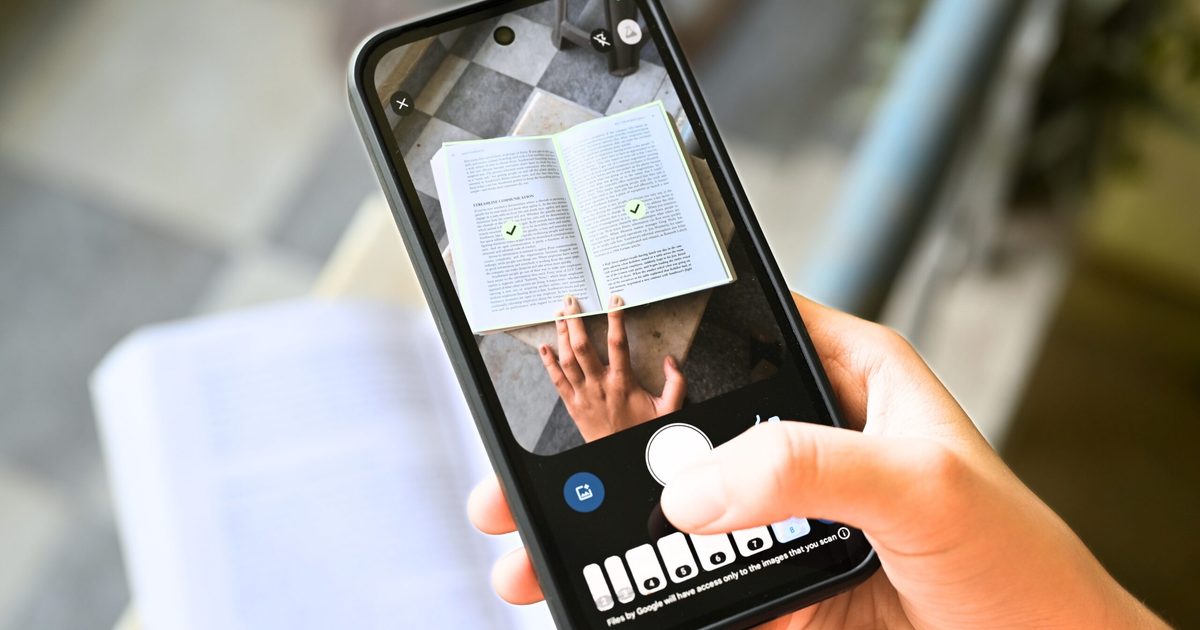
Scanning documents on a phone has always been a pain, especially on Android devices. Users often have to capture each page separately, deal with blurry shots that aren’t obvious until later, or accidentally scan the same page twice – all everyday annoyances.
The latest redesign of the Google Drive document scanner tackles these three issues at once. Announced by Sameer Samat, President of Android Ecosystem at Google, the update is now being rolled out to Android users.
What’s new in the Google Drive scanner?
The most significant addition, in my view, is Smart Batch Scanning. Instead of pressing the capture button for every single page, you can simply sweep your phone over a stack of documents placed on a table or bed, much like recording a video.
The scanner recognises each sheet, separates them into individual files, and even includes a pause button that lets you stop auto‑scanning mid‑session. A system file picker also lets you import pictures you’ve already taken.
Beyond batch scanning, the update introduces Auto‑Best Frame and Duplicate Detection. Auto‑Best Frame automatically swaps blurry captures for the sharpest frame available, while Duplicate Detection spots pages you’ve scanned twice and skips them.
Scanning documents from a phone is a pain! Glad to see the new document scanning experience in Google Drive on Android is rolling out now. 📄 Smart Batch Scanning: Scan multiple pages at once, automatically splits them into separate docs.🚫 Duplicate Detection: Hovering… pic.twitter.com/Uqh2Zf2NMY
— Sameer Samat (@ssamat) May 29, 2026
Is there a catch?
The scanner also receives a refreshed interface, swapping the old beaker icon in the top‑right corner for a cleaner Material 3 Expressive viewfinder. Because the feature is built into Google Play Services, it works in the Files by Google app as well as Google Drive. The downside, however, is a bit disappointing.
The entire automated scanning process runs on‑device, meaning it works offline and keeps your documents away from Google’s servers. This on‑device processing demands at least 8 GB of RAM, so devices that don’t meet that threshold won’t be able to use the feature.