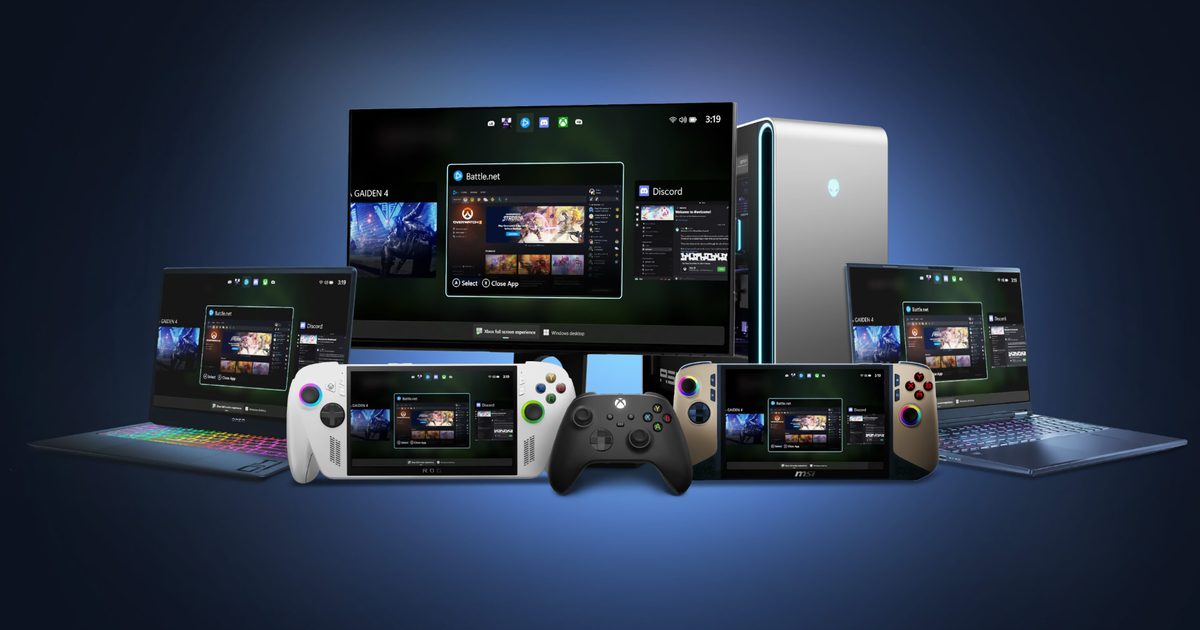
To challenge Linux’s increasing presence in handheld gaming devices, Microsoft demonstrated Xbox mode, a streamlined, gaming-centric iteration of Windows. Last month, Microsoft delighted Windows users by revealing that Xbox mode would also expand to Windows PCs and laptops.
That moment has now arrived. Xbox mode is currently being deployed to Windows 11 PCs, covering laptops, desktops, and tablets. If you have long desired a PC that operates more like a gaming console, this is the update you have been anticipating.
Why is Xbox mode generating so much excitement?
Xbox mode offers a full-screen, controller-friendly interface designed specifically for gaming. Imagine a console-style hub layered over Windows 11. It highlights your game library, minimizes background clutter, and allows you to launch titles instantly without navigating the standard Windows environment.

Users can navigate and launch titles using a controller, return to the Windows desktop whenever necessary, and access their entire game collection in one location, including the complete Xbox Game Pass library and titles from other PC platforms.
Xbox mode aims to provide a cohesive gaming experience across all your devices. It does not replace Windows but rather offers an alternative way to utilize your PC. If you value the flexibility of PC gaming but desire the ease of a console interface, Xbox mode delivers both.
How can you install Xbox mode on your PC?
The deployment is rolling out gradually, meaning availability will vary by device. To receive the update as soon as it becomes available on your system, open Settings, navigate to Windows Update, and enable “Get the latest updates as soon as they are available.”
Once the update is installed, you can launch Xbox mode directly from your PC. Microsoft states it will continue refining Xbox mode based on user feedback, ensuring the experience will only improve moving forward.