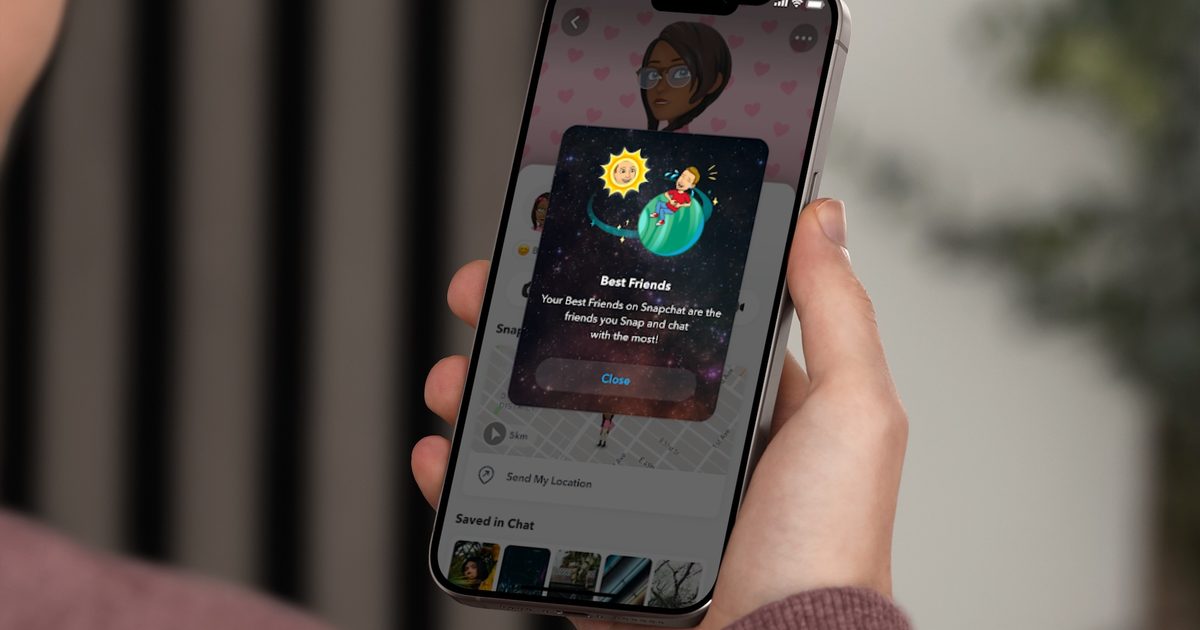
Snapchat already contains a myriad of tiny icons that can be surprisingly tricky to interpret. From streaks and emojis to badges, scores, Best Friends, and—if you’re a Snapchat Plus subscriber—a miniature solar system indicating your rank in someone’s closest‑friends list.
What is the Friend Solar System?
The feature, officially named Friend Solar System but commonly referred to as Snapchat Planets, converts your standing in a friend’s Snapchat orbit into a planetary symbol. Ranging from Mercury to Neptune, each “planet” reflects how close you are to that person.
Snapchat Planets explained
When the Friend Solar System is turned on, Snapchat visualises a friend’s Best Friends list as a solar system, with that friend acting as the sun and you as one of the orbiting planets.
In plain language, the planet you see indicates your rank on that friend’s Best Friends list: Mercury means you’re their top Snapchat contact, Venus is second, Earth is third, and so forth.

To view it, open a user’s Friendship Profile and tap the Best Friends or Friends badge outlined with a gold ring. Snapchat will then display which planet you occupy in their system. Remember, the planet you see reflects your position in *their* system only; it doesn’t automatically mirror your own ranking of them.
Order and meaning of the planets
The lineup follows our real solar system, excluding Pluto. Mercury is the innermost, Neptune the outermost.
- Mercury
- Venus
- Earth
- Mars
- Jupiter
- Saturn
- Uranus
- Neptune
So, if you tap a badge and see Earth, you’re third in that friend’s Snapchat hierarchy. Spotting Neptune means you’re still within their top eight, just farther out.
Best Friends vs. Friends badges
Snapchat Planets can appear via two different badges: Best Friends and Friends. A Best Friends badge indicates mutual inclusion in each other’s closest‑friends circles. In contrast, a Friends badge shows you’re in their Solar System, but the relationship may not be reciprocated in the same way.


Either badge will reveal your planet as long as you have Snapchat Plus and the feature is active.
How to check your Snapchat Planet
- Open Snapchat.
- Navigate to a friend’s Friendship Profile.
- Locate a Best Friends or Friends badge with a gold ring.
- Tap the badge.
- Snapchat will display the planet you occupy in that friend’s Solar System.
If no badge appears, it usually means you lack Snapchat Plus, the Friend Solar System isn’t enabled, or you’re not listed in that person’s visible ranking.
Activating Snapchat Planets
First, you need a Snapchat Plus subscription. Prices differ by region and plan; the most reliable way to see the current cost is within the Snapchat app or on Snapchat’s subscription page. Some regions also offer multiple Plus‑related plans.
After subscribing, you may still have to enable Friend Solar System manually:
- Open Snapchat and go to your profile.
- Tap your Snapchat Plus membership card or banner.
- Enter the Snapchat Plus feature‑management screen.
- Locate “Solar System” or “Friend Solar System”.
- Switch it on.