Google is making a bigger play for the living room, and this time, it is not just about what you watch — it is also about how you interact with your TV. At Google I/O 2026, the company revealed a fresh batch of updates for Google TV and Android TV developers, all centered around one idea: TVs are no longer passive screens sitting in the corner of your house. With more than 300 million monthly active devices across Google TV and Android TV, Google clearly sees the television as its next major AI battleground. And Gemini is now at the center of that strategy.
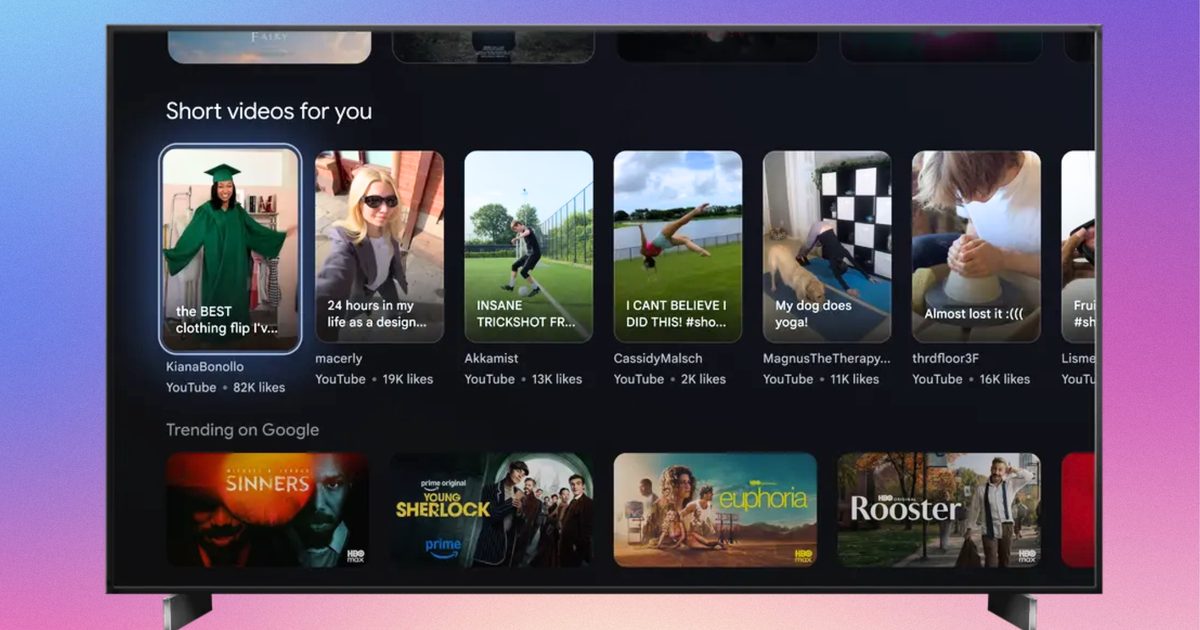
The company says Gemini is already helping users discover content through natural voice interactions. But Google now wants the experience to feel more dynamic and conversational, almost like searching the web — except on your couch. Instead of only surfacing static results, Gemini on Google TV can now respond with a combination of visuals, videos, and text snippets to answer queries. So if someone asks for a thriller with a strong female lead or a documentary about space exploration, Gemini pulls contextual recommendations directly from streaming apps and their metadata.
For streaming platforms, that is a massive shift. Discovery on TVs has historically been messy, fragmented, and heavily dependent on whichever app you opened first. Google seems to be positioning Gemini as the layer that sits above all of that, acting as an intelligent content guide rather than a basic search tool.
Your TV remote is evolving
Interestingly, Google’s bigger announcement may not actually be Gemini itself. It is the remote control. The company says future Google TV devices will increasingly support “pointer remotes,” which bring motion and cursor-based navigation to televisions. Think of it as a halfway point between a traditional TV remote and a computer mouse. That might sound minor, but it changes how TV apps need to work.
Most TV interfaces today are designed around rigid D-pad navigation — up, down, left, right, select. Pointer controls introduce hovering, free-form movement, touchpad scrolling, and cursor clicks. Suddenly, TV apps have to behave more like desktop or tablet interfaces. Google is now asking developers to start preparing their apps for this transition. That includes adding hover states to buttons and UI elements, supporting smoother scrolling interactions, and ensuring apps can properly respond to cursor-based clicks instead of only directional focus controls.
And honestly, this feels overdue. TV interfaces have remained surprisingly clunky for years, especially compared to how fluid smartphones and tablets have become. Streaming apps often feel slow, restrictive, and awkward to navigate when you are browsing massive content libraries. Pointer-based interaction could make that experience significantly faster — assuming developers properly optimize their apps.
Google is pushing developers to prepare now
To help developers adapt, Google says apps built with Jetpack Compose already have an easier path forward because many modern interaction models are supported natively. The company is also encouraging developers to test these new interactions today using standard Bluetooth or wired mice connected to Google TV devices. That way, they can better understand how hover effects, scrolling behavior, and cursor inputs work on large-screen interfaces. Google notes, however, that pointer remotes are naturally less precise than an actual mouse because users are typically sitting several feet away from the television and making rough gestures from the couch. To compensate, developers are being advised to create larger interactive targets and more forgiving UI layouts.
Finally, developers can now officially declare pointer remote support on Google Play, making compatible TV apps easier for users with newer remotes to discover. All of this paints a fairly clear picture of where Google TV is heading next. TVs are slowly turning into more active, AI-driven computing platforms rather than simple streaming boxes. Gemini handles discovery, pointer remotes modernize navigation, and developers are being nudged to rethink the decade-old TV app experience altogether. Whether users actually embrace waving remotes around their living rooms is another question entirely. But Google clearly believes the future of TV interaction needs to feel smarter, faster, and a lot less dependent on endlessly clicking directional buttons.
Few superhero franchises continue to dominate pop culture like Spider-Man. With upcoming films like Spider-Man: Brand New Day and Spider-Man: Beyond the Spider-Verse building up hype, Sony is now expanding the web-slinger’s universe onto streaming with MGM+ and Prime Video’s new live-action series, Spider-Noir, developed by Oren Uziel.
Developed by Oren Uziel, this 1930s-set noir thriller stars Nicolas Cage as Ben Reilly, a private investigator who has long abandoned his masked alter-ego, “The Spider.” However, when superpowered criminals emerge in New York City, Reilly must confront his past and become a superhero once again.
In an interview with Digital Trends, Uziel discusses taking on Spider-Noir as a first-time showrunner, collaborating with Cage, and crafting a Spider-Man story unlike any other.
This interview has been edited for length and clarity.
Digital Trends:Thank you so much for meeting with me today. It’s a pleasure to meet you.
Uziel: Nice to meet you.
Digital Trends:Thank you. Now, how you doing today?
Uziel: I’m good. I’m good. Excited to be in New York. Yeah, it’s a great city. I haven’t been back in a while.
Digital Trends: All right. Now, you’ve worked as a screenwriter in Hollywood for quite a while now, but Spider-Noir is actually the first TV show that you served on as a showrunner. I’d love to hear more about what the experience was like for you.
Uziel: It was oddly smooth and incredibly challenging. I made the pitch, wrote the pilot, started the room, started to prep. It all happened in the order it was supposed to happen. There weren’t huge delays. But, yeah, showrunning is a massive undertaking.
I had a co-showrunner, which was nice and definitely helped because he was seasoned and could help guide me a little bit… I’ve been doing this for a long time. I know most things, but TV, it turns out, is fairly similar to features. Just more episodes and more infrastructure to deal with. But it’s a lot. It’s an overwhelming job, show running.
Digital Trends: Now, why did you choose to helm Spider-Noir?
Uziel: I love noir. I’m a real junkie for it, and I love Spider-Man. And I was fortunate enough to have worked with Phil [Lord] and Chris [Miller] and Amy [Pascal], the producers on the project, many times in the past…
So when they came to me with one that was Spider-Man, combined with noir. It was like a live-action set in New York, and then also set in the 30s, which is like, just a deco kind of romantic era. I was pretty sold on it, and it felt like the first TV opportunity that I really wanted to do with the passion that you need if you’re going to do it.
Digital Trends: I absolutely love the style and execution of Spider-Noir, and so I’d love to know, what were your specific inspirations for writing the show, both from in and outside the comics? What’s a sort of story were you trying to tell?
Uziel: Well, it’s definitely the collision of these two genres…It’s not drawn from the comic book world exclusively, and it’s not drawn from the noir world exclusively. I think we were sort of noir forward, and because of both the setting and that type of storytelling. [What] we talked about a lot, in the making of the show, was, “What if you made a [Humphrey] Bogart movie where Bogart just happened to be Spider-Man?”
So, you’ve got your classic private detective story, but then, “How are you going to subvert all the expectations?” Well, it’s a lot easier to do when this guy happens to have powers that a normal private detective wouldn’t.
And then, on the flip side, you’re telling a Spider-Man story that hasn’t been told before because he’s way older than we’ve ever seen him, and he’s dealing with very different issues and problems than a high school kid.
Digital Trends: Now with Nic Cage in the lead role. He’s really well known for being an intense actor. So what was it like working with him on this series? What sets them apart from all the other Spider-People that we’ve seen on film and television so far?
Uziel: There’s a few things. He is older, right? He’s not a kid…Nic is incredibly prepared. A professional actor. I think sometimes you can think, “Oh, it’s Nic Cage? He’s going to be like this big, larger life character.”He’s kind of a straightforward…a quiet guy sometimes, and very thoughtful.
And so, he read the material, responded [to] the material, and then got off-book immediately.By the table read, he knew every script by heart. And so, he just got to work thinking about how to make this character different from all the characters that have come before.
He’s seen Spider-Man a lot. So I think both of us did not want to just do another iteration without making it our own…We thought a lot about what actually happened to [Reilly] and how it changed him to become the Spider. “What if being the Spider is more of a challenge, just in terms of his humanity, than we realize? And what if he’s become more Spider than man, andhow that affects you…to the way you live your daily life?”
Digital Trends: Right. I could tell Nic really gave it his all with his performance, and yet, he was like having the time of his life, and personally, I think it’s like one of his best performances so far.
Uziel: Oh, thanks. I really think he, given this space, he was apprehensive about TV, because I think he was sort of thinking almost like by sitcoms or this or that, but I think once he realized what we were trying to do, he really got excited and got on board, and every single day he would come to set with another reference of something he wanted to do, and it’s always so smart and thoughtful.
So you’d have little bits like, ‘This is sort of a little bit of Bogart from The Big Sleep. This is a little bit of [James] Cagney. There’s a little bit of Peter Lorre. There’s a little bit of Edward G. Robinson.” And so, it was always…haunted by the heroes of noir’s past.
Digital Trends:Awesome. Now, these days, it’s no secret that there are a lot of comic book movies and TV shows. Some people have said that superhero fatigue has set in. So, in this age of so many superhero projects, what sets Spider Noir apart from all the others? Why should people go and see this show?
Uziel: I think sometimes you get lucky with your timing, and if you have superhero fatigue and you don’t want your sort of standard superhero show, this is the show for you. And if you aren’t even that interested in superheroes, this is the show for you because it’s so steeped in film history and cinema and noir. That is really just a story about characters and love and loss and friendship. I’m confident to say that there’s no chance you’ve seen a superhero show like this.
Digital Trends: Now I’ve seen that you’ve worked with Phil Lord and Christopher Miller…you’ve worked with them before writing22 Jump Street. How did it feel to collaborate with them again on this big project?
Uziel: It’s great. It’s great to work with people repeatedly over the years because you just develop a trust and a shorthand. And I think that was very important here because they had hatched the Spider-Verse movies.
They brought Nic on to do the first iteration of this character. And they just know me, and they trust me that, just in talking about what I wanted to do and what story I wanted to tell, when they got busy with Project Hail Mary…it wasn’t an issue at all. They were able to kind of let me tell the story I wanted to tell and help me when I needed help…with my vision. Because they’re really good collaborators.
Digital Trends: That’s terrific. I just like love it when filmmakers and creatives have a community that they just like work together on so many projects together, and I’m really glad they were really supportive with you on this show. And I think the show really just came out spectacularly well.
Uziel: Oh, thanks. Appreciate that.
Digital Trends:Do you have any plans for a second season of Spider-Noir? I can see the story go far beyond at least what I’ve seen so far.
Uziel: Yeah, there’s definitely [an] opportunity to take this story and go a lot further with it. I think we’re gonna wait and see what happens. But I’m excited to tell another story. For sure.
Digital Trends: Fantastic. Do you have any other stories that you’re working on at this moment?
Uziel: I’m working right now on Murder, She Wrote for Universal with Jamie Lee Curtis, and I’m working on Puss in Boots 3 for DreamWorks.
Digital Trends:All right, fantastic. I’m looking forward to seeing both of those.
Uziel: Yeah, it’ll be fun.
Digital Trends: I just want to say I’m in love with the visuals that you came up with for [Spider-Noir]. It looks like it just came out from a page of a comic book with the images on top of each other. I thought it was so inventive, and I think that really makes it stand out. Is there anything you want to say about that?
Uziel: Well, we shot in LA, and so we kind of had the best crew I think I could have ever hoped for. Darren Tiernan and Peter Deming, our two DPs, are brilliant. And we just worked very hard to make everything as pushedand visually inventive and interesting as possible.
We wanted this to feel as cinematic and large-scale as we could possibly get it. So I’m glad to hear you are feeling that [while] watching it, because it was a labor of love for everybody.
Spider-Noir premieres on MGM+ and Prime Video on May 27.
Apple has announced a major set of accessibility updates across iPhone, iPad, Mac, Apple Vision Pro, and Apple TV, with many of the new features powered by Apple Intelligence. The company says the updates are designed to make devices more useful for users with visual, hearing, mobility, and learning disabilities while maintaining Apple’s privacy-focused approach to AI.
The new accessibility features will roll out later this year as part of Apple’s upcoming software updates.
Apple is bringing AI into accessibility features
One of the biggest updates focuses on VoiceOver and Magnifier for users who are blind or have low vision. Apple says VoiceOver’s new “Image Explorer” feature can now provide more detailed descriptions of photos, scanned documents, bills, and other visual content using Apple Intelligence. Users will also be able to ask follow-up questions about what the camera sees through the iPhone’s Action button.
Magnifier is also getting AI-powered visual descriptions and voice controls. Users can ask spoken commands such as “zoom in” or “turn on flashlight” while using the feature.
Apple is additionally improving Voice Control with natural-language interactions. Instead of memorising exact button labels, users can now describe what they see on screen with phrases like “tap the purple folder” or “open the restaurant guide.” The company says this should make navigating apps easier for users with physical disabilities.
Generated subtitles and smarter reading features
Another update expands Accessibility Reader, which is aimed at users with dyslexia or low vision. The feature will now support more complex content such as scientific articles with columns, tables, and images. AI-generated summaries and built-in translation tools are also being added.
Apple Vision Pro gains eye-controlled wheelchair support
One of the more notable announcements involves Apple Vision Pro. Apple says users with compatible alternative wheelchair drive systems will soon be able to control power wheelchairs using Vision Pro’s eye-tracking system. The feature will initially support Tolt and LUCI systems in the US.
The company also announced additional Vision Pro accessibility updates, including face gestures, improved Dwell Control, and motion sickness reduction tools for passengers in moving vehicles.
Why these features matter
Accessibility has long been a major focus area for Apple, but the latest updates show how AI is increasingly becoming part of assistive technology. Instead of positioning AI only as a productivity or chatbot tool, Apple is integrating it into real-world accessibility functions such as visual understanding, navigation, reading assistance, and communication.
The company is also continuing to emphasize on-device processing and privacy, especially as AI-generated features become more common across consumer devices. Apple says the new accessibility features will launch later this year across its ecosystem. The company is expected to share more details during WWDC, where it will likely showcase how Apple Intelligence powers these updates across iOS, iPadOS, macOS, and visionOS.
After years of legal battles, platform bans, and public clashes over app store fees, Fortnite is officially returning to Apple’s App Store worldwide. Epic Games announced the move on Monday, calling it part of the “final battle” in its long-running fight against Apple’s App Store policies.
The return marks one of the biggest reversals in modern app store history. Fortnite was originally removed from Apple’s App Store in 2023 after Epic Games introduced its own payment system inside the app to bypass Apple’s commission fees, which can reach up to 30 percent. That decision triggered a years-long legal conflict that quickly became one of the most important antitrust battles in the tech industry.
Epic says global pressure is finally working
In its latest statement, Epic Games argued that increasing regulatory scrutiny around the world is forcing Apple to loosen its control over app store payments and alternative marketplaces. The company specifically pointed to growing pressure from regulators in regions such as the European Union, Japan, and the United Kingdom.
Fortnite is back on the App Store around the world for iPhones and iPads! 🌍 Jump in and level up today to unlock the Yeddy outfit: https://t.co/Sv7ZD0iuKn
Epic claims Apple’s current app store model relies on what it calls “junk fees” and restrictive rules around payment systems and third-party app stores. According to the company, Fortnite’s return signals confidence that future rulings and regulations may further weaken Apple’s ability to enforce those restrictions globally.
The timing is also notable because Apple recently faced renewed criticism from US courts over how it implemented earlier injunctions tied to app store competition. A federal judge previously ruled that Apple violated portions of a court order requiring more flexibility around app downloads and payment systems.
Why this matters beyond Fortnite
This is bigger than just one game returning to iPhones. The Epic vs Apple dispute has effectively become a larger fight over how much control Apple and Google should have over mobile ecosystems. Developers have long argued that app store fees are too high and that platform owners unfairly restrict alternative payment methods and competing marketplaces.
The outcome affects not only games like Fortnite but also streaming apps, subscription services, AI apps, and digital marketplaces that rely heavily on mobile payments. Epic has already secured major concessions from Google earlier this year, leading to Fortnite’s return to Google Play worldwide after Google reduced fees and expanded billing flexibility on Android.
For users, this could eventually mean lower prices, more payment options, and greater freedom over how apps are installed and purchased on mobile devices.
What happens next
Despite Fortnite’s return, the broader legal and regulatory battle is far from over. Epic says it will continue challenging Apple’s restrictions around alternative app stores and competing payment systems. Meanwhile, regulators globally are still examining how companies like Apple and Google manage app distribution, fees, and platform control.
At the same time, Epic appears to be expanding its own ecosystem ambitions. The company continues growing the Epic Games Store on mobile devices, which is already available globally on Android and in select iPhone regions.
For Apple, Fortnite’s return may close one chapter of the dispute, but it also signals something larger: the era of tightly controlled mobile ecosystems is increasingly facing pressure from courts, regulators, and developers worldwide.
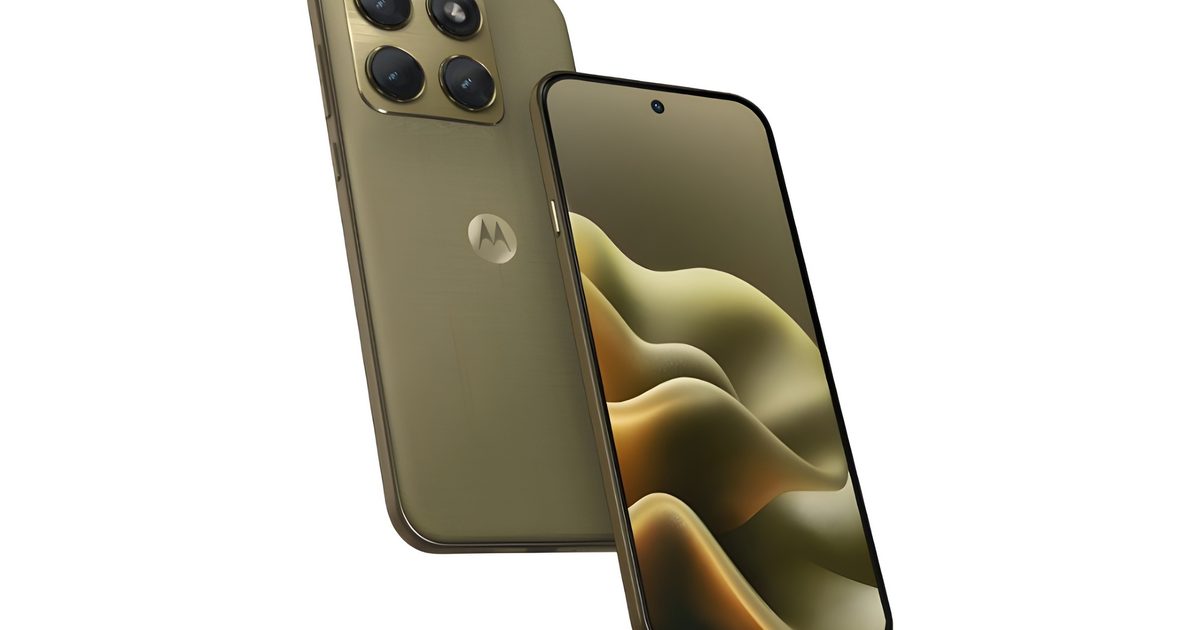
Motorola may drip out its next Edge smartphone in gold. A new leak from Digital Citizen claims to show the upcoming Motorola Edge 2026, and the design is the whole story for now. The leaked images show a warm champagne gold finish. The rear panel also has a fine woven texture, which should offer a brushed silk-like feel.
Gold, texture, and a whole lot of personality
Over the last couple of years, Motorola has leaned into designs that include a textured back. So the Edge 2026 model continues this tradition. The overall look seems more fashion-forward than the average Android phone. The brand has continued its partnership with Pantone, with some special edition models even using Swarovski crystals for a more premium finish.
To recall, the company has already released the Edge 70 in the global market as a super-slim mid-range phone. However, the upcoming Edge 2026 appears closer in both looks and size to the brand’s flagship Motorola Signature, which also debuted with a similar color and finish.
What else do we know?
The leaked design also shows a large square camera module in the top-left corner. It seems to house a triple camera setup that is housed on a raised metallic module. There are no confirmed camera specs yet, so this part is mostly visual. The size and layout suggest Motorola may be aiming higher than a basic midrange setup, but details like sensor size, telephoto capability, and stabilization are still unknown.
On the front, the device sports a flat display with minimal bezels and a centered punch-hole selfie camera. Motorola’s Edge line has often played with curved displays, but this model could be moving to flat screens since they are easier for typing, gaming, screen protectors, and avoiding accidental touches.
LG has unveiled the UltraGear 25G590B, the world’s first Full HD gaming monitor with a native 1000Hz refresh rate. The 24.5-inch display is built specifically for competitive gaming, where faster visual updates can translate directly to quicker reaction times in FPS titles.
Built for competitive FPS, not just benchmarks
The 25G590B delivers its 1000Hz performance natively at FHD (1920×1080) resolution, setting it apart from dual-mode monitors, like TCL’s recently announced 640Hz panel, that require resolution or screen-size adjustments to hit peak refresh rates. That means you train and compete under the same consistent visual conditions without toggling settings.
LG UltraGear™ introduces the world’s first native 1000Hz FHD gaming monitor 🚀
✅ LG UltraGear25G590B debuts as the world’s first native 1000Hz Full HD gaming monitor
✅ Built for FPS gaming, it enables faster visualconfirmation and quicker reactions
The monitor pairs its high refresh rate with LG’s Motion Blur Reduction Pro technology, which sharpens fast-moving objects to make tracking lateral movements easier during intense gameplay. The monitor features an IPS panel with a low-reflection film for consistent color reproduction and reduced glare.
Designed for the esports setup
LG says the 24.5-inch screen size is a deliberate choice, as it’s the format most commonly used in professional esports setups. It keeps key visual elements within the player’s natural field of view without requiring excessive eye movement.
The minimalist stand has a small base footprint to maximize mouse movement space, and calibration indicators that let players precisely replicate their preferred height, swivel, and tilt settings across different setups.
LG has not yet announced pricing or a release date for the 25G590B. The company says the gaming monitor is expected to launch in select markets in the second half of 2026, with availability in additional markets to follow later.
The memory market is already in terrible shape, and Nvidia’s new Rubin could be kicking it while it’s already down. According to a Fast Company report, citing a forecast from Citrini Research, the company’s next-gen AI platform could require more than 6 billion GB of LPDDR memory in 2027. With the LPDDR (low-powered memory) primarily being used in phones, tablets, and other portable devices, the price hikes might get even worse.
And if the report is true, Nvidia alone may consume more memory than Apple and Samsung combined.
How Rubin is eating into consumer memory supply
Nvidia’s Rubin platform is the company’s next big AI hardware push after Blackwell. The company designed it for the growing demand for generative AI workloads and real-time reasoning, with the next-gen platform expected to be twice as fast as Blackwell. But this growth leads to the problem of scale.
Your next phone or laptop could feel it
With the memory shortage already causing notable price hikes across consumer electronics, new gadgets are feeling the pinch. With many pandemic-era gadgets, like TVs, PC, and other devices, now entering refresh timing, replacing anything from smartphones to smart TVs is a lot more expensive now.
At the same time, memory prices have reportedly climbed 150% to more than 200% over the past year, with storage prices moving in the same direction. The RAM crisis became so bad that even expandable storage might return on smartphones. While Rubin might be a big win for Nvidia, consumers could be hit with painfully higher price tags with their next tech purchases.
Google is preparing to kick off its annual developer conference, Google I/O 2026, and this year’s event is shaping up to be heavily focused on artificial intelligence, Android 17, and the future of Google’s ecosystem. The conference begins on May 19 at the Shoreline Amphitheatre in Mountain View, California, with CEO Sundar Pichai expected to lead the keynote presentation. The event will be livestreamed globally through Google’s official I/O website and YouTube channels.
While Google I/O has traditionally focused on developers, this year’s announcements are expected to directly affect everyday users across Android phones, Search, Chrome, Workspace, and smart devices.
Google is turning AI into the center of everything
The biggest theme expected at Google I/O 2026 is Gemini AI. Google has already spent the last year integrating Gemini into products like Gmail, Search, Android, and Workspace, but this event may show how deeply the company plans to embed AI into its entire ecosystem.
One of the most anticipated announcements is the next phase of Gemini Intelligence inside Android 17. Reports suggest Android is evolving from a traditional operating system into a more context-aware AI platform capable of automating tasks, generating widgets, handling voice interactions, and proactively assisting users across apps.
Google is also expected to reveal more about “Gemini Omni,” a rumored AI model focused on advanced video generation and editing. This could position Google more directly against OpenAI’s Sora and Adobe’s generative AI tools.
Beyond smartphones, AI may also reshape Google’s laptop ambitions. Multiple reports suggest Google could formally unveil “Googlebook,” a new AI-first laptop platform designed to eventually succeed Chromebooks. The devices are expected to combine Android and ChromeOS elements while deeply integrating Gemini AI features into the user experience.
Android 17 and XR could also take center stage
Android 17 is expected to receive several upgrades focused on personalization, multitasking, and AI-powered features. Leaks and previews have hinted at redesigned widgets, enhanced voice input, new digital wellbeing tools, and updates to Android Auto.
Google may also showcase progress on Android XR, its augmented and mixed reality platform. Smart glasses and wearable AI devices have become increasingly important across the tech industry following moves from Meta, Apple, and Samsung. Google previously teased Android XR hardware, and I/O 2026 could provide a clearer look at the company’s long-term strategy.
Why this event matters
Google I/O 2026 arrives at a critical moment for the company. The AI race has accelerated rapidly over the past two years, with OpenAI, Microsoft, Apple, and Meta all competing to define how consumers interact with AI systems.
For Google, this event is not just about announcing new software features. It is about showing that Gemini can become the foundation of Google’s future products rather than simply an optional assistant layered onto existing services.
At the same time, the company faces growing scrutiny over AI-generated search summaries, misinformation risks, and the broader impact AI may have on publishers and the web ecosystem.
What happens next
Google I/O 2026 begins on May 19, with announcements expected across Android, Gemini AI, XR devices, Search, Workspace, and possibly new hardware categories.
If the leaks and reports are accurate, this year’s conference could mark Google’s biggest shift yet toward an AI-first ecosystem – one where Android, laptops, search, and productivity tools all revolve around Gemini.
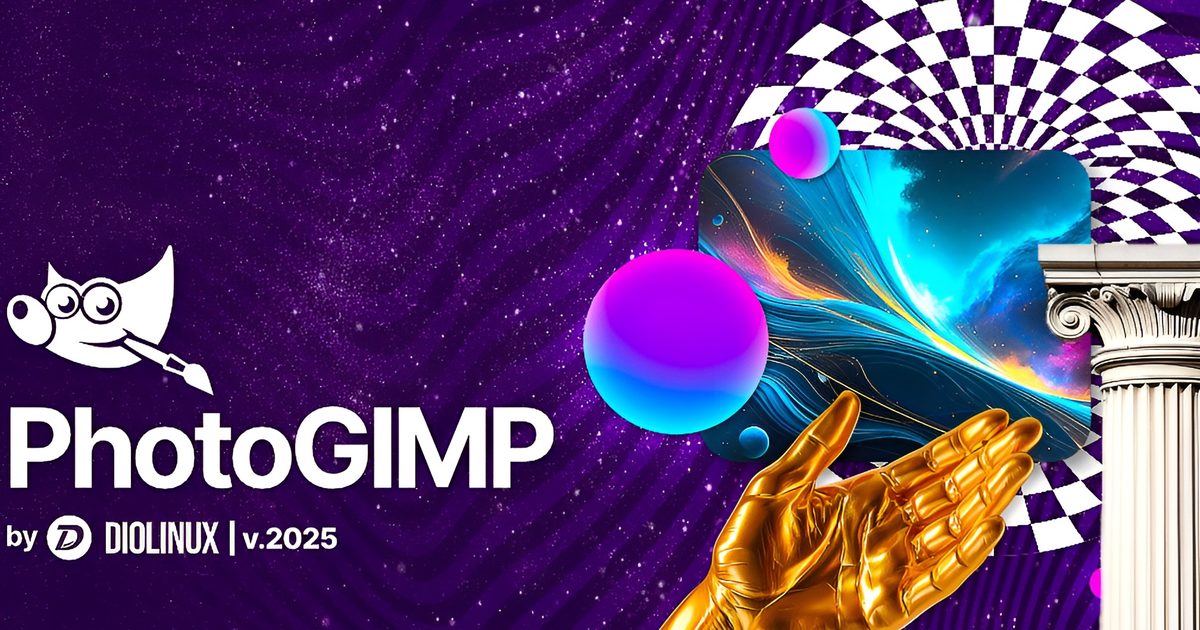
Switching from Photoshop to GIMP might feel like a big move. Everything is suddenly in the wrong place, and the UI could feel alien. This is exactly where PhotoGIMP comes in. PhotoGIMP is a free, community-driven patch for GIMP 3.0 and newer that reshapes the open-source image editor into something much more familiar for Photoshop users.
It doesn’t turn GIMP into Adobe Photoshop. The patch just shakes up the layout, shortcuts, and app identity to match Photoshop, so that new users don’t feel lost on day one.
Why PhotoGIMP is great for new users
The biggest appeal is the interface. PhotoGIMP reorganizes GIMP’s tools to mimic the layout Photoshop users are used to, while also maximizing canvas space by adjusting default settings. It also adds a custom splash screen, custom icon and app name, and a dedicated desktop launcher on Linux.
The keyboard shortcuts are another highlight. PhotoGIMP can map shortcuts to follow Adobe’s official Photoshop documentation for Windows, which should make basic editing feel less alien if muscle memory is still wired around Adobe’s tools. This is a powerful tool since GIMP has always been a great free alternative to Photoshop, but its interface can be intimidating for people used to Photoshop’s workflow.
Free, open-source, and a little DIY
Keep in mind that PhotoGIMP is not a standalone Photoshop clone. It is just a patch that overwrites GIMP’s configuration files. The project specifically says that users need to install GIMP first, open it once so it creates its config folders, close it, and then apply the PhotoGIMP files.
The project supports Linux, Windows, and macOS, with separate installation instructions for each. You’re also advised to back up any of your existing GIMP settings first, since PhotoGIMP replaces configuration files like shortcuts, tool ordering, dock layout, session settings, templates, and theme tweaks.
PhotoGIMP won’t give you Adobe’s cloud features like generative AI tools or full Photoshop compatibility. Professional users may still run into gaps depending on their workflows. But the free and open-source platform becoming a little more accessible can be useful for many.
Over the last few years, Sony gradually got PC gamers used to the idea that most major PlayStation exclusives would eventually land on Steam. Games like God of War, Spider-Man, Horizon, Ghost of Tsushima, and The Last of Us all made the jump sooner or later. But earlier this year, reports suggested that Sony was planning to stop releasing future single-player PlayStation titles on PC and keep them locked to PS5 instead. Now, it looks like those fears are finally becoming reality.
Sony reportedly wants PlayStation exclusives to stay exclusive again
Bloomberg’s Jason Schreier, who originally reported this story back in March, has now confirmed that PlayStation Studio Business CEO Hermen Hulst told staff during a Monday morning town hall that Sony will continue bringing multiplayer and live-service titles to PC. However, major single-player games like Ghost of Yotei and Saros are reportedly no longer planned for Steam releases.
SCOOP: PlayStation studio business CEO Hermen Hulst told staff in a town hall Monday morning that the company’s narrative single-player games will now be PlayStation exclusive, confirming Bloomberg’s reporting from earlier this year.Original story from March: www.bloomberg.com/news/article…
Interestingly, this is a pretty dramatic reversal from Sony’s earlier ambitions. Back in 2022, the company openly talked about expanding aggressively into PC and mobile platforms, even predicting that nearly half of its releases could eventually land outside traditional consoles.
That said, honestly, the warning signs have been visible for a while now. Several PlayStation PC ports reportedly underperformed commercially, while others launched with technical problems, PSN account controversies, or lukewarm player reception. Sony’s PC strategy also always felt strangely inconsistent, with some games arriving years later while others skipped PC entirely.
Sony probably realized exclusives sell consoles better than Steam copies
The bigger reason behind this shift may simply come down to hardware identity. Sony has spent decades building the PlayStation brand around blockbuster single-player exclusives, and the moment those same games started routinely appearing on PC, that exclusivity naturally became less meaningful.
There’s also an awkward timing factor here. Rumors strongly suggest Microsoft’s next Xbox hardware, Project Helix, could integrate PC storefronts like Steam much more deeply. If PlayStation exclusives are sitting on Steam, they theoretically become playable on competing ecosystems too, which Sony likely hates the idea of. And honestly, while PC gamers will obviously hate this move, Sony probably looked at the numbers and realized something painfully simple: selling consoles is still far more important to PlayStation than making a few extra Steam sales years later.