I have always been fully on board with the “games as an art form” argument and how esports in many ways is similar to actual sports. From the intense training regime, physical routines, to strict diets, there’s a whole team working on keeping pro players performing at their peak. And after visiting BenQ’s lab in Taiwan, I saw the real science taking place behind the scenes.
If you play competitive games, a lot of this sounds pretty obvious. Titles like Counter-Strike, Valorant, Apex Legends, and other esports are not casual screen time at the highest level. They are built on reaction speed, hand control, endurance, consistency, communication, and the ability to repeat precise actions under pressure. That is exactly what BenQ’s ZOWIE lab treats seriously.
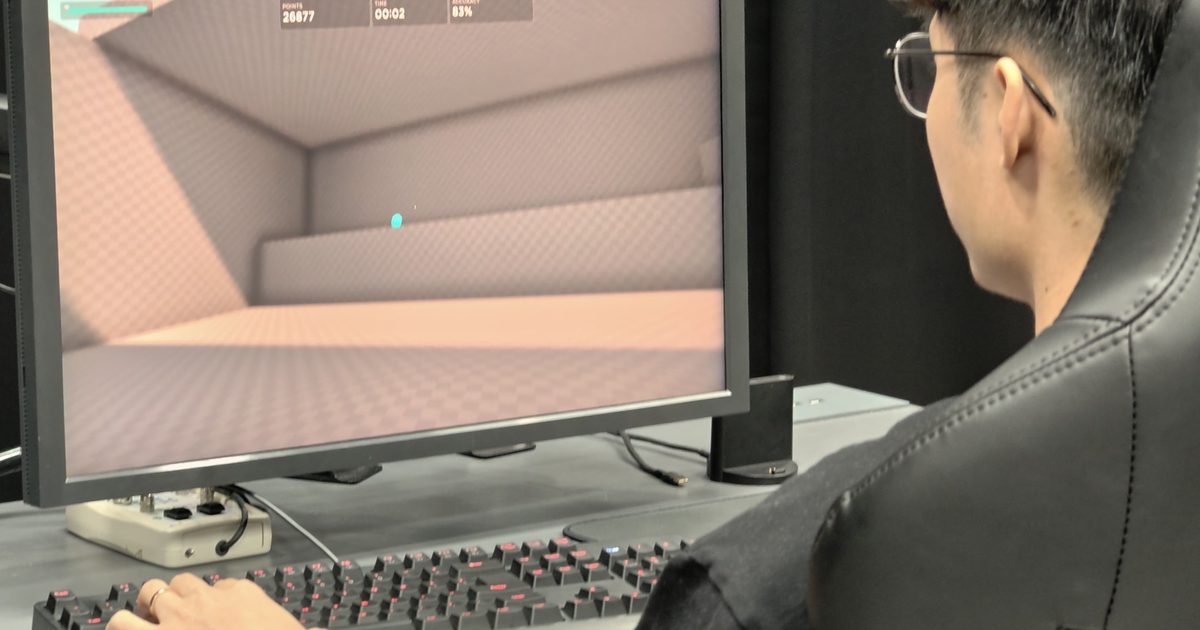
Displays and related tech are where BenQ has always had a strong reputation, but the ZOWIE side always made it clear that the company is not taking shortcuts with peripherals either. During the tour, I saw a proper lab setup with high-speed cameras, motion sensors, test stations, and detailed tracking systems designed to study how players actually interact with a mouse.
This was not just a “make it lighter and call it esports” approach either. The team talked about designing for the highest level of gaming, where tiny differences in shape, grip, movement, comfort, and fatigue can matter.
Science behind a single click
The most interesting part was seeing how deep the testing goes. ZOWIE’s mouse research team looks at qualitative interviews, grip style, hand dimensions, thermochromic ink for contact areas, game performance, motion capture, and electromyography, or EMG, to inspect muscle activation and fatigue. That already sounds like a lot of work for such a gaming peripheral. But it all serves a very important purpose.
In simpler terms, they are trying to measure why it feels good, where the hand makes contact, how the wrist moves, how fast the mouse travels, what muscles are being stressed, and whether that design actually helps performance. In the demo, the motion-capture setup felt more like something you would expect from a sports biomechanics lab than a gaming accessory company. Cameras and sensors were mapping hand posture and mouse movement while a player performed in-game tasks.
The big idea was to understand the relationship between the hand and the mouse. A mouse can feel comfortable for five minutes and still become tiring over a long session, while not every shape can support every grip style.
ZOWIE’s strengths were in the boring details
The brand has always had a very focused esports identity. Its modest designs that often lack loud RGB doesn’t inspire the average gamer–but ZOWIE never really cared about just the aesthetics. It is built around competitive function, which is exactly why a lot of pros still swear by the ZOWIE gaming mouse (especially for FPS). Over the years, this evolution has allowed it to shift its focus outside of craftsmanship and player feedback to include scientific and quantitative standards.
I am used to seeing gaming gear marketed with big claims and flashy words. What BenQ showed was something more deliberate with cameras, sensors, hand tracking, muscle data, player feedback, and a genuine attempt to understand how competitive gaming works at the body level. So it is nice to see esports getting the seriousness it deserves.
This post is brought to you in paid partnership with SKG.
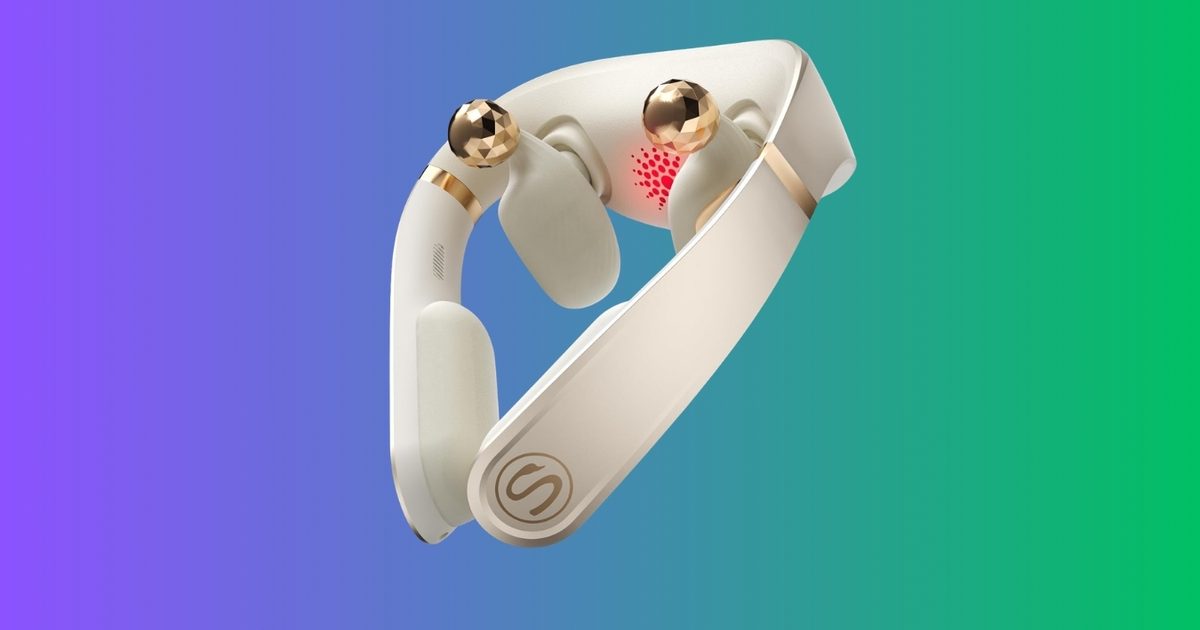
If you’ve ever given a present that vanished into a drawer by mid‑year, this one breaks the mold. The SKG PS700 neck massager retails for $199.99 and, unlike most novelty gadgets on the gifting shelf, it’s designed for everyday use. At that price and with its feature set, it can transform an evening routine, and its 360‑degree bionic kneading delivers deep‑tissue relief that cheap vibrate‑only neck devices simply can’t match.
What you get
A neck massager proves its worth in a different way than a generic massage gadget. While a vibration‑only unit merely rattles the surface, the PS700 employs bionic kneading that imitates the press‑and‑roll motion of real hands, working into the muscle instead of skimming over it. This distinction separates a tool someone reaches for after a long day from one they try a couple of times and then forget.
The red‑light heat is the feature that sets it apart from a basic heated wrap. Focused warmth loosens tight muscles before the kneading begins, creating relief that feels earned rather than superficial. It’s cordless and portable, so it can be used at a desk, on the couch, or packed in a carry‑on, without the wall‑tethering that limits cheaper models.
App and Bluetooth control round out the experience, letting the user adjust intensity and mode to personal preference, while Bluetooth music support turns it into a relaxation aid rather than just a clinical device. For a Father’s Day present, that everyday practicality is exactly the point.
Why it’s worth it
Spending $199.99 on any wellness gadget is a notable investment, so it warrants scrutiny. A massager that offers genuine kneading mechanics, heat therapy, and app control provides a feature set that comparable premium neck devices charge similar or higher prices for—often without the cordless convenience. The PS700’s combination of kneading and warmth keeps it competitive within the category.
Bottom line
The SKG PS700 at $199.99 is the Father’s Day gift that’s hard to dismiss once you see what it actually does. The 360‑degree bionic kneading, red‑light warmth, and cordless, app‑controlled design make it a device that gets used daily rather than shelved, and that everyday utility justifies the expense for the dad who claims he doesn’t need anything.
For years, Bluetooth speakers have followed a familiar formula: better sound, longer battery life, maybe a splash of waterproofing, and then onto the next model. Marshall’s new Stockwell III certainly checks those boxes, but its most interesting upgrade isn’t about audio at all. It’s about staying alive longer.
The Stockwell III arrives as Marshall’s first refresh of the portable speaker since 2019, carrying forward the same road‑ready design with its signature carrying strap and retro‑inspired aesthetic. At first glance, it looks like a predictable update. Underneath, however, Marshall is making a subtle but meaningful shift toward repairability.
**The battery isn’t the end of the story anymore**
It comes with a replaceable battery, a rarity in modern portable audio products. While most Bluetooth speakers are effectively on a countdown clock from the day they’re purchased, the Stockwell III offers a way to extend its lifespan as the battery inevitably wears out.
Anyone who has owned a portable speaker for several years knows that battery degradation often becomes the reason a perfectly functional device ends up in a drawer. By making the battery replaceable, Marshall is addressing one of the biggest weaknesses of portable electronics.
The company has also doubled battery life, increasing the Stockwell III’s playback time from 20 hours to more than 40 hours. That means fewer charging cycles over time and, theoretically, a longer‑lasting product overall.
Marshall isn’t stopping with the battery, either. Owners can replace the carrying strap, the front and rear grilles, and even the protective outer sleeve. It’s the kind of design philosophy that feels increasingly relevant as consumers become more conscious of electronic waste and the rising cost of replacing gadgets every few years.
**A speaker that ages a little more gracefully**
The repair‑friendly approach has another benefit: resale value. A worn‑out strap, scuffed exterior, or aging battery can make even premium speakers look tired. Being able to swap out those parts could help keep the Stockwell III looking and functioning closer to new, long after purchase.
Beyond longevity, Marshall has made several practical upgrades. The speaker now doubles as a USB‑C power bank for charging other devices, and its durability has improved with an IP55 rating that offers better protection against dust and water exposure. The brass control panel has also been refreshed with a customizable sound‑profile button and dedicated media controls.
The Stockwell III still aims to be a portable speaker. It just happens to be one that’s designed to stick around for a lot longer than most.
A humanoid robot called Pemba has made it to the top of Ecuador’s Chimborazo volcano, a 20,341‑foot peak that adds a chilly backdrop to the whole robots‑are‑coming narrative.
The ascent is noteworthy, yet the details reveal that the robot relied heavily on its support crew. Pemba, a modified Unitree G1, completed the 16‑hour push to the summit with aid from its team. The robot navigated on its own over easier terrain, while people carried it through steeper, more technical sections.
Introducing Pemba.The first humanoid to climb to 20,000ft.Everest next. More below. pic.twitter.com/k1BHkRLYjm
— pabs (@pabloberlangab) June 7, 2026
This turns the feat into less of a solo robot conquest of the Andes and more of a rigorous field trial with a dramatic climax. Although Pemba still needed human strength, it was exposed to conditions that most laboratory demonstrations never encounter.
How much of the climb was actually done by Pemba?
The robot moved independently on slopes under 30 degrees, which remains a significant test for a humanoid machine at altitude.
On the steeper, more technical parts, expedition members lifted the robot, making the summit a hybrid human‑machine climb rather than a fully autonomous one.
This caveat doesn’t diminish the accomplishment. Chimborazo added snow, cold, uneven ground, thin air, and battery strain to the usual robotics challenges—conditions far harder to simulate than a showroom floor.
Why take a robot up a volcano?
Pemba is being used to evaluate whether humanoid robots can operate in environments where humans face real danger and conventional machines struggle.
A humanoid equipped with cameras, environmental sensors, satellite connectivity, and onboard AI could patrol protected zones, gather data, or inspect terrain without the need for thousands of fixed cameras scattered across remote areas.
This application is less flashy than a volcano summit, but it is far more convincing. If a robot can endure altitude, freezing temperatures, rough ground, weak communications, and power limits, it moves closer to being useful in disaster zones, conservation areas, and other places where sending a person is costly, slow, and hazardous.
What’s next before tackling Everest?
Pemba’s next major objective is Everest, but the project is already hitting paperwork hurdles. Geologic Dome and Nepal‑based Fourteen Peaks Expedition have proposed testing a humanoid robot between Everest Base Camp and Camp IV, where it could collect data on battery performance, joint stress, locomotion, and environmental resilience.
The obstacle is oddly fitting. Nepal reportedly lacks a legal framework for robotic expeditions on Everest, so officials are seeking rules for non‑human climbers before the project proceeds.
It may sound absurd, but it is probably the appropriate kind of boring. Fragile, dangerous, heavily managed environments need regulations before robots join the queue. A machine that fails on a mountain could become an obstacle, a rescue problem, or simply expensive trash.
I bought into the reMarkable dream years ago and tried multiple slates, but the Paper Pure is the version I keep coming back to. At $399, it’s the entry-level E Ink tablet from the brand that finally retires the aging reMarkable 2, and it does so by stripping away almost everything you’d expect from a 2026 gadget.
There’s no color screen, no front light, no keyboard. All you get is a pad and a pen, taken about as seriously as anyone has ever taken them. Underneath, a faster dual-core processor, 2GB of RAM, and 32GB of storage make it noticeably snappier than the device it replaces. The move from an aluminum body to textured plastic drops the weight to a feathery 360g, which your arms will thank you for. The 10.3-inch Canvas display serves up gorgeous, paper-crisp black-and-white contrast.
On the darker side of the value debate, the deliberate absence of a backlight kneecaps it in low light, and the missing keyboard support locks it into handwriting alone. Several of the smartest software tricks, such as calendar sync and handwriting-to-text, sit behind the Connect subscription, which stings. And yet, for students, writers, and professionals who want a flawlessly executed minimalist notebook with an unbeatable note-taking feel, the Paper Pure is still the best place to start.
reMarkable Paper Pure specs: What’s fitted inside the shell?
Size and weight
228.1 x 187.1 x 6.0 mm (8.9 x 7.4 x 0.24 inches); Approximately 360 g (0.79 lb)
Sensors detect when the device is placed inside a Sleeve Folio
Operating system
reMarkable OS (a custom, Linux-based operating system for digital paper displays)
Document support
Importing: PDF, EPUB
Exporting: PDF, PNG, SVG
System language
English, German, French, Spanish
Handwriting conversion
Feature powered by MyScript
Apps and extensions
Companion apps available for macOS, Windows, iOS, and Android; Read on reMarkable extensions available for Google Chrome and Microsoft Office
Cloud storage
Sync files with the reMarkable cloud (unlimited cloud storage upgrade available with Connect)
Connect
Access to exclusive templates, full cloud storage, and cross-device note editing from phone or laptop via subscription
Security
Data encryption (on device, at rest, and in transit), Multifactor authentication, Secure boot, Developer mode, Optional passcode, Auto-locks after 20 minutes of inactivity
reMarkable Paper Pure design and build quality: Clean, light, and fulfilling
Whenever a tech company swaps a beloved, premium device for a cheaper alternative, I brace for the letdown. The moment the plastic creaks, the magic evaporates. reMarkable escaped that trap handsomely with the Paper Pure. Yes, the headline change from the reMarkable 2 is the jump from cold, brushed aluminum to a textured plastic shell, but the result feels less like cost-cutting and more like a genuinely smart bit of engineering.
At 7.4 x 8.9 inches across, and with a 6mm waistline, the tablet carries the proportions of a slim steno pad. The real surprise, though, is the weight. At 360 grams (0.79 pounds), the Paper Pure sheds plenty of heft compared to the reMarkable 2 and dramatically undercuts the Paper Pro. That difference reshapes the whole experience.
You can hold it one-handed through a long reading or sketching session without that familiar forearm clench you get while gripping an iPad. It feels almost weightless, yet it stays rigid and sturdy, with practically zero flex when you press on it, except for a teensy wobble on a dead-flat table.
reMarkable has poured a real sustainability ethos into the Paper Pure. The device is built from recycled materials, including all the lithium and cobalt in its battery, and the company sourced recycled magnesium for the internal core frame to keep the chassis rigid without piling on grams. The biggest surprise, however, waits on the back.
Once you flip it over, you’ll find ten exposed plastic screws holding the backplate in place. Instead of the adhesive glue traps that modern electronics love to bury inside, the Paper Pure uses screws and snaps. That’s a pointed nod to the EU’s right-to-repair push, and it hints at a device engineered for a five-year life rather than a two-year upgrade churn.
The tablet wears a uniform white bezel on three sides, with a pronounced, thicker bezel along the left edge. That fatter strip doubles as a thumb-sized resting spot, so you can grip the slate without smudging your strokes. The interface flips cleanly for left-handed users, in case you’re wondering. The back and sides carry a subtly textured, grayish plastic that’s welcoming and room-temperature to the touch, which is a world away from the cold metallic feel of the older models.
There’s one hardware omission worth flagging, though. There are no pogo pins. Unlike the Pro models, the Paper Pure won’t take a Type Folio keyboard, because reMarkable sees this strictly as a pen-and-paper replacement. Needless to say, typists will feel the cold shoulder.
For protection, there’s a new polymer-weave Sleeve Folio in Mist Green, Desert Pink, and Ocean Blue. I got the green one, and it’s simply stunning. Where the old magnetic book folios left the edges exposed, this one wraps the whole device, shielding it nicely in a crowded backpack and putting the tablet to sleep the moment you slide it in.
Score: 9/10
reMarkable Paper Pure writing experience: In a league of its own
The entire reason Paper Pure exists comes down to one promise, and that’s making digital writing feel like the real thing. And at this crucial test, it serves an absolute masterclass. The Paper Pure runs a 10.3-inch monochrome Canvas display built on E Ink’s Carta 1300 technology. The 226 pixel-per-inch (ppi) resolution matches its predecessor, but the panel’s generational leap is impossible to miss.
The screen is far whiter. The contrast is much higher, and the rich black ink sits sharply against it with barely any pixelation even when you zoom into your handwriting. If you’re coming from the reMarkable 2, the change in physical sensation is immediate. The old model felt incredibly soft, like dragging a fat felt-tip across the very first page of a fresh Moleskine.
The Paper Pure, borrowing the flagship Paper Pro’s custom textured glass and active stylus, feels firmer and smoother. It’s much closer to writing with a biro on the last few pages of a well-worn legal pad. There’s a deeply satisfying resistance that nails the friction of real paper, complete with a faint, authentic tap each time the nib meets the glass.
Latency has been tightened to a blistering 21 milliseconds. It’s not quite the 12ms of the pricier Paper Pro, but the digital ink lands under your pen faster than you can blink. Line weight tracks pressure cleanly across the Marker’s range, too. As a result, even a quick, forceful checkbox reads completely differently from a light, sweeping underline.
The Paper Pure uses reMarkable’s new active stylus, leaving the passive EMR pens of the yore behind. The standard Marker does the job beautifully, but the upgraded Marker Plus, armed with a sensor on its back end that turns it into a physical eraser, is far better for keeping your creative flow intact. Both pens snap magnetically to the right edge of the chassis and charge wirelessly there.
Alright, we have to talk about the elephant in the room here. The Paper Pure has no built-in front light. reMarkable defends the omission as an intentional choice to mimic the real feeling of writing on paper. The minimalist logic makes sense. Real paper doesn’t glow, after all, but for a modern user in the age of iPads everywhere, it’s maddening.
If your day revolves around sketching in bright daylight or scribbling in a fluorescent-lit conference room, the Paper Pure is phenomenal. The textured screen fights glare beautifully, softening the harsh reflections from overhead lights into a gentle, unobtrusive glow.
But the second the sun goes down, you’re at the mercy of whatever light is in the room. If you like journaling in bed while your partner sleeps, or taking notes in a dim lecture hall, the Paper Pure will leave you literally in the dark. In 2026, no illumination on a $399 device is a bitter pill to swallow.
Score: 9/10
reMarkable Paper Pure software: Barebones for a purpose, but vexing, too
reMarkable’s custom OS is still a sanctuary for deep focus. There’s no web browser, no app store, and not a single push notification to be found. But distraction-free no longer has to mean frustratingly feature-devoid. reMarkable has loaded the Paper Pure with several genuinely powerful, enterprise-minded tools, but with a few caveats attached.
One of the standout additions is native calendar sync for Google and Outlook. You can access it through the web portal, and a calendar icon will appear on your home screen. The catch, however, is that it only allows a single calendar integration and can’t pull in shared team calendars, which dulls its edge for collaborative work.
reMarkable wisely skipped the generative-AI bloatware everyone else is chasing, leaning instead on machine learning for optical character recognition (OCR). The “Convert and Share” feature reads your handwritten pages and transcribes them into typed text, after which you can email them or spin up a shareable web link that shows your original handwriting beside the transcription.
This convenience goes a long way if you intend to pass whiteboard-style brainstorming fruits to colleagues. Accuracy, however, is a mixed bag. If you take notes with the digital fineliner or ballpoint tools, the OCR is remarkably sharp.
But if you try to flex your calligraphy skills with the stylized pens, or your own irredemable handwriting, the AI starts to stutter. There’s a learning curve to the formatting, too. If you’re making a list, you have to draw a physical dash before each item, or the AI mashes everything into one unreadable block.
The Paper Pure shines in a modern office thanks to its screen-sharing chops. Connect the tablet to your computer (over USB-C or wirelessly through the web client), and you can mirror its screen in real-time. reMarkable even tucked in a lovely touch. As you hover the Marker a few millimeters above the display, it becomes a digital laser pointer.
Cloud support also decent, with direct syncing to Google Drive, Microsoft OneDrive, and Dropbox. You can import PDFs, mark them up with a range of highlighter tools, and push them right back to your cloud container. On the flip side, the drive view on the tablet misses out on a universal search feature. Your best bet is to create a dedicated folder so that all the files destined for the Remarkable Paper Pure can be found and easily imported from a unified drive container.
The big asterisk hanging over all of this is the “Connect” subscription. At $3.99 per month (or $39 annually), it walls off several of the tablet’s best features. If you skip it, you lose calendar integration, keyword search across your handwritten notes, one-tap send to Slack, and unlimited cloud storage. Free users are limited to syncing files edited within the last 50 days. The tablet still works well without it, but restricting something as basic as handwriting search on a dedicated note-taker feels a tad too harsh.
Hey reMarkable, loosen up a bit on the software, unless simplicity is there by design and paramount!
Looking over at the competition, Amazon’s Kindle Scribe Colorsoft offers a more rewarding software experience. Boox, on the other hand, delivers the full-fledged Android experience on its E Ink slates such as Note Air 5C. Even the dirt-cheap and utterly tiny Xteink X4 lets you install the community-driven Crosspoint firmware that supercharges the software experience.
Score: 7/10
reMarkable Paper Pure battery life: A job well done
If there’s one area where the Paper Pure simply runs away from the competition, it’s endurance. By ditching the power-hungry frontlight and color display of the Paper Pro and packing a hefty 3,820mAh lithium-ion cell inside the frame, reMarkable has pulled off some staggering longevity.
Officially, the company claims up to three weeks on a charge, figuring roughly an hour of daily note-taking and reading. Based on plenty of real-world use, that estimate isn’t totally accurate. At best, it may be conservative. Even under heavy, punishing days of writing, PDF markup, and constant cloud syncing, the device barely sips power. I went two straight weeks of heavy use without ever watching the battery dip low enough to spark any charging anxiety.
The E Ink Carta 1300 display deserves a bulk of the credit, drawing power only when its microscopic ink capsules physically flip state during a page turn or a pen stroke. Because the screen leans on ambient room light rather than an internal LED array, you can leave a document open on your desk for hours and watch it drain virtually nothing.
The active Marker stylus is just as impressive. It sips power straight from the tablet whenever it’s magnetically docked on the right bezel, and the charging is so quick and seamless that you’ll likely never run into a dead stylus. It juices itself up every time you set it down. When the tablet itself finally needs a refill, it charges over a standard USB-C port on the bottom edge and takes over two hours to fill up the drained tank.
Score: 8/10
Should you buy?
The reMarkable Paper Pure is a beautifully designed and fiercely specific tool that nails one job while cheerfully ignoring everything else. Whether you should buy it really comes down to knowing exactly what kind of user you are. At $399 for the base tablet and standard Marker, the Paper Pure is the cheapest way into the reMarkable world. But the smarter buy is the $449 bundle, which folds in the superior Marker Plus (with its built-in eraser) and the lovely Sleeve Folio. When compared against the reMarkable 2, this one looks like a much more palatable deal.
If you’re a student digitizing your lecture notebooks, an architect sketching out blueprints, or a professional desperate to escape the notification fatigue of an iPad, the Paper Pure is a revelation. It’s built for the purist who wants a device that demands focus. The snappier processor, enhanced RAM, and 32GB of storage make it a massive step up from the reMarkable 2, ending the pain of sluggish menus and laggy page turns. It offers the best handwriting feel on the market, by a mile, while staying wrapped in a durable, lightweight body you can carry all day without noticing.
If your workflow needs flexibility, look elsewhere. The total lack of a front light is a dealbreaker for anyone who reads or writes in bed, on a dark plane, or in a dim lecture hall. If you’d rather type than handwrite, the missing keyboard folio support makes this useless for any long-form word processing. Moreover, heavy readers should note that the 226 PPI screen comes off slightly fuzzy for long ebook sessions next to the crisp 300 PPI panels on modern e-readers.
Why not try
Amazon Kindle Scribe (2024) — If you want a device that balances note-taking with a world-class reading experience, the Kindle Scribe is the one to beat. Priced identically to the Paper Pure, it delivers a far sharper 300 ppi display and, crucially, a built-in frontlight with adjustable warmth for night-time reading. You also get direct access to Amazon’s vast Kindle store and a tidy Kindle Unlimited integration. Its glass screen feels a touch more slippery and doesn’t quite match reMarkable’s friction-heavy paper feel, but it more than makes up for that in versatility.
reMarkable Paper Pro — If you love the reMarkable software but refuse to give up premium hardware, the flagship Paper Pro is the obvious step up. Its larger 11.8-inch display uses E Ink Gallery 3 technology to bring soft, muted color to your highlights and sketches. Plus, it offers the built-in front light that fixes the Paper Pure’s biggest weakness. The Pro model also adds pogo pins to connect with reMarkable’s Type Folio keyboard and become a distraction-free e-ink typewriter. It’s heavier and pricier, but it’s the complete, uncompromised reMarkable.
Onyx Boox Go 10.3 — For anyone who balks at the idea of closed ecosystems and paywalled features, the Boox Go 10.3 is a fantastic alternative. It runs full Android, which means direct access to the Google Play Store. You can install the Kindle app for reading, Microsoft OneNote for your enterprise notebooks, Libby for library loans, and even lightweight email clients. It packs a crisp 300 ppi screen and delivers a seriously low latency. It can’t match the foolproof, distraction-free simplicity of the reMarkable, however. Plus, Android on e-ink occasionally feels clunky.
Amazon Kindle Scribe (2024) — If you want a device that balances note-taking with a world-class reading experience, the Kindle Scribe is the one to beat. Priced identically to the Paper Pure, it delivers a far sharper 300 ppi display and, crucially, a built-in frontlight with adjustable warmth for night-time reading. You also get direct access to Amazon’s vast Kindle store and a tidy Kindle Unlimited integration. Its glass screen feels a touch more slippery and doesn’t quite match reMarkable’s friction-heavy paper feel, but it more than makes up for that in versatility.
reMarkable Paper Pro — If you love the reMarkable software but refuse to give up premium hardware, the flagship Paper Pro is the obvious step up. Its larger 11.8-inch display uses E Ink Gallery 3 technology to bring soft, muted color to your highlights and sketches. Plus, it offers the built-in front light that fixes the Paper Pure’s biggest weakness. The Pro model also adds pogo pins to connect with reMarkable’s Type Folio keyboard and become a distraction-free e-ink typewriter. It’s heavier and pricier, but it’s the complete, uncompromised reMarkable.
Onyx Boox Go 10.3 — For anyone who balks at the idea of closed ecosystems and paywalled features, the Boox Go 10.3 is a fantastic alternative. It runs full Android, which means direct access to the Google Play Store. You can install the Kindle app for reading, Microsoft OneNote for your enterprise notebooks, Libby for library loans, and even lightweight email clients. It packs a crisp 300 ppi screen and delivers a seriously low latency. It can’t match the foolproof, distraction-free simplicity of the reMarkable, however. Plus, Android on e-ink occasionally feels clunky.
How we tested
I replaced my trusty Kindle Scribe Colorsoft with the reMarkable Paper Pure for over a month. During that spell, I linked it to my Google Drive account and calendar. For reading duties, I imported EPUB books downloaded from open libraries such as the Gutenberg Project and converted plenty of articles using the Remarkable extension installed on the Google Chrome browser.
During the test period, I only charged the remarkable slate once, and that too, using a generic USB Type-C cable and a 45 W adapter. The stylus was always connected to the slate. Note-taking duties were restricted to the built-in app, and all the syncing was handled over a stable 200Mbps Wi-Fi network.
To test the handwriting experience, I compared this slate against the Onyx Books Note 5C and the Kindle Scribe Colorsoft. For a neutral perspective, I also handed these three slates to at least half a dozen people in my friend and family circle to properly gauge their opinion on the note-taking feel of these three comparable products.
There is a quiet shift in how we experience daily life. In an era of constant notifications and digital noise, our devices shouldn’t compete for our attention. They should rather blend into our rhythm. We want to capture, share, and remember more without reaching for a screen every single minute.
Modern technology is constantly bridging the gap between documenting the moment and actually living in it, moving away from bulky and distracting hardware toward invisible integration. L’Atitude 52°N embodies this evolution. It is more than just another smart wearable that sits on your face and overwhelms the senses. It’s where intelligent technology finally fades into the background.
When Iconic Style meets Invisible Tech
On first impression, there’s nothing overtly “techy” about the L’Atitude 52°N smart glasses. They feel like the usual stylish frames that I’d pick out. The ooze classic appeal, happens to be pretty lightweight (40 gms without lenses), and offer well-balanced proportions. Inspired by iconic silhouettes like the Milan panto and Berlin navigator, these frames are designed for all-day wear without becoming a distraction. Beyond the lenses, photochromic variants automatically adjust to the changing light, so you just put them on and get on with your day.
This effortlessness is intentional, and that’s where the brand philosophy comes through. By keeping design as the core focus, the L’Atitude 52°N lets innovation sit beneath the surface, without forcing the wearers to adapt to tech. Within that minimalist design sits a Sony 12MP camera paired with a 6nm AI imaging chip. The imaging kit can shoot 1080p videos with a 107° ultra-wide field of view, effortlessly capturing memories from a human-eye perspective.
In practice, that style-first approach proves its worth, removing the need for awkward pauses to frame a shot. Whether you are taking a leisurely walk or exploring a new city, the experience remains fluid. When capturing a moment is this seamless, you’ll rarely feel the need to reach for your phone.
The same discipline also applies to the exterior quality. The L’Atitude 52°N smart glasses aren’t your usual delicate gadget. These stylish frames come with an IP65-tier ingress protection, providing reliable dust and water resistance.
Furthermore, the diamond-like carbon hinges are three times stronger than steel and have been tested for over 20,000 folding and unfolding cycles. It’s crafted for modern travelers who demand durability without compromise, all without feeling over-engineered. This holistic approach is what earned the prestigious Red Dot Award: Product Design 2026 for the L’Atitude 52°N smart glasses.
Built with Intelligence that Moves with You
At its core, the L’Atitude 52°N smart glasses bring AI into the real-world environment with a heavy focus on subtlety and integration into your real-life activities. Interactions stay fluid and entirely hands-free. By summoning the on-board AI assistant with the “Hey Goya” voice command, you can trigger an instant response.
The AI Tour Guide perfectly illustrates this hands-free philosophy. It offers short, yet insightful commentary on the landmarks or local spots you explore, through simple gestures. This makes solo travelling easier, informed and intuitive, without the need to tirelessly surf or scroll the web, wondering where to go next. At the end of the day, these glasses feel more like a quiet companion than a robotic device.
These smart conveniences also enhance the ease of staying connected, thanks to the Real-time translation. Ultimately, conversations flow naturally, allowing stress-free travel while shattering the language barriers. For group adventures, the offline mesh intercom supports up to eight users, keeping everyone in sync even during poor network coverage.
With open-ear speakers, microphones, and on-device processing seamlessly built into the frame, every interaction feels natural and seamless. All your tasks run smoothly in the background, while the mobile app ties everything together. Privacy, too, follows the same philosophy of staying out of your way. It is built directly into the core experience, offering clear, granular control over what is captured so you never have to worry about recording more than you intended.
Such hands-free intelligence is only the beginning. L’Atitude is also taking a more transparent approach to how its software evolves following user needs, with plans to introduce enhanced image and multi-category recognition in future releases. Supporting that experience is a two-tier Goya AI subscription model designed to keep things flexible over time.
Basic Edition (Free): Comes with 100 to 200 minutes of AI features per month, including AI Q&A for exhibits and scenarios, real-time translation across five languages (German, Italian, French, Spanish, and English), as well as concise guided tours in exhibits. Usage will be metered only when active and can also be paused, with service pausing automatically once the limit is reached. During its 12-month trial period, however, users receive Pro-level access with unlimited use of all features before transitioning back to the Basic tier.
Advanced Edition (Pro): Expected to cost about $20 per month, this tier is precisely made for users who want extended AI access alongside immersive guided tours with interactive, music-integrated experiences.
Basic Edition (Free): Comes with 100 to 200 minutes of AI features per month, including AI Q&A for exhibits and scenarios, real-time translation across five languages (German, Italian, French, Spanish, and English), as well as concise guided tours in exhibits. Usage will be metered only when active and can also be paused, with service pausing automatically once the limit is reached. During its 12-month trial period, however, users receive Pro-level access with unlimited use of all features before transitioning back to the Basic tier.
Advanced Edition (Pro): Expected to cost about $20 per month, this tier is precisely made for users who want extended AI access alongside immersive guided tours with interactive, music-integrated experiences.
To round it off, there’s also ample opportunity to explore what more these glasses can do. If you purchase these glasses before December 31, 2026, you’ll receive a 12-month AI feature trial (60 min/day), with access to present as well as the forthcoming features designed for everyday use. After the trial, a free Basic tier will remain available, with an optional upgraded plan for extended access and more advanced capabilities. Full details can be found on the official website.
For users who want to actively contribute to shaping the forthcoming updates, L’Atitude also encourages sharing feedback by joining the Discord community as the platform continues to evolve.
Why L’Atitude 52°N is Worth Considering
The L’Atitude 52°N smart glasses are now available for purchase through the company’s website. The BERLIN model is priced at $399, €399, and £349 in two colors — Obsidian and Dune — while the version with photochromic lenses comes in at $449, €449, and £389. Buyers can also take advantage of a limited-time $100 voucher available through June 30. The MILAN model will launch later in Q2 2026, and users can access the same voucher by paying $1 to unlock it.
Overall, the L’Atitude 52°N smart glasses aren’t about adding more tech to your life. Instead, they serve as an outlet to move away from cumbersome screens or hardware, evolving into a tool that helps you reclaim your focus. In a world defined by constant digital buzz, this is what next-gen innovation looks like. It’s quiet, considerate, and precisely made to step back so you can stay present in every moment.
Apple’s WWDC 2026 event was packed with major software announcements, including its new Siri AI experience, expanded child safety tools, and the latest operating system updates for its phones, Macs, and iPads. It was only a matter of time before someone dug out something interesting from the new software, and developer Sam Henri Gold might have just found the biggest clue yet that Apple is planning to launch a foldable iPhone soon.
iOS 27 is quietly preparing apps for a foldable future
Sam Henri Gold recently took to X to post that he found several references inside the iOS 27 framework that appear closely tied to foldable hardware. These include “foldState,” “angleDegrees,” and a key related to the number of built-in displays.
iOS 27 framework references “foldState” and “angleDegrees” but I’m sure that’s nothing pic.twitter.com/PcYNVvymms
Interestingly, the Platforms State of the Union presented at WWDC26 also mentioned new changes coming to SwiftUI, with Apple pushing developers to make apps work better across different screen sizes and aspect ratios. That connects well with Gold’s findings. A foldable iPhone would need apps to adjust smoothly when moving from a smaller outer display to a larger inner screen. It would also need iOS to understand whether the phone is closed, open, or resting at an angle.
The rumored iPhone Ultra may borrow its best idea from the iPad
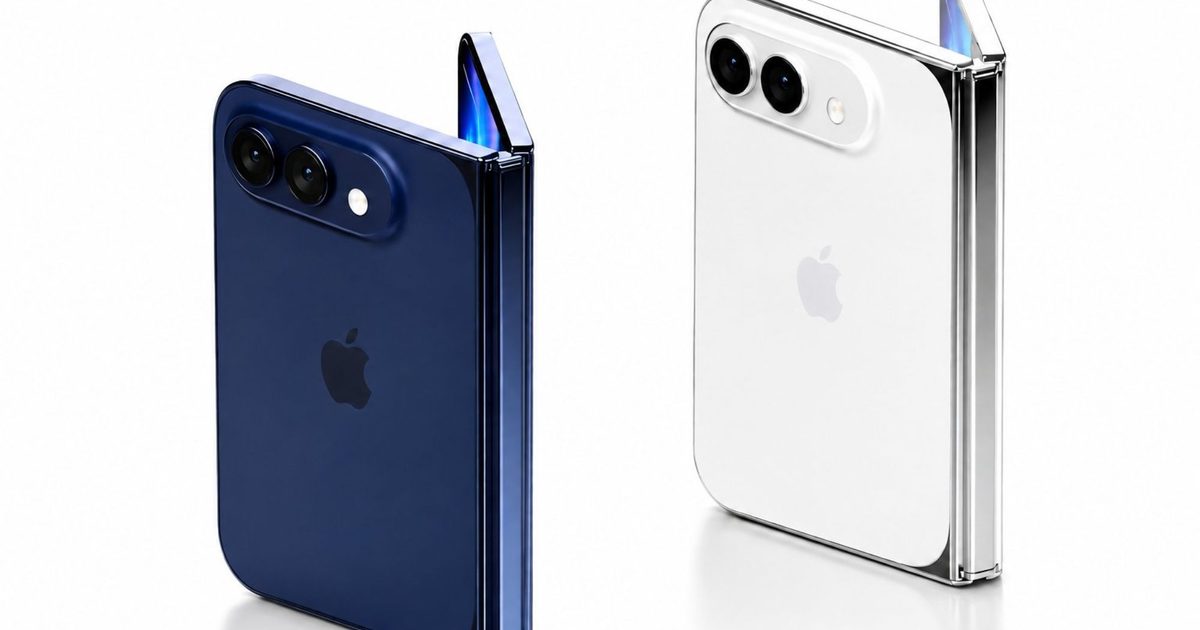
The rumored foldable iPhone, often referred to as the iPhone Ultra, is expected to behave more like a small iPad when opened. It is rumored to feature a 7.76- to 7.8-inch OLED inner display with a 4:3 aspect ratio, along with a 5.3- to 5.5-inch outer OLED screen.
A 4:3 inner display closely matches the aspect ratio Apple has used on the iPad for years. That shape is well suited for reading, web browsing, multitasking, and split-screen app layouts. If Apple adopts the same approach for the iPhone Ultra, the unfolded device could deliver an experience that feels much closer to using a compact iPad than a traditional foldable smartphone like the Samsung Galaxy Z Fold 7.
Speaking of Samsung, the company seems to be heading in the same direction. Its rumored Galaxy Z Fold Wide is expected to use a broader, more tablet-like design, making it a more direct rival to Apple’s expected iPhone Ultra than the current Galaxy Z Fold 7. It may take some getting used to, but this wider form factor is closer to what foldables were meant to be from the start: a tablet that folds down into a smartphone you can easily carry in your pocket.
Safari has never been the browser people pick for a massive add-on library. Chrome has long been the obvious choice for that, while Apple’s browser has leaned harder on speed, battery life, privacy, and tight integration across its own devices.
Now Apple is trying a different fix. Announced at Apple WWDC, Safari will let users describe the extension they want and have Apple Intelligence create it. That turns Safari AI extensions into personal web tweaks instead of another thing to search for, install, and hope someone maintains.
The custom extension builder arrives alongside smarter tab grouping, page monitoring through Notify Me, and automated password updates through the Passwords app. The extension feature is the sharpest of the bunch because it gives Safari a new answer to one of its oldest weak spots.
Why Safari is not copying Chrome
With Describe an Extension, users can explain what they want in plain language, such as a button that changes how a webpage behaves or saves something for later. That could help with tiny annoyances too specific for a polished extension store listing.
Safari also becomes less dependent on someone else building the exact add-on a user needs. A recipe shortcut, a cleaner shopping page, or a small rating button may not deserve a public extension, but it could still work as a private browser fix.
What else Safari can clean up
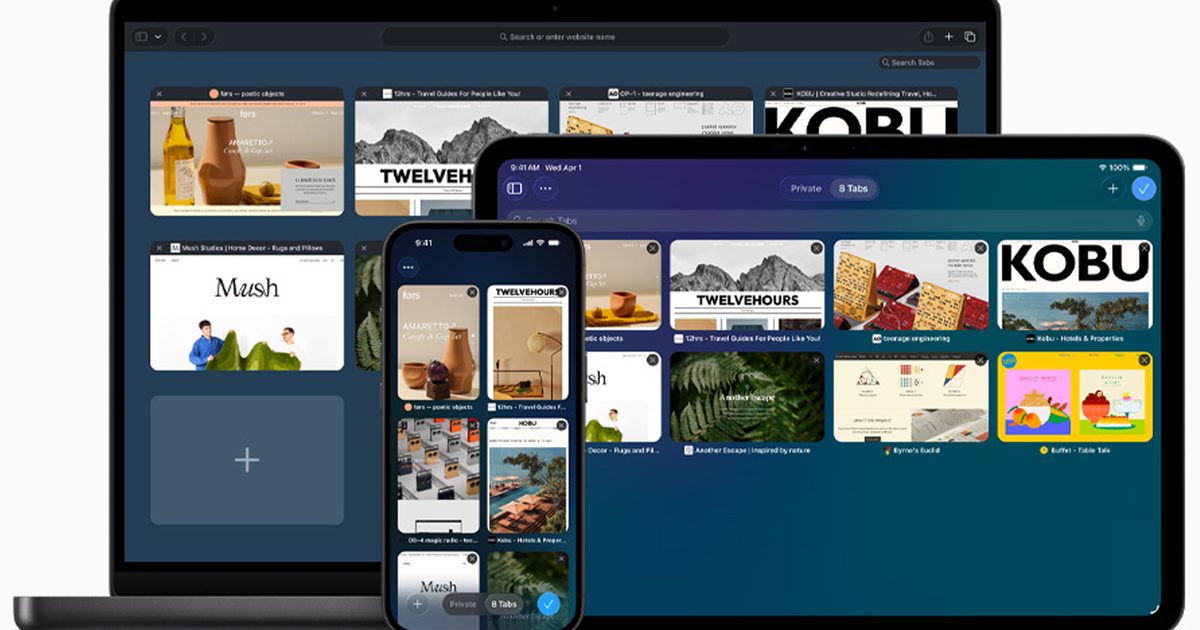
Safari’s other AI features target the clutter people create while browsing. Intelligent Tab Management can analyze open pages, spot similarities, and group related tabs into topics. As browsing continues, Safari can add new related pages to the same topic, then let users close the pile or save it as a Tab Group.
Notify Me goes after the tab you keep open because you’re waiting for something to change. Instead of babysitting a restock page or signup form, you can tell Safari what to watch for, close the page, and wait for a notification.
What Safari needs to prove
Generated extensions will only feel safe if Safari makes them easy to understand and control. A personal add-on that changes webpages sounds useful, but users need to know what it can see, what it can change, and how quickly they can shut it down when it behaves badly.
Apple says Safari’s new intelligence is designed to avoid sharing sensitive browsing data with anyone, including Apple. That claim still has to translate into something users can see and manage on the device itself.
For anyone who has ever searched for a browser extension and immediately regretted the internet, this could be the more interesting fix. Safari does not need a mountain of add-ons if the small ones feel safe enough to create.
Apple gave Siri a major glow‑up at WWDC 2026, and one of my favorite parts is how it now lives right inside your iPhone’s camera app. With a brand‑new Siri mode, your camera becomes a tool for understanding the world around you, not just snapping photos of it. Let me explain how it works.
### How does the new camera Siri mode work?
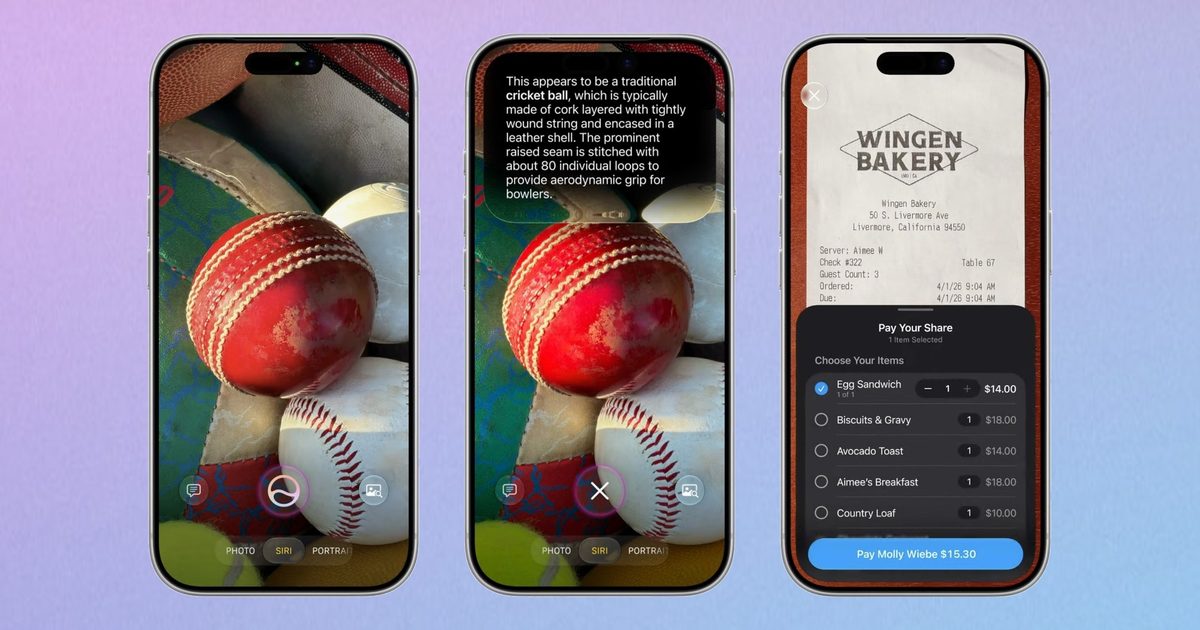
Siri now offers powerful visual‑intelligence features directly from the camera app via a new Siri mode. You can activate it by swiping on the mode bar that currently lets you switch between photo, video, and other modes.
Once you’re in Siri mode, simply point the phone at something, tap the shutter button, and Siri interprets what it sees, delivering a helpful response. Pull down for richer details and ask follow‑up questions if you want to dig deeper.
The best part for privacy‑conscious users is that all of these capabilities run on Apple Foundation models using private‑cloud compute, keeping your data safe. Your images and conversations are also stored in the new Siri app, so you can revisit them whenever you like.
### What can you use it for?
Siri mode suggests relevant actions in real time based on what’s in front of you. Point your iPhone at a plate of food, and it will provide nutritional information. Out for a meal with friends? Aim the camera at the bill, select what you ordered, and split the tab with Apple Cash right there—no awkward math at the table.
Combine this with AI tools in the Photos app that let you reframe shots, erase unwanted objects, and extend images, and the new Siri camera upgrade becomes a compelling addition.
It’s a modest tweak to how you use your camera, but I think it will change how often you reach for it. I can’t wait to try it out.