Author: TechGeeks

  • Motorola Razr Fold review: The foldable surprise I didn’t see coming

    Motorola Razr Fold review: The foldable surprise I didn’t see coming

    “A terrific foldable phone, if you’re willing to make the brand value plunge.”

    • Surprisingly eye-catching looks
    • Excellent inner and cover displays
    • Strong battery life and fast charging
    • Moto Pen Ultra adds real utility
    • Reliable main and telephoto cameras
    • Smooth everyday performance
    • It’s pretty expensive
    • Games skip the 120Hz perk
    • Software feels barebones
    • A tad heavy for one-handed usage

    The Motorola Razr Fold had a lot to prove before I even put my SIM card inside it. Motorola has spent years building its modern Razr identity around its iconic flip phones. Some of them were charming beyond the nostalgia bait, and some were genuinely good devices in their own right. But a book-style foldable is a different beast altogether. 

    This is the arena where Samsung has had years to refine the Galaxy Z Fold formula, while Google has been trying to make the Pixel Fold line feel more useful. So why should anyone trust Motorola’s first attempt? 

    I was both curious and skeptical. I expected the usual first-gen product problems, whether that meant a questionable hinge, bulky design, or software that was learning how to behave on a foldable screen. 

    After using the Razr Fold, I don’t think Motorola has made a clumsy first draft.

    This is still a first-generation book-style foldable, and it has a few rough edges that remind you of that. However, you also get a surprising amount of polish and thought put into this phone.

    It is still a first-generation book-style foldable and has a few rough edges that remind you of that. But there’s also a surprising amount of polish and thought put into this phone. The design feels considered, the hinge inspires more confidence than I expected, the cameras are far more useful than Motorola’s older reputation would suggest, and the Moto Pen Ultra was a nice touch to the whole package.

    The big question now is whether all of that is enough. Foldables aren’t experimental products anymore. These are ultra-premium devices that make the iPhone look like a safe investment. So, is the Motorola Razr Fold a serious alternative to Samsung, or is this just a handsome one-off release? 

    Motorola Razr Fold Specs

    Dimensions 144.47 x 160.05 x 4.55 mm (open), 160.05 x 73.6 x 9.89 mm (closed) 
    Weight 243g
    Display 8.1-inch LTPO pOLED, 120Hz (Main), 6.56-inch LTPO pOLED, 165Hz (Cover)
    Screen Resolution 2484 x 2232 (Main), 2520 x 1080 (Cover)
    Chipset Snapdragon 8 Gen 5
    RAM  16GB
    Storage 512GB
    OS Android 16 OS based Hello UI
    Rear Cameras 50MP main / 50MP Periscope Telephoto / 50MP Ultrawide
    Front Camera 32MP (Inner), 20MP (External)
    Battery & Charging 6,000mAh / 80 wired / 50W wireless

    Design: Motorola Razr Fold dodges the first-gen curse

    Quick take: The Razr Fold doesn’t feel like a first attempt, and that might be its biggest design win.

    The phrase “first-gen foldable” usually comes with a few warning labels. You expect compromises and some design quirks. However, the Motorola Razr Fold, surprisingly, doesn’t give off that impression.

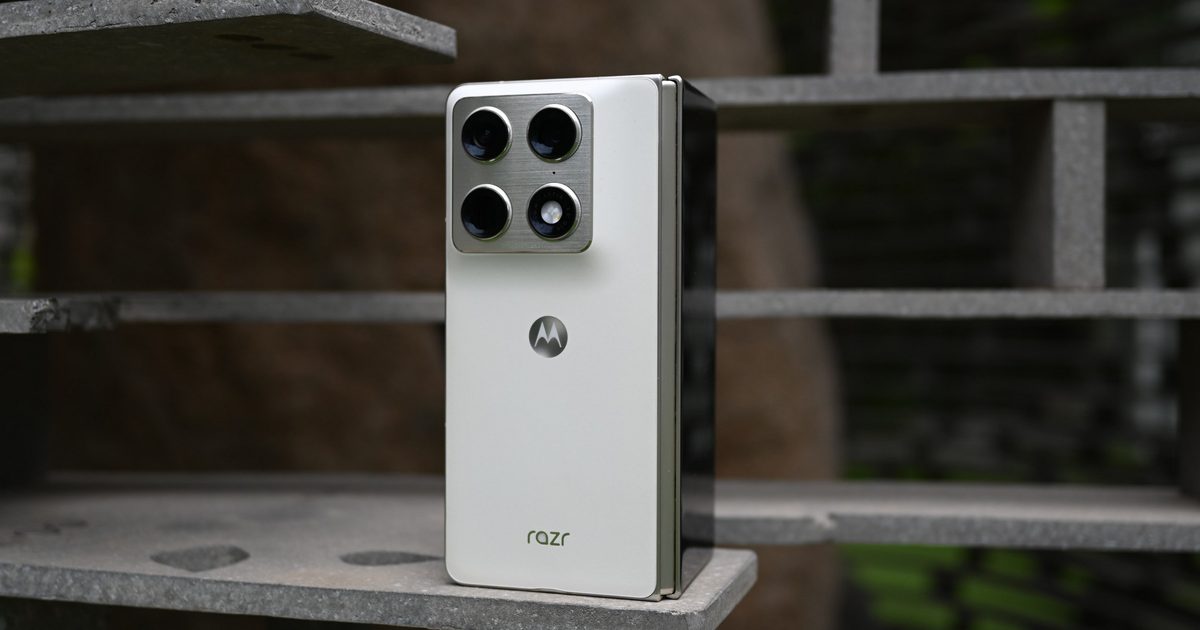
    This is Motorola stepping into the book-style foldable space for the first time, and yet, the phone doesn’t come across as a device that’s figuring out what it wants to be. The overall shape feels confident, and the finish gives it more personality than the usual slab of metal and glass. The Pantone Lily White version, in particular, has that soft, almost silk-like look that makes the phone feel like a fashion statement rather than a fragile showpiece.

    The chamfered edges also help. They give the frame a cleaner, more premium feel while making the phone easier to grip than I expected. That matters with a foldable, because this is still a big device. You feel the size when it’s closed, and you definitely know you’re holding something more substantial than a regular phone. But Motorola has done a good job making that size feel intentional. 

    The hinge is the part I was most unsure about, and it ended up being one of the parts that impressed me most. It opens and closes with the kind of resistance that makes you trust it, not baby it. The large inner screen gives you the obvious tablet-like workspace, but the outer display keeps the phone useful when you don’t want to open the whole thing. So Motorola didn’t need a warm-up round. The Razr Fold looks and plays the part of a proper premium foldable. 

    There are a few quirks, though. It is slightly thicker and heavier than the Z Fold 7 (4.2mm unfolded, 8.9mm folded, and 215g). So the Razr Fold is about 1mm thicker and nearly 30 grams heavier. The weight here is what really makes the difference. It gets really tiring to hold onto after a while. But apart from that, it’s hard to find any faults here with just the design. You also get just an IP48 + IP49 rating. This is great against accidental water immersion and rain, but the body of this phone isn’t “dust-tight”. An IP6X rating is still a rarity among foldables. Still, given how Motorola phones are often advertised with durability in mind, this could’ve been one area the brand could’ve iterated on, which would’ve made me forgive the heavy weight.

    Design score: 8.5/10

    Displays: Gorgeous screens inside and out 

    Quick take: Motorola’s first foldable brings a polished folding screen experience on both sides

    For many, the cover panel will be the display they interact with the most, so it has to be a solid display and not just an add-on for the big flexible screen. Measuring 6.56 inches tall, it’s not the tallest panel out there, but the 21:9 aspect ratio means that it’s narrower than your typical iPhone or Galaxy. This does make it easier to hold despite its heft, but the trade-off is that one-handed use isn’t always convenient. Although the media shot in a 21:9 aspect ratio feels right at home here.

    That nitpick aside, this is still a great screen. You got an LTPO pOLED panel with an FHD+ resolution and a 165Hz refresh rate. So you get sharp pictures and smooth touch inputs. The refresh rate realistically caps off at 120Hz, only hitting 165Hz in select apps and games. Thanks to its peak brightness of 6,000 nits, it also remains perfectly legible in the bright outdoors. 

    Colors are punchy by default, though you can set them to a more natural tone through the settings. Durability is always a concern with foldables, and the Motorola Razr Fold delivers a strong first impression here as well. It is claimed to be the first foldable to feature Corning’s Gorilla Glass Ceramic 3, and my review unit survived two scary drops, one on pavement and another on a road, with only minor scratches. You can even put up the screen in a tent mode on your desk, which turns the cover into a digital alarm clock.

    The real highlight, of course, is the inner display. The 8.1-inch LTPO pOLED panel is the reason this phone exists, and it feels like a proper big-screen experience rather than a stretched-out phone display. Combine the high resolution, 120Hz refresh rate, and strong brightness, and you get a very good foldable formula. There’s no obvious compromise on screen sharpness or quality. 

    Watching movies or videos on this screen is a solid experience. Gaming becomes more immersive in the unfolded state, even if it doesn’t feel completely natural at first. Reading comics and manga was especially fun because the larger panel lets you appreciate smaller details in the artwork that get lost on a regular phone.

    The teardrop-style fold also helps reduce how harsh the crease looks and feels. It’s still there, but in my experience, it’s on the same level as the Galaxy Z Fold 7. A larger screen real estate also enables improved multitasking and document work. The larger canvas also makes multitasking and document work more useful. I wrote a section of this review on the phone, and it felt oddly more comfortable than typing on the conventional cover display. 

    You also get a desktop mode that lets one half of the inner display work like a regular display, while the other half acts as a trackpad. But this just feels more like a gimmick than a useful feature you’d use often. 

    The one obvious drawback is the aspect ratio. Unlike the outer panel, the main screen is closer to a square, so you can expect large black bars around a lot of video content. The picture is still larger than what you get on a typical tall flagship, but the gap isn’t always as dramatic as you’d expect once the content actually fits into the display. Rounding out the screen experience is stylus support, though the Moto Pen Ultra is sold separately. 

    Display score: 9/10

    Moto Pen Ultra: The surprise accessory that actually changed how I used the phone 

    Quick take: The Moto Pen Ultra isn’t just a throw-in productivity accessory; it gives the Razr Fold some of its most memorable tricks. 

    I’ll be honest, I thought smartphone styluses had mostly gone out of style. The Galaxy Note made them exciting, while the Galaxy Ultras are keeping them on life support. Styluses on smartphones have quietly settled into niche territory. My experience with the Moto Pen Ultra, however, made me rethink that a little. 

    The Razr Fold is the device where a stylus becomes a natural fit. The inner screen is large enough that writing, sketching, annotating, and clipping things doesn’t feel too cramped. You actually have more room to work, and Motorola knows it. The Moto Pen Ultra is used for more than just taking notes. 

    You can write and sketch, along with all of the other basics. But the better features are the ones that turn the pen into a shortcut for getting things done faster. Quick Clip is a good example. Being able to highlight something and send it into Notes makes the pen feel like a natural extension of the phone rather than a separate accessory you have to remember to use. Sketch to Image is another fun one, especially because it can clean up rough drawings and turn them into something more usable. Circle to Search with pen input also makes sense on a display this size, because circling, marking, and selecting things feels more precise than doing it with your finger. 

    Since the pen also supports Bluetooth connectivity, it can also work as a remote camera shutter, which is great when the foldable is propped up for a shot. Double-tapping the opposite end of the pen on a surface can trigger a screenshot. Long-pressing the button lets you annotate from almost anywhere, and the button can also be configured to jump straight into Notes. 

    But there’s still a catch. Because of the relatively slim design of the Razr Fold, you can’t house the pen within the Razr Fold’s body. You carry it around in a charging case, which does become a little inconvenient. With Samsung moving away from stylus support on its latest Z Fold 7, the Moto Pen Ultra gives the Razr Fold a stronger identity. For creatives and power users, the difference can be huge, as Motorola has its own idea of what a foldable workspace can be capable of.

    Performance: Powerful, with a few gaming quirks 

    Quick take: The Razr Fold feels fast and effortless in daily use, though game optimization still hasn’t fully caught up to the hardware. 

    Performance on the Motorola Razr Fold is not something I found myself worrying about in daily use. Quickly jumping between apps, switching between the cover display and inner screen, handling multitasking, and keeping split-screen apps alive was still a flagship experience. 

    Whether I was switching between social apps, browsing, editing photos, using the camera, or opening the phone into its larger display for a more tablet-like setup, the Razr Fold felt consistently responsive. This is thanks to the Qualcomm Snapdragon 8 Gen 5 chip under the hood, which is coupled with a robust 16GB of RAM, which helps the Razr Fold put up strong figures even in synthetic benchmarks.

    In Geekbench 6, it scored 2,618 in single-core and 9,092 in multi-core. AnTuTu was even more dramatic, with an overall score of 3,034,798, broken down into 886,191 for CPU, 1,040,985 for GPU, 469,394 for memory, and 638,228 for UX. 3DMark paints a similar picture, though with a little more nuance. In Wild Life Extreme, the Razr Fold scored 5,205 with an average frame rate of 31.17fps. In Steel Nomad Light, it posted 2,030 with an average frame rate of 15.04fps. 

    These are demanding graphics tests, and the scores line up with what I saw in real gaming. It can absolutely handle heavier titles, but the experience is not always so smooth. The Wild Life Extreme Stress Test is the more interesting result. The Razr Fold hit a best loop score of 4,994 and a lowest loop score of 3,309, with 66.3% stability. That means there is some performance drop under sustained load. 

    Real gaming mostly follows that same pattern. PUBG Mobile has yet to be properly optimized for the Razr Fold. Competitive players looking for the high 120fps mode won’t get it here for now, so you’re stuck at 60fps. The good news is that the 60fps experience is generally stable, and gameplay still feels smooth enough. Since it is a battle royale, you also get a better view of your surroundings on the main screen, which does help give you a slight edge.

    Zenless Zone Zero was more interesting. At high settings, the game usually averaged around 60fps, and on the unfolded inner display, it looked genuinely great. The larger canvas makes combat, menus, and movement feel more immersive than they do on a regular phone. It does take some getting used to, especially if you’re used to gaming on narrower slab phones, but once your hands adjust, gaming on a big screen is surprisingly fun. 

    On some occasions, I noticed random drops into the mid-40fps range. These are likely related to optimization rather than the hardware falling short. Thermals were handled better than I expected. During gaming, temperatures usually stayed around 37 to 39 degrees Celsius, which is comfortable enough for longer sessions. Benchmark runs pushed the phone harder, with temperatures climbing up to around 44 degrees Celsius, but that is also when you’re deliberately forcing the hardware into a sustained stress scenario. In normal gaming, I never felt like the phone was getting uncomfortably hot. 

    So the performance story here is mostly positive, with one clear caveat. The Razr Fold has the raw power, and day-to-day use is superb. Gaming is also strong, especially on the unfolded display, but a few app and game optimization issues remind you that the hardware is ready, but some games just haven’t fully caught up to it yet. 

    Performance score: 8/10

    Cameras: Better than Motorola’s reputation… but not entirely flawless

    Quick Take: The Razr Fold’s cameras are true flagship grade, though tuning can use a little touch-up

    Motorola phones haven’t always had the strongest camera reputation, especially when stacked against giants like Samsung, Apple, Google, Oppo, and others. But with the Motorola Signature, the brand handily broke free from this expectation, delivering an impressive photography experience with top-tier camera hardware. So I was excited to see what the Razr Fold could achieve with the exact same setup. 

    The camera system feels aggressive for a foldable phone, and that’s what you’d expect from a phone with such a hefty price tag. The main camera is the safest bet. It’s the one I trusted the most, and it delivers the kind of dependable point-and-shoot experience you want from a premium phone. Detail is strong, colors usually look pleasing, and the phone doesn’t make you work too hard to get a usable shot. 

    The telephoto camera also gives the Razr Fold an important advantage. Foldables often compromise on camera hardware, so having a proper zoom option rather than an afterthought. The telephoto is useful not only for reach, but also for that more compressed look that makes portraits and tighter compositions feel more deliberate. You can digitally zoom into 6x from the telephoto camera for some usable shots, though anything past 10x introduces heavy AI upscaling. 

    The ultrawide is where expectations need to be kept in check. It’s fine in good lighting, and it does the job when you need that wider frame, but it is not the camera I’d lean on when the light gets tricky. That’s not unusual for foldables or even many premium phones, but it does create a clear gap between the main camera and the rest of the setup. 

    Motorola’s first book-style foldable is already in the top ranks of DxOMark (9th position), and for good reason. It continues the brand’s partnership with Pantone for improved color reproduction and realistic skin tones, which you can really tell. Colors also stay consistent between the three lenses, which is the kind of detail you appreciate in flagship phones. 

    However, HDR processing is one frustrating aspect here. In really bright scenarios, the Razr Fold can blow out the highlights. The result is a few shots that look a little overcooked when you zoom in or compare them to what the scene actually looked like. It doesn’t ruin the camera experience. Though it does remind you that Motorola’s processing still has a few rough edges. 

    Low-light performance did not disappoint. This foldable managed noise, exposure, and colors well from all three cameras, not just the big main sensor. Video capture was another surprise. Stabilization was competent, and details were managed well. Apart from the occasional jitters during panning shots, the recordings always came out solid. You get up to 8K30fps recording on the main and telephoto shooters, while the ultra-wide maxes out at 4K60fps. The selfie shooters top out at 1080p60fps and 4K60fps on the outer and inner screen, respectively.

    The foldable form factor also helps the camera experience in ways a regular slab phone can’t. Being able to prop the phone up, use the larger screen as a preview, or pair it with the Moto Pen Ultra as a remote shutter gives you more ways to shoot without needing extra gear. This adds to the versatility in your shooting experience. 

    Selfie cameras are the weakest of the bunch. Not terrible, just nothing to write home about. But the best part is that you can just not use them. The cover display can act as a camera viewfinder, allowing you to click selfie shots from the rear camera. 

    The Razr Fold is not a perfect camera phone, and I’d still wait before calling it a true rival to the most aggressive camera flagships. But for a foldable, this is a much stronger showing than I expected. 

    Camera score: 8.5/10

    Battery and charging: A big cell that keeps up with you 

    Quick take: A massive 6,000mAh battery helps it take the lead with endurance over its competition.

    Motorola absolutely blows most of the competition out of the water when it comes to raw battery specs. It is powered by a large 6,000mAh battery that just makes the Razr Fold chug along no matter what you throw at it. Even after a full 2 hours of street photography, I only lost 20% of battery juice. Later the same day, I watched a movie and even played some games. Add more time with the large screen reviewing all the images, scrolling through social media, and reading manga, and I still couldn’t kill it in a day.

    I only found myself reaching for a charger the next afternoon. Given I wasn’t always pushing it as hard except for those short bursts, endurance was top-tier on this foldable phone. Sweetening the deal even further is support for 80W wired fast charging and 50W wireless charging. So a quick top-up back to full doesn’t take longer than an hour from zero. I averaged a screen-on time of around 7 hours with mixed use.

    To put things into perspective, the Galaxy Z Fold 7, for a nearly similar size, offers a 4,400mAh battery, while the Pixel 10 Pro Fold has a larger 5,015mAh battery. Now, both of these are respectable for the form factor they offer. Thanks to clever tuning and optimizations, these devices can get you through your typical day with maybe a single charging downtime. But these won’t have you hit the bed worry-free about the charge levels for the next morning. 

    The only setback was the lack of an included charging brick in the box, which hurts considering how expensive this phone is. Unfortunately, this is the industry standard, though that won’t stop me from calling it out every time.

    Battery score: 9/10

    Software: Motorola gets the foldable basics right 

    Quick take: The Razr Fold’s software feels more useful than flashy.

    The Razr Fold is a foldable first, so it should be judged based on that standard. A regular phone can get away with clean software and a few smart features. Foldables, on the other hand, have to make the big screen feel worth opening. From multitasking to app continuity, the user experience needs to pull naturally towards the main screen. 

    This is where Motorola’s cleaner Android approach helps, because the Razr Fold doesn’t feel buried under unnecessary visual noise. The software gives the hardware some breathing room, and that works in its favor. But this is also where Motorola has to compete with Samsung, which has spent years building foldable muscle memory into One UI.  

    Multitasking on a phone has never felt especially intuitive to me, largely because I daily drive a compact device where screen space is always at a premium. The Razr Fold changed that surprisingly quickly. Motorola has done a good job making the larger inner display feel genuinely useful rather than simply bigger. Split-screen mode became something I used regularly instead of a feature I occasionally tested for the sake of a review. Editing a Google Doc while keeping a YouTube video open, referencing notes while replying to emails, or browsing the web alongside a messaging app all felt natural after a few days. 

    Motorola has also nailed the basics that can make or break a foldable experience. Apps transition smoothly between the cover display and the inner screen, animations remain consistent whether the phone is folded or unfolded, and I didn’t encounter any major app scaling issues during my testing. Most apps adapted properly to the larger display.

    Stock Android isn’t the lovely experience we remember it to be. It used to be sought after due to the unoptimized mess that used to be some custom UIs. But in 2026, every brand has put in the effort to iron out its software. Keeping this in mind, the Razr Fold’s software can seem a bit lackluster, especially in regard to customization options and features. 

    The software itself remains relatively clean. Motorola continues to avoid the temptation to overload Android with duplicate apps and unnecessary services. Aside from the usual collection of Google apps, Meta integrations, and Motorola’s own utilities, there isn’t much in the way of bloatware here. 

    One of Motorola’s more compelling additions is Smart Connect, which has quietly become one of the company’s strongest ecosystem features. If you own a Motorola tablet, PC, or compatible Lenovo device, Smart Connect allows you to move files between devices, mirror apps, extend displays, share clipboards, and continue workflows with minimal setup. 

    It’s not as expansive as Samsung’s Galaxy ecosystem, but it’s surprisingly polished and genuinely useful. You also get some handy gestures for quickly launching certain actions, like twisting to launch the camera and shaking twice to turn on the flash. 

    Moto AI is the other major software pillar, though its usefulness varies depending on which features you lean into. The most practical tools are the ones that help summarize notifications, organize information, and surface contextual actions without requiring much effort from the user. Features like Catch Me Up, which summarizes missed notifications, and Remember This, which lets you save and recall information later, fit naturally into daily use. 

    Some of the more generative AI features feel less essential, but Motorola deserves credit for integrating them in ways that don’t constantly interrupt the experience or demand attention. Unlike some competitors, Moto AI generally feels like an optional layer on top of Android rather than the entire identity of the phone. 

    The result is software that doesn’t necessarily reinvent the foldable experience, but consistently supports it. Motorola is not coming in with flashy tricks and just wants to make the device feel right as a priority. Long-term support is something you expect on premium phones, and the Razr Fold doesn’t disappoint with 7 major OS updates and 7 years of security patches. 

    Software score: 7/10

    Should you buy the Motorola Razr Fold? 

    Practicality isn’t the reason that would determine whether you’d buy this phone or not. It is expensive and built around a form factor that will have you adapt to how you use a phone. What I would compare it to are existing foldables as a first-gen model. The Razr Fold feels polished enough to be taken seriously right away. 

    The design is gorgeous, the hinge feels robust, the cameras are better than you’d expect, and the Moto Pen Ultra gives it a creative and productivity angle. At its best, it feels like Motorola understood why someone might want that bigger screen in the first place. 

    But the price will decide a lot here. In the US, the Razr Fold is listed for $1,899 for the 512GB model. Add the $100 stylus, and you’re looking at a device that costs just shy of $2,000. At this level, the Razr Fold isn’t competing with normal phones. It’s competing with mature foldables from Samsung and even top-end iPhones that most would consider a “safer purchase”. 

    Despite Samsung’s experience with foldables, the Razr Fold feels a little more exciting. You should buy it if you want a premium book-style foldable with a strong design identity, useful stylus support, excellent battery life, and a capable photography experience packed into one device. 

    You might want to skip it if you’re looking for the safest foldable software experience, the camera-first device, or a regular flagship that fits better in your hand. 

    The Razr Fold isn’t perfect, but for Motorola’s first book-style foldable, it’s a commendable effort. I can recommend it to someone shopping seriously in the foldable market, though the next wave of foldables from Samsung, Honor, Vivo, and possibly Apple could make that decision harder very quickly. 

    Why not try

    At this price range, there’s plenty of flagship foldables to choose from. So here’s a couple of

    • Samsung Galaxy Z Fold 7: The Galaxy Z Fold 7 is the safest alternative if you want the most mature foldable ecosystem. Samsung has the software advantage, stronger app continuity, and years of foldable refinements behind it. It’s also the more familiar pick for anyone already deep in the Galaxy ecosystem. 
    • Honor Magic V6: The Honor Magic V6 remains one of the Razr Fold’s closest rivals, especially for buyers who prioritize thinness and portability. Honor’s foldable is impressively slim and light for a book-style device, while still offering strong battery life, capable cameras, and a polished multitasking experience. 
    • Vivo X Fold 5: The Vivo X Fold 5 is one of the most compelling alternatives if it’s available in your region. It is the foldable many enthusiasts wish they could buy instead of the Galaxy Z Fold 7, thanks to its combination of slim hardware, large battery, fast charging, and strong camera credentials. 
    • Google Pixel 10 Pro Fold: The Pixel 10 Pro Fold is worth considering if you want Google’s own software with Pixel camera processing, and Gemini-heavy AI features in a book-style foldable. It brings a 6.4-inch cover display, an 8-inch inner display, 16GB of RAM, the Tensor G5 chip, and a 5,015mAh battery with Qi2-style PixelSnap magnetic wireless charging. It also has full IP68 dust and water resistance, which is still rare for foldables.
  • Samsung Galaxy Z Fold 7: The Galaxy Z Fold 7 is the safest alternative if you want the most mature foldable ecosystem. Samsung has the software advantage, stronger app continuity, and years of foldable refinements behind it. It’s also the more familiar pick for anyone already deep in the Galaxy ecosystem. 
  • Honor Magic V6: The Honor Magic V6 remains one of the Razr Fold’s closest rivals, especially for buyers who prioritize thinness and portability. Honor’s foldable is impressively slim and light for a book-style device, while still offering strong battery life, capable cameras, and a polished multitasking experience. 
  • Vivo X Fold 5: The Vivo X Fold 5 is one of the most compelling alternatives if it’s available in your region. It is the foldable many enthusiasts wish they could buy instead of the Galaxy Z Fold 7, thanks to its combination of slim hardware, large battery, fast charging, and strong camera credentials. 
  • Google Pixel 10 Pro Fold: The Pixel 10 Pro Fold is worth considering if you want Google’s own software with Pixel camera processing, and Gemini-heavy AI features in a book-style foldable. It brings a 6.4-inch cover display, an 8-inch inner display, 16GB of RAM, the Tensor G5 chip, and a 5,015mAh battery with Qi2-style PixelSnap magnetic wireless charging. It also has full IP68 dust and water resistance, which is still rare for foldables.
  • How we tested 

    I used the Motorola Razr Fold as my primary phone for about a month, running the latest software build during the review period. My testing included everyday use across calls, messaging, social media, email, web browsing, navigation, streaming, and camera use. 

    Because this is a book-style foldable, I also paid close attention to how often I used the cover display versus the inner screen, how well apps moved between both displays, and whether multitasking actually felt useful in daily life. I tested the hinge, crease visibility, typing comfort, display brightness, camera behavior, and Moto Pen Ultra features across regular work and casual use.

    I also used the phone for gaming with PUBG Mobile and Zenless Zone Zero. For the synthetic benchmark, I relied on GeekBench 6, various 3DMark tests, and AnTuTu.

    FAQs

    Does the Motorola Razr Fold support a stylus? 

    Yes, the Motorola Razr Fold supports the Moto Pen Ultra, though it is sold separately. The stylus works well with the large inner display and adds useful features like Quick Clip, annotation, Sketch to Image, Circle to Search input, screenshots, and Bluetooth camera shutter control.

    Is the Motorola Razr Fold good for gaming? 

    Yes, but with some caveats. Day-to-day performance is superb, and games look great on the unfolded inner display. Zenless Zone Zero ran at around 60 fps at high settings, though I noticed occasional stutters into the mid-40fps range. PUBG Mobile is currently capped at 60fps because it hasn’t been optimized for higher frame rate modes on this device yet. 

    How long does the Motorola Razr Fold battery last?

    Battery life is one of the Razr Fold’s biggest strengths. The 6,000mAh battery comfortably lasted beyond a full day in my testing, even with camera use, video watching, gaming, social media, and reading on the inner display. I usually reached for the charger the next afternoon.

    Is the Motorola Razr Fold better than the Galaxy Z Fold 7?

    It depends on what you want. The Galaxy Z Fold 7 still has the more mature foldable ecosystem and Samsung’s years of software refinement. The Razr Fold feels more exciting, has stronger battery specs, faster charging, stylus support, and a more versatile camera setup.
  • 3,5 times:  3x AI slop on TikTok versus YouTube – Study

    3,5 times: 3x AI slop on TikTok versus YouTube – Study

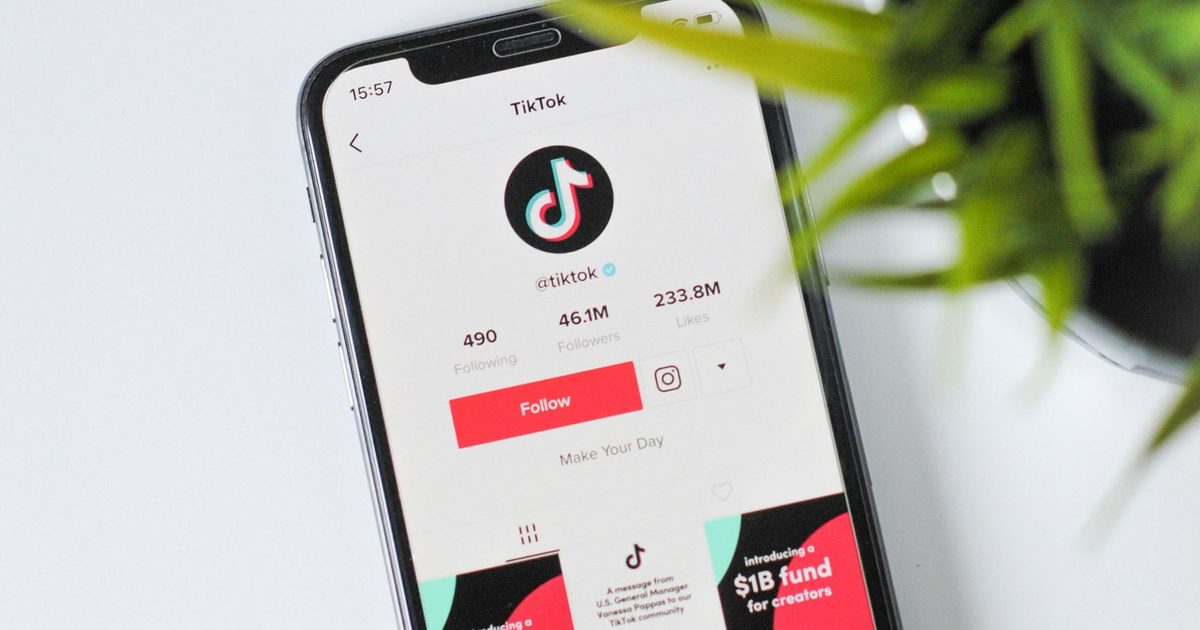
    If you ever thought that your TikTok feed is dominated by fake material, you’re not dreaming. A fresh report from Kapwing shows that 59% of the videos served to a brand‑new TikTok account are AI‑generated nonsense – roughly three times the proportion Kapwing recorded when it performed the same test on YouTube.

    **How does TikTok’s AI‑slop issue stack up against YouTube’s?**

    Kapwing created a new account on each platform and manually examined the first 500 videos each delivered. On TikTok, 294 of those clips were AI‑generated, while on YouTube only 104 of the first 500 Shorts qualified as AI slop, giving YouTube a 21% rate.

    The magnitude of the problem becomes clearer when you note that TikTok had already labelled 1.3 billion videos as AI‑generated by November. Kapwing also manually inspected over 10,000 TikTok videos across 20 content categories to map where the slop tends to cluster.

    **Which TikTok categories are saturated with AI slop?**

    Children’s content topped the list, with 57% of 2,000 videos identified as AI‑generated. The worst tag was #cartoonkids, where 97 out of 100 videos were artificial.

    Science & Education, Health, and History followed closely, each showing 33‑35% AI slop – categories where animation and voice‑over often replace real‑world demonstration.

    At the opposite end, Fashion, Music, and Fitness were almost untouched, each staying below 2%, likely because these formats rely heavily on genuine, on‑camera presence.

    Even though TikTok has introduced tools for users to dial back AI content in their feeds, this study suggests that the default stream still leans heavily toward AI. For now, the task of sifting the slop from the substance largely falls on the viewer.

  • Claude Design will now stick to your brand guidelines instead of generic AI mockups

    Claude Design will now stick to your brand guidelines instead of generic AI mockups

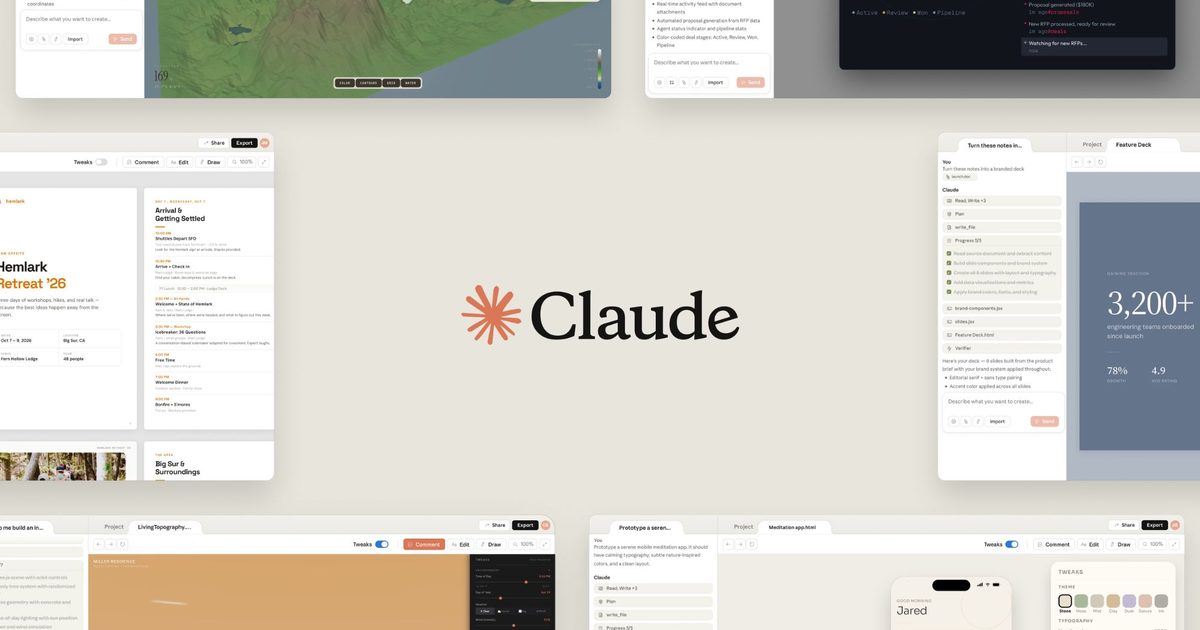
    Anthropic just rolled out a big update to Claude Design, its AI-powered visual creation tool that first launched in research preview. The tool already lets you turn a simple prompt into prototypes, decks, and marketing assets, and now it does even more.

    The latest update brings design system support, a smooth handoff to Claude Code, a redesigned editor, and a bunch of new app integrations.

    Your brand guidelines now drive what Claude builds

    The biggest change is a rebuilt design system import. You can now import one or multiple design systems from GitHub repositories, design files, or uploaded assets. Claude Design will build using those approved components and automatically check its output against the design system before showing it to you.

    For larger organizations, admins can approve a single design system and lock it for company-wide use, so every project stays on brand.

    Anthropic is also bringing Claude Design and Claude Code closer together. Teams can now sync design systems directly from a local codebase using a new command /design-sync. Once a design is ready, it can be handed off to Claude Code without rebuilding it from scratch.

    Developers can also access Claude Design features from the terminal using the /design command, allowing them to create, edit, import, and export design projects without leaving their development workflow.

    A revamped editor and more places to send your work

    Anthropic has rebuilt the editor, too. There are new controls to drag, resize, and align elements directly on the canvas. Claude Design now also shares usage limits with chat, Cowork, and Claude Code, so most people get more room before hitting any cap.

    Claude Design is also expanding its integrations. Users can now export projects to PDF and PowerPoint, while new connections with Adobe, Canva, Gamma, Lovable, Miro, Replit, Vercel, Wix, and other platforms make it easier to continue work across different tools.

    You can try it out at claude.ai/design or find it right in the sidebar of the Claude desktop app.

  • Techgeeks: Disney’s love for witch tales shines in the Hexed trailer, its most promising in years

    Techgeeks: Disney’s love for witch tales shines in the Hexed trailer, its most promising in years

    Disney has just unveiled the inaugural teaser for Hexed, an animated adventure set in a spell‑bound realm of witches. The film marks the studio’s first original, non‑sequel feature since 2023’s Wish.

    Walt Disney Animation Studios’ 65th animated feature is slated for theatrical release on November 25, 2026, with a Disney+ debut planned for early 2027.

    Hexed cast, story and trailer highlights

    The preview introduces Billie (voiced by Hailee Steinfeld), a head‑strong teen who’s always felt out of place. When her bracelet shatters and her fingertips erupt in magic, her life spins out of control.


    After inadvertently wrecking a school bathroom and being expelled, she is thrust from suburban life into a concealed magical domain called Hexe, rendered in a dreamy, distinctive visual style.

    There she befriends two new allies: Ms. Quill, an enchanted feather‑pen voiced by seven‑time Emmy winner Tracey Ullman, and Elias Quire, a mystical journal voiced by Stephen Fry.

    Her wary mother, Alice (voiced by Rashida Jones), is drawn into the quest as well. Together they uncover deep family secrets that could forever alter the witching world.

    Director Fawn Veerasunthorn describes Billie as someone who has always felt miscast in her own life, and suggests that stepping into a chaotic, untamed magical realm finally lets her begin to understand herself.

    A strong season for Disney and Pixar animation

    Hexed arrives at a robust moment for Disney and Pixar. Pixar’s original sci‑fi comedy Hoppers, about a woman who transfers her consciousness into a robotic beaver, surpassed $500 million worldwide earlier this year.

    Toy Story 5, featuring Woody and Buzz confronting a disruptive new tablet toy named Lilypad, opens on June 19. Hexed follows in November, giving the studio a solid animated lineup throughout the year.

  • Key Factors That Distinguish Successful AI Adoption from Failure in Automotive Retail

    Key Factors That Distinguish Successful AI Adoption from Failure in Automotive Retail

    Dek: AI demands careful stewardship and purposeful use. Below are examples of automotive retailers who are deploying AI both effectively and safely.

    Remember the classic Spider‑Man line about “with great power comes great responsibility”? That sentiment has never been more apt than it is today. AI stands out as one of the most potent technological breakthroughs in recent decades—its impact was even likened to the discovery of fire by Google’s CEO.

    When a tool wields such influence, it carries a heavy duty of responsibility. You can’t simply drop a new technology into a business and expect it to behave perfectly. The entire workflow, its ripple effects, and the desired outcomes must be considered. Inevitably, many pilots will stumble; the crucial skill is turning those setbacks into teachable moments rather than defeats.

    The reach of AI is so broad that leaders across every sector—restaurants, home services, e‑commerce, and beyond—should be exploring how to harness it for maximum benefit while staying accountable. The firms that excel aren’t merely adding another gadget to their stack; they are re‑imagining the whole operation—from daily workflows and job roles to incentive structures and more.

    What does a well‑executed transformation look like? A deep dive into a niche market—automotive retail—illustrates how AI is reshaping business practices and highlights the variables that separate triumph from disappointment.

    Tailored AI Solutions Drive Automotive Success

    In automotive retail, AI must be fine‑tuned and woven into existing platforms and data streams to deliver real value. The auto sector is highly specialized, leaving little room for generic, one‑size‑fits‑all tools. Off‑the‑shelf AI can create as many challenges as it solves, making customization essential. The most effective AI sits inside a dealer’s ecosystem, not the other way around.

    Impel’s Sales AI exemplifies this philosophy. The platform digitizes merchandising and customer outreach through AI‑enhanced features. Its standout offering is a suite of domain‑specific AI assistants that go beyond generic chatbots, delivering large‑language‑model (LLM) interactions rooted in automotive expertise.

    By ingesting anonymized dealer conversations from its broader network and merging them with each dealership’s inventory, CRM, and financing data, Impel crafts a bespoke LLM. The result is a model that produces dealer‑specific metrics, replies, and summaries—far more relevant than a generic AI response.

    From Prompting to Real‑World Execution

    The AI journey has moved past the experimental “prompt” stage. While prompts still spark ideas, true value emerges when AI is applied to concrete tasks that shift performance, not just brainstorming.

    In automotive retail, this means tools that operate after hours, reaching customers when staff are offline. AI‑driven systems can proactively answer vehicle‑specific queries, schedule showroom visits, and book service appointments. They know when to hand off a conversation to a human and can log concise summaries directly into a CRM.

    This level of implementation goes beyond theory. It frees up staff time, deepens customer relationships, and lifts key metrics. Impel reported that, in 2025, dealerships using its AI saw a 27% rise in appointment bookings and a 26% boost in lead‑to‑sale conversion rates—clear evidence that intentional AI use delivers measurable gains.

    Security Must Underpin Long‑Term AI Adoption

    The “responsibility” aspect shines brightest in cybersecurity. A growing share of AI tools are built via “vibe coding,” where developers let AI generate most of the source code from natural‑language prompts. While fast and fun for prototypes, the lack of manual review introduces serious security gaps.

    Missing security controls, absent code audits, and weak governance create entry points for attackers seeking to steal proprietary or customer data. By 2026, research shows that applications created through vibe coding can unintentionally expose sensitive information on the open web.

    The safer path is a slower, more controlled development process. Custom applications for automotive retailers should incorporate robust backend protections—identity and access management, role‑based privileges, and thorough code reviews. Pairing AI‑generated speed with professional oversight (either in‑house or outsourced) allows firms to reap efficiency benefits without compromising safety.

    Change Management Eases Employee Pushback

    As with any major digital overhaul, the human factor is decisive. Even a secure, high‑impact AI tool will flop if staff don’t adopt it.

    Leaders should avoid the temptation to roll out a system, cut staff, and watch the results. Instead, they need to redesign workflows, invest in training, and monitor productivity and cost metrics. By aligning new technology with data‑driven standard operating procedures, organizations can create a synergistic environment where AI amplifies, rather than disrupts, daily work.

    Deploying AI Wisely and Responsibly

    Artificial intelligence holds immense promise, but it must be wielded with intention and accountability. Companies in automotive retail—or any industry—should follow a concise roadmap:

    • Customize solutions to fit real‑world needs.
    • Prioritize secure development practices.
    • Plan and execute change‑management initiatives.

    Adhering to this framework positions businesses to unlock AI’s advantages across a wide array of sectors and scenarios.

  • Wear OS 7 is here and your Pixel Watch is about to get a lot smarter

    Wear OS 7 is here and your Pixel Watch is about to get a lot smarter

    Google just rolled out Wear OS 7 to eligible Pixel Watch devices with several useful changes. More than half of Wear OS users wear their watch seven days a week, and the most active wear it for over 23 hours a day, so it’s no surprise that Wear OS 7 is built for exactly that kind of commitment.

    New Wear OS 7 features rolling out to Pixel Watch

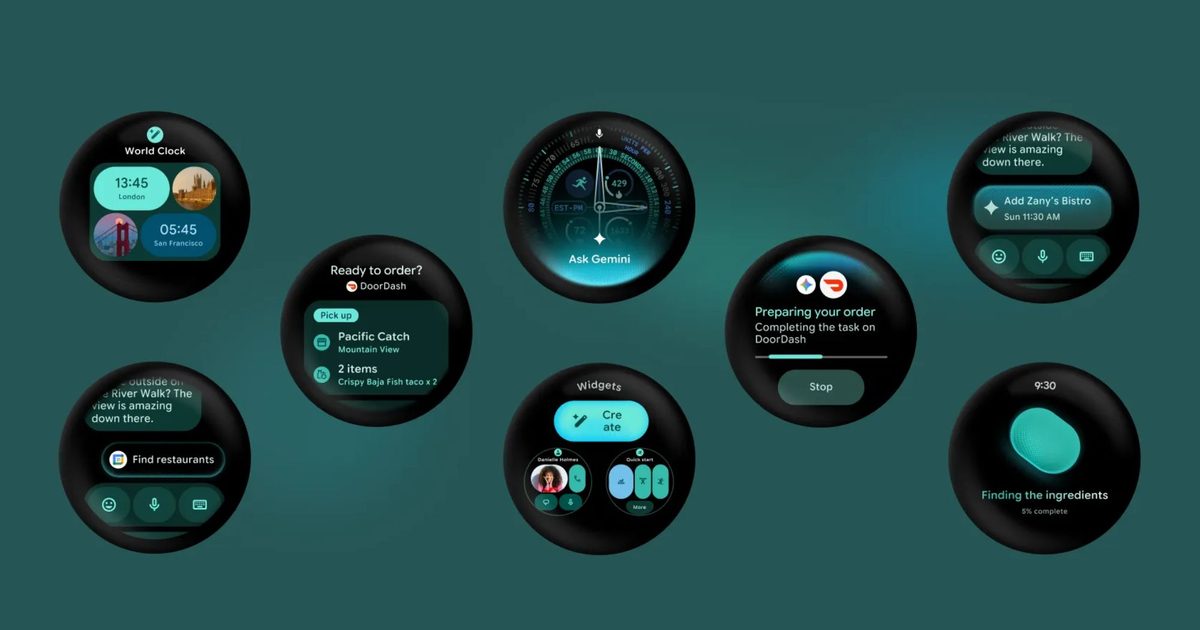
    The most useful addition is Live Updates, which brings Android Live Updates straight to your wrist. It mirrors real-time information from your phone apps directly to your wrist so you can track your food delivery, live sports scores, or workout progress without pulling out your phone.

    Wear OS 7 also makes your watch a smarter hub for your connected devices. You can control audio playback across your headphones, home speakers, and other devices using a media output switcher.

    If you take a photo with a pair of audio glasses, you can preview it instantly on your watch. Google’s intelligent eyewear launches this fall and will work directly with Wear OS 7.

    Every Gemini Intelligence feature coming to Wear OS 7

    The update gets even more interesting later this summer, when select devices unlock Gemini Intelligence.

    • Create My Widget lets you build personalized watch dashboards just by describing what you want in plain language.
    • Multi-step app automation takes it further by letting Gemini complete tasks for you, whether that is booking a spin class or reordering your usual from a favorite restaurant.
    • Personal Intelligence pulls from your Gmail, Search history, and chat history to offer suggestions tailored specifically to you.
    • Gemini’s Neural Expressive design language, a new visual identity for the AI, also comes to the watch face.
  • Create My Widget lets you build personalized watch dashboards just by describing what you want in plain language.
  • Multi-step app automation takes it further by letting Gemini complete tasks for you, whether that is booking a spin class or reordering your usual from a favorite restaurant.
  • Personal Intelligence pulls from your Gmail, Search history, and chat history to offer suggestions tailored specifically to you.
  • Gemini’s Neural Expressive design language, a new visual identity for the AI, also comes to the watch face.
  • Besides the new features, Wear OS 7 also delivers up to 10% better battery life compared to Wear OS 6. For something you wear round the clock, this extra bit of backup can make quite a difference.

  • Roblox introduces age‑specific accounts and enhanced parental controls for kids

    Roblox introduces age‑specific accounts and enhanced parental controls for kids

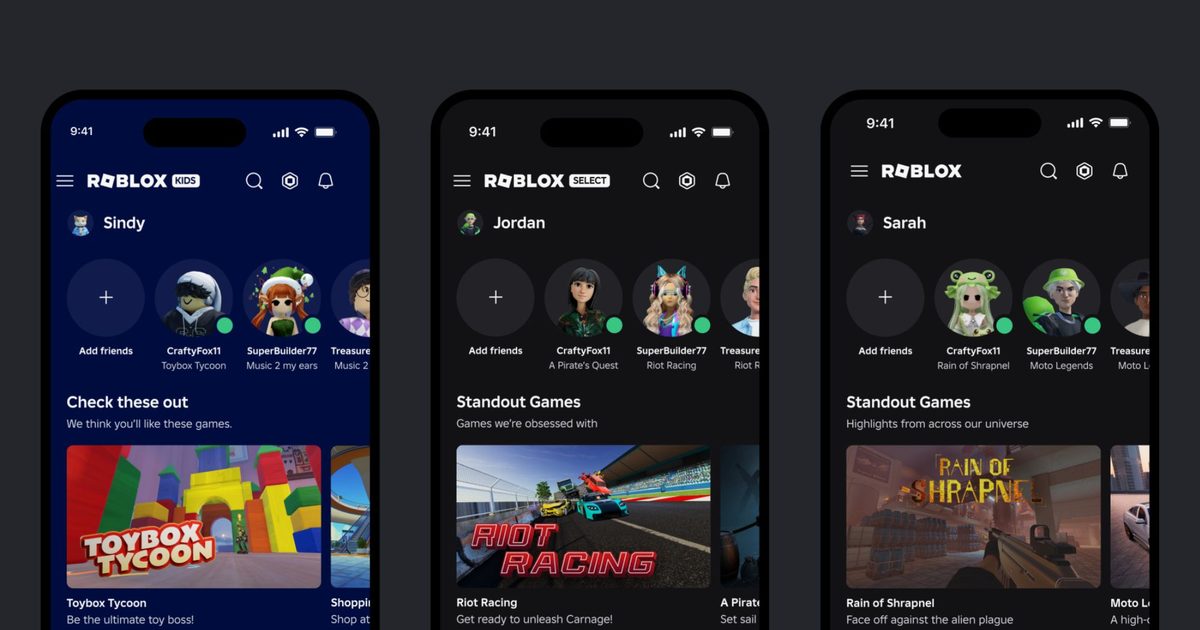
    Roblox just launched Roblox Kids and Roblox Select accounts globally, following a limited pilot last month in Australia, Indonesia, the Netherlands, and New Zealand.

    These are dedicated account types for users under 16, and the idea is that child safety protections grow with the child rather than staying static.

    **How Roblox Kids and Roblox Select accounts work for your child**

    The two account types are split by age. Roblox Kids covers ages 5 to 8 and carries the platform’s strictest default settings. Children in this tier can only access games with Minimal or Mild content maturity labels that have passed Roblox’s ongoing selection process. In this account, chat is turned off by default.

    Roblox Select covers ages 9 to 15 and opens up access to Moderately rated games, with chat settings that vary by age and region. Both catalogs exclude games involving sensitive topics, social hangouts, and free‑form drawing tools.

    Games must also meet tougher entry requirements, including developer ID verification, two‑factor authentication, and either a Roblox subscription or a refundable publishing fee. Accounts progress automatically as children age, moving from Roblox Kids to Roblox Select at 9, and from Roblox Select to a standard account at 16.

    **How Roblox’s new parental controls keep your child safer**

    Parental controls have also been expanded with this rollout. Parents who link their account to their child’s can monitor gameplay activity and friend lists, manage content ratings, set screen time limits, and control spending.

    New additions include granular game blocking, direct chat management extended until the child turns 16, and a game approval feature that lets parents grant access to specific titles outside the default catalog.

    Roblox is also the first major gaming platform to require facial age checks for chat access. Users who skip age verification cannot use chat at all, regardless of their age. Later this year, Roblox will also adopt the International Age Rating Coalition framework for content ratings.

  • Microsoft unveils the Surface Pro 12, its most powerful yet most pricey 2-in-1

    Microsoft unveils the Surface Pro 12, its most powerful yet most pricey 2-in-1

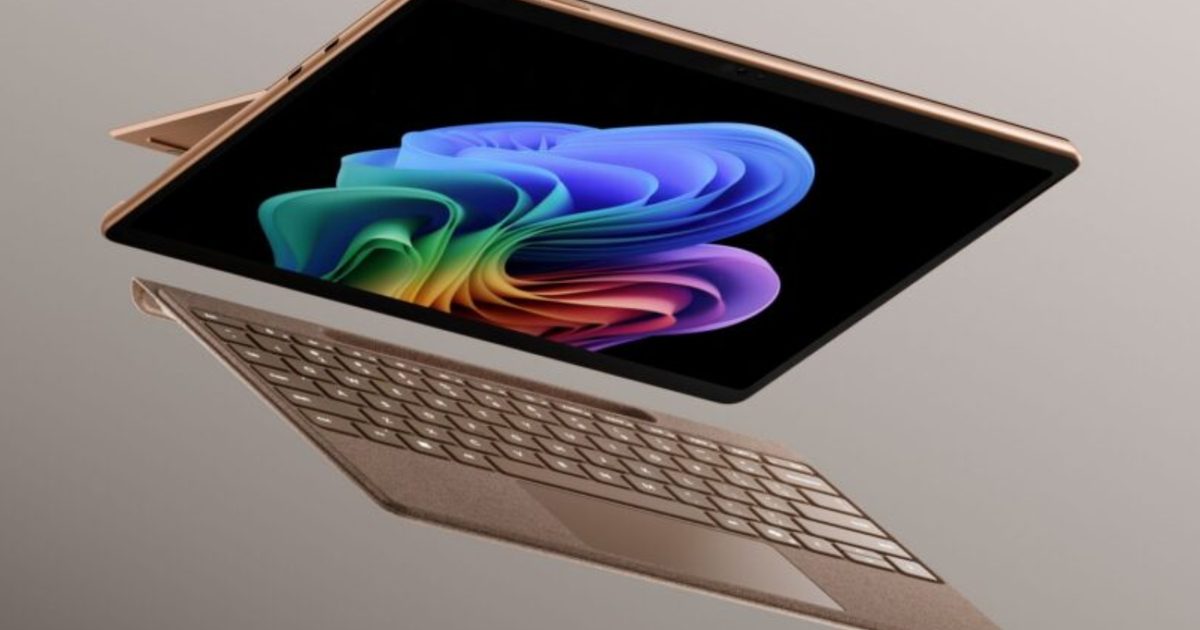
    Microsoft has just introduced what could be its finest Surface Pro to date. The 12th‑generation 13‑inch Surface Pro brings substantial upgrades across the board, from CPU and GPU performance to battery endurance.

    These enhancements make it an obvious pick for anyone seeking a versatile 2‑in‑1 that can double as a tablet and also accept a keyboard for faster productivity. The only hurdle is the cost.

    What’s new with the Surface Pro 12?

    The headline change is the shift to Qualcomm’s Snapdragon X2 chip family, offering either a 10‑core X2 Plus or a 12‑core X2 Elite. The Elite version delivers up to 53 % faster graphics compared with the 11th‑generation model.

    Battery life improves from 14 hours to 15.5 hours, and the device now sports a 1440p Quad‑HD camera with an ultrawide field of view, plus faster Wi‑Fi 7 connectivity.

    It will be sold in the traditional Platinum and Black finishes, as well as a new Dune color, all paired with a colour‑matched Surface Pro Flex Keyboard.

    How much does it cost?

    Here’s where the price tag forces a pause. The base configuration of the new Surface Pro starts at $1,499, including 16 GB of RAM and 256 GB of storage – a full $500 above the $999 starting price of the previous generation. Opting for an OLED display adds another $300, pushing the price to $1,799.

    This price jump is notable for a device that looks almost identical to its predecessor. Part of the increase is driven by the industry‑wide AI‑related surge in LPDDR5x RAM costs, affecting premium Windows hardware.

    To soften the impact, Microsoft is offering a free Surface Pro Flex Keyboard through June 30, up to $900 in trade‑in credit, and a 50 % discount on Microsoft Complete protection.

  • Aiper IrriSense 2 review: A smarter sprinkler for small yards

    Aiper IrriSense 2 review: A smarter sprinkler for small yards

    “The Aiper Irrisense 2 is the most user-friendly above-ground smart sprinkler out there”

    • Easy setup
    • Customizable zones
    • Weather software
    • Requires power outlet
    • No voice assistant support

    Quick Review

    The Aiper IrriSense 2 is a compelling all-in-one smart irrigation system that combines a sprinkler, controller, electric valve, and nutrient feeder into a single device that you can install in around 15 minutes or less. It covers up to 4,800 square feet with its TUV-certified EvenRain technology, supports up to 10 customizable watering zones and can reduce water usage significantly through weather-aware scheduling and grass mapping. At $500 MSRP (frequently discounted to around $400), it’s a strong pick for homeowners with small to mid-sized yards who want smart irrigation without digging trenches or hiring a professional.

    That said, the system requires a nearby outdoor power outlet (and I hate cords), lacks native voice assistant integration, and its zone-mapping tool can be finicky with irregular yard shapes. If your priority is ecosystem integration with Alexa, Google Home, or HomeKit, traditional smart controllers from Rachio or Orbit still lead the space as far as controllers go. But for pure ease of setup and standalone smarts, the IrriSense 2 is hard to beat.

    What I Like

    • 15-minute DIY setup: No trenching, no plumber. Anchor, connect the hose, plug in, and map your zones in the app.

    • Up to 10 customizable zones: Tailor watering schedules per zone for different plant types across your yard.

    • EvenRain technology: TUV-certified uniform water distribution simulates natural rainfall and minimizes erosion.

    • Weather-aware scheduling: Built-in rain detection pauses watering automatically during rainfall.

    • Nutrient feeder built in: Optional SoilPulse organic soil amendment can be dispensed through the irrigation cycle.

    • Eco-friendly packaging: Recyclable materials with minimal plastic waste.

    What I Don’t Like

    • Requires a power outlet: No battery or solar option means you may need an extension cord.

    • Requires Wi-Fi to fully function, so make sure you have a Wi-Fi signal where you want to place it
  • Requires Wi-Fi to fully function, so make sure you have a Wi-Fi signal where you want to place it
  • • No native voice assistant support: No Alexa, Google Home, or HomeKit integration out of the box.

    • Zone mapping quirks: Irregular yard shapes can trigger overlap errors; the app forced straight-line workarounds near structures.

    • Water pressure dependent: Reaching the full 39-foot spray range requires 45 PSI and 6.9 GPM — lower pressure reduces coverage.

    • Single map storage: You can only save one map at a time, limiting flexibility if you rearrange zones seasonally.

    Specifications

    Product Aiper IrriSense 2 (Model N2)
    Type 4-in-1 Smart Irrigation System (sprinkler, controller, valve, nutrient feeder)
    Coverage Area Up to 4,800 sq ft (445 m²)
    Spray Range Up to 39 ft (12 m)
    Watering Zones Up to 10 customizable zones
    Mapping Modes Area, Line, and Point mapping
    Connectivity Wi-Fi (2.4 GHz), Bluetooth for setup
    Smart Features Weather-sense scheduling, rain detection, water usage tracking
    Voice Assistants None (unofficial Home Assistant integration available)
    Power AC outlet required (no battery/solar)
    Hose Compatibility 5/8” or 3/4” standard garden hose
    App Aiper App (iOS / Android)
    Water Conservation Up to 40% reduction (TUV certified)
    Nutrient Feeder SoilPulse organic soil amendment compatible (sold separately)
    Warranty 2 years
    MSRP $499.99 (frequently discounted to ~$399)
    Sustainability 2026 SEAL Sustainable Product Award winner

    Setup and Onboarding

    Aiper claims the IrriSense 2 can be set up in 15 minutes, and in my testing, that was roughly accurate. The box contains the IrriSense 2 unit, ground anchoring stakes, a hose adapter, a power cable, and a quick-start guide. Packaging is recyclable with very little plastic waste; a nice touch for eco-friendly buyers.

    The physical installation is dead simple: position the unit where you want it, drive the included ground screws to anchor it, connect your garden hose, and plug in the power cable. You’ll need either a nearby outdoor outlet or an extension cord, which is the system’s most notable limitation and can be irritating for OCD people like myself.

    Onboarding through the Aiper app (iOS/Android) is straightforward. After creating an account, the app walks you through connecting the device via Bluetooth, then transitioning to your Wi-Fi network. From there, you map your watering zones. The app offers preset yard shapes like oval, rectangle, and others that you customize by dragging control points to match your actual yard. For our small, pinto bean-shaped test yard, we selected the oval preset and adjusted points accordingly.

    One point of friction for me: the mapping tool throws an error when boundary points overlap, which forced us to straighten out zones near the house rather than tracing the exact yard perimeter. It’s a minor annoyance that I hope Aiper will address with a firmware update in the future. Other reviewers and customers online have reported that mapping can take 30 to 45 minutes for complex layouts rather than the advertised 15 minutes, though our simple yard stayed within that window.

    Design and Build Quality

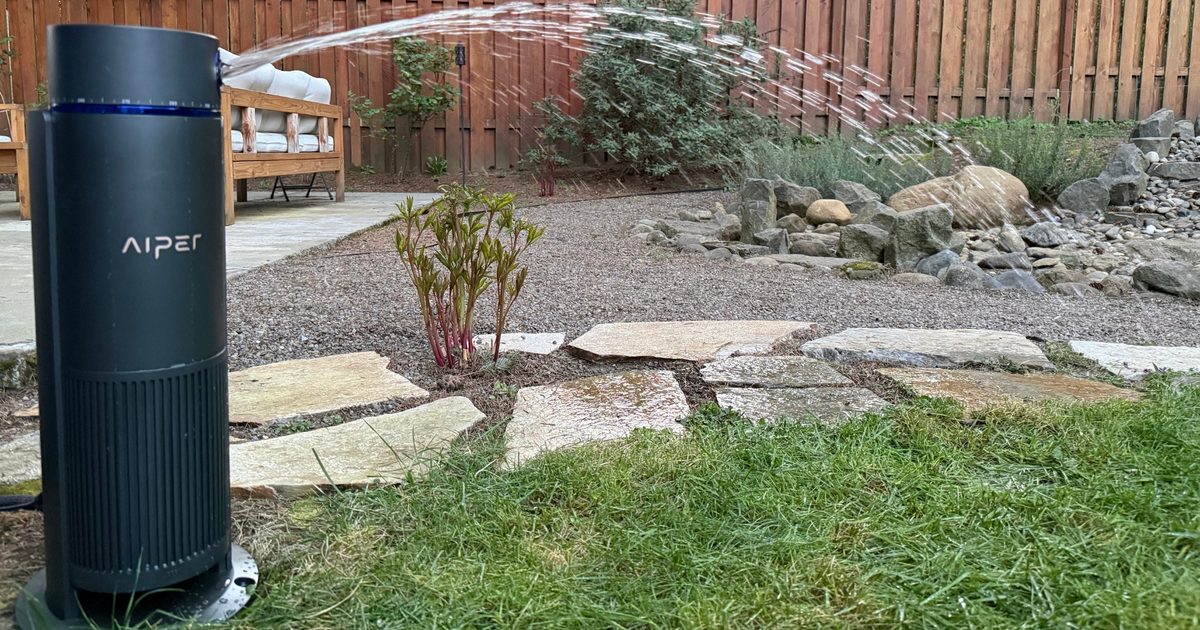
    The IrriSense 2 is a compact, ground-mounted unit with a clean industrial design. Its gray housing is unobtrusive on a lawn, and the blue control ring gives it a subtle modern look. Build quality feels solid; the housing is weather-resistant and designed for long-term outdoor placement.

    At its core, the device integrates four components that traditionally require separate purchases: a rotor sprinkler head, an irrigation controller, an electric valve, and a nutrient feeder. This consolidation is the IrriSense 2’s main design innovation. Rather than running underground pipes and wiring between separate components, everything lives in one self-contained unit connected to your hose bib and a power outlet.

    The ground anchoring system is secure but also allows for easy relocation if you want to reposition the sprinkler. No permanent installation or professional help was required for me to get this setup.

    Daily Use and Performance

    Once mapped and scheduled, the IrriSense 2 is pretty much set-and-forget. Creating watering schedules in the app is simple. You set duration, frequency, and time of day per zone, and the system handles the rest. The scheduling interface is clean, and the controls are intuitive enough that anyone in the household could adjust them.

    Aiper has its own EvenRain technology, which distributes water in a uniform curtain rather than concentrated jets. In practice, this means fewer dry patches and less soil erosion compared to a standard oscillating sprinkler. The system covers up to 4,800 square feet from a single unit with a 39-foot spray range in every direction, though reaching that maximum requires strong water pressure (45 PSI, 6.9 GPM). Most municipal water supplies should meet that threshold, but if you’re on a well or have older plumbing, your coverage radius may shrink.

    Like almost every smart home device out there (even Aiper’s own pool cleaners), Weather-aware scheduling is where the IrriSense 2 really earns its “smart” label. The built-in rain sensor automatically pauses watering during rainfall, and the app’s predictive weather monitoring can adjust schedules preemptively based on incoming forecasts. During my testing, the system correctly skipped several watering cycles during rainy stretches without any manual intervention.

    Aiper claims this can reduce water consumption by up to 40 percent, and while I didn’t measure that precisely, the in-app water-usage tracking showed meaningful savings compared to my regular sprinkler setup, which doesn’t use any sort of weather-sensing technology. I want to point out that every smart sprinkler controller on the market has weather-sensing technology, so I fully expected Aiper to have a product like this.

    The app also provides real-time and historical water usage data, giving you clear insight into consumption patterns. You can monitor and control the system from anywhere with a cellular or Wi-Fi connection.

    One note on hoses: because the IrriSense 2 maintains continuous water pressure during operation, a cheap or worn garden hose can fail under sustained load. Investing in a hose rated for continuous use is worth the small added expense. I would also recommend disconnecting the hose in the winter, especially if you experience freezing in your area. This will help minimize expanding and contracting and ultimately wearing down the hose connector.

    Ecosystem Compatibility

    This is the IrriSense 2’s weakest area. The device operates exclusively through Aiper’s own app and has no native integration with Alexa, Google Home, Apple HomeKit, or SmartThings. For a device in the “smart home” category priced at $500, the absence of voice assistant support is a meaningful gap.

    That said, the Home Assistant community has developed unofficial integrations (available on GitHub) that allow the IrriSense 2 to be controlled through Home Assistant dashboards and automations via AWS IoT MQTT endpoints. If you run Home Assistant, this is a viable workaround. But for mainstream smart home users who expect to say “Hey Google, water the lawn,” this isn’t there yet.

    The system connects via 2.4 GHz Wi-Fi for ongoing operation and uses Bluetooth for initial device pairing. There is no Matter or Thread support. I would recommend checking the distance of your Wi-Fi connection before purchasing this. 

    Privacy and Security

    The Aiper app requires an account with your email address and collects standard device telemetry: operation history (start/end times, durations), device status (connection, battery, mode), and mobile device information (OS, brand). The app also stores your Wi-Fi credentials for device pairing. This is a typical data footprint for a connected outdoor device, though Aiper does not offer two-factor authentication for app accounts, which I thought was weird.

    All control and scheduling appear to be cloud-dependent. If you lose internet, the system cannot receive remote commands through the app. However, previously scheduled watering routines should continue to be executed based on the device’s local clock. Aiper’s privacy policy states that data is used for device management, support, and app improvement, with no indication of data sales to third parties.

    How I Tested

    Tester Anita Kekona (co-worker) and Ian Bell
    Test Location Anita’s home, small residential yard
    Yard Shape Pinto Bean
    Setup Time Around 12 minutes including ground anchoring
    App Platform Aiper App (iOS)
    Test Scenarios Zone mapping, scheduled watering, rain response, app control

    The IrriSense 2 was installed and tested in a colleague’s yard. Setup included unboxing, anchoring, hose connection, app onboarding, and zone mapping. We configured multiple watering zones and schedules, tested the rain-detection pause feature during actual rainfall events, and evaluated the app’s usability for creating and modifying irrigation schedules. Zone mapping was tested using the oval preset adapted to an irregular yard shape (Pinto bean shaped).

    Comparison and Alternatives

    The Aiper IrriSense 2 occupies a unique niche as an above-ground, all-in-one smart irrigation system. Most competitors in the smart irrigation space are controllers that connect to existing in-ground sprinkler systems, making direct comparison tricky. Still, here’s how it stacks up against the most relevant alternatives:

    Rachio 3 (~$200 for 8-zone)

    The Rachio 3 remains the gold standard for smart sprinkler controllers, with native Alexa, Google Home, and HomeKit support, hyperlocal weather intelligence from eight data sources, and EPA-certified 32% average water savings. However, Rachio requires an existing in-ground sprinkler system and professional installation if you don’t already have one; a cost that can run into thousands of dollars. If you already have in-ground infrastructure, Rachio is the better smart controller. If you don’t, the IrriSense 2’s all-in-one approach is far more cost-effective, especially for smaller yards. I personally use a Rachio 1 system, and it’s been great, years later. But, again, this is just a controller. 

    Orbit B-Hyve XR (~$95 for 8-zone)

    The budget king of smart controllers, the B-Hyve XR offers WaterSense-certified irrigation at less than half Rachio’s price, with no subscription fees. Like Rachio, it requires an existing in-ground system. Its app is capable, and its proprietary 900 MHz radio offers strong connectivity through walls. Again, the key differentiator is that the IrriSense 2 doesn’t need underground plumbing.

    Traditional Hose-End Sprinklers + Smart Timers (~$50–$100)

    You can pair a standard oscillating sprinkler with a smart hose timer (like the Orbit B-Hyve hose faucet timer) for much less money. But you lose multi-zone precision, uniform coverage from EvenRain technology, nutrient feeding, and the integrated weather intelligence. For a single small zone, this budget combo works. For anything more sophisticated, the IrriSense 2 justifies its premium. Just remember to call the neighbor kid when you forget to turn off the sprinkler, and you leave the area!

    Verdict

    The Aiper IrriSense 2 delivers on its core promise: smart, precision lawn irrigation without the cost or complexity of an in-ground system. The sub-15-minute setup is real, the EvenRain coverage is impressively uniform, and the weather-aware scheduling works as advertised. The built-in nutrient feeder and water-usage tracking are thoughtful additions that go beyond what any comparable above-ground sprinkler offers, but appeal to few people. 

    Its shortcomings are real but manageable. The power-outlet requirement limits placement flexibility, the lack of voice assistant integration feels like an oversight at this price point, and the zone-mapping tool needs polish for irregular yard shapes. These are firmware- and software-level issues that Aiper could address in future updates.

    At its current street price of around $400, the IrriSense 2 is an excellent value for anyone who wants smart irrigation without committing to a full in-ground system. It’s perfect for small yards, raised beds, and gardens. We’d love to see solar power capability and Alexa/Google integration in a future generation, but as it stands, this is the most user-friendly above-ground smart sprinkler out there. 

    Frequently Asked Questions

    Does the Aiper IrriSense 2 work with Alexa or Google Home?

    No. The IrriSense 2 currently has no native voice assistant integration. It operates exclusively through the Aiper app. Unofficial Home Assistant integrations exist for advanced users, but you better be patient and love to tinker with tech.

    How much yard can the IrriSense 2 cover?

    A single unit covers up to 4,800 square feet (445 square meters) with a 39-foot spray range. Achieving maximum coverage requires a water pressure of at least 45 PSI with a 6.9 GPM flow rate.

    Does it need to be plugged in, or is there a battery option?

    The IrriSense 2 requires a constant AC power connection. There is no battery or solar power option. You’ll need a nearby outdoor outlet or an extension cord.

    Can the IrriSense 2 fertilize my lawn while watering?

    Yes. The built-in nutrient feeder is compatible with Aiper’s SoilPulse organic soil amendment (sold separately), which is dispensed through the irrigation cycle to improve soil health.

    Is professional installation required?

    No. The IrriSense 2 is designed as a complete DIY system. Setup involves anchoring the unit, connecting a garden hose, plugging in the power cable, and configuring zones through the Aiper app. Most users complete installation in 15 minutes or less.

  • LiberNovo’s Answer to a Growing Workplace Problem: Ergonomics That Actually Fit

    LiberNovo’s Answer to a Growing Workplace Problem: Ergonomics That Actually Fit

    Software developers spend hours moving between lines of code. Designers jump from one creative workflow to another across multiple screens. Remote professionals move through packed calendars of virtual meetings, while gamers can remain seated through entire evenings without stepping away from their setups. Different routines, different demands, but a shared reality: the chair has become one of the hardest-working pieces of equipment in the modern workspace.

    Productivity discussions often focus on faster hardware, smarter software, and AI-powered tools. Physical comfort rarely receives the same attention, despite playing a direct role in how people feel and perform throughout the day. Long stretches at a desk expose shortcomings that are easy to overlook during a showroom demo. A seat that feels comfortable for twenty minutes can become a source of constant adjustment by mid-afternoon. Headrests sit too low, seat pans feel too short, and support systems designed around average dimensions leave many users trying to adapt their bodies to furniture that was never designed around them.

    LiberNovo‘s latest product lineup takes aim at that disconnect. Headlining the launch is the Maxis Series, a chair developed specifically for Big & Tall users, a group that has often been underserved by the ergonomic furniture market. Joining it are the Omni Pro and Omni SE, two models designed for professionals, creators, and enthusiasts looking for different approaches to workplace comfort. Together, the three launches reflect a broader shift within the category: ergonomic seating is becoming less about finding a chair with the most adjustments and more about finding one built around the person using it.

    Customers who place their orders before July 31 can secure LiberNovo’s Super Early Bird pricing, representing the lowest launch pricing available and savings of more than 44% off MSRP across the new range.

    LiberNovo Maxis: The ergonomic chair big & tall users have been waiting for

    Walk through most office furniture showrooms and a familiar pattern quickly emerges. Ergonomic chairs come loaded with adjustments, yet the fundamental dimensions rarely change. Bigger and taller users are often left choosing between products that feel restrictive and oversized chairs that sacrifice ergonomics in favour of scale.

    LiberNovo developed the Maxis Series to challenge that compromise. Designed for users between 5’10” and 6’7″ and supporting up to 399 lbs, the chair was engineered around the needs of larger frames rather than adapted from a standard-size model. A 52cm extended seat depth delivers fuller thigh support, while the broader backrest, 430mm shoulder span, and 520mm waist width provide the coverage and stability many larger users struggle to find in conventional ergonomic chairs. An extended-travel headrest and redesigned Arc Armrests further improve fit, helping create a seating position that feels natural rather than restrictive.

    Dimensions alone, however, are only part of the story. The Maxis incorporates LiberNovo’s Dynamic Support System, which continuously adapts to movement and helps maintain alignment across the neck, back, hips, and arms. At its core is the Bionic FlexFit Backrest, an adaptive structure built around flexible panels and multi-pivot linkages designed to provide consistent spinal support throughout the workday. Depending on the model selected, users can also benefit from Electric Lumbar Support, allowing more precise lower-back adjustment and support.

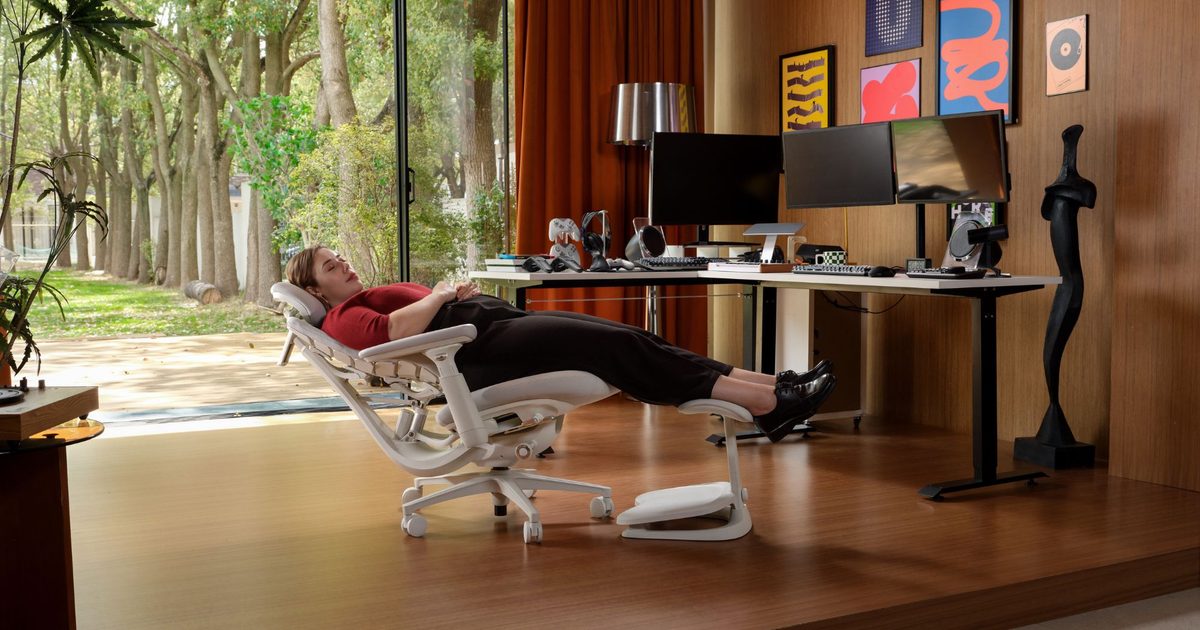
    Long-session comfort remains a key focus throughout the range. A Controlled Recline System uses a six-spring mechanism to deliver smooth, stable recline without the sudden drop often associated with larger chairs. Five dedicated recline positions support everything from focused work to full relaxation, while OmniStretch Mode introduces a guided spinal stretch designed to relieve built-up tension during extended sitting sessions. Buyers choosing the Maxis Airflow also gain access to Active AirFlow Seat Ventilation, which combines a multi-layer breathable structure with fan-assisted airflow to keep the seating surface cooler during long hours at a desk.

    LiberNovo is offering the Maxis Series in three configurations during its Super Early Bird campaign. The Maxis Manual starts at $809, while the Maxis Electric is available from $1,049. Users looking for the most feature-rich version can opt for the Maxis Airflow, which starts at $1,239. Bundle options that include the StepSync Footrest and additional accessories are also available for buyers looking to build a complete ergonomic workstation while taking advantage of launch pricing.

    LiberNovo Omni Pro: Ergonomics That Move With You

    Most ergonomic chairs are designed around a static idea of comfort: adjust the chair, find a position that feels right, and stay there. The challenge is that people don’t sit still. Research cited by LiberNovo suggests users shift posture dozens of times throughout the workday, creating small breaks in alignment that traditional ergonomic chairs aren’t designed to accommodate.

    The Omni Pro approaches ergonomics differently through a Dynamic Support System that moves with the user rather than requiring constant manual adjustments. At the heart of the chair is LiberNovo’s Bionic FlexFit Backrest, an adaptive system built around flexible panels and multi-pivot linkages that respond to movement while maintaining consistent spinal support. Combined with electric lumbar adjustment, the chair is designed to help users maintain alignment whether they are leaning forward during focused work, reclining between meetings, or settling into a longer session at their desk.

    Comfort extends beyond support alone. The Omni Pro also features OmniStretch, a built-in motorized spinal decompression function designed to help relieve accumulated pressure, alongside Active AirFlow seat ventilation that promotes airflow during extended work or gaming sessions. Starting at $909 during the Super Early Bird promotion, buyers can also opt for Standard and Premium Bundles that add the StepSync Footrest and battery accessories, creating a more complete ergonomic workstation.

    LiberNovo Omni SE: Ergonomic Support Without the Premium Barrier

    Building a comfortable workspace doesn’t always require a flagship chair. For many professionals, students, and remote workers, the priority is finding a seating solution that delivers meaningful ergonomic support, promotes healthier posture, and remains comfortable throughout long hours at a desk. The Omni SE was developed for exactly that audience, focusing on the core principles of ergonomic seating through a streamlined manual adjustment system that keeps the experience simple and intuitive.

    Rather than overwhelming users with complexity, LiberNovo has concentrated on the features that matter most to everyday use. The result is a chair that serves as a practical upgrade from conventional office seating while bringing the benefits of ergonomic design to a wider audience. Whether it’s a first dedicated home office or a long-overdue replacement for a standard task chair, the Omni SE is designed to make better seating more accessible.

    Positioned as the most accessible model in LiberNovo’s latest lineup, the Omni SE starts at $569 during the Super Early Bird promotion. Buyers can also choose the Standard Bundle, which pairs the chair with the StepSync Footrest, creating a more complete ergonomic setup while taking advantage of launch pricing.

    Choosing the Right LiberNovo Ergonomic Chair

    Selecting an ergonomic chair is only part of the equation. Many users spend just as much time thinking about the accessories and support systems that contribute to long-term comfort, particularly when a workspace is used for eight or more hours a day.

    LiberNovo’s Super Early Bird campaign reflects that reality through a range of bundle options designed to help users create a more complete ergonomic setup rather than purchasing a chair in isolation.

    Across the lineup, buyers can choose between Basic, Standard, and Premium configurations. Standard Bundles pair the chair with LiberNovo’s StepSync Footrest, an addition aimed at improving lower-body support and sitting posture during extended work sessions. Select Premium Bundles go a step further by combining the chair, StepSync Footrest, and battery accessories into a single package, allowing users to unlock the full feature set while benefiting from launch pricing.

    The value becomes particularly compelling across the Maxis range. Buyers can choose between the Maxis Manual, Maxis Electric, and Maxis Airflow, then customise their purchase through bundle configurations that best suit their workspace requirements. Similar options are available across the Omni lineup, giving customers flexibility without forcing them into a one-size-fits-all package.

    For users already considering an ergonomic upgrade, the bundle offers may represent the strongest value within the entire promotion. Rather than purchasing accessories separately at a later stage, the launch campaign allows buyers to build a more complete workstation from day one while taking advantage of some of the deepest discounts available across the range.

    The Super Early Bird campaign runs through July 31, with pricing starting at $569 for the Omni SE, $909 for the Omni Pro, and $809 for the Maxis Manual. With discounts reaching over 44% on select Maxis bundle configurations, the current launch window offers the most attractive entry point into LiberNovo’s newest ergonomic lineup before regular retail pricing takes effect.