A year after the UK’s Online Safety Act came into force, a new study has found that harmful social media content is still reaching teenagers at nearly the same rate as before the law took effect. Research by the Molly Rose Foundation (via The Guardian) found that a third of all UK teenagers and nearly half of all girls encountered suicide, self-harm, depression, or eating disorder content on social media in the span of just one week.
What the data shows
The study surveyed 1,825 children aged 13 to 17 across 21 UK schools in April and May 2026. Here’s what it found:
Over a third of children (34%) were exposed to high-risk content in the past week. The figure was 37% before the Online Safety Act came into force in July 2025. The researchers say this change is not statistically significant.
Girls were disproportionately affected, with nearly half (47%) encountering harmful content in the past week, compared to 23% of boys.
The numbers were worse for vulnerable groups. Exposure reached 57% among children with low wellbeing and 40% among those with special education needs and disabilities.
Three-quarters of children who saw harmful content saw it on TikTok, more than three times the rate of the next most common platform, Instagram, at 23%.
Algorithmic recommendation feeds drove between 59% and 62% of all harmful content exposure.
Among children who saw content encouraging or promoting suicide, one in five encountered it 10 or more times on at least one platform within a single week.
Over a third of children (34%) were exposed to high-risk content in the past week. The figure was 37% before the Online Safety Act came into force in July 2025. The researchers say this change is not statistically significant.
Girls were disproportionately affected, with nearly half (47%) encountering harmful content in the past week, compared to 23% of boys.
The numbers were worse for vulnerable groups. Exposure reached 57% among children with low wellbeing and 40% among those with special education needs and disabilities.
Three-quarters of children who saw harmful content saw it on TikTok, more than three times the rate of the next most common platform, Instagram, at 23%.
Algorithmic recommendation feeds drove between 59% and 62% of all harmful content exposure.
Among children who saw content encouraging or promoting suicide, one in five encountered it 10 or more times on at least one platform within a single week.
What the law was supposed to do
The Online Safety Act’s Protection of Children Codes legally require platforms to prevent children from encountering content that promotes suicide, self-harm, or eating disorders. Violations can result in fines of up to £18 million or 10% of a company’s global revenue.
Ian Russell, father of Molly Russell, who died by suicide in 2017 at age 14 after viewing harmful content online, said the findings were “shocking but sadly unsurprising.” UK Prime Minister Keir Starmer is expected to announce next week whether the government will pursue a social media ban for children under 16. The foundation’s own research, however, suggests that a blanket ban is unlikely to work without also targeting the recommendation algorithms that keep pushing harmful content in front of young users.
Working from home has become a normal part of life for many employees since the pandemic, as it offers greater flexibility and control over where work gets done. However, new research suggests that this shift may also be playing a role in rising mental health challenges.
Researchers writing in the journal Science analyzed data from five large surveys covering more than 580,000 U.S. workers between 2011 and 2024. Their findings suggest that the rise of remote work has significantly increased social isolation and may account for roughly one-third of the increase in mental distress observed since the pandemic.
The study focused on occupations that can be performed remotely, such as software development and office work, and compared them with jobs that require workers to be physically present.
Remote workers are spending more time alone
The impact was even greater among people living alone. These workers were significantly more likely to go through a full day without interacting with another person, and they experienced a much larger increase in mental distress than workers living with family members.
The findings suggest that many conversations about remote work have focused on flexibility, convenience, and productivity while overlooking a more basic question of what happens when millions of people spend much less time around other people every day?
The hidden downside of workplace flexibility
For many adults, work is one of the few places where they regularly interact with people outside their households. Casual conversations, team meetings, lunch breaks, and other everyday interactions may seem unimportant, but they can play a meaningful role in maintaining social connections.
The researchers are not arguing that companies should bring everyone back to the office full time. Instead, the findings suggest that social connection could become a bigger challenge as remote and hybrid work arrangements become more common.
As more companies embrace flexible work policies, the study raises an important question about how workers can maintain meaningful social connections when their workplace is no longer a place they regularly visit.
Apple has spent the last few years expanding what Wallet can hold, from driver’s licenses now live in as many as 14 states in the US to transit cards for cities like Atlanta, reducing the need to carry physical cards and documents.
The steady expansion has turned Wallet from a simple payment app into a broader digital hub. While Siri AI and Apple Intelligence stole much of the spotlight at WWDC 2026, Apple Wallet quietly received its most substantial upgrade yet with iOS 27.
More importantly, iOS 27 feels like the moment those individual additions start coming together as a cohesive platform rather than a collection of separate features living inside the same app.
There’s a lot of ground to cover, so without further ado, here’s everything new coming to Apple Wallet with iOS 27 later this year.
**Ditch your physical loyalty cards**
If you’re tired of carrying a stack of cards you never use because you forgot they exist, Apple Wallet has something for you.
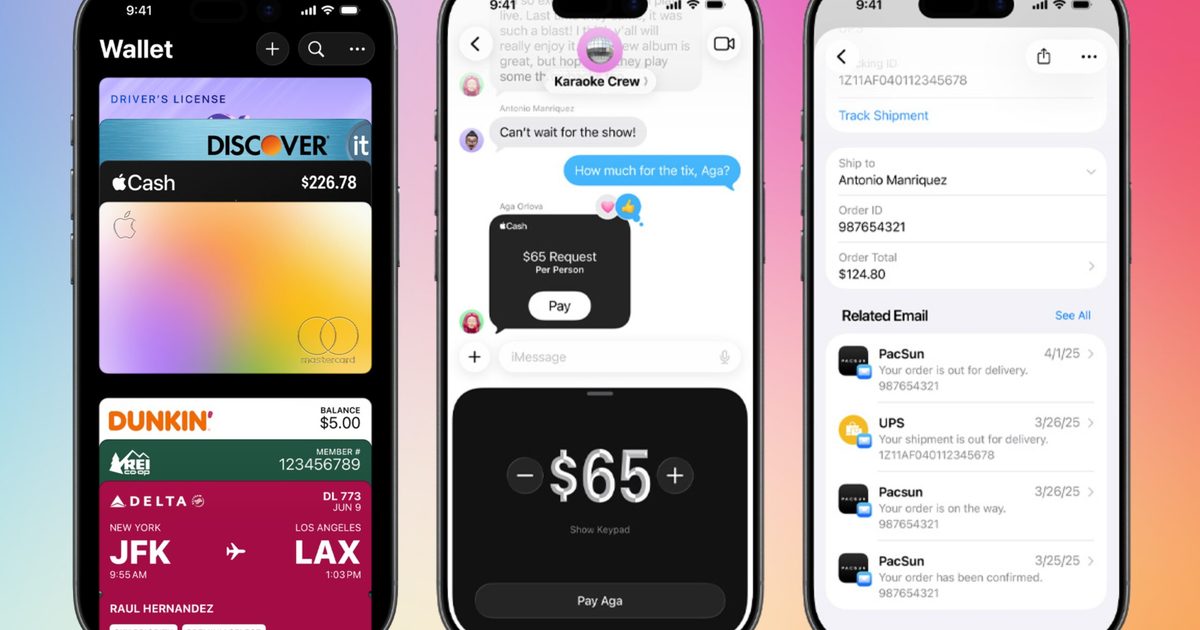
With iOS 27, you’ll be able to point your iPhone (with the Siri mode in the Camera app) at any physical card (with a barcode), and save it as a digital card in Apple Wallet. You can also add a pass manually from within the Wallet itself.
Once saved, it shows up as a scannable barcode or QR code in the app, ready to go either from your iPhone or Apple Watch. If you’ve been carrying your gym card or library card around for years out of pure habit, iOS 27 will finally give you a reason to clear out your wallet for good.
**Digital Passes get a major glow‑up**
With iOS 26, boarding passes in Apple Wallet got a richer redesign with more visuals and integrated travel information. With iOS 27, Apple is extending that same treatment to a variety of digital cards, including loyalty cards, rewards cards, membership cards, and gift cards.
Passes will gain vibrant background art, custom branding, and information tiles that surface useful context, such as loyalty point balances, event details, and membership perks, right where you’d expect to find them.
What’s even more interesting is that Apple is leaning into real‑time updates for these passes, and Disney World is first in line. Later this year, Apple Wallet will automatically surface your Disney World ticket as you approach the park’s gates.
**Smarter hotel keys that double as a concierge**
Digital hotel keys aren’t new, but iOS 27 gives them a meaningful upgrade.
Beyond unlocking your room, the new key experience will surface your entire trip details, updates about the activities you’ve booked, and provide access to other amenities and services, all from the same pass, the digital hotel key, in the Apple Wallet app.
Basically, the app will turn your room key into a mini concierge service that lives in your phone. The catch, however, is that it’s up to hotels to enable the feature for their digital room keys, so don’t expect it to arrive everywhere on day one.
**Splitting the bill just got a whole lot easier**
This might be the most useful addition for anyone who’s ever sat at a restaurant table, doing math on a napkin.
In iOS 27, Apple Wallet will allow you to scan a receipt using Siri mode in the Camera app, use Apple Intelligence to identify each item, let you assign items to different people (if you’re going Dutch), and calculate everyone’s share, including tax and tip. From there, it lets you send Apple Cash requests, directly from within the app.
You can use the feature in Apple Wallet, Messages, or straight from the Camera app. It’s U.S. only at launch, which is good news for us, and needs an Apple Intelligence‑compatible iPhone.
So, if you’ve ever been the designated bill‑splitter for a group of six, this particular feature is going to be a lifesaver.
**A redesigned Apple Pay checkout**
Apple Pay is also getting a checkout redesign that fixes a longstanding annoyance, something that I’ve also covered as a separate news story.
Right now, tapping a card on the payment sheet opens the address settings instead of intuitively switching cards. However, with iOS 27, you should be able to swipe between cards on the same screen.
The checkout interface will also show useful information like rewards balances, account balances, and pay‑later options, before you commit to one payment option.
**Topping up cards without leaving the app**
Later this year, Apple Pay will let you add funds to debit and prepaid cards, the eligible ones, either from within Wallet or during checkout. It’s a small addition, but if you’ve ever had a prepaid card decline at checkout, you’ll get why this is a welcome fix.
**Tap to Share: a faster way to check out in stores**
Apple Wallet’s Tap to Pay already lets merchants accept payments using an iPhone, but Tap to Share takes things further. By tapping your iPhone to a participating merchant’s iPhone or supported payment systems, you can securely share details like your shipping address, email, or loyalty information, the kind that usually means standing at the register and saying everything out loud.
You’ll also be able to watch your final basket update, in real time, as the cashier scans the items, then pay right on your phone. This requires an iPhone 12 or later running iOS 27, though, something to keep in mind.
**More barcodes, more countries**
Wallet passes now support four more barcode formats: EAN‑13, Code 39, Codabar, and ITF. These are still used at places with relatively older retail systems, ones that haven’t caught up to QR codes yet.
**Better Wallet integration in Smart Stacks on Apple Watch**
On compatible Apple Watch models, watchOS 27 surfaces pinned passes, keys, tickets, and transit cards more proactively, based on the time of day and your location.
The feature wants to make sure that the right pass, depending on where you are and what you’re doing, is only a wrist‑raise away when you need it.
**A new app for businesses: Pass Designer**
On the developer side, Apple introduced a new Mac app currently in beta with macOS 27: Pass Designer. It lets businesses build, customize, and preview the new Enhanced Passes.
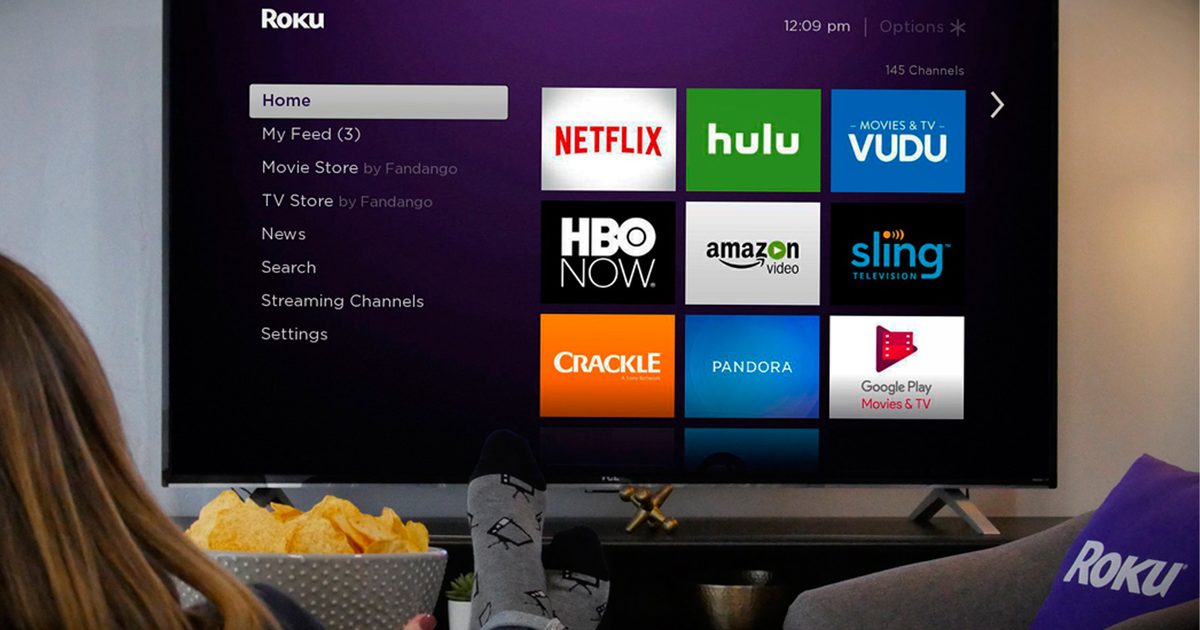
Roku may not stay independent for much longer. According to a Reuters report citing people familiar with the matter, the streaming platform company is exploring strategic alternatives that include a full sale, with at least one U.S. media company already involved in preliminary discussions.
Roku is reportedly weighing a sale amid growing industry interest
Reuters reports that Roku has held talks with at least one American media company over a possible combination, though no final decision has been made. The company has also explored alternatives such as a private investment in public equity, better known as a PIPE transaction. Roku has not publicly commented on the reports.
The speculation sent Roku’s stock soaring more than 20%, reflecting investor optimism that a takeover could unlock additional value. With a market capitalization of roughly $19.4 billion, Roku remains one of the biggest names in connected TV, generating much of its revenue through advertising and subscriptions rather than hardware sales.
One of Roku’s biggest assets is scale. The platform now reaches more than 100 million streaming households and owns a treasure trove of viewing data, making it an attractive target for media, technology, and advertising companies looking to strengthen their position in the increasingly competitive streaming market.
This might be less about streaming sticks and more about advertising gold
The funny thing is that nobody is likely to buy Roku just for its little purple boxes. The real value lies in its advertising platform, user data, and ability to sit between viewers and virtually every major streaming service. In today’s connected TV landscape, that kind of influence is incredibly difficult to build from scratch.
Whether a deal ultimately materializes remains uncertain, and acquisition talks often fall apart before reaching the finish line. Even so, the reports highlight just how valuable Roku’s position has become. In an era where every media company wants a direct relationship with viewers, owning the front door to millions of living rooms could be worth far more than the hardware sitting beneath the TV.
“Apple Intelligence 2.0” isn’t Apple’s official name, but it’s a useful shorthand for where the company is going. Apple calls it the next generation of Apple Intelligence, with Siri AI as the most visible piece.
That’s a risky place to put the spotlight because Siri has baggage. For years, it’s been the assistant people use for timers, weather, and arguments with a glowing orb that somehow heard every word except the important one.
The ideal version is Siri finding the flight code from an email while the airline hold music slowly removes the will to live.
That’s the version Apple is now trying to sell: AI that doesn’t live in a separate prompt window, but inside the normal behavior of the iPhone.
Why Siri still carries the whole thing
Siri AI is the obvious star because Siri has spent years as Apple’s most public AI problem. The new version is supposed to understand context, see what’s on screen, answer tougher questions, and act across apps. Apple says Siri AI can use personal context to search across messages, emails, photos, and more, while also answering onscreen questions and taking broader systemwide actions.
That is a huge reset, meant to make Siri look like it didn’t sleep through the entire chatbot boom. The funny thing is that this sounds impressive partly because the baseline has been so low. Apple is finally describing the Siri people thought they were getting years ago.
That doesn’t make the update fake or unimportant. It makes the stakes stranger. Apple is rebuilding trust in a feature many users have already trained themselves to ignore.
A better Siri doesn’t need to become a charming digital friend. It needs to stop making simple things feel like a scavenger hunt.
What the new features are really doing
The new Apple Intelligence features can look scattered at first. Some live in Siri. Others show up in the camera, text fields, calls, photos, and everyday apps. Taken together, they point at one goal: make the phone feel less fragmented.
Writing help should appear where people are already typing. Visual search should work through the camera. Call Context should surface the right detail during a call, because modern life still requires that specific punishment.
Apple specifically says Call Context can surface a confirmation code or reservation number during a business call, including finding an airline confirmation code from Mail.
Photo tools should make editing feel less like a separate errand. Messages and Mail should get smarter without turning every reply into a corporate memo with better punctuation. The camera should understand more of what it sees without demanding that users learn another AI ritual.
The best version of Apple Intelligence shouldn’t feel like “using AI.” It should feel like the phone understands the task better and removes some of the manual nonsense around it.
Much of the AI race has trained people to think of AI as a separate destination, and Apple is trying to make it feel like something already under the glass.
How Apple ended up here
Apple Intelligence started in 2024 with a smaller first wave of tools. It brought writing help, notification summaries, photo cleanup, and a nicer Siri shell.
Those tools were useful, though they were not the full version of the idea Apple was selling. The larger promise was always a more personal Siri that could understand what users were doing and act across apps. That’s the stuff that would make it feel less like a voice interface with nicer lighting.
Because those more ambitious Siri features weren’t part of the first wave, the first version of Apple Intelligence felt oddly incomplete. This update is Apple trying to close that gap.
Apple can talk about privacy, polish, and ecosystem control, but useful AI also needs raw model strength. Apparently, that meant letting Google into the machinery.
Why the boring plumbing decides everything
That hidden machinery may decide whether Apple Intelligence works at all. Siri AI can only become useful if apps expose enough information and actions for the system to understand.
That’s where things like App Intents and semantic indexing stop being developer jargon and start becoming the product. Apple says App Intents lets developers connect app content and capabilities to Siri AI features like personal context understanding, app actions, and onscreen awareness.
Most users will never think about any of this. Nobody buys an iPhone because the app plumbing looks healthy. If Siri can’t find the right thing, act on the right screen, or understand what an app can do, the magic trick collapses back into voice-command theater.
This is the least glamorous part of Apple Intelligence, and probably the most important. A smarter model can answer better questions, but an assistant that can’t interact with the apps people actually use is still trapped behind glass.
Where the promise gets messy
Apple’s careful approach creates its own problems. Siri needs enough personal context to help without making the phone feel like it’s reading over someone’s shoulder with a clipboard. It also needs enough app access to act without becoming unpredictable.
Then there’s the uneven rollout, which will depend on the device, region, language, and whether apps support the deeper hooks.
Apple says Siri AI will arrive as a beta later this year for supported devices set to English, will not initially be available in the EU on iOS, iPadOS, and watchOS, and will not be available in China while Apple works through regulatory requirements.
Privacy is Apple’s advantage here, but it’s also a constraint. Too little access, and Siri remains a polite search box with a voice. Too much access, and the iPhone starts to feel like a personal assistant that has been rifling through the drawers.
What this means for normal iPhone users
For normal iPhone users, Apple Intelligence comes down to friction. Someone should be able to ask Siri to find the flight code from an email while they’re on a call, instead of playing clipboard gymnastics across three apps.
That’s a small example, but small examples are where this kind of AI has to prove itself. The real test is whether Siri can understand the thing happening in front of the user, find the right personal detail, use the right app, and avoid turning the whole process into another chore.
Apple Intelligence shouldn’t ask users to become prompt engineers. It should make the iPhone feel less like a pile of apps pretending to be one device.
That’s the real promise of Apple Intelligence 2.0, even if Apple would never call it that. Siri is getting a second chance, but the future of Apple AI may depend less on a shiny chatbot moment than on whether it can finally handle ordinary phone work without making a meal of it.
After all these years, Siri may finally be getting the job it’s been pretending to have.
Every Computex has its headline-grabbing announcements. There’s always a faster processor, a shinier graphics card, or a laptop that’s somehow even thinner than last year’s model. But after spending several days wandering the halls of Computex 2026, talking to engineers, trying products, and occasionally getting lost between exhibition booths, I came away with a very different takeaway. That said, this year’s show wasn’t really about individual products. Rather, it was about the direction the industry is heading. Instead of chasing flashy specifications for the sake of marketing slides, manufacturers finally seem focused on solving real problems.
The MacBook Neo effect is impossible to ignore
Whether companies admit it or not, Apple’s MacBook Neo shook up the PC industry by proving that a thin, silent, and premium-looking laptop doesn’t have to come with an eye-watering price tag. Its blend of impressive performance, excellent battery life, and aggressive pricing has clearly forced Windows manufacturers to rethink their priorities.
Products like the refreshed Dell XPS 13 (2026) and Acer Swift 14 AI are no longer trying to outmuscle bulky gaming notebooks. Instead, they’re focused on delivering premium build quality, all-day battery life, cooler thermals, dedicated NPUs, and hardware-level AI acceleration in sleek, highly portable designs while also pushing to make those experiences more accessible to mainstream buyers rather than luxury-only purchases.
Perhaps the clearest example of this shift is Intel’s Project Firefly, a design initiative centered around building ultra-lightweight AI PCs that maximize day-to-day efficiency instead of brute-force horsepower. The conversation has evolved from asking how much raw performance manufacturers can cram into a chassis to how much performance users actually need before portability, battery life, near-silent acoustics, and affordability become the bigger selling points. As someone who reviews laptops regularly, I genuinely welcome this change. Raw performance still matters, but carrying a power brick the size of a paperback novel everywhere I go doesn’t.
AI is finally becoming useful
If there was one buzzword impossible to escape at Computex, it was AI. Thankfully, this year it felt less like marketing jargon and more like something that can genuinely improve everyday workflows.
The best example was the NVIDIA RTX Spark platform, driven by the flagship NVIDIA N1X superchip. Built around a 20-core Grace CPU co-developed with MediaTek, this ARM-powered platform is designed to execute demanding AI workloads locally instead of constantly reaching for cloud servers. Watching Adobe Photoshop intelligently generate assets from simple visual instructions using directional arrows, or seeing Premiere Pro perform near-instant scene edit detection and one-click asset rotoscoping, demonstrated what happens when software developers and hardware manufacturers actually work together.
Companies aren’t just shipping raw NPUs anymore; they’re partnering with application developers to integrate AI directly into creative workflows, productivity tools, and editing software where it can quietly remove repetitive tasks instead of getting in the way. Even discussions around agentic AI workloads reflected that shift. Rather than treating AI as another simple chatbot box, manufacturers increasingly see it as an always-available assistant capable of handling routine work autonomously in the background while users focus on more meaningful tasks.
ARM is taking the fight straight to x86
For years, ARM-powered Windows laptops have felt like promising experiments searching for the right audience. Computex 2026 made me feel like that phase might finally be ending. Qualcomm continued pushing its vision forward with the Qualcomm Snapdragon C platform, aggressively targeting affordable AI PCs that combine impressive battery life with dedicated local AI capabilities. At the other end of the spectrum sat NVIDIA RTX Spark, proving that ARM systems can also deliver serious enthusiast-grade creative performance while comfortably handling gaming and AI workloads on the same platform.
Perhaps the biggest surprise wasn’t just how natural these systems felt during hands-on demos, but how NVIDIA has completely changed the conversation around ARM itself. Rather than positioning it as a low-power alternative to x86, RTX Spark presents ARM as the foundation for a scalable AI ecosystem. Built around a 20-core Grace CPU paired with Blackwell RTX graphics and up to 128GB of unified memory, the same architectural philosophy extends beyond laptops into NVIDIA’s broader Grace Blackwell portfolio, including powerful DGX systems designed for AI development and enterprise workloads. It sends a clear message that efficient ARM designs no longer have to stop at thin-and-light notebooks.
Technologies like DLSS 4.5 Ray Reconstruction, Microsoft’s Prism compatibility layer, and NVIDIA’s work with developers on anti-cheat support also made gaming feel surprisingly polished during the demos I experienced. Will ARM replace x86 overnight? Almost certainly not. But for the first time, it genuinely feels less like a compromise and more like a platform capable of scaling from ultraportable laptops all the way to AI workstations, making it a far more formidable competitor than ever before.
Current generation hardware isn’t going anywhere
One of the most unexpected trends from Computex wasn’t brand-new hardware. It was companies refusing to abandon existing platforms. AMD reaffirmed its commitment to the AM5 desktop socket through at least 2029, giving enthusiasts a much longer, consumer-friendly upgrade path than many expected. To combat rising component costs, the company also expanded its mainstream graphics lineup with the new AMD Radeon RX 9070 GRE, reinforcing the idea that existing architectures still have meaningful room to evolve instead of immediately becoming obsolete.
That philosophy extended well beyond processors and graphics cards. Cooling specialist Noctua showcased the NT-CP1 carbon nanotube thermal pad, a maintenance-free, solid-state alternative to traditional thermal paste that promises consistent long-term performance without drying out over time. The company also previewed its first all-in-one liquid coolers, built around Asetek’s mature platform but enhanced with Noctua’s own acoustic engineering to reduce pump noise and vibrations, highlighting how refinement is becoming just as important as raw performance. GPU manufacturers echoed the same sentiment with increasingly optimized thermal designs and factory tuning aimed at extracting more efficiency from familiar architectures.
For consumers, that’s excellent news. The message coming out of Computex wasn’t “throw everything away and start over.” It was “make what you already own even better.” Considering how expensive PC components have become lately, that might just be the most consumer-friendly trend of the entire show.
Gaming monitors are growing up
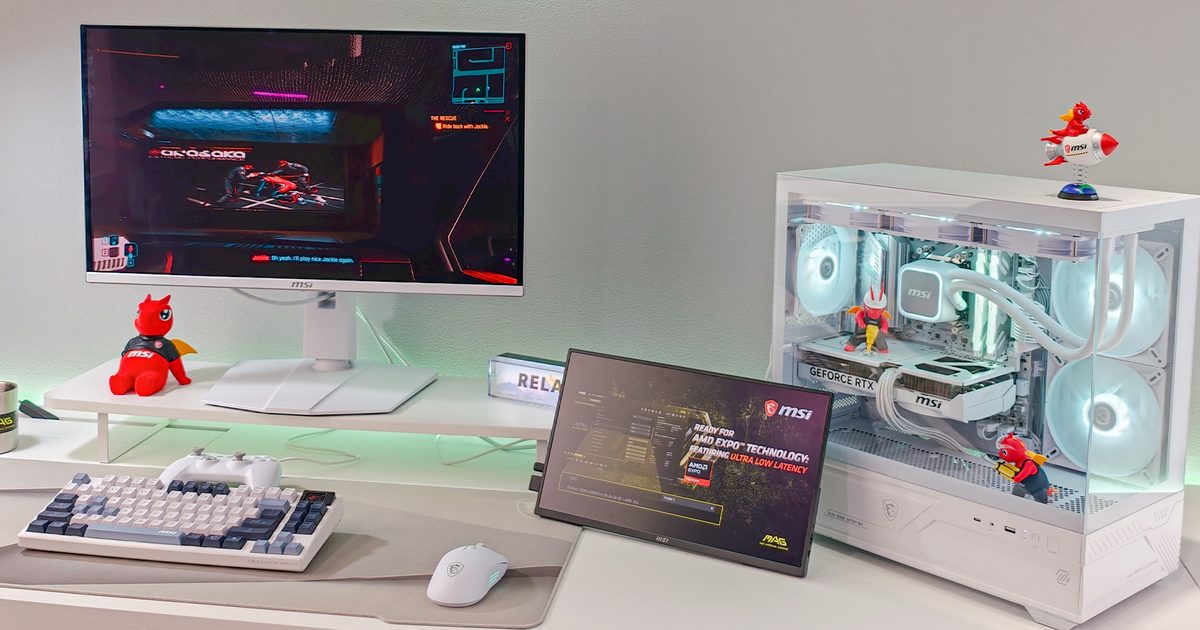
Gaming monitors spent years competing in a never-ending numbers race. More hertz. More brightness. More HDR certifications. This year felt refreshingly different. Displays like the Alienware AW3926QW introduced RGB-stripe Tandem OLED technology on a gorgeous 39-inch 5K curved panel, allowing users to switch between pristine 5K clarity at 165Hz for creative work and a lightning-fast 1080p mode at 330Hz, significantly improving brightness and text subpixel clarity along the way. Meanwhile, the MSI MPG OLED 322URDX36 triple-mode monitor demonstrated just how far refresh rates have come, offering a fifth-generation QD-OLED panel with Penta Tandem technology that can scale dynamically across multiple resolution profiles depending on the game genre.
Even esports displays continued evolution into absolute precision instruments. The ASUS ROG Strix OLED XG259QWPG Ace pushed tournament refresh rates to a blistering 540Hz while retaining TrueBlack Glossy Tandem WOLED image quality. On the hybrid front, the Acer Nitro XV345CKR P showcased how a 5K WUHD resolution, a 1,344-zone Mini-LED backlight, and Dynamic Frequency and Resolution (DFR) modes can seamlessly serve professional creators who also happen to be hardcore gamers. It feels like the era of buying separate displays for work and play may finally be starting to fade.
Handheld gaming PCs are finally growing up
Just a couple of years ago, handheld gaming PCs still felt like ambitious experiments trying to squeeze desktop hardware into portable shells. Computex 2026 made them feel much more mature. The biggest story was undoubtedly the Intel Arc G3 Extreme processor, a graphics-first platform based on the Panther Lake architecture and manufactured using the cutting-edge Intel 18A process node. Packing a 14-core CPU configuration alongside 12 next-gen Xe3 Celestial graphics cores, complete with hardware ray tracing and Intel XeSS 3 with Multi Frame Generation, Intel finally looks ready to challenge AMD’s long-standing dominance in the premium handheld market.
Devices like the MSI Claw 8 EX AI+, the Acer Predator Atlas 8 (PA08-I51), and the ASUS ROG Xbox Ally X20 (20th Anniversary Edition) all reinforced the same message. Better ergonomics, smarter cooling systems (like Acer’s 89-blade metal AeroBlade technology), massive 80Wh batteries, refined full-screen Windows 11 Xbox Mode software experiences, and highly efficient silicon mean manufacturers are no longer trying to prove handheld PCs are viable. They’re competing to build the absolute best one. As someone who’s spent years using devices like the Steam Deck and the original ROG Ally, that’s perhaps the most exciting trend of them all.
The next big thing is… Practicality?
Looking back at Computex 2026, I don’t think I’ll remember the show for a single processor, graphics card, or laptop. I’ll remember it for the industry’s changing mindset. For the first time in a while, it felt like companies were exploring how to make PCs better to live with. AI is quietly taking over repetitive tasks instead of demanding attention, ARM is growing into a serious challenger rather than an interesting experiment, gaming monitors are becoming versatile enough to replace multiple displays, and handhelds are finally maturing into products I’d happily recommend without a long list of caveats. If these trends continue, the next generation of PCs won’t just be faster. They’ll be quieter, more efficient, more affordable to upgrade, and a whole lot smarter about how they use their performance.
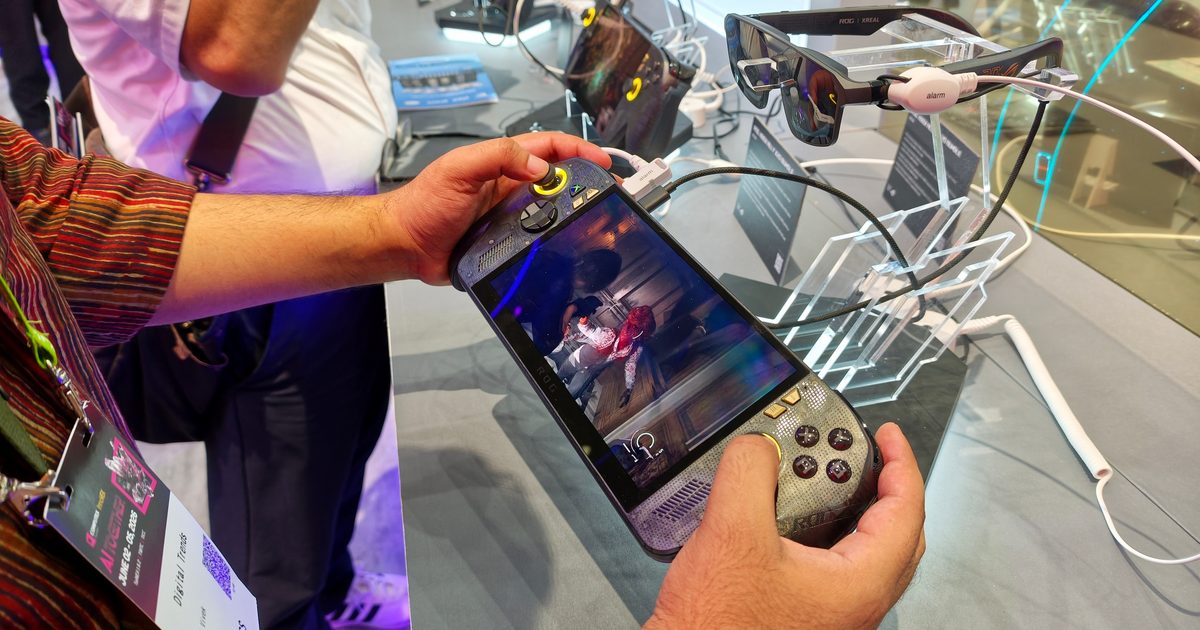
Gaming handhelds are great because they are portable (basically small). But that is also one of its biggest weaknesses. I was reminded of that while trying Asus’ new ROG Xbox Ally X20 bundle at Computex 2026. On its own, the Ally X20 is already a more polished version of the ROG Xbox Ally X. It arrives with nice updates that sound minor on paper but make a device feel more complete in your hands. The real surprise, though, was the bundled ROG XREAL R1 Edition 20 Gaming AR Glasses.
I walked in to try the 20th anniversary edition of ASUS’ handheld console, but the massive 171-inch screen trick surprisingly stole the show.
The handheld gets the right upgrades
The ROG Xbox Ally X20 is not a total reinvention of Asus’ Xbox-branded handheld. It still sits in that familiar Windows handheld space, with PC gaming power, Xbox integration, and the usual promise of taking your library anywhere. Everything ASUS changed here is to smooth out the experience, and you can feel it as soon as you actually hold it.
The biggest upgrade is the display. The X20 moves to a 7.4-inch OLED Nebula HDR panel, which is slightly larger than the standard Ally X screen and far more exciting visually. It supports a 120Hz refresh rate, FreeSync Premium Pro, Dolby Vision, and up to 1,400 nits of peak brightness.
The controls have also been cleaned up. ASUS added TMR joysticks, a Transforming D-pad that can switch between four-way and eight-way control, improved face buttons that sit more flush with the chassis, and rubberized grips on the back that definitely offer improved handfeel, which is important for gamers. A few extra fps, thanks to a faster chip, is great, though bad grips, mushy controls, or a weaker display are something you’ll notice every time you start playing on the gaming handheld.
Then ASUS straps a giant screen to the idea
The bundled ROG XREAL R1 Edition 20 glasses are what make ASUS’ portable console a little more interesting than the new Intel G3 Extreme-powered handhelds. Even at their largest, handheld screens are still handheld screens. Admittedly, that is part of the appeal. If you wanted a bigger screen, you’d likely go for a gaming laptop. For many, this is exactly what they want: a smaller window into big games.
Except that the glasses still change that equation. They can project a virtual display up to 171 inches at 4 meters, which sounds absurd until you actually put them on. Now, you’re not relying on the handheld screen anymore, and the Ally X20 becomes an oversized controller, which is powering a much larger screen.
During my hands-on with this ROG Xbox Ally X20 with the XREAL R1 Edition 20, I understood why the bundle exists. ASUS pairing these two gadgets together makes it all the more immersive. This isn’t the first time a pair of gaming AR glasses has been built for handhelds, but the Ally X20 bundle is the exception as it comes with the ROG XREAL R1 Edition 20, which is also optimized for this system in particular.
How AR glasses just work here
Gaming AR glasses have been pretty niche in the overall PC and console gaming segment. However, you are already holding a portable console in your hands, which comes with its own set of cables, chargers, and a case. So adding another peripheral doesn’t sound too inconvenient. The fact that you can stay portable, while the glasses let the display feel massive when you want it to, sounds incredibly fun.
Not everyone would want this bundle, but the ROG XREAL R1 Edition 20 glasses complete it. They turn the Ally X20 from a nicer handheld into a more flexible gaming setup. You get the benefit of both a convenient form factor console with a 171-inch virtual screen when you want a more immersive experience.
Every year, Computex promises the next big thing. Sometimes that means another processor with a few extra cores, a laptop that’s 200 grams lighter, or a monitor that’s somehow even faster than the one before it. But every now and then, a trade show surprises you not with a single product, but with an entire category that suddenly feels new again. That’s exactly how Computex 2026 felt to me.
After spending days walking the show floor, trying products, talking to engineers, and inevitably getting lost between booths more times than I’d like to admit, one thing became crystal clear. The biggest stories weren’t about incremental upgrades. They were about categories, finally shedding old compromises. Monitors became smarter, handhelds became more mature, creator laptops became more versatile, and ARM processors started looking like genuine powerhouses instead of niche alternatives.
Monitors are finally solving problems instead of chasing numbers
For years, gaming monitors chased bigger numbers, but at Computex 2026, the focus finally shifted to solving real-world problems and making displays genuinely more versatile. Alienware’s new AW3926QW perfectly captures that philosophy. Billed as the world’s first 39-inch 5K OLED gaming monitor with RGB-stripe Tandem OLED technology, it uses a four-stack, three-subpixel RGB-stripe tandem panel that not only boosts brightness and panel longevity but also improves color purity compared to conventional OLED implementations. It’s the kind of monitor that refuses to make gamers choose between eye candy and esports performance.
MSI took a different route with the MPG OLED 322URDX36, proving that flexibility might just be the next big battleground. Powered by a 5th-generation QD-OLED panel with Penta Tandem technology and an RGB Stripe sub-pixel layout, it offers three distinct personalities in one package: 4K at 360Hz, 1440p at 520Hz, and an almost unbelievable 1080p at 680Hz. MSI also adds thoughtful touches like Dark Armor Film, an AI Care Sensor to protect the OLED panel, and up to 1,500 nits of peak brightness, making it one of the smartest displays on the show floor.
For competitive gamers, though, ASUS may have stolen the spotlight with the ROG Strix OLED XG259QWPG Ace. The 24.5-inch esports-focused display pairs a blistering 540Hz refresh rate with OLED’s lightning-fast response times, effectively eliminating the age-old compromise between image quality and competitive performance. ASUS even engraved alignment markings onto the stand, allowing professional players to recreate their exact desk setup at tournaments down to the millimetre, a tiny but genuinely clever feature that shows just how laser-focused this monitor is on esports.
Then there’s the technology quietly working behind the scenes. MediaTek’s new MT9820 grabbed plenty of attention as the world’s first 5K AI upscaling monitor scaler chip, developed in collaboration with NVIDIA. Rather than simply stretching lower-resolution content, it uses AI-powered processing to intelligently reconstruct details and sharpen images in real time, making games and videos look noticeably cleaner on high-resolution displays while also paving the way for smarter, AI-assisted monitors in the future. If this is where display technology is headed, I’m more than happy to keep staring at screens.
Handheld gaming PCs are finally acting like grown-ups
The biggest story in the handheld gaming space at Computex 2026 was the silicon powering it. Intel’s Arc G3 Extreme stole the spotlight by signaling the company’s most serious push into portable gaming yet. Purpose-built for handhelds on the Panther Lake architecture and Intel 18A process, it combines a 14-core CPU with Arc B390-class graphics powered by 12 Xe3 cores, while also bringing features like hardware ray tracing and XeSS 3 with Multi Frame Generation to compact gaming machines. If my hands-on time was anything to go by, Intel has finally arrived as a genuine contender in the handheld space.
That silicon was brought to life by the MSI Claw 8 EX AI+ and Acer Predator Atlas 8, both of which felt impressively polished during my hands-on time. The Atlas stood out with its comfortable ergonomics, vibrant 8-inch 120Hz display, 89-blade AeroBlade cooling system, and clever dual-mode triggers that switch between microswitch and analog inputs. MSI’s latest Claw, meanwhile, feels like a complete rethink with improved ergonomics, refined software, and a large 80Wh battery that should help tackle one of handheld gaming’s biggest pain points.
Even ASUS’ ROG Xbox Ally X20 Anniversary Edition reinforced the same message: handheld gaming PCs are no longer experimental gadgets trying to prove themselves. With better silicon, smarter cooling, improved ergonomics, and increasingly console-like software experiences, the entire category feels like it’s finally growing up.
Creator laptops are no longer forcing creators to compromise
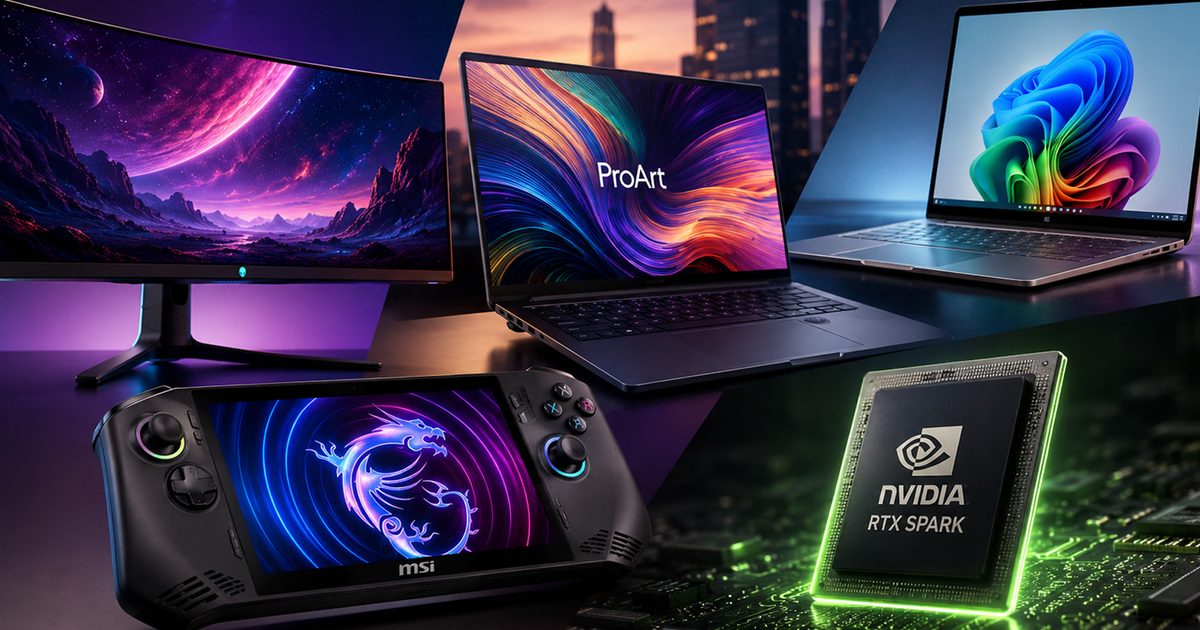
Creator laptops at Computex 2026 felt less like bulky mobile workstations and more like sleek productivity machines that don’t sacrifice performance. For instance, ASUS’s latest ProArt lineup embodies this shift by combining powerful hardware, gorgeous OLED displays, and dedicated local AI acceleration that can handle tasks like photo editing, video enhancement, and content generation directly on the device without constantly relying on the cloud.
The MSI Prestige series takes a more workflow-focused approach with the addition of the Nano Pen, transforming the laptop into a responsive digital canvas for artists, designers, and note-takers. It’s a simple addition, but one that makes sketching and annotation feel far more natural than on a traditional productivity laptop. There’s also Dell’s refreshed XPS 16 (2026), which continues to blur the line between premium design and professional performance by adopting a Tandem OLED display, bringing higher brightness and improved longevity while retaining the clean, minimalist aesthetic the XPS family is known for.
Perhaps the most ambitious of the lot is Microsoft’s Surface Laptop Ultra, which can be configured with up to 128GB of unified memory and places a heavy emphasis on local AI processing. The result is a compact machine capable of tackling demanding creative and AI workloads without constantly leaning on cloud infrastructure, making it feel more like a portable workstation than a conventional laptop.
ARM is taking the fight straight to x86
A couple of years ago, ARM processors were mostly associated with smartphones and ultra-efficient laptops. At Computex 2026, however, they emerged as one of the most exciting areas of innovation. Qualcomm’s new Snapdragon C platform continues to push ARM into mainstream Windows PCs, offering improved battery life, built-in AI capabilities, and a more efficient computing experience.
The real highlight, though, was NVIDIA’s RTX Spark, which felt less like another processor launch and more like a glimpse into the future of computing. Built around a 20-core Grace CPU paired with Blackwell-based RTX graphics and capable of delivering up to one petaflop of local AI compute, RTX Spark is designed to run massive AI models directly on the device rather than constantly relying on cloud servers. During NVIDIA’s demos, it effortlessly handled AI-assisted creative workflows, large language model inferencing, and even graphically intensive applications, showcasing just how much can now be processed locally.
What impressed me even more was how naturally AI blended into the experience. Instead of waiting for remote servers to generate results, tasks happened almost instantly on the hardware itself, reducing latency while improving privacy and reliability. One of the highlights for me was getting to play Fortnite on an RTX Spark-powered system, and the experience felt surprisingly fluid. More importantly, NVIDIA confirmed that it’s actively working with developers and anti-cheat providers to ensure proper anti-cheat support, addressing one of the biggest roadblocks that has historically held Windows on ARM gaming back. If these early demos are any indication, RTX Spark could redefine what creators, developers, and even gamers expect from a compact ARM-powered PC over the next few years.
The Real Glow-up
Looking back at Computex 2026, the biggest story wasn’t a single gadget but the direction the industry is heading. Companies seem less focused on chasing flashy numbers and more interested in solving real problems. OLED panels are getting brighter without sacrificing longevity, handhelds are becoming more efficient, creator laptops are packing serious power into slimmer designs, and ARM processors are finally emerging as credible challengers to x86. Of course, none of this innovation will come cheap, and pricing will ultimately decide how quickly these technologies reach the mainstream. Even so, I walked away from the show feeling genuinely optimistic. For the first time in years, it felt like the industry wasn’t just building faster gadgets, but building smarter and better ones.
Apple barely mentioned CarPlay during its WWDC 2026 keynote, focusing instead on Siri AI and the broader Apple Intelligence upgrades in iOS 27. That doesn’t mean CarPlay is being ignored this year.
The company tucked most of the CarPlay enhancements into a developer‑only video, and, as it turns out, there’s genuinely more than you might expect. As a CarPlay user myself, I can say a few of these updates are long overdue, while others simply follow the overall iOS 27 redesign.
So, without further delay, here’s a rundown of everything new arriving on your CarPlay dashboard this fall with the stable iOS 27 release.
Full‑screen video apps when the car is parked
The biggest change for CarPlay this year is the ability to play video. iOS 27 lets developers create video‑streaming apps that run directly on your car’s screen. CarPlay already supported AirPlay video casting last year, but iOS 27 pushes it further by allowing native video playback from supported apps.
Apple hasn’t released an official list of compatible apps yet, but titles like YouTube and Netflix are likely candidates. The limitation is that video can only be viewed when the vehicle is stationary, and the car manufacturer must explicitly enable the feature, so it may not appear on every model on day one.
Audio scrubbing in the Now Playing screen
This is the “how was this not already here” update. Many of us have tried to jump to a specific part of a song using the horizontal bar on the CarPlay Now Playing screen, only to find it unresponsive.
iOS 27 finally adds a functional scrubber. You can drag the progress bar to any point in a song or podcast, making it easy to replay a favorite 10‑second segment or skip podcast intros without hassle.
Persistent audio MiniPlayer
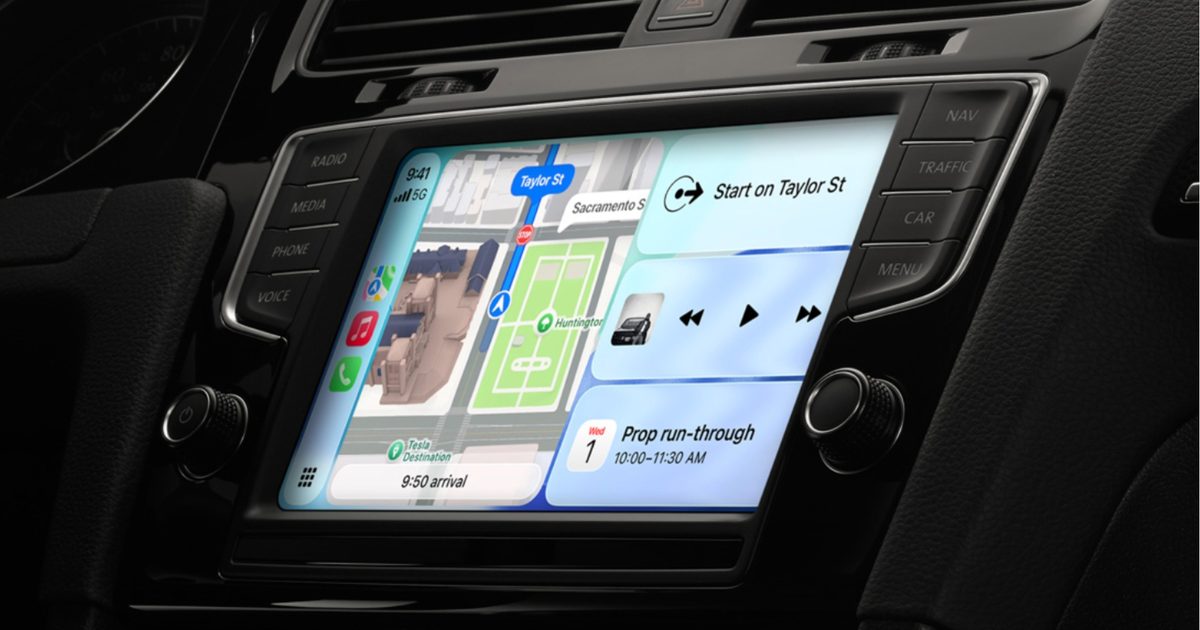
Music and podcast apps will now show a small, always‑visible MiniPlayer in the top‑right corner of the CarPlay interface, displaying basic controls and album art.
This lets you glance at the track while checking navigation, know what’s playing, and skip tracks without exiting the map view.
Improved heading and GPS accuracy
One of the quieter but vital updates in iOS 27 refines how CarPlay mirrors your iPhone’s direction and location data, boosting both GPS precision and heading detection.
It may not be flashy, but it should eliminate the occasional spinning car icon at a traffic light or incorrect rerouting when the system thinks you’re on a different street.
More dependable wireless CarPlay
Wireless CarPlay is great until the connection drops, voice calls become garbled, or audio quality dips. iOS 27 promises a more stable wireless link, which should help those who have experienced mid‑drive disconnects.
Apple hasn’t detailed the exact improvements, but it states that wireless CarPlay connections are more reliable in iOS 27.
New developer tools
iOS 27 introduces fresh app templates across several categories, adds support for Live Activities (originally launched with iOS 16.1) and lets any app provide widgets on the CarPlay screen—think a live sports score widget without opening the full app.
Developers also receive new APIs for building conversational voice experiences, including AI chatbot integrations, directly into CarPlay.
Subtle visual refresh
While the overall design language stays consistent, CarPlay gets 14 new wallpapers in the Celosia style, rolling out across iOS 27 and macOS 27. Liquid‑Glass elements will reflect the transparency level you set with the new iOS 27 slider, and app icons gain extra refractive layers for added depth.
Siri AI finally arrives in the car
On top of everything else, CarPlay now supports Siri AI with iOS 27. This is Apple’s long‑awaited Gemini‑powered assistant that can handle natural follow‑up questions just like Gemini does.
You can ask for a restaurant, then follow up with its closing time without restating the entire query. Siri AI logs each conversation in the iPhone’s Siri app, marking CarPlay requests with a small car icon. The only catch: Siri AI for CarPlay requires an iPhone 15 Pro or newer.
Every iOS rollout ships with a handful of headline‑grabbing features, but it’s often the modest, behind‑the‑scenes tweaks that end up making the biggest impact on daily life. iOS 27 is full of these small wins, and after testing the beta, I’ve found seven that already make my routine smoother.
Connectivity Assist keeps me online
If you’ve ever watched a web page stall because your iPhone clings to a weak Wi‑Fi signal, you’ll love this. Apple introduced a new Connectivity Assist that automatically switches to cellular data when the Wi‑Fi connection is flaky. You can enable it in Settings → Wi‑Fi. It guarantees you stay connected, though it may consume a bit more mobile data, so keep an eye on usage if you have a limited plan.
Auto‑paste suggestion for copied text
This tiny adjustment makes a noticeable difference. Now, after you copy something, a paste suggestion appears right above the keyboard. Instead of long‑pressing a text field and hunting for the paste button, you simply tap the suggestion and the text is inserted. It feels trivial, but I copy and paste dozens of times a day, so this streamlines the workflow considerably.
Separate volumes for alarms and ringtones
Previously, your alarm and ringtone shared the same volume level, meaning lowering the ringer at night could make the morning alarm too quiet. iOS 27 finally lets you set independent volumes. Go to Settings → Sounds & Haptics and turn off Match Ringtone Volume. From there you can adjust alarms, timers, and system sounds separately, so you can keep your ringtone low without compromising the alarm.
New mid‑size connectivity widget in Control Center
The connectivity widget in Control Center offers quick toggles for Bluetooth, Wi‑Fi, cellular data, AirDrop, and more. In iOS 26 you were limited to a small or a full‑page widget. iOS 27 adds a medium size that occupies half the page, giving you space for other controls while still allowing a single tap to toggle each option. To adjust, long‑press the Control Center, enter edit mode, and drag the corner handle.
Faster timer creation
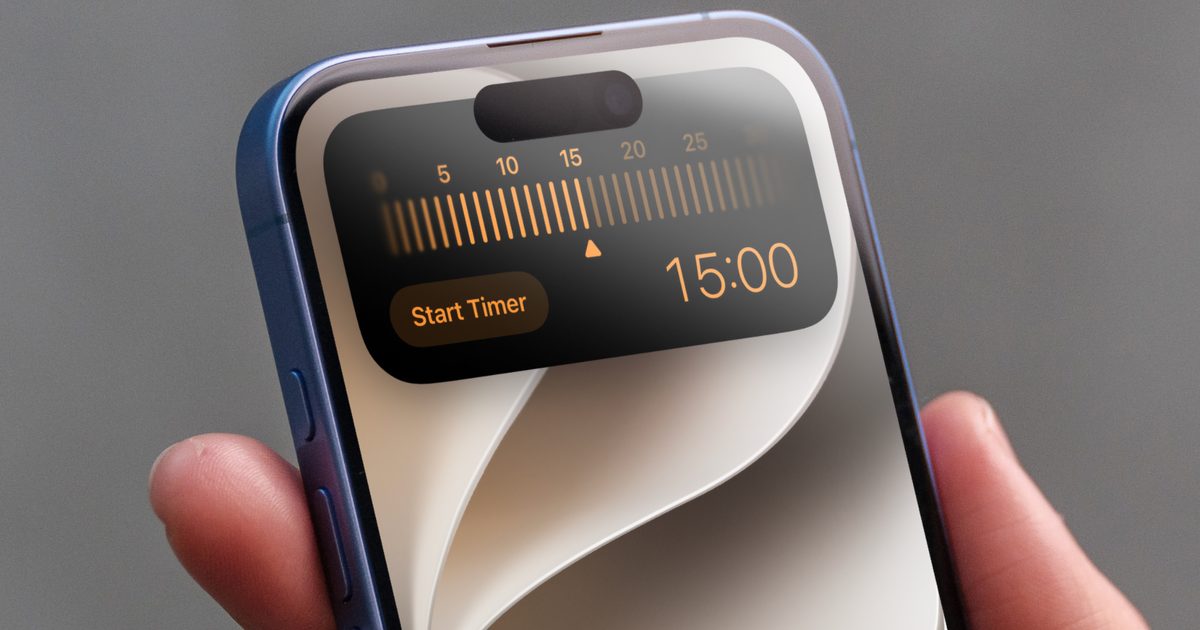
You could add a timer toggle to Control Center before, but it only opened the Clock app. With iOS 27, tapping the timer toggle brings up an overlay where you can set the duration and start the timer without leaving the current app. Swipe left or right to adjust the time and hit “Set Timer” – quick, efficient, and app‑free.
Dictation gets a major upgrade
iPhone dictation used to be unreliable, lacking punctuation and often mis‑recognizing words. iOS 27 introduces an Advanced Dictation preview that runs on‑device, drastically reducing errors and automatically inserting punctuation. Enable it via Settings → General → Keyboard → Advanced Dictation Preview. If Apple continues to refine it, you may no longer need a paid dictation app.
AirDrop is dramatically faster
Saving the best for last, AirDrop feels like it’s been given a caffeine boost. Small files such as photos and documents transfer instantly, and larger files move almost twice as fast as before. The speed improvement saves a noticeable amount of time each day.
These understated tweaks might not make the headlines, but they smooth out the everyday annoyances that keep iOS 27 worth the upgrade.